
【SpringCloud】 第十篇: 高可用的服务注册中心
前言:
必需学会SpringBoot基础知识
简介:
spring cloud 为开发人员提供了快速构建分布式系统的一些工具,包括配置管理、服务发现、断路器、路由、微代理、事件总线、全局锁、决策竞选、分布式会话等等。它运行环境简单,可以在开发人员的电脑上跑。
工具:
JDK8
apache-maven-3.5.2
IntelliJ IDEA 2017.3 x64
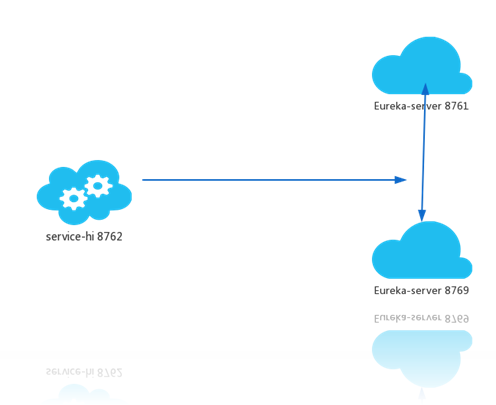
文章 SpringCloud 教程 第一篇: 服务的注册与发现(Eureka) 介绍了服务注册与发现,其中服务注册中心Eureka Server,是一个实例,当成千上万个服务向它注册的时候,它的负载是非常高的,这在生产环境上是不太合适的,这篇文章主要介绍怎么将Eureka Server集群化。
一、准备工作
创建三个实例:
- eureka-server-peer1
- eureka-server-peer2
- eureka-server-peer3
二、Code.View
2.0 peer*
<?xml version="1.0" encoding="UTF-8"?>

<project xmlns="http://maven.apache.org/POM/4.0.0" xmlns:xsi="http://www.w3.org/2001/XMLSchema-instance"

         xsi:schemaLocation="http://maven.apache.org/POM/4.0.0 http://maven.apache.org/xsd/maven-4.0.0.xsd">

    <modelVersion>4.0.0</modelVersion>

    <groupId>com.lwc</groupId>

    <artifactId>eureka-server-peer1</artifactId>

    <version>0.0.1-SNAPSHOT</version>

    <packaging>jar</packaging>

    <name>eureka-server-peer1</name>

    <description>Demo project for Spring Boot</description>

    <parent>

        <groupId>org.springframework.boot</groupId>

        <artifactId>spring-boot-starter-parent</artifactId>

        <version>1.5.10.RELEASE</version>

        <relativePath/> <!-- lookup parent from repository -->

    </parent>

    <properties>

        <project.build.sourceEncoding>UTF-8</project.build.sourceEncoding>

        <project.reporting.outputEncoding>UTF-8</project.reporting.outputEncoding>

        <java.version>1.8</java.version>

        <spring-cloud.version>Edgware.SR3</spring-cloud.version>

    </properties>

    <dependencies>

        <dependency>

            <groupId>org.springframework.cloud</groupId>

            <artifactId>spring-cloud-starter-eureka-server</artifactId>

        </dependency>

        <dependency>

            <groupId>org.springframework.boot</groupId>

            <artifactId>spring-boot-starter-test</artifactId>

            <scope>test</scope>

        </dependency>

    </dependencies>

    <dependencyManagement>

        <dependencies>

            <dependency>

                <groupId>org.springframework.cloud</groupId>

                <artifactId>spring-cloud-dependencies</artifactId>

                <version>${spring-cloud.version}</version>

                <type>pom</type>

                <scope>import</scope>

            </dependency>

        </dependencies>

    </dependencyManagement>

    <build>

        <plugins>

            <plugin>

                <groupId>org.springframework.boot</groupId>

                <artifactId>spring-boot-maven-plugin</artifactId>

            </plugin>

        </plugins>

    </build>

</project>
2.1 peer1
package com.lwc;

import org.springframework.boot.SpringApplication;

import org.springframework.boot.autoconfigure.SpringBootApplication;

import org.springframework.cloud.netflix.eureka.server.EnableEurekaServer;

/**

 * @author Eddie

 */

@EnableEurekaServer

@SpringBootApplication

public class EurekaServerPeer1Application {

    public static void main(String[] args) {

        SpringApplication.run(EurekaServerPeer1Application.class, args);

    }

}
server:

  port: 8861

spring:

  application:

      name: eureka-server-peer1

  profiles:

    active: peer1

eureka:

  instance:

    hostname: eureka-server-peer1

  client:

    registerWithEureka: false

    fetchRegistry: false

    serviceUrl:

      defaultZone: http://eureka-server-peer2:8862/eureka/,http://eureka-server-peer3:8863/eureka/
2.2 peer2
package com.lwc;

import org.springframework.boot.SpringApplication;

import org.springframework.boot.autoconfigure.SpringBootApplication;

import org.springframework.cloud.netflix.eureka.server.EnableEurekaServer;

/**

 * @author Eddie

 */

@EnableEurekaServer

@SpringBootApplication

public class EurekaServerPeer2Application {

    public static void main(String[] args) {

        SpringApplication.run(EurekaServerPeer2Application.class, args);

    }

}
server:

  port: 8862

spring:

  application:

      name: eureka-server-peer2

  profiles:

    active: peer2

eureka:

  instance:

    hostname: eureka-server-peer2

  client:

    registerWithEureka: false

    fetchRegistry: false

    serviceUrl:

      defaultZone: http://eureka-server-peer2:8861/eureka/,http://eureka-server-peer3:8863/eureka/
2.3 peer3
package com.lwc;

import org.springframework.boot.SpringApplication;

import org.springframework.boot.autoconfigure.SpringBootApplication;

import org.springframework.cloud.netflix.eureka.server.EnableEurekaServer;

/**

 * @author Eddie

 */

@EnableEurekaServer

@SpringBootApplication

public class EurekaServerPeer3Application {

    public static void main(String[] args) {

        SpringApplication.run(EurekaServerPeer3Application.class, args);

    }

}
server:

  port: 8863

spring:

  application:

      name: eureka-server-peer3

  profiles:

    active: peer3

eureka:

  instance:

    hostname: eureka-server-peer3

  client:

    registerWithEureka: false

    fetchRegistry: false

    serviceUrl:

      defaultZone: http://eureka-server-peer2:8862/eureka/,http://eureka-server-peer3:8861/eureka/
2.4 改造 eureka-client
package com.lwc.controller;

import org.springframework.beans.factory.annotation.Autowired;

import org.springframework.cloud.client.ServiceInstance;

import org.springframework.cloud.client.discovery.DiscoveryClient;

import org.springframework.web.bind.annotation.GetMapping;

import org.springframework.web.bind.annotation.RequestMapping;

import org.springframework.web.bind.annotation.RequestParam;

import org.springframework.web.bind.annotation.RestController;

import java.util.ArrayList;

import java.util.HashMap;

import java.util.List;

import java.util.Map;

/**

 * @author eddie.lee

 * @Package com.lwc.controller

 * @ClassName EurekaClientController

 * @description

 * @date created in 2018-03-26 17:19

 * @modified by

 */

@RestController

@RequestMapping("/eureka")

public class EurekaClientController {

    @Autowired

    private DiscoveryClient discoveryClient;

    @GetMapping("/client")

    public String home(@RequestParam String name) {

        List<Map<String, Object>> list = new ArrayList<>();

        Map<String, Object> map = new HashMap<>(16);

        List<String> stringList = discoveryClient.getServices();

        stringList.forEach(str -> {

            List<ServiceInstance> serviceInstances = discoveryClient.getInstances(str);

            serviceInstances.forEach(ins -> {

                map.put("host", ins.getHost());

                map.put("port", ins.getPort());

                map.put("serviceId", ins.getServiceId());

                map.put("uri", ins.getUri());

                list.add(map);

            });

        });

        String url = null;

        for (Map<String, Object> m : list) {

            for (String k : m.keySet()) {

                System.out.println(k + " : " + m.get(k));

                url = "欢迎点击:  "+m.get("uri") + "/eureka/client?name=" + name;

            }

        }

        return url;

    }

}
eureka:

  client:

    serviceUrl:

      #defaultZone: http://localhost:8761/eureka/

      defaultZone: http://eureka-server-peer1:8861/eureka/

server:

  port: 8762
三、测试
启动:
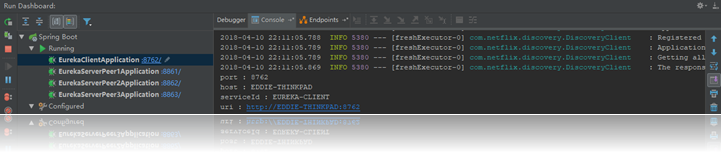
最后改造 client 是为了让大家学习一下获取信息,访问: http://localhost:8762/eureka/client?name=eddie
欢迎点击: http://EDDIE-THINKPAD:8762/eureka/client?name=eddie
题外话:
也可以通过原来第一篇的项目结构, 修改配置文件的端口达到效果;
1. 通过Maven打包之后
2. CMD下运行:
java -jar eureka-server-0.0.1-SNAPSHOT.jar - -spring.profiles.active=peer1
java -jar eureka-server-0.0.1-SNAPSHOT.jar - -spring.profiles.active=peer2
3. 在运行:
java -jar eureka-client-0.0.1-SNAPSHOT.jar
技巧:
eureka.instance.preferIpAddress=true是通过设置ip让eureka让其他服务注册它。也许能通过去改变去通过改变host的方式。
原理:
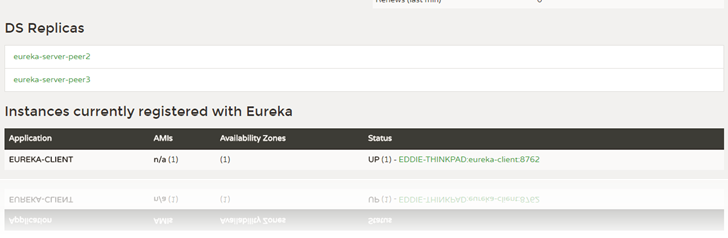
peer1 8861,peer2 8862,peer2 8863 相互感应,当有服务注册时,两个Eureka-server是对等的,它们都存有相同的信息,这就是通过服务器的冗余来增加可靠性,当有一台服务器宕机了,服务并不会终止,因为另一台服务存有相同的数据。
三、源码下载
标签 10-1
https://github.com/eddie-code/SpringCloudDemo
【SpringCloud】 第十篇: 高可用的服务注册中心的更多相关文章
- 史上最简单的SpringCloud教程 | 第十篇: 高可用的服务注册中心(Finchley版本)
转载请标明出处: 原文首发于 https://www.fangzhipeng.com/springcloud/2018/08/30/sc-f10-eureka/ 本文出自方志朋的博客 文章 史上最简单 ...
- SpringCloud教程 | 第十篇: 高可用的服务注册中心
版权声明:本文为博主原创文章,欢迎转载,转载请注明作者.原文超链接 ,博主地址:http://blog.csdn.net/forezp. http://blog.csdn.net/forezp/art ...
- 微服务配置内容《网上copy》=========》如何创建一个高可用的服务注册中心
前言:首先要知道什么是一个高可用的服务注册中心,基于spring boot建成的服务注册中心是一个单节点的服务注册中心,这样一旦发生了故障,那么整个服务就会瘫痪,所以我们需要一个高可用的服务注册中心, ...
- SpringCloud 教程 (三)高可用的服务注册中心
一.准备工作 Eureka can be made even more resilient and available by running multiple instances and asking ...
- springcloud 高可用的服务注册中心
https://blog.csdn.net/forezp/article/details/81041101 上面是方老师的博客,看liuyan也有好多同学不是很清楚,这里自己也记录一下具体的做法. 1 ...
- 搭建高可用的Eureka注册中心
搭建高可用的Eureka注册中心 一.搭建高可用的Eureka的作用 当服务器因种种原因导致Eureka注册中心(后面简称Eureka)服务当机(服务器跪了,异常关闭停止服务).这样就会影响到整个业务 ...
- 【SpringCloud】第七篇: 高可用的分布式配置中心(Spring Cloud Config)
前言: 必需学会SpringBoot基础知识 简介: spring cloud 为开发人员提供了快速构建分布式系统的一些工具,包括配置管理.服务发现.断路器.路由.微代理.事件总线.全局锁.决策竞选. ...
- SpringCloud教程 | 第七篇: 高可用的分布式配置中心(Spring Cloud Config)(Finchley版本)
上一篇文章讲述了一个服务如何从配置中心读取文件,配置中心如何从远程git读取配置文件,当服务实例很多时,都从配置中心读取文件,这时可以考虑将配置中心做成一个微服务,将其集群化,从而达到高可用,架构图如 ...
- SpringCloud教程 | 第七篇: 高可用的分布式配置中心(Spring Cloud Config)
版权声明:本文为博主原创文章,欢迎转载,转载请注明作者.原文超链接 ,博主地址:http://blog.csdn.net/forezp. http://blog.csdn.net/forezp/art ...
随机推荐
- 自定义的打印语句NSLog在控制台输出不完整的完美解决
// 打印日志 debug #ifdef DEBUG // 调试状态, 打开LOG功能 #define APPLog( s, ... ) printf("class: <%p %s:( ...
- [转]C#如何获取客户端IP地址
代码如下: /// <summary> /// 获取客户端IP地址 /// </summary> /// <returns></returns> ...
- WPF引用ActiveX提示没有注册类或不是有效的Win32程序
VS2017开发WPF时,需要引用UKey组件读取插入的Ukey编号和密钥 该组件在网页端调用时使用ObjectId进行ActiveX注册即可,后来做成WPF客户端进行读取遇到该问题. 解决: 右键项 ...
- STM32之系统时钟
转载:http://www.openedv.com/posts/list/302.htm 时钟系统是处理器的核心,所以在学习STM32所有外设之前,认真学习时钟系统是必要的,有助于深入理解STM32. ...
- 四、MapReduce 基础
是一个并行计算框架(计算的数据源比较广泛-HDFS.RDBMS.NoSQL),Hadoop的 MR模块充分利用了HDFS中所有数据节点(datanode)所在机器的内存.CUP以及少量磁盘完成对大数据 ...
- delect 删除
delete ---整表数据删除 (慎用) delete * from 表名; ---条件删除 delete * from 表名 where 限制条件;
- module.exports与exports的联系与区别
首先说明他们是啥? 在CommonJS规范中,exports和module.exports这两个对象是把某一模块化文件中的属性和方法暴露给外部模块的接口(说法可能不准确),外部模块通过require引 ...
- 『ACM C++』 Codeforces | 1005D - Polycarp and Div 3
今天佛了,魔鬼周一,在线教学,有点小累,但还好,今天AC了一道,每日一道,还好达成目标,还以为今天完不成了,最近任务越来越多,如何高效完成该好好思考一下了~最重要的还是学业的复习和预习. 今日兴趣新闻 ...
- eclipse官方下载地址
下载地址: https://www.eclipse.org/downloads/packages/release/Luna/SR2 选择不同版本
- window系统mysql无法输入和无法显示中文的处理配置
第一步:使用记事本打开mysql安装目录下的"my.ini”文件. # MySQL client library initialization. [client] port= [mysql] ...