
spring security实现限制登录次数功能
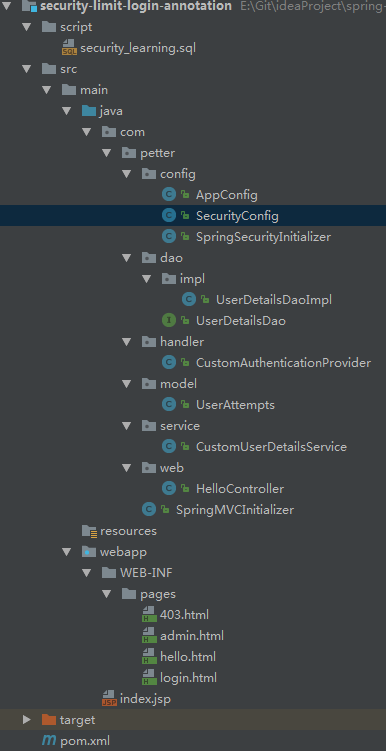
CREATE TABLE users (

  username VARCHAR(45) NOT NULL,

  password VARCHAR(45) NOT NULL,

  enabled BOOLEAN NOT NULL DEFAULT TRUE,

  accountNonExpired BOOLEAN NOT NULL DEFAULT TRUE,

  accountNonLocked BOOLEAN NOT NULL DEFAULT TRUE,

  credentialsNonExpired BOOLEAN NOT NULL DEFAULT TRUE,

  PRIMARY KEY (username)

);
用户角色表user_roles:
CREATE TABLE user_roles (

  user_role_id int(11) NOT NULL AUTO_INCREMENT,

  username varchar(45) NOT NULL,

  role varchar(45) NOT NULL,

  PRIMARY KEY (user_role_id),

  UNIQUE KEY uni_username_role (role,username),

  KEY fk_username_idx (username),

  CONSTRAINT fk_username FOREIGN KEY (username) REFERENCES users (username)

);
用户尝试登陆次数表user_attempts:
CREATE TABLE user_attempts (

  id int(11) NOT NULL AUTO_INCREMENT,

  username varchar(45) NOT NULL,

  attempts varchar(45) NOT NULL,

  lastModified datetime,

  PRIMARY KEY (id)

);
插入数据:
INSERT INTO users(username,password,enabled) VALUES ('hxf','', true);

INSERT INTO users(username,password,enabled) VALUES ('wpp','', true);

INSERT INTO user_roles (username, role) VALUES ('hxf', 'ROLE_USER');

INSERT INTO user_roles (username, role) VALUES ('hxf', 'ROLE_ADMIN');

INSERT INTO user_roles (username, role) VALUES ('wpp', 'ROLE_USER');
一、用户尝试次数类以及相关的操作类
package com.petter.model;

import java.util.Date;

/**

 * @author hongxf

 * @since 2017-03-20 10:50

 */

public class UserAttempts {

    private int id;

    private String username;

    private int attempts;

    private Date lastModified;

    public int getId() {

        return id;

    }

    public void setId(int id) {

        this.id = id;

    }

    public String getUsername() {

        return username;

    }

    public void setUsername(String username) {

        this.username = username;

    }

    public int getAttempts() {

        return attempts;

    }

    public void setAttempts(int attempts) {

        this.attempts = attempts;

    }

    public Date getLastModified() {

        return lastModified;

    }

    public void setLastModified(Date lastModified) {

        this.lastModified = lastModified;

    }

}
对应的操作类,接口UserDetailsDao:
package com.petter.dao;

import com.petter.model.UserAttempts;

/**

 * @author hongxf

 * @since 2017-03-20 10:53

 */

public interface UserDetailsDao {

    void updateFailAttempts(String username);

    void resetFailAttempts(String username);

    UserAttempts getUserAttempts(String username);

}
其实现类UserDetailsDaoImpl 如下,具体见注释:
package com.petter.dao.impl;

import com.petter.dao.UserDetailsDao;

import com.petter.model.UserAttempts;

import org.springframework.dao.EmptyResultDataAccessException;

import org.springframework.jdbc.core.support.JdbcDaoSupport;

import org.springframework.security.authentication.LockedException;

import org.springframework.stereotype.Repository;

import javax.annotation.PostConstruct;

import javax.annotation.Resource;

import javax.sql.DataSource;

import java.util.Date;

/**

 * @author hongxf

 * @since 2017-03-20 10:54

 */

@Repository

public class UserDetailsDaoImpl extends JdbcDaoSupport implements UserDetailsDao {

    private static final String SQL_USERS_UPDATE_LOCKED = "UPDATE USERS SET accountNonLocked = ? WHERE username = ?";

    private static final String SQL_USERS_COUNT = "SELECT count(*) FROM USERS WHERE username = ?";

    private static final String SQL_USER_ATTEMPTS_GET = "SELECT * FROM USER_ATTEMPTS WHERE username = ?";

    private static final String SQL_USER_ATTEMPTS_INSERT = "INSERT INTO USER_ATTEMPTS (USERNAME, ATTEMPTS, LASTMODIFIED) VALUES(?,?,?)";

    private static final String SQL_USER_ATTEMPTS_UPDATE_ATTEMPTS = "UPDATE USER_ATTEMPTS SET attempts = attempts + 1, lastmodified = ? WHERE username = ?";

    private static final String SQL_USER_ATTEMPTS_RESET_ATTEMPTS = "UPDATE USER_ATTEMPTS SET attempts = 0, lastmodified = null WHERE username = ?";

    private static final int MAX_ATTEMPTS = 3;

    @Resource

    private DataSource dataSource;

    @PostConstruct

    private void initialize() {

        setDataSource(dataSource);

    }

    @Override

    public void updateFailAttempts(String username) {

        UserAttempts user = getUserAttempts(username);

        if (user == null) {

            if (isUserExists(username)) {

                // 如果之前没有记录,添加一条

                getJdbcTemplate().update(SQL_USER_ATTEMPTS_INSERT, username, 1, new Date());

            }

        } else {

            if (isUserExists(username)) {

                // 存在用户则失败一次增加一次尝试次数

                getJdbcTemplate().update(SQL_USER_ATTEMPTS_UPDATE_ATTEMPTS, new Date(), username);

            }

            if (user.getAttempts() + 1 >= MAX_ATTEMPTS) {

                // 大于尝试次数则锁定

                getJdbcTemplate().update(SQL_USERS_UPDATE_LOCKED, false, username);

                // 并且抛出账号锁定异常

                throw new LockedException("用户账号已被锁定,请联系管理员解锁");

            }

        }

    }

    @Override

    public UserAttempts getUserAttempts(String username) {

        try {

            UserAttempts userAttempts = getJdbcTemplate().queryForObject(SQL_USER_ATTEMPTS_GET,

                    new Object[] { username }, (rs, rowNum) -> {

                        UserAttempts user = new UserAttempts();

                        user.setId(rs.getInt("id"));

                        user.setUsername(rs.getString("username"));

                        user.setAttempts(rs.getInt("attempts"));

                        user.setLastModified(rs.getDate("lastModified"));

                        return user;

                    });

            return userAttempts;

        } catch (EmptyResultDataAccessException e) {

            return null;

        }

    }

    @Override

    public void resetFailAttempts(String username) {

        getJdbcTemplate().update(

                SQL_USER_ATTEMPTS_RESET_ATTEMPTS, username);

    }

    private boolean isUserExists(String username) {

        boolean result = false;

        int count = getJdbcTemplate().queryForObject(

                SQL_USERS_COUNT, new Object[] { username }, Integer.class);

        if (count > 0) {

            result = true;

        }

        return result;

    }

}
二、实现自定义的UserDetailsService
package org.springframework.security.core.userdetails.jdbc;

public class JdbcDaoImpl extends JdbcDaoSupport implements UserDetailsService {

  //...

  protected List<UserDetails> loadUsersByUsername(String username) {

    return getJdbcTemplate().query(usersByUsernameQuery, new String[] {username}, new RowMapper<UserDetails>() {

      public UserDetails mapRow(ResultSet rs, int rowNum) throws SQLException {

        String username = rs.getString(1);

        String password = rs.getString(2);

        boolean enabled = rs.getBoolean(3);

        return new User(username, password, enabled, true, true, true, AuthorityUtils.NO_AUTHORITIES);

      }

  });

}
可见已经实现了UserDetailsService,但是它默认设置accountNonLocked总是true,我们在此基础上进行实现 CustomUserDetailsService
package com.petter.service;

import org.springframework.beans.factory.annotation.Value;

import org.springframework.security.core.GrantedAuthority;

import org.springframework.security.core.authority.AuthorityUtils;

import org.springframework.security.core.userdetails.User;

import org.springframework.security.core.userdetails.UserDetails;

import org.springframework.security.core.userdetails.jdbc.JdbcDaoImpl;

import org.springframework.stereotype.Service;

import javax.annotation.PostConstruct;

import javax.annotation.Resource;

import javax.sql.DataSource;

import java.util.List;

/**

 * 查看JdbcDaoImpl的源码可以发现这是实现自定义的UserDetailsService

 * 添加上锁定和过期信息

 * @author hongxf

 * @since 2017-03-20 12:30

 */

@Service("userDetailsService")

public class CustomUserDetailsService extends JdbcDaoImpl {

    @Resource

    private DataSource dataSource;

    @PostConstruct

    private void initialize() {

        setDataSource(dataSource);

    }

    @Override

    @Value("select * from users where username = ?")

    public void setUsersByUsernameQuery(String usersByUsernameQueryString) {

        super.setUsersByUsernameQuery(usersByUsernameQueryString);

    }

    @Override

    @Value("select username, role from user_roles where username = ?")

    public void setAuthoritiesByUsernameQuery(String queryString) {

        super.setAuthoritiesByUsernameQuery(queryString);

    }

    @Override

    protected List<UserDetails> loadUsersByUsername(String username) {

        return getJdbcTemplate().query(super.getUsersByUsernameQuery(), new Object[]{username},

                (rs, rowNum) -> {

                    String username1 = rs.getString("username");

                    String password = rs.getString("password");

                    boolean enabled = rs.getBoolean("enabled");

                    boolean accountNonExpired = rs.getBoolean("accountNonExpired");

                    boolean credentialsNonExpired = rs.getBoolean("credentialsNonExpired");

                    boolean accountNonLocked = rs.getBoolean("accountNonLocked");

                    return new User(username1, password, enabled, accountNonExpired, credentialsNonExpired,

                            accountNonLocked, AuthorityUtils.NO_AUTHORITIES);

                });

    }

    @Override

    protected UserDetails createUserDetails(String username, UserDetails userFromUserQuery, List<GrantedAuthority> combinedAuthorities) {

        String returnUsername = userFromUserQuery.getUsername();

        if (!super.isUsernameBasedPrimaryKey()) {

            returnUsername = username;

        }

        return new User(returnUsername, userFromUserQuery.getPassword(),

                userFromUserQuery.isEnabled(),

                userFromUserQuery.isAccountNonExpired(),

                userFromUserQuery.isCredentialsNonExpired(),

                userFromUserQuery.isAccountNonLocked(), combinedAuthorities);

    }

}
三、实现自定义的AuthenticationProvider,当每次登录失败以后更新用户尝试次数表
package com.petter.handler;

import com.petter.dao.UserDetailsDao;

import com.petter.model.UserAttempts;

import org.springframework.beans.factory.annotation.Autowired;

import org.springframework.beans.factory.annotation.Qualifier;

import org.springframework.security.authentication.BadCredentialsException;

import org.springframework.security.authentication.LockedException;

import org.springframework.security.authentication.dao.DaoAuthenticationProvider;

import org.springframework.security.core.Authentication;

import org.springframework.security.core.AuthenticationException;

import org.springframework.security.core.userdetails.UserDetailsService;

import org.springframework.stereotype.Component;

import javax.annotation.Resource;

import java.util.Date;

/**

 * 自定义验证程序

 * @author hongxf

 * @since 2017-03-20 14:28

 */

@Component

public class CustomAuthenticationProvider extends DaoAuthenticationProvider {

    @Resource

    private UserDetailsDao userDetailsDao;

    @Autowired

    @Qualifier("userDetailsService")

    @Override

    public void setUserDetailsService(UserDetailsService userDetailsService) {

        super.setUserDetailsService(userDetailsService);

    }

    @Override

    public Authentication authenticate(Authentication authentication) throws AuthenticationException {

        try {

            //调用上层验证逻辑

            Authentication auth = super.authenticate(authentication);

            //如果验证通过登录成功则重置尝试次数, 否则抛出异常

            userDetailsDao.resetFailAttempts(authentication.getName());

            return auth;

        } catch (BadCredentialsException e) {

            //如果验证不通过,则更新尝试次数,当超过次数以后抛出账号锁定异常

            userDetailsDao.updateFailAttempts(authentication.getName());

            throw e;

        } catch (LockedException e){

            //该用户已经被锁定,则进入这个异常

            String error;

            UserAttempts userAttempts =

                    userDetailsDao.getUserAttempts(authentication.getName());

            if(userAttempts != null){

                Date lastAttempts = userAttempts.getLastModified();

                error = "用户已经被锁定,用户名 : "

                        + authentication.getName() + "最后尝试登陆时间 : " + lastAttempts;

            }else{

                error = e.getMessage();

            }

            throw new LockedException(error);

        }

    }

}
四、根据抛出的异常实现自定义错误信息
//获取session存储的SPRING_SECURITY_LAST_EXCEPTION的值,自定义错误信息

    @RequestMapping(value = "/login", method = RequestMethod.GET)

    public ModelAndView login(

            @RequestParam(value = "error", required = false) String error,

            @RequestParam(value = "logout", required = false) String logout,

            HttpServletRequest request) {

        ModelAndView model = new ModelAndView();

        if (error != null) {

            model.addObject("error", getErrorMessage(request, "SPRING_SECURITY_LAST_EXCEPTION"));

        }

        if (logout != null) {

            model.addObject("msg", "你已经成功退出");

        }

        model.setViewName("login");

        return model;

    }

    //自定义错误类型

    private String getErrorMessage(HttpServletRequest request, String key){

        Exception exception =

                (Exception) request.getSession().getAttribute(key);

        String error;

        if (exception instanceof BadCredentialsException) {

            error = "不正确的用户名或密码";

        }else if(exception instanceof LockedException) {

            error = exception.getMessage();

        }else{

            error = "不正确的用户名或密码";

        }

        return error;

    }
五、最后配置自定义的验证类CustomAuthenticationProvider
package com.petter.config;

import com.petter.handler.CustomAuthenticationProvider;

import org.springframework.context.annotation.Configuration;

import org.springframework.security.config.annotation.authentication.builders.AuthenticationManagerBuilder;

import org.springframework.security.config.annotation.web.builders.HttpSecurity;

import org.springframework.security.config.annotation.web.configuration.EnableWebSecurity;

import org.springframework.security.config.annotation.web.configuration.WebSecurityConfigurerAdapter;

import javax.annotation.Resource;

/**

 * 相当于spring-security.xml中的配置

 * @author hongxf

 * @since 2017-03-08 9:30

 */

@Configuration

@EnableWebSecurity

public class SecurityConfig extends WebSecurityConfigurerAdapter {

    @Resource

    private CustomAuthenticationProvider authenticationProvider;

    @Override

    protected void configure(AuthenticationManagerBuilder auth) throws Exception {

        auth.authenticationProvider(authenticationProvider);

    }

    /**

     * 配置权限要求

     * 采用注解方式,默认开启csrf

     * @param http

     * @throws Exception

     */

    @Override

    protected void configure(HttpSecurity http) throws Exception {

        http.authorizeRequests()

                .antMatchers("/admin/**").hasRole("ADMIN")

                .antMatchers("/dba/**").hasAnyRole("ADMIN", "DBA")

            .and()

                .formLogin().loginPage("/login")

                .defaultSuccessUrl("/welcome").failureUrl("/login?error")

                .usernameParameter("user-name").passwordParameter("pwd")

            .and()

                .logout().logoutSuccessUrl("/login?logout")

            .and()

                .exceptionHandling().accessDeniedPage("/403")

            .and()

                .csrf();

    }

}
启动程序进行测试,测试时候账号必须是数据库存在的,然后尝试失败3次,账号即被锁定
spring security实现限制登录次数功能的更多相关文章
- Spring Security 的注册登录流程
Spring Security 的注册登录流程 数据库字段设计 主要数据库字段要有: 用户的 ID 用户名称 联系电话 登录密码(非明文) UserDTO对象 需要一个数据传输对象来将所有注册信息发送 ...
- spring security使用自定义登录界面后,不能返回到之前的请求界面的问题
昨天因为集成spring security oauth2,所以对之前spring security的配置进行了一些修改,然后就导致登录后不能正确跳转回被拦截的页面,而是返回到localhost根目录. ...
- spring security之 默认登录页源码跟踪
spring security之 默认登录页源码跟踪 2021年的最后2个月,立个flag,要把Spring Security和Spring Security OAuth2的应用及主流程源码研究透 ...
- Spring Security笔记:登录尝试次数限制
今天在前面一节的基础之上,再增加一点新内容,默认情况下Spring Security不会对登录错误的尝试次数做限制,也就是说允许暴力尝试,这显然不够安全,下面的内容将带着大家一起学习如何限制登录尝试次 ...
- spring boot:spring security给用户登录增加自动登录及图形验证码功能(spring boot 2.3.1)
一,图形验证码的用途? 1,什么是图形验证码? 验证码(CAPTCHA)是"Completely Automated Public Turing test to tell Computers ...
- spring security采用自定义登录页和退出功能
更新... 首先采用的是XML配置方式,请先查看 初识Spring security-添加security 在之前的示例中进行代码修改 项目结构如下: 一.修改spring-security.xml ...
- Spring Security(12)——Remember-Me功能
目录 1.1 概述 1.2 基于简单加密token的方法 1.3 基于持久化token的方法 1.4 Remember-Me相关接口和实现类 1.4.1 Toke ...
- Spring Security 入门(1-3-3)Spring Security - logout 退出登录
要实现退出登录的功能我们需要在 http 元素下定义 logout 元素,这样 Spring Security 将自动为我们添加用于处理退出登录的过滤器 LogoutFilter 到 FilterCh ...
- Spring Security Oauth2 单点登录案例实现和执行流程剖析
Spring Security Oauth2 OAuth是一个关于授权的开放网络标准,在全世界得到的广泛的应用,目前是2.0的版本.OAuth2在“客户端”与“服务提供商”之间,设置了一个授权层(au ...
随机推荐
- spring boot 整合kafka 报错 Exception thrown when sending a message with key='null' and payload=JSON to topic proccess_trading_end: TimeoutException: Failed to update metadata after 60000 ms.
org.springframework.kafka.support.LoggingProducerListener- Exception thrown when sending a message w ...
- jq 选择器基础及拓展
jquery 用的很多,所以jq的选择器就很受欢迎,但是用的过程中有一些小问题,如果不点透就永远不知道. 1:ID选择器:$("#ID"); 得到一个指定对应,并且只能得到一个对象 ...
- java的奇技淫巧--意外行为与特性(译文)
Java是一种非常成熟的编程语言 - 事实上,它已经走过21年了,如果它是一个人,它可以在美国随便混!随着年龄的增长,智慧也在增长,而至少有时候,有些东西会变得很怪异.在本文中,我将介绍Java语言的 ...
- java导出简单写法
List<SaleOrderExportDTO> list = TransferUtil.transferList(queryList, SaleOrderExportDTO.class) ...
- 170213、亿级Web系统搭建——单机到分布式集群
[导读]徐汉彬曾在阿里巴巴和腾讯从事4年多的技术研发工作,负责过日请求量过亿的Web系统升级与重构,目前在小满科技创业,从事SaaS服务技术建设. 大规模流量的网站架构,从来都是慢慢“成长”而来.而这 ...
- 微信公众号开发 但是服务端仅仅接收到了 p1 p2 没有接收到p3
w 栗子 js window.location = www.xx.com?p1=123&p2=456&p3=789 但是服务端仅仅接收到了 p1 p2 没有接收到p3 原因有哪些呢? ...
- XPath 快速入门
XPath 是一门在 xml 文档中查找信息的语言. XPath 使用路径表达式来选取 xml 文档中的节点或者节点集合. 路径表达式由元素和属性组成. 语法介绍 // 示例: // xml 文档 & ...
- 转!java操作redis
package sgh.main.powersite; import java.util.ArrayList; import java.util.HashMap; import java.util.I ...
- mysql多条更新
最近在完成MySql项目集成的情况下,需要增加批量更新的功能,根据网上的资料整理了一下,很好用,都测试过,可以直接使用. mysql 批量更新共有以下四种办法 1..replace into 批量更新 ...
- rabbitmq channel参数详解【转】
1.Channel 1.1 channel.exchangeDeclare(): type:有direct.fanout.topic三种durable:true.false true:服务器重启会保留 ...