
Spring学习笔记:Spring整合Mybatis(mybatis-spring.jar)(一:知识点回顾)
一、知识点回顾
1、Mybatis环境搭建(DAO层的实现)(使用maven项目管理工具)
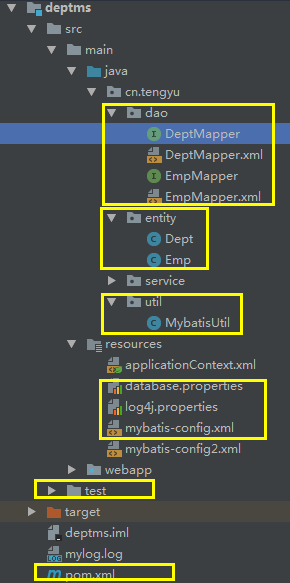
需要引入的依赖包:
<!-- 单元测试junit -->

        <dependency>

            <groupId>junit</groupId>

            <artifactId>junit</artifactId>

            <version>4.3</version>

            <scope>test</scope>

        </dependency>

        <!-- log4j -->

        <dependency>

            <groupId>log4j</groupId>

            <artifactId>log4j</artifactId>

            <version>1.2.17</version>

        </dependency>

        <!-- mybatis -->

        <dependency>

            <groupId>org.mybatis</groupId>

            <artifactId>mybatis</artifactId>

            <version>3.2.2</version>

        </dependency>

        <!-- mysql-connector-java -->

        <dependency>

            <groupId>mysql</groupId>

            <artifactId>mysql-connector-java</artifactId>

            <version>5.1.43</version>

        </dependency>
核心配置文件:configuration.xml
<?xml version="1.0" encoding="UTF-8" ?>

<!DOCTYPE configuration

        PUBLIC "-//mybatis.org//DTD Config 3.0//EN"

        "http://mybatis.org/dtd/mybatis-3-config.dtd">

<!--核心配置文件的根节点-->

<configuration>

    <properties resource="database.properties"></properties>

    <typeAliases>

        <package name="cn.tengyu.entity"/>

    </typeAliases>

    <!--数据库的连接信息-->

    <environments default="development">

        <environment id="development">

            <transactionManager type="JDBC"/>

            <dataSource type="POOLED">

                <!--数据库连接属性-->

                <property name="driver" value="${jdbc.driver}"/>

                <property name="url" value="${jdbc.url}"/>

                <property name="username" value="${jdbc.username}"/>

                <property name="password" value="${jdbc.password}"/>

            </dataSource>

        </environment>

    </environments>

    <mappers>

        <package name="cn.tengyu.dao"/>

    </mappers>

</configuration>
Mapper.xml
<?xml version="1.0" encoding="UTF-8"?>

<!DOCTYPE mapper

        PUBLIC "-//mybatis.org//DTD Mapper 3.0//EN"

        "http://mybatis.org/dtd/mybatis-3-mapper.dtd">

<mapper namespace="cn.tengyu.dao.DeptMapper">

    <!--查询记录数-->

    <select id="count" resultType="int">

        SELECT count(1) as count FROM dept

    </select>

    <select id="findAll" resultType="Dept">

        SELECT * FROM dept

    </select>

    <select id="findByName" resultType="Dept" parameterType="String">

        SELECT * FROM dept WHERE deptname=#{deptname}

    </select>

    <!--查询某部门员工信息-->

    <resultMap id="empList" type="Emp">

        <id property="empno" column="empno"/>

    </resultMap>

    <select id="findByDeptName" parameterType="String" resultMap="empList">

        SELECT emp.* FROM emp,dept WHERE dept.deptno=emp.deptno

        AND deptname like concat ('%',#{detname},'%')

    </select>

    <!--添加修改部门信息-->

    <insert id="addDeptByName" parameterType="string">

        INSERT INTO dept(deptname)VALUES (#{deptname})

    </insert>

    <insert id="addDept" parameterType="Dept">

        INSERT INTO dept(deptno,deptname)VALUES (#{deptno},#{deptname})

    </insert>

    <!--删除部门信息-->

    <delete id="delDept" parameterType="int">

        DELETE FROM dept WHERE deptno=#{deptno}

    </delete>

    <!--修改数据-->

    <update id="modifyDept" parameterType="string">

        UPDATE dept SET deptname=#{newdeptname} WHERE deptname=#{deptname}

    </update>

</mapper>
MybatisUtil.java
import org.apache.ibatis.io.Resources;

import org.apache.ibatis.session.SqlSession;

import org.apache.ibatis.session.SqlSessionFactory;

import org.apache.ibatis.session.SqlSessionFactoryBuilder;

import java.io.IOException;

import java.io.InputStream;

public class MybatisUtil {

    static SqlSessionFactory factory;

    static SqlSession sqlSession;

    /**

     * 初始化SqlSessionFactory对象

     */

    static {

        try {

            InputStream is = Resources.getResourceAsStream("mybatis-config.xml");

            factory = new SqlSessionFactoryBuilder().build(is);

        } catch (IOException e) {

            e.printStackTrace();

        }

    }

    /**

     * 创建SqlSession对象

     *

     * @return

     */

    public static SqlSession createSqlSession() {

        sqlSession = factory.openSession(false);

        return sqlSession;

    }

    public static void closeSqlSession(SqlSession sqlSession) {

        if (sqlSession != null) {

            sqlSession.close();

        }

    }

}
测试(使用mybatis实现增删改查)
private static Logger logger = Logger.getLogger(DeptMapperTest.class);

    @Test

    public void getCount(){

        SqlSession sqlSession = MybatisUtil.createSqlSession();

        int count = sqlSession.selectOne("cn.tengyu.dao.DeptMapper.count");

        logger.debug("部门表总记录数:"+count);

        sqlSession.close();

    }

    @Test

    public void findAll(){

        SqlSession sqlSession = MybatisUtil.createSqlSession();

        List<Dept> depts = sqlSession.selectList("cn.tengyu.dao.DeptMapper.findAll");

        for (Dept dept :depts) {

            logger.debug("编号:"+dept.getDeptno()+"\t名称:"+dept.getDeptname());

        }

        sqlSession.close();

    }

    @Test

    public void findByName(){

        SqlSession sqlSession = MybatisUtil.createSqlSession();

        try {

            Dept dept = sqlSession.getMapper(DeptMapper.class).findByName("公关部");

            logger.debug("编号:"+dept.getDeptno()+"\t名称:"+dept.getDeptname());

            sqlSession.close();

        } catch (Exception e) {

            logger.debug("查询结果为空!!!");

            e.printStackTrace();

        }

    }

    @Test

    public void findByDeptName(){

        SqlSession sqlSession = MybatisUtil.createSqlSession();

        List<Emp> emps = sqlSession.getMapper(DeptMapper.class).findByDeptName("广告");

        for (Emp emp :emps) {

            logger.debug("编号:"+emp.getEmpno()+"\t姓名:"+emp.getEmpname());

        }

        sqlSession.close();

    }

    @Test

    public void addDeptByName(){

        SqlSession sqlSession = MybatisUtil.createSqlSession();

        int i = sqlSession.getMapper(DeptMapper.class).addDeptByName("XXX");

        if (i>0){

            sqlSession.commit();

            logger.debug("添加数据成功"+i+"条");

        }

        sqlSession.close();

        this.findAll();

    }

    @Test

    public void addDept(){

        SqlSession sqlSession = MybatisUtil.createSqlSession();

        Dept dept = new Dept();

        dept.setDeptno(1);

        dept.setDeptname("娱乐部");

        try {

            int i = sqlSession.getMapper(DeptMapper.class).addDept(dept);

            if (i>0){

                sqlSession.commit();

                logger.debug("添加数据成功"+i+"条");

            }

        } catch (Exception e) {

            sqlSession.rollback();

            logger.debug("数据添加失败!");

            e.printStackTrace();

        } finally {

            MybatisUtil.closeSqlSession(sqlSession);

        }

        this.findAll();

    }

    @Test

    public void delDept(){

        SqlSession sqlSession = MybatisUtil.createSqlSession();

        try {

            int i = sqlSession.getMapper(DeptMapper.class).delDept(12);

            if (i>0){

                sqlSession.commit();

                logger.debug("删除数据成功"+i+"条");

            }

        } catch (Exception e) {

            sqlSession.rollback();

            logger.debug("数据删除失败!");

            e.printStackTrace();

        } finally {

            MybatisUtil.closeSqlSession(sqlSession);

        }

        this.findAll();

    }

    @Test

    public void modifyDept(){

        SqlSession sqlSession = MybatisUtil.createSqlSession();

        try {

            int i = sqlSession.getMapper(DeptMapper.class).modifyDept("测试部", "销售部");

            if (i>0){

                sqlSession.commit();

                logger.debug("修改数据成功"+i+"条");

            }

        } catch (Exception e) {

            sqlSession.rollback();

            logger.debug("修改数据失败!!!");

            e.printStackTrace();

        } finally {

            MybatisUtil.closeSqlSession(sqlSession);

        }

    }
2.Spring框架搭建
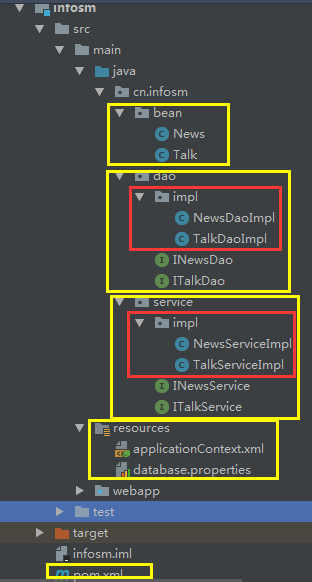
依赖的jar包:(maven添加以下依赖即可)
<dependency>

            <groupId>junit</groupId>

            <artifactId>junit</artifactId>

            <version>4.3</version>

            <scope>test</scope>

        </dependency>

        <dependency>

            <groupId>org.springframework</groupId>

            <artifactId>spring-webmvc</artifactId>

            <version>4.2.0.RELEASE</version>

        </dependency>

        <dependency>

            <groupId>org.springframework</groupId>

            <artifactId>spring-jdbc</artifactId>

            <version>4.2.0.RELEASE</version>

        </dependency>

        <dependency>

            <groupId>mysql</groupId>

            <artifactId>mysql-connector-java</artifactId>

            <version>5.1.43</version>

        </dependency>
多种数据源的引用:
<!--添加数据源-->

        <!--spring JDBCTemplate-->

        <dependency>

            <groupId>org.springframework</groupId>

            <artifactId>spring-jdbc</artifactId>

            <version>4.2.0.RELEASE</version>

        </dependency>

        <!--druid-->

        <dependency>

            <groupId>com.alibaba</groupId>

            <artifactId>druid</artifactId>

            <version>1.0.18</version>

        </dependency>

        <!--dbcp 数据源-->

        <dependency>

            <groupId>commons-dbcp</groupId>

            <artifactId>commons-dbcp</artifactId>

            <version>1.4</version>

        </dependency>

        <!--c3p0-->

        <dependency>

            <groupId>com.mchange</groupId>

            <artifactId>c3p0</artifactId>

            <version>0.9.5.2</version>

        </dependency>
DAO层实现:(为了使用getJdbcTempalte()方法需要注入/实现JdbcDaoSupport接口)
import org.springframework.jdbc.core.RowMapper;

import org.springframework.jdbc.core.support.JdbcDaoSupport;

import java.sql.ResultSet;

import java.sql.SQLException;

import java.util.List;

public class NewsDaoImpl extends JdbcDaoSupport implements INewsDao {

    @Override

    public List<News> findAll() {

        String sql = "SELECT * FROM infosm_news";

        List<News> list = getJdbcTemplate().query(sql, new RowMapper<News>() {

            @Override

            public News mapRow(ResultSet rs, int rowNum) throws SQLException {

                News news = new News();

                news.setNewsid(rs.getInt("newsid"));

                news.setNewstitle(rs.getString("newstitle"));

                news.setNewscontent(rs.getString("newscontent"));

                news.setClickcount(rs.getInt("clickcount"));

                return news;

            }

        });

        return list;

    }

}
核心配置文件:applicationContext.xml
<?xml version="1.0" encoding="UTF-8"?>

<beans xmlns="http://www.springframework.org/schema/beans"

       xmlns:xsi="http://www.w3.org/2001/XMLSchema-instance"

       xsi:schemaLocation="http://www.springframework.org/schema/beans

       http://www.springframework.org/schema/beans/spring-beans.xsd">

    <!--通过bean元素生命需要Spring创建的实例。该实例的类型通过class属性指定,

    并通过id属性为该实例制定一个名称,以便于访问-->

    <!--DataSource jdbc-->

    <bean id="dateSource" class="org.springframework.jdbc.datasource.DriverManagerDataSource">

        <property name="driverClassName" value="com.mysql.jdbc.Driver"/>

        <property name="url" value="jdbc:mysql:///infosm"/>

        <property name="username" value="root"/>

        <property name="password" value="tengyu"/>

    </bean>

    <!--DataSource druid-->

    <!--<bean id="dateSource" class="com.alibaba.druid.pool.DruidDataSource">

        <property name="driverClassName" value="com.mysql.jdbc.Driver"/>

        <property name="url" value="jdbc:mysql:///infosm"/>

        <property name="username" value="root"/>

        <property name="password" value="tengyu"/>

    </bean>-->

    <!--DataSource c3p0-->

    <!--<bean id="dateSource" class="com.mchange.v2.c3p0.ComboPooledDataSource">

        <property name="driverClass" value="com.mysql.jdbc.Driver"/>

        <property name="jdbcUrl" value="jdbc:mysql:///infosm"/>

        <property name="user" value="root"/>

        <property name="password" value="tengyu"/>

    </bean>-->

    <!--DataSource dbcp-->

    <!--<bean id="dateSource" class="org.apache.commons.dbcp.BasicDataSource">

        <property name="driverClassName" value="com.mysql.jdbc.Driver"/>

        <property name="url" value="jdbc:mysql:///infosm"/>

        <property name="username" value="root"/>

        <property name="password" value="tengyu"/>

    </bean>-->

    <!--jdbcTemplate-->

    <bean id="jdbcTemplate" class="org.springframework.jdbc.core.JdbcTemplate">

        <property name="dataSource" ref="dateSource"/>

    </bean>

    <!--newsDao-->

    <bean id="newsDao" class="cn.infosm.dao.impl.NewsDaoImpl">

        <property name="jdbcTemplate" ref="jdbcTemplate"/>

    </bean>

    <!--newsService-->

    <bean id="newsService" class="cn.infosm.service.impl.NewsServiceImpl">

        <property name="dao" ref="newsDao"/>

    </bean>

    <!--talkDao-->

    <bean id="talkDao" class="cn.infosm.dao.impl.TalkDaoImpl">

        <property name="jdbcTemplate" ref="jdbcTemplate"/>

    </bean>

    <!--talkService-->

    <bean id="talkService" class="cn.infosm.service.impl.TalkServiceImpl">

        <property name="dao" ref="talkDao"/>

    </bean>

</beans>
正常测试即可:
@Test

    public void findAllNews(){

        ApplicationContext context = new ClassPathXmlApplicationContext("applicationContext.xml");

        INewsService newsService = (INewsService) context.getBean("newsService");

        List<News> list = newsService.findAll();

        for (News news :list) {

            System.out.println(news.getNewstitle());

        }

    }

    @Test

    public void findAllTalks(){

        ApplicationContext context = new ClassPathXmlApplicationContext("applicationContext.xml");

        ITalkService talkService = (ITalkService) context.getBean("talkService");

        List<Talk> list = talkService.findAll();

        for (Talk talk :list) {

            System.out.println(talk.getTid()+talk.getContent()+talk.getTalktime());

        }

    }
Spring学习笔记:Spring整合Mybatis(mybatis-spring.jar)(一:知识点回顾)的更多相关文章
- Spring学习笔记四 整合SSH
三大框架架构(整合原理) 步骤1:导包 Hibernate包 1.Hibernate包,hibernate/lib/required 2.hibernate/lib/jpa | java persis ...
- Spring学习笔记(二) 初探Spring
版权声明 笔记出自<Spring 开发指南>一书. Spring 初探 前面我们简单介绍了 Spring 的基本组件和功能,现在我们来看一个简单示例: Person接口Person接口定义 ...
- Spring学习笔记(1)——初识Spring
一.Spring是什么 通常说的Spring其实指的是Spring Framework,它是Spring下的一个子项目,Spring围绕Spring Framework这个核心项目开发了大 ...
- Spring学习笔记之整合struts
1.现有项目是通过 <action path="/aaaaAction" type="org.springframework.w ...
- Spring学习笔记之整合hibernate
1.web.xml里边要配置好对应的springxml的路径 <context-param> <param-name>contextConfigLocation</par ...
- Spring 学习笔记之整合Hibernate
Spring和Hibernate处于不同的层次,Spring关心的是业务逻辑之间的组合关系,Spring提供了对他们的强大的管理能力, 而Hibernate完成了OR的映射,使开发人员不用再去关心SQ ...
- 【Spring学习笔记-1】Myeclipse下Spring环境搭建
*.hl_mark_KMSmartTagPinkImg{background-color:#ffaaff;}*.hl_mark_KMSmartTagBlueImg{background-color:# ...
- Spring 学习笔记(一):Spring 入门
1 Spring简介 Spring是一个轻量级Java开发框架,最早由Rod Johnson创建,目的是为了解决企业级应用开发的业务逻辑层和其他各层的耦合问题,是一个分层的Java SE/EE ful ...
- Spring学习笔记之四----基于Annotation的Spring AOP编程
你能使用@Aspect annotation将某个Java类标注为Aspect,这个Aspect类里的所有公有方法都可以成为一个Advice,Spring提供了5个Annotation去将某个方法标注 ...
- Spring学习笔记之三----基于Annotation的Spring IOC配置
使用Annotation 来创建Bean有两种方式 在配置类中创建bean(配置类是指标注为@Configuration的类),在配置类中每一个创建bean的方法都应该标注为@Bean,可以在@Bea ...
随机推荐
- css3边角旋转
<!DOCTYPE html> <html lang="en"> <head> <meta charset="UTF-8&quo ...
- bzoj1801中国象棋
题目链接 很裸的$dp+$组合计数 注意 注意 注意 $BZOJ$不要用玄学优化 $CE$不管$qwq$ /********************************************** ...
- ajax的两个重要参数contentType 和dataType
contentType 是入参!!!!!! 是传递给后端参数的格式: contentType : 'application/json;charset=UTF-8', contentType : 'te ...
- [Objective-C语言教程]程序结构(3)
1. Objective-C Hello World示例 Objective-C程序基本上由以下部分组成 - 预处理程序命令 接口 实现 方法 变量 声明和表达 注释 下面来看一下打印“Hello W ...
- 使用git提交代码简单说明
一. 图形化git 1.首先下载msysgit,和 tortoisegit, 先装msysgit再装小乌龟 2.运行git按照github上说明生成秘钥对 ssh-keygen -t rsa ...
- 基于Java软引用机制最大使用JVM堆内存并杜绝OutOfMemory
题记:说好的坚持一周两篇文章在无数琐事和自己的懒惰下没有做好,在此表达一下对自己的不满并对有严格执行力的人深表敬意!!!! -------------------------------------- ...
- animal与@keyframe
.test1 { width: 90px; height: 60px; -webkit-animation-name: skyset; -webkit-animation-duration: 2000 ...
- dbproxy-user/pwd
dbproxy 的账号是统一的, 即连接dbproxy,连接主mysql ,连接从mysql 的账号必须一样, 为了隔离 即使用dbproxy的人感知不到mysql, 需要分离 配置文件 #dbpro ...
- unity里的c#
类方法:start只进行一次,update每一帧都会进行调用 拖动脚步到对应物体就可以将其关联 定义变量与c++相似 F2修改文件名 脚本的类名要与文件名保持一致 数组的定义:1.类型[] 数组名={ ...
- P1444 [USACO1.3]虫洞wormhole
luogu P1444 [USACO1.3]虫洞wormhole 首先感谢ghj的讲解 题目描述 农夫约翰爱好在周末进行高能物理实验的结果却适得其反,导致N个虫洞在农场上(2<=N<=12 ...