
C++11 并发之std::thread std::mutex
https://www.cnblogs.com/whlook/p/6573659.html
(https://www.cnblogs.com/lidabo/p/7852033.html)
C++:线程(std::thread)
1.创建一个线程
创建线程比较简单,使用std的thread实例化一个线程对象就创建完成了,示例:
#include <iostream>

#include <thread>

using namespace std;

void t1()  //普通的函数,用来执行线程

{

    for (int i = ; i < ; ++i)

    {

        cout << "t1111\n";

    }

}

void t2()

{

    for (int i = ; i < ; ++i)

    {

        cout << "t22222\n";

    }

}

int main()

{

    thread th1(t1);  //实例化一个线程对象th1,使用函数t1构造,然后该线程就开始执行了(t1())

    thread th2(t2);

    cout << "here is main\n\n";

    return ;

}
不过这个示例是有问题的,因为在创建了线程后线程开始执行,但是主线程main()并没有停止脚步,仍然继续执行然后退出,此时线程对象还是joinable的,线程仍然存在但指向它的线程对象已经销毁,所以会抛出异常。

那么该如何保证子线程执行完了退出后再退出主线程呢?
2.thread::join()
使用join接口可以解决上述问题,join的作用是让主线程等待直到该子线程执行结束,示例:
#include <iostream>

#include <thread>

using namespace std;

void t1()

{

    for (int i = ; i < ; ++i)

    {

        cout << "t1111\n";

    }

}

void t2()

{

    for (int i = ; i < ; ++i)

    {

        cout << "t22222\n";

    }

}

int main()

{

    thread th1(t1);

    thread th2(t2);

    th1.join(); //等待th1执行完

    th2.join(); //等待th2执行完

    cout << "here is main\n\n";

    return ;

}
此时就可以正常地执行子线程了,同时注意最后一个输出,说明了main是等待子线程结束才继续执行的
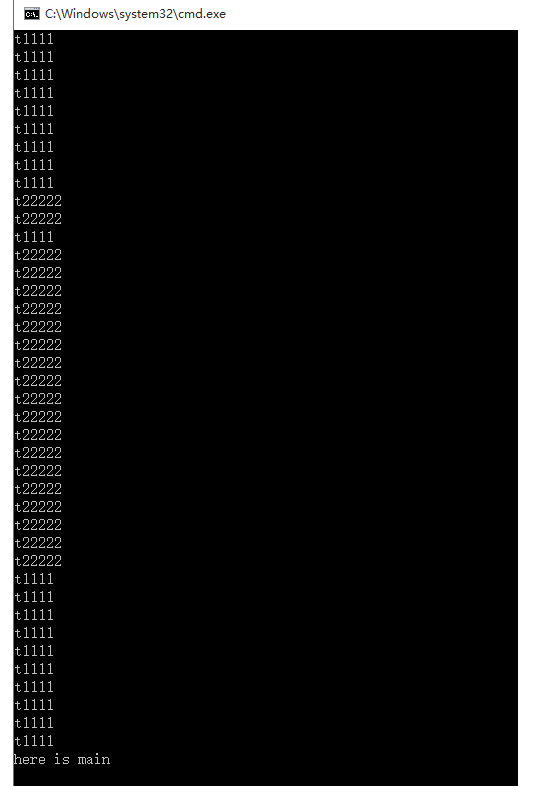
需要注意的是线程对象执行了join后就不再joinable了,所以只能调用join一次。
3.thread::detach()
(1.)中提到的问题,还可以使用detach来解决,detach是用来和线程对象分离的,这样线程可以独立地执行,不过这样由于没有thread对象指向该线程而失去了对它的控制,当对象析构时线程会继续在后台执行,但是当主程序退出时并不能保证线程能执行完。如果没有良好的控制机制或者这种后台线程比较重要,最好不用detach而应该使用join。
int main()

{

    thread th1(t1);

    thread th2(t2);

    th1.detach();

    th2.detach();

    cout << "here is main\n\n";

    return ;

}
由结果可见线程并没有执行完而退出:

4.mutex
头文件是<mutex>,mutex是用来保证线程同步的,防止不同的线程同时操作同一个共享数据。
但是使用mutex是不安全的,当一个线程在解锁之前异常退出了,那么其它被阻塞的线程就无法继续下去。
5.std::lock_guard
使用lock_guard则相对安全,它是基于作用域的,能够自解锁,当该对象创建时,它会像m.lock()一样获得互斥锁,当生命周期结束时,它会自动析构(unlock),不会因为某个线程异常退出而影响其他线程。示例:
int cnt = ;

mutex m;

void t1()

{

    while (cnt > )

    {

        lock_guard<mutex> lockGuard(m);

        if (cnt > )

        {

            --cnt;

            cout << cnt << endl;

        }

    }

}

void t2()

{

    while (cnt > )

    {

        lock_guard<mutex> lockGuard(m);

        if (cnt > )

        {

            --cnt;

            cout << cnt << endl;

        }

    }

}
C++11 并发之std::thread std::mutex的更多相关文章
- c++11 Using Callable Objects, std::thread, std::bind, std::async, std::call_once
- C++11 并发指南------std::thread 详解
参考: https://github.com/forhappy/Cplusplus-Concurrency-In-Practice/blob/master/zh/chapter3-Thread/Int ...
- C++11并发——多线程std::thread (一)
https://www.cnblogs.com/haippy/p/3284540.html 与 C++11 多线程相关的头文件 C++11 新标准中引入了四个头文件来支持多线程编程,他们分别是< ...
- C++11 并发指南二(std::thread 详解)
上一篇博客<C++11 并发指南一(C++11 多线程初探)>中只是提到了 std::thread 的基本用法,并给出了一个最简单的例子,本文将稍微详细地介绍 std::thread 的用 ...
- C++11 并发指南二(std::thread 详解)(转)
上一篇博客<C++11 并发指南一(C++11 多线程初探)>中只是提到了 std::thread 的基本用法,并给出了一个最简单的例子,本文将稍微详细地介绍 std::thread 的用 ...
- 【C/C++开发】C++11 并发指南二(std::thread 详解)
上一篇博客<C++11 并发指南一(C++11 多线程初探)>中只是提到了 std::thread 的基本用法,并给出了一个最简单的例子,本文将稍微详细地介绍 std::thread 的用 ...
- c++11 跨平台多线程demo和qt 静态链接(std::thread有join函数,设置 QMAKE_LFLAGS = -static)
#include <stdio.h>#include <stdlib.h> #include <chrono> // std::chrono::seconds#in ...
- C++11并发——多线程条件变量std::condition_variable(四)
https://www.jianshu.com/p/a31d4fb5594f https://blog.csdn.net/y396397735/article/details/81272752 htt ...
- [原]C++新标准之std::thread
原 总结 C++11 thread 概览 std::thread 类定义 各个成员函数的简单介绍 例子 更多 参考资料 概览 从C++11开始提供了线程的支持,终于可以方便的编写跨平台的线程代码了. ...
随机推荐
- System.out.println 报错: 只能运行在方法体内哦, 类里面只包含属性和方法哦,注意!
类里面包含属性和方法 所以, System.out.println,只能放在方法体内运行,不能放在类里.方法外哦
- HDUOJ 不容易系列之(4)——考新郎
题目链接http://acm.hdu.edu.cn/showproblem.php?pid=2049 一开始我的想法就是使用错排公式,先使用全排列从N对中选出M对,然后再使用错排对选出的M对进行错排计 ...
- arcpy导入错误 问题 “ImportError: No module named arcpy”
如果阁下也出现如下图的错误,用本文的方法也许可以解决问题 首先,打开你python的安装位置,如下图所示的路径,找到desktop10.3.pth文件,打开查看,将你arcgis的相关路径,共3个绝对 ...
- 写给前端的Python依赖管理指北
概述 在Python的项目中,我们可以通过pip来安装依赖包,但是不像npm install,pip默认安装的依赖包会挂在全局上,不利于项目工程协作. 这时候需要一款类似npm的工具记录我们的项目依赖 ...
- git分支错误提交导致代码丢失--窗口提示HEAD detached错误
今天开发时git 检出分支到本地时操作错误,导致在一个临时分支上开发,且把代码提交了,结果代码未提交到任何分支,提交时还报了个错: HEAD detached at 4d927fa4 后来把代码重新检 ...
- maven ----> 子工程中引入父工程
创建父工程,打包方式指定为 pom <groupId>com.example</groupId> <artifactId>SleuthMain</artifa ...
- gem "ransack"(4000✨) 简单介绍
Object-based searching:演示. git: https://github.com/activerecord-hackery/ransack Gorails视频和我的博客记录:ht ...
- sgu 203 Hyperhuffman
题意:给出字符出现的次数,问替换成哈夫曼编码后的文本长度. 实际上观察发现就等于树的所有节点的和.用nlogn超时.用O(n),用两个队列,一个放原始数组,一个放新生成的节点. #include &l ...
- hdu-1115 计算几何 求重心 凸多边形 面积
思想是分割成三角形,然后求三角形的重心.那么多边形重心就是若干个三角形的重心带权求中心,可以用质点质心公式. #include <cstdio> #include <iostream ...
- PHP流程控制笔记
一.运算符(Operator) 1.运算符 2.运算符分类 (1)按功能分 (2)按操作数个数分 3.按功能分 (1)算术运算符 (2)递增递减 (3)字符运算符 (4)赋值运 ...