
[React] 08 - Tutorial: evolution of code-behind
有了七篇基础学习,了解相关的知识体系,之后便是系统地再来一次。
[React] 01 - Intro: javaScript library for building user interfaces
[React] 02 - Intro: react component and Design pattern
[React] 03 - Intro: react.js in twelve demos
[React] 04 - Intro: MongoDB becomes popular
[React] 05 - Route: connect with ExpressJS 【Nodejs + Express + MongoDB 基础篇】
[React] 06 - Route: koa makes your life easier
[React] 07 - Flux: react communicates with mongodb
From [React] 08, based on React JS Tutorials.
运行起来
1.Installs webpack globally on your system, that makes it available in terminal window.
npm i webpack -g
2.运行代码:
$ webpack-dev-server --content-base src
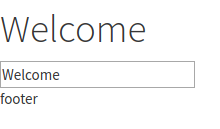
3.UI效果:数据绑定
client.js文件的进化
(1). render()返回值的思考
client.js
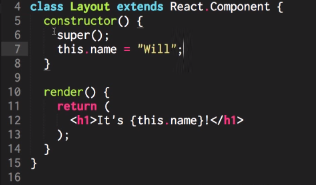
如果需返回多个东东,则使用<div>标签。
(2). Layout独立出来
client.js

import Layout from "./components/Layout";

const app = document.getElementById('app');  // html的app在哪里?

ReactDOM.render(<Layout/>, app);              // ----> 参见[对比1],第一个参数是组件内容,第二个是挂载位置
react会根据标签制定的位置来动态改变html内容。
index.html

<!DOCTYPE html>

<html>

  <head>

    <meta charset="utf-8">

    <title>React Tutorials</title>

    <!-- change this up! http://www.bootstrapcdn.com/bootswatch/ -->

    <link href="https://maxcdn.bootstrapcdn.com/bootswatch/3.3.6/cosmo/bootstrap.min.css" type="text/css" rel="stylesheet"/>

  </head>

  <body>

    <div id="app"></div>    // <---- 实际上成了一个变量,也即是react会根据标签制定的位置来动态改变

    <script src="client.min.js"></script>

  </body>

</html>
这里是 [对比1]:
ReactDOM.render(

  <div>

    <input type="text" value={value}/>        // 注意单标签一定要闭合“/”,否则会报错

    <button>{buttonName}</button>             // 在{}中插入变量

  </div>,

  document.getElementById("container")

)
(3). Louyout --> Header --> Title
将Header和Footer作为组件单独实现,也就是【复合组件】。
Layout.js

 render() {

    return (

      <div>

        <Header changeTitle={this.changeTitle.bind(this)} title={this.state.title} />

        <Footer />

      </div>

    );

  }
当然,Header也可以进一步地独立出来。
Header.js

import React from "react";

import Title from "./Header/Title";

export default class Header extends React.Component {

  handleChange(e) {

    const title = e.target.value;

    this.props.changeTitle(title);

  }

  render() {

    return (

      <div>

        <Title title={this.props.title} />

        <input value={this.props.title} onChange={this.handleChange.bind(this)} />

      </div>

    );

  }

}
Header中的标签Title的实现处。
Title.js

export default class Title extends React.Component {

  render() {

    return (

      <h1>{this.props.title}</h1>

    );

  }

}
执行流程
Header.js

import React from "react";

import Title from "./Header/Title";

export default class Header extends React.Component {

  handleChange(e) {        // e就是指:event

    // (1) 获得新的input数据

    const title = e.target.value;

    // (2) 然后改变title数据

    this.props.changeTitle(title);        // 第二步:在逻辑上,虚拟DOM需要改变title, according to input

    // (3) 之后命令layout渲染

  }

  render() {

    // input中的onChange作为listener,触发上面的handleChange()

    return (

      <div>

        <Title title={this.props.title} />

        <input value={this.props.title} onChange={this.handleChange.bind(this)} />        // 第一步:监听事件获得input改变
      </div>
    );
  }
改变title实际干活的地方,如下。
Layout.js

import React  from "react";

import Footer from "./Footer";

import Header from "./Header";

export default class Layout extends React.Component {

  constructor() {

    super();

    this.state = {

      title: "Welcome",

    };

  }

  changeTitle(title) {

    this.setState({title});

  }

  render() {

    return (

      <div>

        <Header changeTitle={this.changeTitle.bind(this)} title={this.state.title} />  // 将函数指针作为参数传给header子组件

        <Footer />

      </div>

    );

  }

}
可见,这里其实透露出的是一种“分离”的思想。
[React] 08 - Tutorial: evolution of code-behind的更多相关文章
- [React] 10 - Tutorial: router
Ref: REACT JS TUTORIAL #6 - React Router & Intro to Single Page Apps with React JS Ref: REACT JS ...
- React-Native(二):React Native开发工具vs code配置
从网上翻阅了一些开发react-native的开发工具时,发现其实可选的工具还是比较多的Sublime Text,WebStrom,Atom+Nuclide,vs code 等.因为我用.net生态环 ...
- [React] 09 - Tutorial: components
jsx变为js的过程:http://babeljs.io/repl/ youtube: https://www.youtube.com/channel/UCA-Jkgr40A9kl5vsIqg-BIg ...
- React.js Tutorial: React Component Lifecycle
Introduction about React component lifecycle. 1 Lifecycle A React component in browser can be any of ...
- [Full-stack] 快速上手开发 - React
故事背景 [1] 博客笔记结合<React快速上手开发>再次系统地.全面地走一遍. [2] React JS Tutorials:包含了JS --> React --> Red ...
- [Code::Blocks] Install wxWidgets & openCV
The open source, cross platform, free C++ IDE. Code::Blocks is a free C++ IDE built to meet the most ...
- 本人SW知识体系导航 - Programming menu
将感悟心得记于此,重启程序员模式. js, py, c++, java, php 融汇之全栈系列 [Full-stack] 快速上手开发 - React [Full-stack] 状态管理技巧 - R ...
- React调试——visual studio code
原文链接:Using React in Visual Studio Code 原文链接:Live edit and debug your React apps directly from VS Cod ...
- [React Native] Installing and Linking Modules with Native Code in React Native
Learn to install JavaScript modules that include native code. Some React Native modules include nati ...
随机推荐
- git 分支合并冲突
准备新的feature1分支,继续我们的新分支开发 [root@node1 git]# git checkout -b feature1 D git/LICENSE.txt Switched to a ...
- Qt 4.6.2静态编译
一.下载mingw 4.4.0:ftp://ftp.trolltech.com/misc/MinGW-gcc440_1.zip 二.解压到C:\mingw目录下,设置环境变量path将C:\mingw ...
- 用vue的自定义组件写了一个拖拽 组件,局部的 只能在自定义元素内的
简单实现 没有做兼容<!DOCTYPE html> <html lang="en"> <head> <meta charset=" ...
- nginx限制ip访问(转)
一.服务器全局限IP #vi nginx.conf allow 10.57.22.172; #允许的IP deny all; 二.站点限IP #vi vhosts.conf 站点全局限IP ...
- Knockout.Js官网学习(enable绑定、disable绑定)
enable绑定 enable绑定使DOM元素只有在参数值为 true的时候才enabled.在form表单元素input,select,和textarea上非常有用. enable简单示例 < ...
- 微信nickname乱码(emoji)及mysql编码格式设置(utf8mb4)解决的过程
转:https://segmentfault.com/a/1190000004594385 项目中涉及保存微信的nickname,之前一直正常使用,但是突然遇到一个之前没有遇到的问题.经过调试发现错误 ...
- 一起来给iOS 11找bug: 苹果还是乔布斯时代的细节控吗?
众所周知,前几天苹果在位于苹果公园的Steve Jobs剧院召开了一年一度的新品发布会,正式揭幕了全屏的iPhoneX, 随后又把iOS 11推送给了测试员(Beta Tester)(正式版将于几周后 ...
- Swift ARC 自动引用计数
1.ARC 引用类型在堆上的内存分配过程中有 8 字节的地址长度用来保存对象的引用计数,堆上的内存并不像栈上那样立即进行回收,系统会定时对堆上的内存进行检查,当某个实例不再被使用时,引用计数会变为 0 ...
- Swift 命令行输入输出
1.类输出 Swift 语言中类输出方法重写 override var description: String { return String(format: "%@, %@", ...
- Python gensim库word2vec 基本用法
ip install gensim安装好库后,即可导入使用: 1.训练模型定义 from gensim.models import Word2Vec model = Word2Vec(senten ...