
[React] 08 - Tutorial: evolution of code-behind
有了七篇基础学习,了解相关的知识体系,之后便是系统地再来一次。
[React] 01 - Intro: javaScript library for building user interfaces
[React] 02 - Intro: react component and Design pattern
[React] 03 - Intro: react.js in twelve demos
[React] 04 - Intro: MongoDB becomes popular
[React] 05 - Route: connect with ExpressJS 【Nodejs + Express + MongoDB 基础篇】
[React] 06 - Route: koa makes your life easier
[React] 07 - Flux: react communicates with mongodb
From [React] 08, based on React JS Tutorials.
运行起来
1.Installs webpack globally on your system, that makes it available in terminal window.
npm i webpack -g
2.运行代码:
$ webpack-dev-server --content-base src
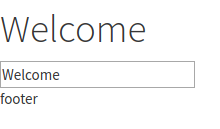
3.UI效果:数据绑定
client.js文件的进化
(1). render()返回值的思考
client.js
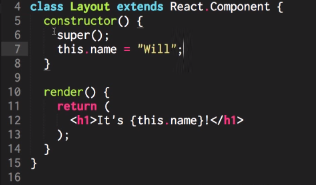
如果需返回多个东东,则使用<div>标签。
(2). Layout独立出来
client.js

import Layout from "./components/Layout";

const app = document.getElementById('app');  // html的app在哪里?

ReactDOM.render(<Layout/>, app);              // ----> 参见[对比1],第一个参数是组件内容,第二个是挂载位置
react会根据标签制定的位置来动态改变html内容。
index.html

<!DOCTYPE html>

<html>

  <head>

    <meta charset="utf-8">

    <title>React Tutorials</title>

    <!-- change this up! http://www.bootstrapcdn.com/bootswatch/ -->

    <link href="https://maxcdn.bootstrapcdn.com/bootswatch/3.3.6/cosmo/bootstrap.min.css" type="text/css" rel="stylesheet"/>

  </head>

  <body>

    <div id="app"></div>    // <---- 实际上成了一个变量,也即是react会根据标签制定的位置来动态改变

    <script src="client.min.js"></script>

  </body>

</html>
这里是 [对比1]:
ReactDOM.render(

  <div>

    <input type="text" value={value}/>        // 注意单标签一定要闭合“/”,否则会报错

    <button>{buttonName}</button>             // 在{}中插入变量

  </div>,

  document.getElementById("container")

)
(3). Louyout --> Header --> Title
将Header和Footer作为组件单独实现,也就是【复合组件】。
Layout.js

 render() {

    return (

      <div>

        <Header changeTitle={this.changeTitle.bind(this)} title={this.state.title} />

        <Footer />

      </div>

    );

  }
当然,Header也可以进一步地独立出来。
Header.js

import React from "react";

import Title from "./Header/Title";

export default class Header extends React.Component {

  handleChange(e) {

    const title = e.target.value;

    this.props.changeTitle(title);

  }

  render() {

    return (

      <div>

        <Title title={this.props.title} />

        <input value={this.props.title} onChange={this.handleChange.bind(this)} />

      </div>

    );

  }

}
Header中的标签Title的实现处。
Title.js

export default class Title extends React.Component {

  render() {

    return (

      <h1>{this.props.title}</h1>

    );

  }

}
执行流程
Header.js

import React from "react";

import Title from "./Header/Title";

export default class Header extends React.Component {

  handleChange(e) {        // e就是指:event

    // (1) 获得新的input数据

    const title = e.target.value;

    // (2) 然后改变title数据

    this.props.changeTitle(title);        // 第二步:在逻辑上,虚拟DOM需要改变title, according to input

    // (3) 之后命令layout渲染

  }

  render() {

    // input中的onChange作为listener,触发上面的handleChange()

    return (

      <div>

        <Title title={this.props.title} />

        <input value={this.props.title} onChange={this.handleChange.bind(this)} />        // 第一步:监听事件获得input改变
      </div>
    );
  }
改变title实际干活的地方,如下。
Layout.js

import React  from "react";

import Footer from "./Footer";

import Header from "./Header";

export default class Layout extends React.Component {

  constructor() {

    super();

    this.state = {

      title: "Welcome",

    };

  }

  changeTitle(title) {

    this.setState({title});

  }

  render() {

    return (

      <div>

        <Header changeTitle={this.changeTitle.bind(this)} title={this.state.title} />  // 将函数指针作为参数传给header子组件

        <Footer />

      </div>

    );

  }

}
可见,这里其实透露出的是一种“分离”的思想。
[React] 08 - Tutorial: evolution of code-behind的更多相关文章
- [React] 10 - Tutorial: router
Ref: REACT JS TUTORIAL #6 - React Router & Intro to Single Page Apps with React JS Ref: REACT JS ...
- React-Native(二):React Native开发工具vs code配置
从网上翻阅了一些开发react-native的开发工具时,发现其实可选的工具还是比较多的Sublime Text,WebStrom,Atom+Nuclide,vs code 等.因为我用.net生态环 ...
- [React] 09 - Tutorial: components
jsx变为js的过程:http://babeljs.io/repl/ youtube: https://www.youtube.com/channel/UCA-Jkgr40A9kl5vsIqg-BIg ...
- React.js Tutorial: React Component Lifecycle
Introduction about React component lifecycle. 1 Lifecycle A React component in browser can be any of ...
- [Full-stack] 快速上手开发 - React
故事背景 [1] 博客笔记结合<React快速上手开发>再次系统地.全面地走一遍. [2] React JS Tutorials:包含了JS --> React --> Red ...
- [Code::Blocks] Install wxWidgets & openCV
The open source, cross platform, free C++ IDE. Code::Blocks is a free C++ IDE built to meet the most ...
- 本人SW知识体系导航 - Programming menu
将感悟心得记于此,重启程序员模式. js, py, c++, java, php 融汇之全栈系列 [Full-stack] 快速上手开发 - React [Full-stack] 状态管理技巧 - R ...
- React调试——visual studio code
原文链接:Using React in Visual Studio Code 原文链接:Live edit and debug your React apps directly from VS Cod ...
- [React Native] Installing and Linking Modules with Native Code in React Native
Learn to install JavaScript modules that include native code. Some React Native modules include nati ...
随机推荐
- Linux中日期的加减运算
Linux中日期的加减运算 目录 在显示方面 在设定时间方面 时间的加减 正文 date命令本身提供了日期的加减运算. date 可以用来显示或设定系统的日期与时间. 回到顶部 在显示方面 使用者可以 ...
- Maven入门指南⑥:将项目发布到私服
1 . 修改私服中仓库的部署策略 Release版本的项目应该发布到Releases仓库中,对应的,Snapshot版本应该发布到Snapshots仓库中.Maven根据pom.xml文件中版本号&l ...
- Android开发中遇到的问题(三)——eclipse创建android项目无法正常预览布局文件
一.问题描述 今天使用SDK Manager将Android SDK的版本更新到了Android 5.1的版本,eclipse创建android项目时,预览activity_main.xml文件时提示 ...
- VMWare Station 问题汇总
1.开机黑屏,不启动系统 解决方法: 命令行窗口cmd—输入下面代码,然后重启计算机. netsh winsock reset 2.提示磁盘被锁无法打开 解决方法: 虚拟机目录下面的.lck文件都删了
- 访问win10的远程桌面(Remote Desktop)总是凭据或者用户密码错误
家里电脑是Win10的,原来可以在公司通过远程桌面访问,最近自动升级了一次补丁后,远程可以连接,但是输入正确的用户密码后总提示凭据错误 (Win10是被访问的一方,修改的也是被访问的机器) 修复方式为 ...
- MUI DtPicker 显示自定义日期
MUI地址:http://dev.dcloud.net.cn/mui/ 首先引入相关JS CSS脚本. HTML代码: <input class="dt flat" styl ...
- IDependency自动注册autofac
ContainerBuilder builder = new ContainerBuilder(); builder.RegisterGeneric(typeof(Repository<,> ...
- 让WebService支持Get请求
在C#中,新建一个webservice,默认是post类型的.如果需要支持Get请求,需要对web.config文件进行配置 <system.web> <compilation de ...
- MongoDB中的explain和hint提的使用
一.简介 这里简单介绍一下各个工具的使用场景,一般用mysql,redis,mongodb做存储层,hadoop,spark做大数据分析. mysql适合结构化数据,类似excel表格一样定义严格的数 ...
- JSP 性能优化
无论当前 JavaScript 代码是内嵌还是在外链文件中,页面的下载和渲染都必须停下来等待脚本执行完成.JavaScript 执行过程耗时越久,浏览器等待响应用户输入的时间就越长.浏览器在下载和执行 ...