
vue-自定义pc端键盘-动画
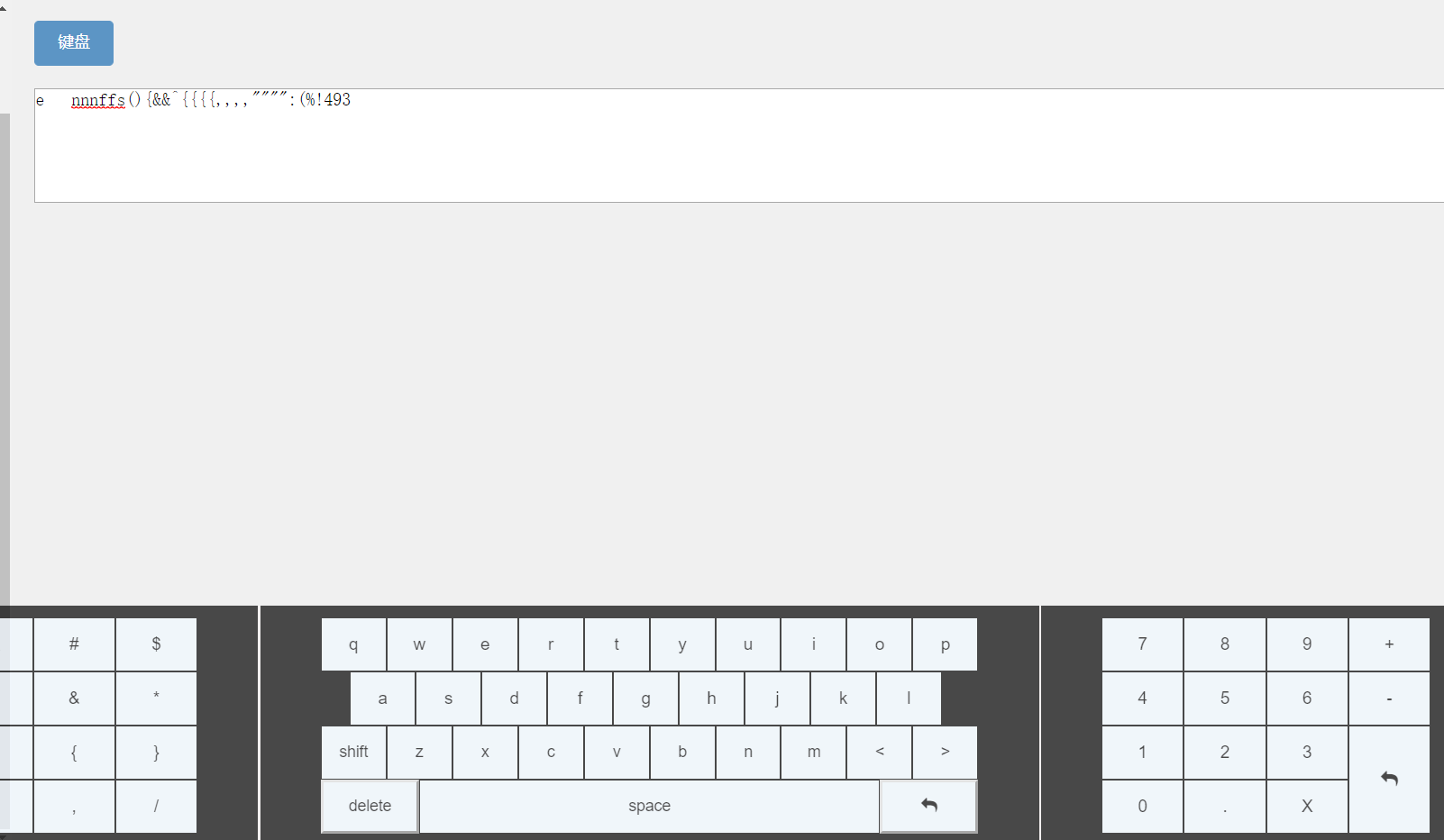
<template>

    <div class="keyboard">

     <div class="keyboard_key">

        <div class="keyboard_character" @click="_chraClick">

            <button type="button" class="pad-num1 specialkey" data-num='!'>!</button>

            <button type="button" class="pad-num1 specialkey" data-num='@'>@</button>

            <button type="button" class="pad-num1 specialkey" data-num='#'>#</button>

            <button type="button" class="pad-num1 specialkey" data-num='$'>$</button>

            <button type="button" class="pad-num1 specialkey" data-num='%'>%</button>

            <button type="button" class="pad-num1 specialkey" data-num='^'>^</button>

            <button type="button" class="pad-num1 specialkey" data-num='&'>&</button>

            <button type="button" class="pad-num1 specialkey" data-num='*'>*</button>

            <button type="button" class="pad-num1 specialkey" data-num='('>(</button>

            <button type="button" class="pad-num1 specialkey" data-num=')'>)</button>

            <button type="button" class="pad-num1 specialkey" data-num='{'>{</button>

            <button type="button" class="pad-num1 specialkey" data-num='}'>}</button>

            <button type="button" class="pad-num1 specialkey" data-num=':'>:</button>

            <button type="button" class="pad-num1 specialkey" data-num='"'>"</button>

            <button type="button" class="pad-num1 specialkey" data-num=','>,</button>

            <button type="button" class="pad-num1 specialkey" data-num='/'>/</button>

        </div>

       <div class="centerdiv"></div>

        <div class="keyboard_Letter">

         <div class="group1">

            <button v-for="(item,index) in keylist" :key="index" type="button" class="pad-num1" @click="upClick1(item)">{{item}}</button>

         </div>

         <div class="group2">

            <button v-for="(item,index) in keylist2" :key="index" type="button" class="pad-num1" @click="upClick2(item)">{{item}}</button>

         </div>

         <div class="group3">

           <button v-for="(item,index) in keylist3" :key="index" type="button" class="pad-num1" @click="upClick3(item)" >{{item}}</button>

         </div>

         <div class="group4" @click="_letterClick">

            <button type="button" class="pad-num1 specialkey" data-num='delete'>delete</button>

            <button type="button" class="pad-num2 specialkey" data-num='space'>space</button>

            <button type="button" class="pad-num1 specialkey" data-num='enter'>

              <i class="fa fa-mail-reply" data-num='enter'></i>

              </button>

         </div>

        </div>

      <div class="centerdiv"></div>

        <div class="keyboard_number" @click="_handleKeyPress">

          <div class="pos-right-pad-num">

            <button type="button" class="pad-num specialkey" data-num=''></button>

            <button type="button" class="pad-num specialkey" data-num=''></button>

            <button type="button" class="pad-num specialkey" data-num=''></button>

            <button type="button" class="pad-num specialkey" data-num=''></button>

            <button type="button" class="pad-num specialkey" data-num=''></button>

            <button type="button" class="pad-num specialkey" data-num=''></button>

            <button type="button" class="pad-num specialkey" data-num=''></button>

            <button type="button" class="pad-num specialkey" data-num=''></button>

            <button type="button" class="pad-num specialkey" data-num=''></button>

            <button type="button" class="pad-num specialkey" data-num=''></button>

            <button type="button" class="pad-num specialkey" data-num='.'>.</button>

            <button type="button" class="pad-num specialkey" data-num='D'>X</button>

          </div>

          <div class="pos-right-pad-act">

            <button type="button" class="pad-num specialkey border-right" style="width:100%" data-num='+'>+</button>

            <button type="button" class="pad-num specialkey border-right" style="width:100%" data-num='-'>-<br></button>

            <button type="button" class="pad-num2 specialkey border-right" data-num='enter'><i class="fa fa-mail-reply" aria-hidden="true"></i></button>

          </div>

        </div>

     </div>

    </div>

</template>

<script>

export default {

  data() {

    return {

      keyValue: "",

      keylist: [],

      keylist2: [],

      keylist3: [],

      bigkeys1:[],

      bigkeys2:[],

      bigkeys3:[],

      smallkeys1:[],

      smallkeys2:[],

      smallkeys3:[],

      selected:false,

    };

  },

  created() {

    this.readle();

  },

  methods: {

    readle() {

      let smallkey1 = ["q", "w", "e", "r", "t", "y", "u", "i", "o", "p"];

      let bigkey1 = ["Q", "W", "E", "R", "T", "Y", "U", "I", "O", "P"];

      let smallkey2 = ["a", "s", "d", "f", "g", "h", "j", "k", "l"];

      let bigkey2 = ["A", "S", "D", "F", "G", "H", "J", "K", "L"];

      let smallkey3 = ["shift","z", "x", "c", "v", "b", "n", "m", "<", ">"];

      let bigkey3 = ["SHIFT", "Z", "X", "C", "V", "B", "N", "M", "<", ">"];

      this.keylist = smallkey1;

      this.keylist2 = smallkey2;

      this.keylist3 = smallkey3;

      this.bigkeys1=bigkey1;

      this.bigkeys2=bigkey2;

      this.bigkeys3=bigkey3;

      this.smallkeys1=smallkey1;

      this.smallkeys2=smallkey2;

      this.smallkeys3=smallkey3;

    },

    _chraClick(e) {

      let num = e.target.dataset.num;

      this.keyValue += num;

      this.$emit("updatekey",this.keyValue);

    },

    _handleKeyPress(e) {

      let num = e.target.dataset.num;

      switch (String(num)) {

        case "D":

          this.deletekey();

          break;

        case "enter":

          this.keyValue+="\n";

          break;

        default:

          this.Addnum(num);

          break;

      }

      this.$emit("updatekey",this.keyValue)

    },

    deletekey() {

      let values = this.keyValue;

      if (!values.length) {

        return false;

      } else {

        this.keyValue = values.substring(, values.length - );

          this.$emit("updatekey",this.keyValue)

      }

    },

    Addnum(num) {

      let value = this.keyValue;

      this.keyValue = value + num;

    },

    upClick1(key){

      this.keyValue+=key;

        this.$emit("updatekey",this.keyValue)

    },

    upClick2(key){

      this.keyValue+=key;

        this.$emit("updatekey",this.keyValue)

    },

    upClick3(key){

      switch(String(key))

      {

        case "shift":

        this.keylist=this.bigkeys1;

        this.keylist2=this.bigkeys2;

        this.keylist3=this.bigkeys3;

        break;

        case "SHIFT":

       this.keylist = this.smallkeys1;

       this.keylist2 = this.smallkeys2;

       this.keylist3 = this.smallkeys3;

       break;

       default:

       this.keyValue+=key;

       break;

      }

        this.$emit("updatekey",this.keyValue)

    },

    _letterClick(e){

        let num = e.target.dataset.num;

        switch(String(num))

        {

          case "delete":

          this.deletekey();

          break;

          case "space":

          this.keyValue +=" ";

          break;

          case "enter":

          this.keyValue +="\n";

          break;

        }

    },

  }

};

</script>

<style lang="less" scoped>

.keyboard {

  width: %;

  height: 215px;

  background: #;

  opacity: 0.7;

  overflow: hidden;

}

.keyboard_key {

  padding-top: 10px;

  width: %;

  display: flex;

  flex-direction: row;

  justify-content: space-between;

}

button {

  background-color: aliceblue;

}

// ----数字键盘-----

.keyboard_number {

  display: flex;

  width: %;

  margin: ;

  padding: ;

  vertical-align: bottom;

  flex-direction: row;

  justify-content: space-between;

  flex-wrap: wrap;

  align-items: center;

}

.pos-right-pad-num {

  display: flex;

  width: %;

  flex-direction: row;

  justify-content: space-between;

  flex-wrap: wrap;

  align-items: center;

}

.pos-right-pad-act {

  width: %;

}

.pad-num {

  margin:  !important;

  width: 33.3333333%;

  height: 48px;

  border: ;

  border: 1px solid #;

  font-size: 15px;

  cursor: pointer;

  &:hover {

    position: relative;

    cursor: pointer;

  }

  &:active {

    top: 1px;

    left: 1px;

    background-color: #201a1a;

  }

}

.pad-num2 {

  margin:  !important;

  width: %;

  height: 96px;

  border: ;

  border: 1px solid #;

  font-size: 15px;

  cursor: pointer;

  &:hover {

    position: relative;

    cursor: pointer;

  }

  &:active {

    top: 1px;

    left: 1px;

    background-color: #201a1a;

  }

}

// 字符键盘

.keyboard_character {

  width: %;

  margin: ;

  padding: ;

  display: flex;

  flex-direction: row;

  justify-content: space-between;

  flex-wrap: wrap;

  align-items: center;

  margin-left: %;

  .pad-num1 {

    width: %;

    height: 48px;

    border: 1px solid #;

    font-size: 15px;

    cursor: pointer;

    &:hover {

      position: relative;

      cursor: pointer;

    }

    &:active {

      top: 1px;

      left: 1px;

      background-color: #201a1a;

    }

  }

}

//字母键盘

.keyboard_Letter {

  width: %;

  margin: ;

  padding: ;

  .group1 {

    display: flex;

    flex-direction: row;

    .pad-num1 {

      width: %;

      height: 48px;

      border: 1px solid #;

      font-size: 15px;

      cursor: pointer;

      &:hover {

        position: relative;

        cursor: pointer;

      }

      &:active {

        top: 1px;

        left: 1px;

        background-color: #201a1a;

      }

    }

  }

  .group2 {

    display: flex;

    flex-direction: row;

    width: %;

    margin-left: 26px;

    .pad-num1 {

      width: %;

      height: 48px;

      border: 1px solid #;

      font-size: 15px;

      cursor: pointer;

      &:hover {

        position: relative;

        cursor: pointer;

      }

      &:active {

        top: 1px;

        left: 1px;

        background-color: #201a1a;

      }

    }

  }

  .group3 {

    display: flex;

    flex-direction: row;

    .pad-num1 {

      width: %;

      height: 48px;

      border: 1px solid #;

      font-size: 14px;

      cursor: pointer;

      &:hover {

        position: relative;

        cursor: pointer;

      }

      &:active {

        top: 1px;

        left: 1px;

        background-color: #201a1a;

      }

    }

  }

  .group4 {

    display: flex;

    flex-direction: row;

    .pad-num1 {

      width: %;

      height: 48px;

      font-size: 14px;

      cursor: pointer;

      &:hover {

        position: relative;

        cursor: pointer;

      }

      &:active {

        top: 1px;

        left: 1px;

        background-color: #201a1a;

      }

    }

    .pad-num2 {

      width: %;

      height: 48px;

      border: 1px solid #;

      font-size: 14px;

      cursor: pointer;

      &:hover {

        position: relative;

        cursor: pointer;

      }

      &:active {

        top: 1px;

        left: 1px;

        background-color: #201a1a;

      }

    }

  }

}

.centerdiv {

  border-right: 2px solid rgb(, , );

  padding-bottom: 1800px; /*关键*/

  margin-bottom: -1800px; /*关键*/

  padding-top: 1800px; /*关键*/

  margin-top: -1800px; /*关键*/

}

.input-box {

  font-size: 35px;

  font-weight: bold;

  height: 40px;

  border-bottom: 1px solid #aaa;

  padding: 10px 15px;

  text-align: right;

  width: %;

}

</style>
<template>

    <div>

        <el-button @click="handShow" type="primary">键盘</el-button>

        <textarea type="text" v-model="keyboards"></textarea>

        <transition name="fade">

        <keyboard refs="key" v-show="ifshow" class="key"  v-on:updatekey="GetKeyVal"></keyboard>

        </transition>

    </div>

</template>

<script>

import Keyboard from "./keyBoard";

export default {

  data() {

    return {

      keyboards: "",

      ifshow: false

    };

  },

  components: {

    Keyboard

  },

  methods: {

    GetKeyVal(val) {

      this.keyboards = val;

    },

    handShow() {

      this.ifshow = !this.ifshow;

    }

  }

};

</script>

<style lang="less" scoped>

#app {

  width: 680px;

  margin: 20px auto;

  font-family: Verdana, Sans-Serif;

  h1 {

    color: #42b983;

    font-weight: bold;

  }

  textarea {

    display: block;

    width: %;

    min-height: 100px;

    padding: ;

    margin: 20px ;

    font-size: 16px;

  }

  .key {

    position: fixed;

    left: 0px;

    bottom: 0px;

    width: %;

    z-index: ;

  }

  .fade-enter-active,

  .fade-leave-active {

    transition: all .3s ease;

  }

  .fade-enter,

  .fade-leave-to {

    transform: translateY(220px);

    opacity: ;

  }

}

</style>
vue-自定义pc端键盘-动画的更多相关文章
- vue实现PC端分辨率适配
lib-flexible + px2rem Loader lib-flexible 阿里伸缩布局方案 px2rem-loader:px转rem: 依赖 首先需要安装 vue-cli 脚手架,这里我安装 ...
- vue实现PC端调用摄像头拍照人脸录入、移动端调用手机前置摄像头人脸录入、及图片旋转矫正、压缩上传base64格式/文件格式
进入正题 1. PC端调用摄像头拍照上传base64格式到后台,这个没什么花里胡哨的骚操作,直接看代码 (canvas + video) <template> <div> &l ...
- vue实现pc端无限加载功能
主要思路通过自定义指令,在视图初始化完成后,绑定scroll事件.当scrollTop + clientHeight >= scrollHeight时(此时滚定条到了底部)触发loadMore事 ...
- vue 自定义 移动端筛选条件
1.创建组件 components/FilterBar/FilterBar.vue <template> <div class="filterbar" :styl ...
- Vue——解决移动端键盘弹起导致的页面fixed定位元素布局错乱
最近做了一个移动端项目,页面主体是由form表单和底部fixed定位的按钮组成,当用户进行表单输入时,手机软键盘弹起,此时页面的尺寸发生变化,底部fixed定位的元素自然也会上移,可能就会覆盖页面中的 ...
- vue实现pc端上拉加载功能,不兼容移动端
所用插件:Mock.js 这个只用到它简单的功能,拦截ajax请求. vue和axios,vue基础知识请看文档. axios类似于jquery的ajax方法. 以下是是该功能所有代码,其中mock的 ...
- js验证input输入正整数 和 输入的金额小数点后保留两位(PC端键盘输入)
// 验证开头不为零的正整数 WST.zhengZhengShuIn = function (className){ var rex = /^[1-9]{1}[0-9]*$/;//正整数 $(&quo ...
- 基于Vue.js PC桌面端弹出框组件|vue自定义弹层组件|vue模态框
vue.js构建的轻量级PC网页端交互式弹层组件VLayer. 前段时间有分享过一个vue移动端弹窗组件,今天给大家分享一个最近开发的vue pc端弹出层组件. VLayer 一款集Alert.Dia ...
- 使用vue实现简单键盘,支持移动端和pc端
常看到各种app应用中使用自定义的键盘,本例子中使用vue2实现个简单的键盘,支持在移动端和PC端使用,欢迎点赞,h5 ios输入框与键盘 兼容性优化 实现效果: Keyboard.vue <t ...
随机推荐
- Linux驱动技术(三) _DMA编程
DMA即Direct Memory Access,是一种允许外设直接存取内存数据而没有CPU参与的技术,当外设对于该块内存的读写完成之后,DMAC通过中断通知CPU,这种技术多用于对数据量和数据传输速 ...
- 利用media query让背景图适应不同分辨率的设备
随着上网方式的多样化,用户选择上网的工具不再仅是PC,而可以是手机,或者平板电脑.随之而来的问题是如何让网页适应不同分辨率,这给前端工程师们带来了新的挑战,其中重要的一点是如何让图片能在不同的分辨率下 ...
- jmeter之结果重定向
在使用jmeter与jenkins对接时,发现默认打印出来的日志就是正常的summary统计,如果要查看日志,只能通过jmeter.log去查看. 来来来,我们一起温习下jmeter的命令行参数 -- ...
- chrome调试创建sq设备进行调试
工作中开发基于手机qq的webapp页面时,通常开发会对页面进行限制让用户通过手机qq访问,进行引导,如下图所示. 很多时候我们开发只是在手机展示,而在pc端进行调试,当开发加了这一层限制之后,就会导 ...
- day_5.5 单例
2018-5-5 15:00:25 单例 : 就是对象只有一个 ''' class main(object): __instance = None def __new__(cls,): if cls. ...
- 使用 tabindex 改变Tab 键顺序
使用 tabindex原文 https://developers.google.cn/web/fundamentals/accessibility/focus/using-tabindex 在表单上使 ...
- FastJson 自定义Serialize、Parser
FastJson 自定义Serialize.Parser 今天在处理Json反序列化时,在C#传过来的JSON字符串中枚举类型为int类型,FastJson对于枚举的处理有两种类型,一种是字符串一种是 ...
- tomcat的缺少tcnative-1.dll的解决(申明:来源于网络)
tomcat的缺少tcnative-1.dll的解决 地址:http://blog.csdn.net/topwqp/article/details/7713388
- python基础①
一. Python 命名规范: 1, 变量量由字⺟母, 数字,下划线搭配组合⽽而成 2, 不不可以⽤用数字开头,更更不不能是全数字 3,不能是pythond的关键字, 这些符号和字⺟母已经 ...
- [No0000B1]ReSharper操作指南2/16-ReSharper食谱与特定于域的教程
自动导入名称空间 有关更多信息,请参阅导入缺少命名空间. 每当您使用未添加using语句的命名空间中的类型时,ReSharper会为您提供在您所在文件的顶部添加相应的语句.这由在所使用的类型上方显示的 ...