
spring cloud:HystrixDashboard
hystrix-dashboard-server
1. File-->new spring starter project
2.add dependency
    <parent>

        <groupId>org.springframework.boot</groupId>

        <artifactId>spring-boot-starter-parent</artifactId>

        <version>2.1.5.RELEASE</version>

        <relativePath/> <!-- lookup parent from repository -->

    </parent>
        <dependency>

            <groupId>org.springframework.cloud</groupId>

            <artifactId>spring-cloud-starter-netflix-hystrix-dashboard</artifactId>

        </dependency>
3.Edit application.yml
server:

  port:

spring:

  application:

    name: hystrix-dashboard-server

#

#eureka:

#  client:

#    service-url:

#      defaultZone: http://localhost:8761/eureka/
4.program
package com.smile;

import org.springframework.boot.SpringApplication;

import org.springframework.boot.autoconfigure.SpringBootApplication;

import org.springframework.boot.web.servlet.ServletRegistrationBean;

import org.springframework.cloud.netflix.hystrix.dashboard.EnableHystrixDashboard;

import org.springframework.context.annotation.Bean;

import com.netflix.hystrix.contrib.metrics.eventstream.HystrixMetricsStreamServlet;

@SpringBootApplication

@EnableHystrixDashboard

public class HystrixDashboardServerApplication {

    public static void main(String[] args) {

        SpringApplication.run(HystrixDashboardServerApplication.class, args);

    }

}
5.Run
visit : http://localhost:9000/hystrix 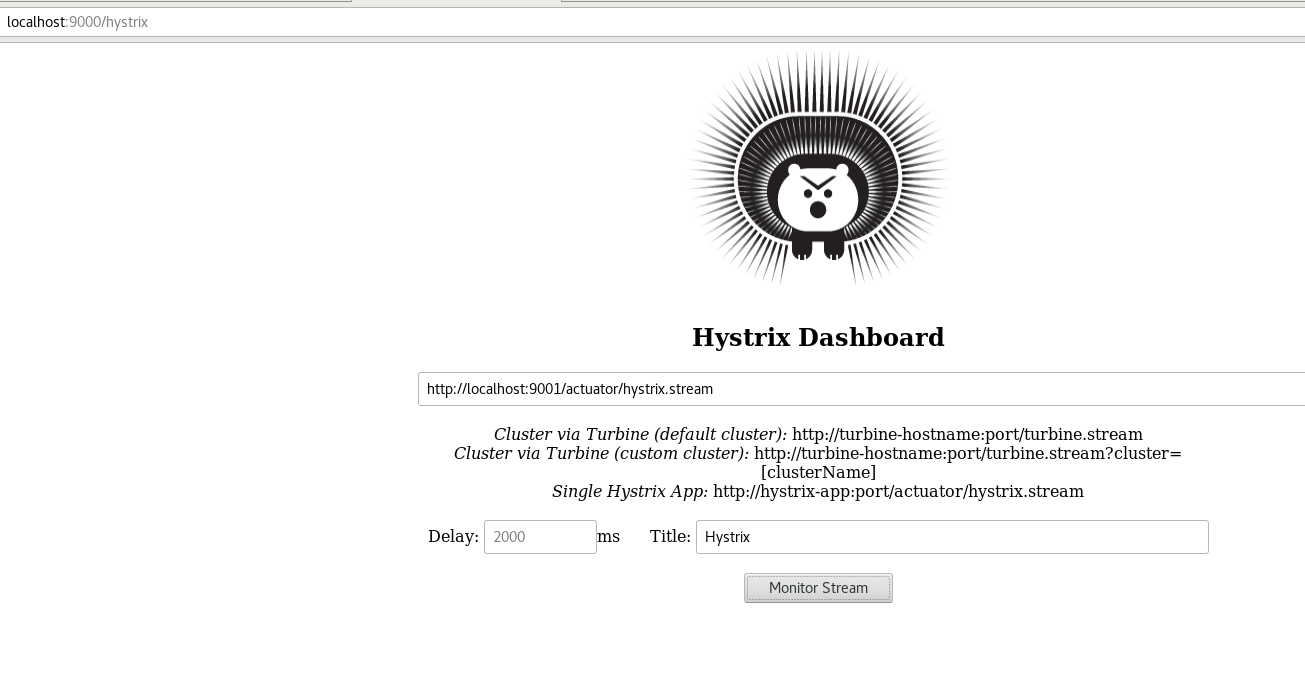
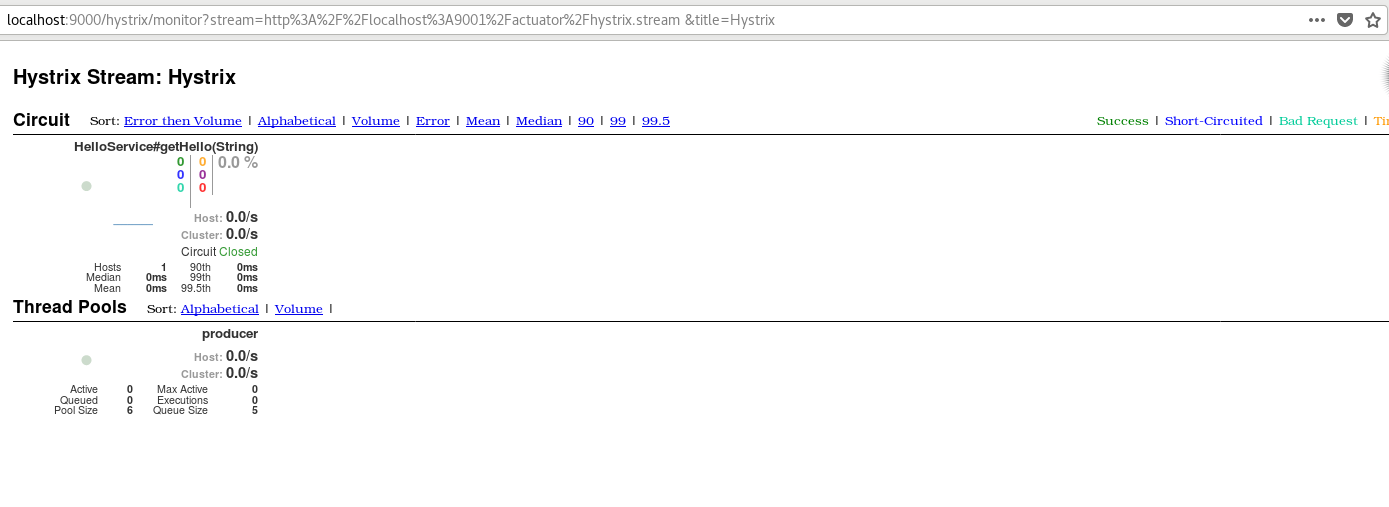
输入要监控的地址 http://localhost:9001/actuator/hystrix.stream 点击 monitor
hystrix-dashboard-client
1. File-->new spring starter project
2.add dependency
<parent>

        <groupId>org.springframework.boot</groupId>

        <artifactId>spring-boot-starter-parent</artifactId>

        <version>2.1.5.RELEASE</version>

        <relativePath/> <!-- lookup parent from repository -->

    </parent>
<dependency>

            <groupId>org.springframework.cloud</groupId>

            <artifactId>spring-cloud-starter-netflix-eureka-client</artifactId>

        </dependency>

        <dependency>

            <groupId>org.springframework.boot</groupId>

            <artifactId>spring-boot-starter-web</artifactId>

        </dependency>

        <dependency>

            <groupId>org.springframework.boot</groupId>

            <artifactId>spring-boot-starter-actuator</artifactId>

        </dependency>

        <dependency>

            <groupId>org.springframework.cloud</groupId>

            <artifactId>

                spring-cloud-starter-netflix-hystrix

            </artifactId>

        </dependency>

        <dependency>

            <groupId>org.springframework.cloud</groupId>

            <artifactId>spring-cloud-starter-openfeign</artifactId>

        </dependency>

        <dependency>

            <groupId>org.springframework.boot</groupId>

            <artifactId>spring-boot-devtools</artifactId>

        </dependency>
3.Edit application.yml
server:

  port:

spring:

  application:

    name: hystrix-dashboard-client

eureka:

  client:

    service-url:

      defaulZone: http://localhost:8761/eureka/

management:

  endpoints:

    web:

      exposure:

        include: '*'

feign:

  hystrix:

    enabled: true
4.program
package com.smile;

import org.springframework.boot.SpringApplication;

import org.springframework.boot.autoconfigure.SpringBootApplication;

import org.springframework.cloud.client.circuitbreaker.EnableCircuitBreaker;

import org.springframework.cloud.netflix.eureka.EnableEurekaClient;

import org.springframework.cloud.openfeign.EnableFeignClients;

@SpringBootApplication

@EnableEurekaClient

@EnableFeignClients

@EnableCircuitBreaker    //开启断路器,否则监控不到

public class HystrixDashboardClientApplication {

    public static void main(String[] args) {

        SpringApplication.run(HystrixDashboardClientApplication.class, args);

    }

}
package com.smile.controller;

import org.springframework.beans.factory.annotation.Autowired;

import org.springframework.web.bind.annotation.PathVariable;

import org.springframework.web.bind.annotation.RequestMapping;

import org.springframework.web.bind.annotation.RestController;

import com.smile.remote.HelloService;

@RestController

public class ConsumerController {

    @Autowired

    HelloService helloService;

    @RequestMapping("/hello/{name}")

    public String helloConsumer(@PathVariable("name") String name) {

        return helloService.getHello(name);

    }

}
package com.smile.remote;

import org.springframework.cloud.openfeign.FeignClient;

import org.springframework.web.bind.annotation.RequestMapping;

import org.springframework.web.bind.annotation.RequestParam;

@FeignClient(name = "producer",fallback = HelloServiceHystrix.class)

public interface HelloService {

    @RequestMapping("/getHello")

    public String getHello(@RequestParam String name);

}
package com.smile.remote;

import org.springframework.stereotype.Component;

@Component

public class HelloServiceHystrix implements HelloService{

    @Override

    public String getHello(String name) {

        return "hello "+name+",this is hystrix!";

    }

}
5.Run
visit: http://localhost:9001/hello/smile
hello smile
停止producer 再次访问 http://localhost:9001/hello/smile
hello smile,this is hystrix!
监控也会监控到hystrix

hystrix-dashboard 就到这里了
spring cloud:HystrixDashboard的更多相关文章
- spring cloud 学习研究- spring-cloud-microservice-example
spring cloud + docker 微服务架构 http://www.open-open.com/lib/view/open1437363835818.html 实例项目 https://gi ...
- 【译文】用Spring Cloud和Docker搭建微服务平台
by Kenny Bastani Sunday, July 12, 2015 转自:http://www.kennybastani.com/2015/07/spring-cloud-docker-mi ...
- 从架构演进的角度聊聊Spring Cloud都做了些什么?
Spring Cloud作为一套微服务治理的框架,几乎考虑到了微服务治理的方方面面,之前也写过一些关于Spring Cloud文章,主要偏重各组件的使用,本次分享主要解答这两个问题:Spring Cl ...
- 玩转Spring Cloud之熔断降级(Hystrix)与监控
本文内容导航目录: 前言:解释熔断降级一.搭建服务消费者项目,并集成 Hystrix环境 1.1.在POM XML中添加Hystrix依赖(spring-cloud-starter-netflix-h ...
- Spring Cloud Alibaba基础教程:使用Sentinel实现接口限流
最近管点闲事浪费了不少时间,感谢网友libinwalan的留言提醒.及时纠正路线,继续跟大家一起学习Spring Cloud Alibaba. Nacos作为注册中心和配置中心的基础教程,到这里先告一 ...
- Spring Cloud项目之断路器集群监控Hystrix Dashboard
微服务(Microservices Architecture)是一种架构风格,一个大型复杂软件应用由一个或多个微服务组成.系统中的各个微服务可被独立部署,各个微服务之间是松耦合的.每个微服务仅关注于完 ...
- Spring Cloud 2-Hystrix DashBoard仪表盘(五)
Spring Cloud Hystrix DashBoard 1.监控系统配置 pom.xml application.yml Application.java 2.被监控服务配置 pom.xml ...
- Spring Cloud 微服务架构全链路实践
阅读目录: 1. 网关请求流程 2. Eureka 服务治理 3. Config 配置中心 4. Hystrix 监控 5. 服务调用链路 6. ELK 日志链路 7. 统一格式返回 Java 微服务 ...
- spring cloud Hystrix监控面板Hystrix Dashboard和Turbine
我们提到断路器是根据一段时间窗内的请求情况来判断并操作断路器的打开和关闭状态的.而这些请求情况的指标信息都是HystrixCommand和HystrixObservableCommand实例在执行过程 ...
随机推荐
- RegexKitLite库的使用
首先在官网: http://regexkit.sourceforge.net/下载RegexKitLite.h和RegexKitLite.m两个文件 将其添加到工程目录下 取消自动引用计数ARC 手 ...
- 模板 - 强连通分量/割点/桥 - Tarjan
int dfn[N], low[N], dfncnt, s[N], tp; int scc[N], sc; // 结点 i 所在 scc 的编号 int sz[N]; // 强连通 i 的大小 voi ...
- c#获取网络时间
public static DateTime GetInternetDate() { var client = new TcpClient("time.n ...
- RS chap2:利用用户行为数据
一.用户行为数据简介 1.用户行为在个性化推荐系统中分为两种: (1)显式反馈行为:包括用户明确表示对物品喜好的行为. (2)隐式反馈行为:不能明确反应用户喜好的行为. (3)显式反馈行为和隐式反馈行 ...
- HTML-简单动画
简单动画 (1)简单动画通常称之为“过渡transition” Transition-property:需要过渡的属性,但是并非所有的属性都支持过渡. Transition-duration:过渡的时 ...
- Linux学习--第十三天--日志、系统运行级别、grub加密
日志 rsyslogd取代了syslogd. /var/log/cron #定时任务相关日志 /var/log/cups #打印信息相关日志 /var/log/dmesg #开机内核自检相关日志,dm ...
- Linux目录的切换
pwd:显示当前所在目录 ~:root目录 /:根目录 ls:查看当前目录下所有的文件和目录 cd usr 切换到该目录下usr目录 cd ../ 切换到上一层目录 cd / 切换到系统根目录 cd ...
- 【学习】026 Zookeeper
什么Zookeeper Zookeeper是一个分布式开源框架,提供了协调分布式应用的基本服务,它向外部应用暴露一组通用服务——分布式同步(Distributed Synchronization).命 ...
- ASP.NET 中 取得 Repeater 里的checkbox值
前言:这两天在维护ASP.NET的项目,需要做一个checkbox来选择数据进行导出,下面提供两种解决思路 1.ASP:CheckBox asp:CheckBox自带控件,没有Value值 <a ...
- Codeforces Round #593 (Div. 2) C. Labs A. Stones
题目:https://codeforces.com/contest/1236/problem/A 思路:两种操作收益都是3 且都会消耗b 操作2对b消耗较小 则可优先选择操作2 再进行操作1 即可得到 ...