
springboot+mybatis搭建web项目
使用idea+springboot+Mybatis搭建一个简单的web项目。
首先新建一个项目;
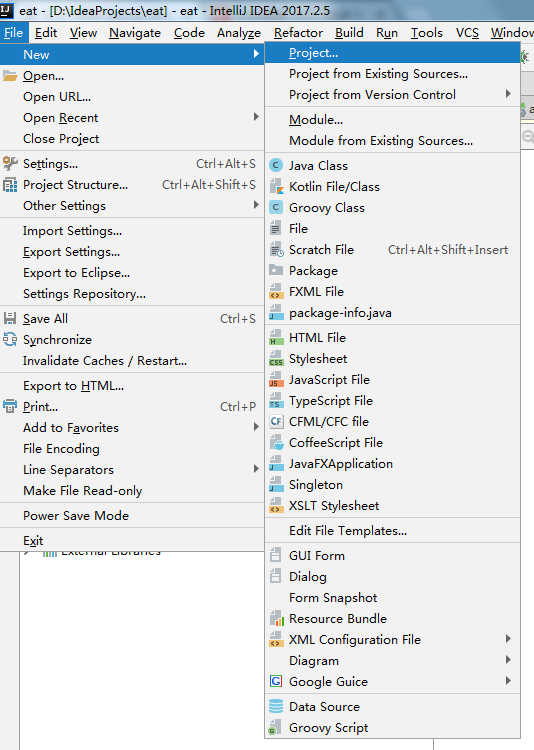
在这里选择Maven项目也可以,但是IDEA为我们提供了一种更方便快捷的创建方法,即Spring Initializr。选择后点击Next;
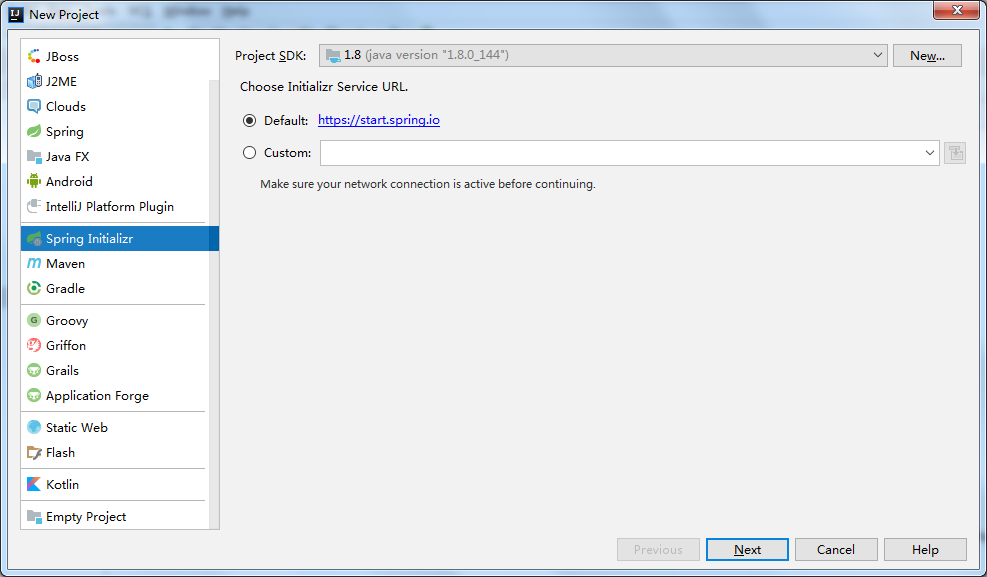
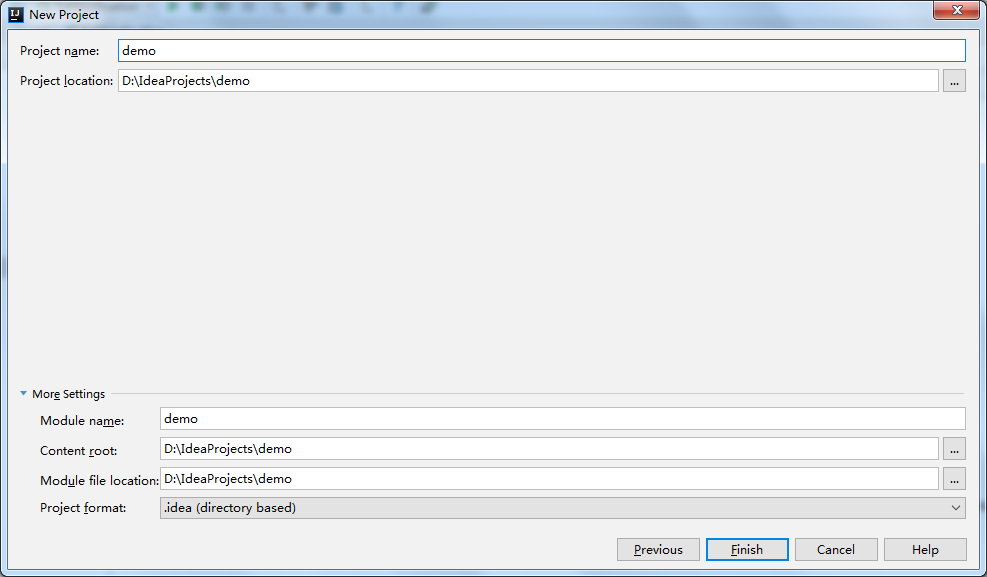
把项目信息写好,Next;
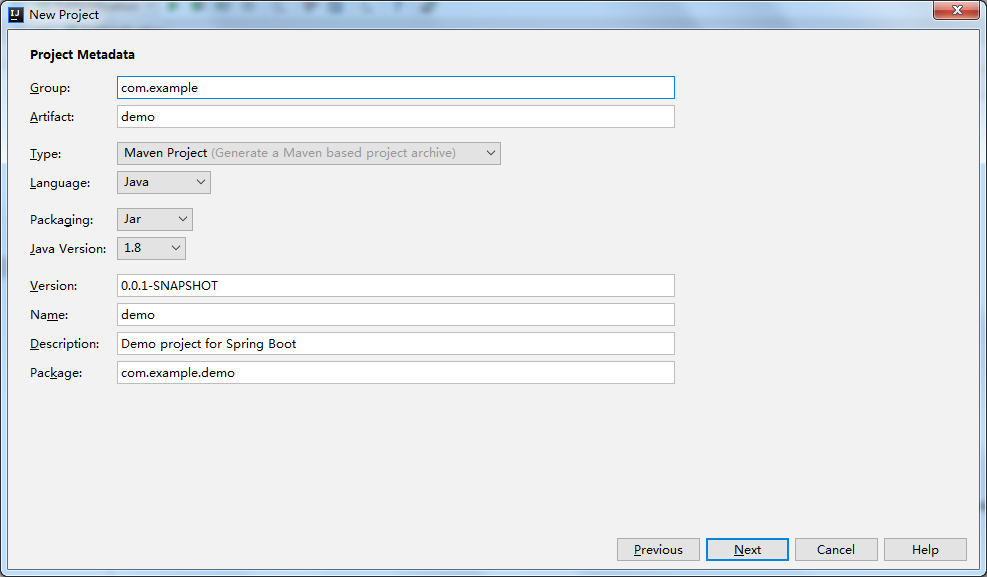
按下面三张图勾选设置;
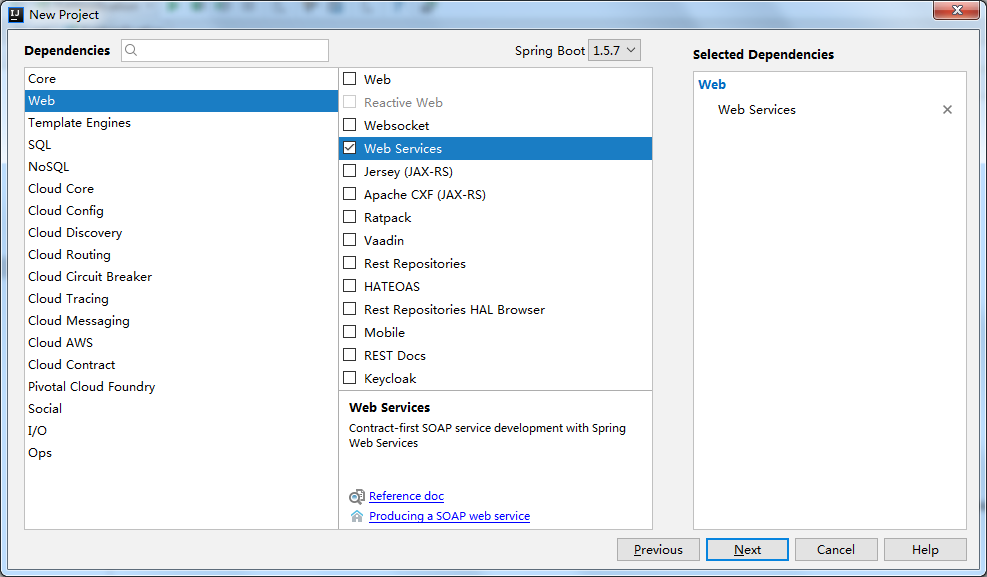
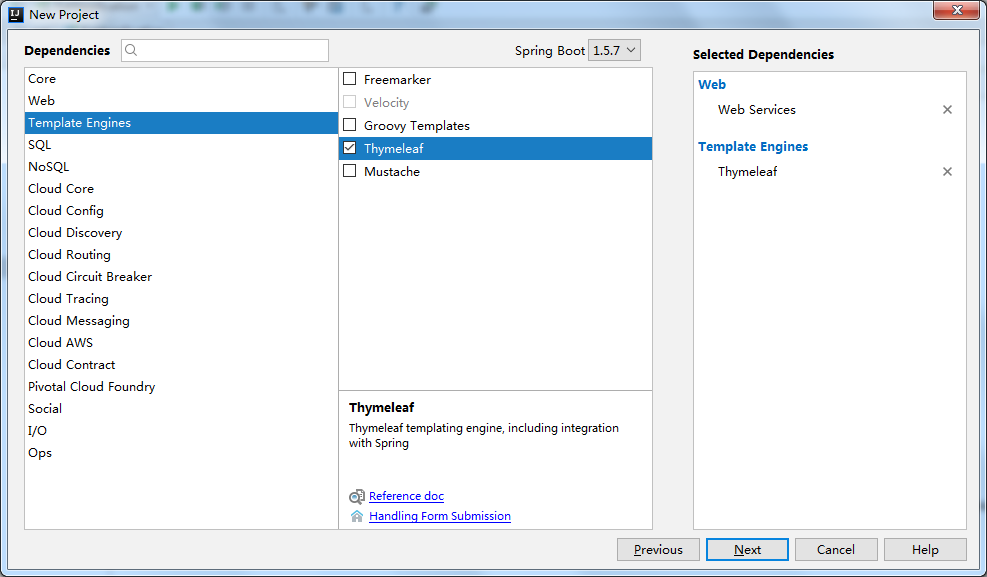
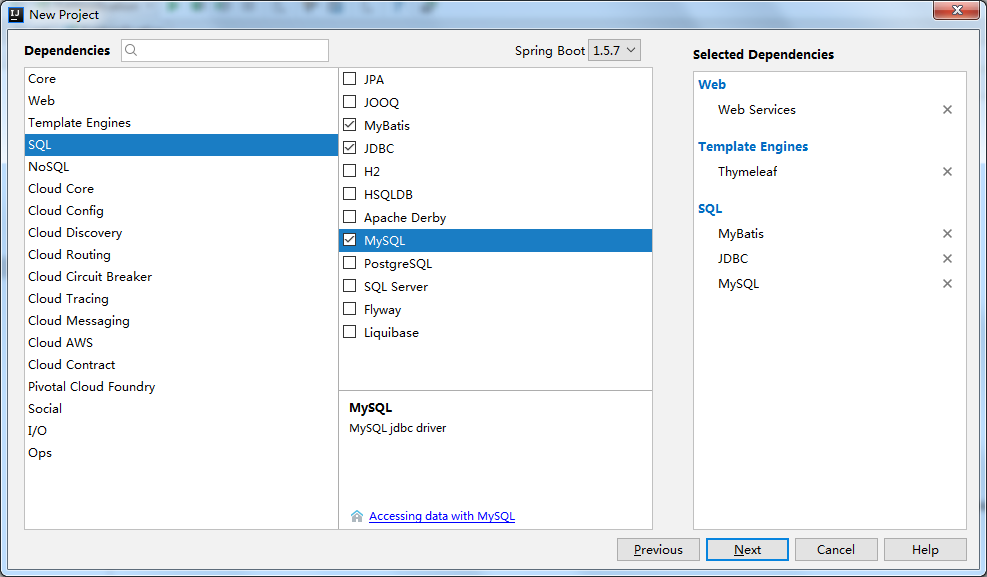
最后Finish。
等待Maven自动加载完成后,最初的项目结构如下图。在Springboot属性文件application.properties中,把数据库连接属性加上,同时可以设置服务端口。
|
1
2
3
4
5
6
7
8
|
spring.datasource.url = jdbc:mysql://localhost:3306/testspring.datasource.username = rootspring.datasource.password = rootspring.datasource.driverClassName = com.mysql.jdbc.Driver#页面热加载spring.thymeleaf.cache = false#端口server.port=8888 |
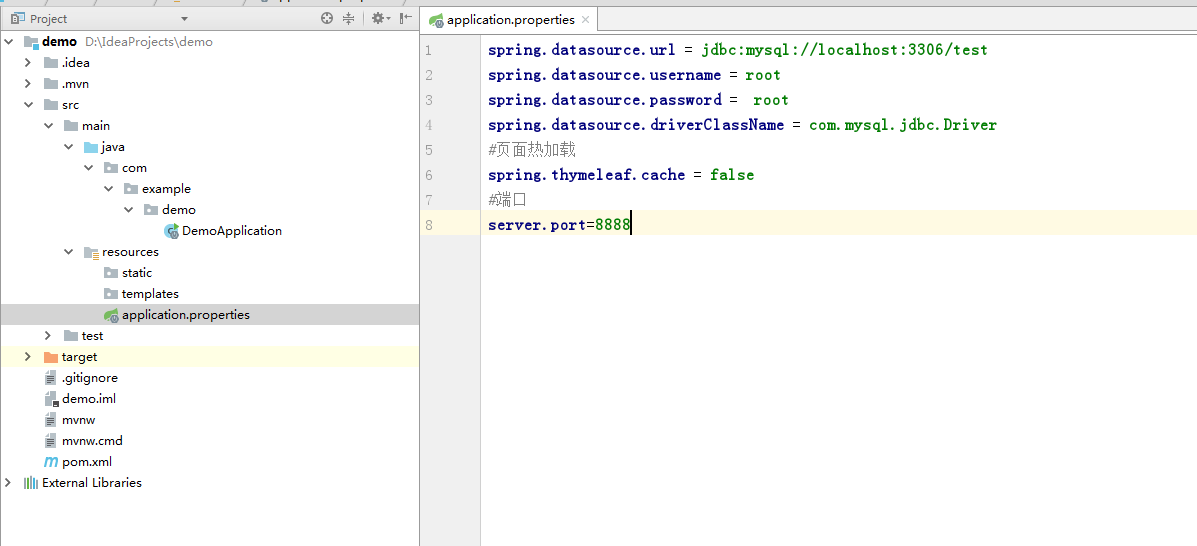
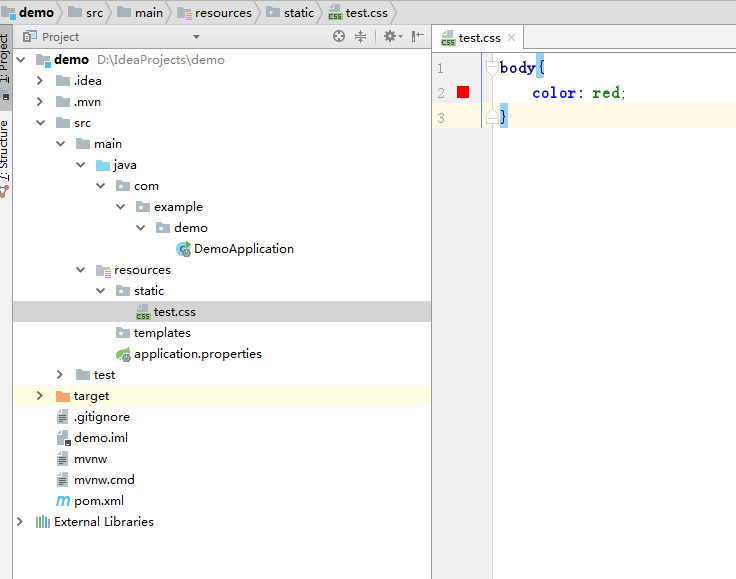
resources目录下,static文件夹是放置各种静态资源,如css,js,img等文件的。templates文件夹则是默认放置网页的。当然也可以更改。
在static文件夹下新建一个测试css,test.css。
|
1
2
3
|
body{ color: red;} |
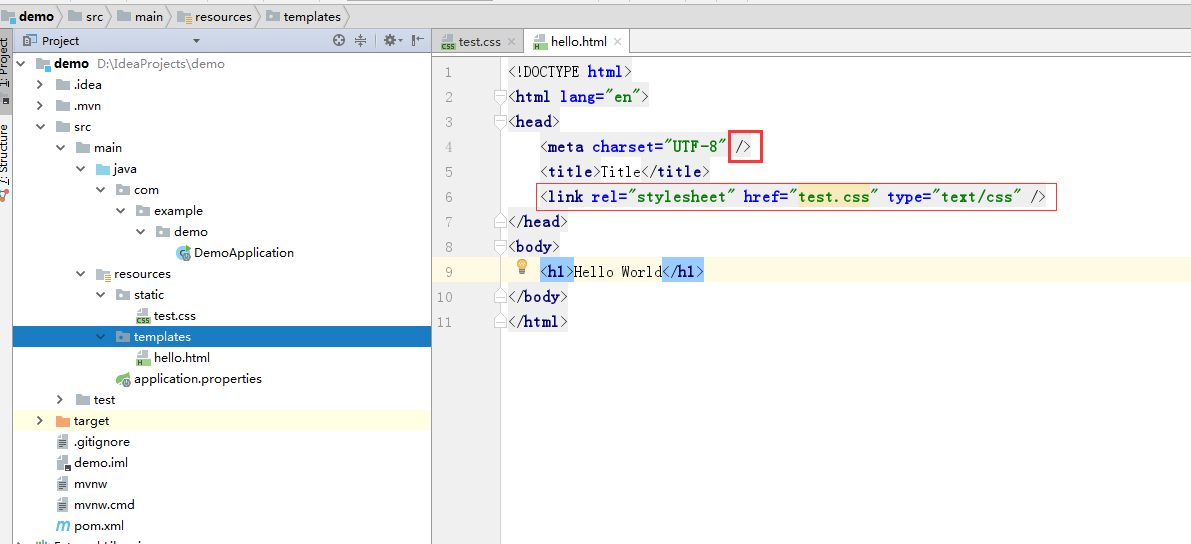
在templates文件夹下新建一个html,要注意的是meta这个标签的结束符软件并没有自动加上,需要手动加上,否则访问网页时会报错。并引入test.css
<!DOCTYPE html>
<html lang="en">
<head>
    <meta charset="UTF-8" />
    <title>Title</title>
    <link rel="stylesheet" href="test.css" type="text/css" />
</head>
<body>
    <h1>Hello World</h1>
</body>
</html>
接下来可以写一个controller了
|
1
2
3
4
5
6
7
8
9
10
11
12
13
|
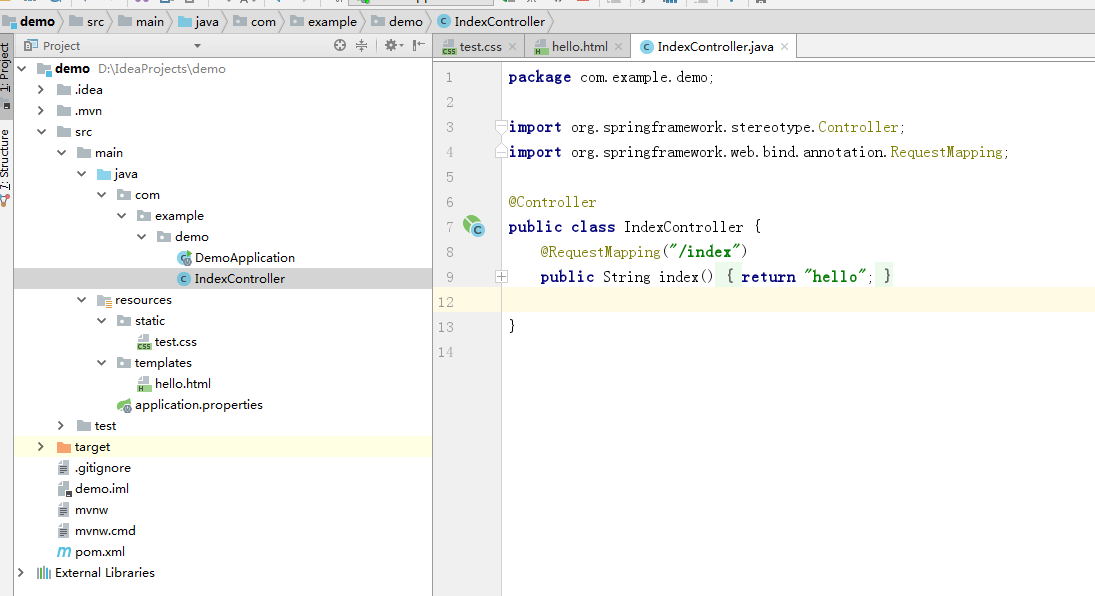
package com.example.demo;import org.springframework.stereotype.Controller;import org.springframework.web.bind.annotation.RequestMapping;@Controllerpublic class IndexController { @RequestMapping("/index") public String index(){ return "hello"; }} |
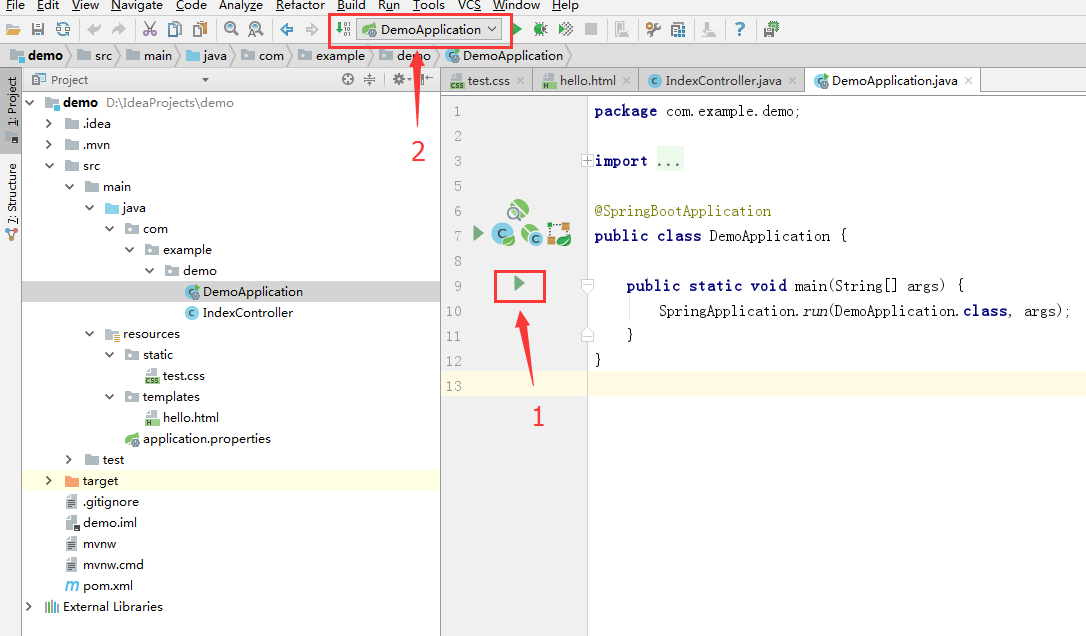
完成之后,通过方式1和方式2都可以启动项目
接下来可以在浏览器中测试了
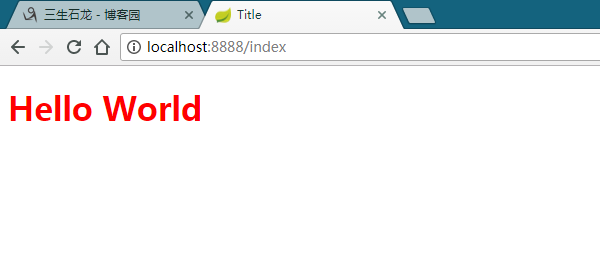
添加application.properties中的数据库配置
|
1
2
3
4
5
6
7
8
9
10
11
12
13
14
15
16
17
18
19
20
21
22
23
24
25
26
27
28
29
30
31
32
33
34
35
36
37
38
39
40
41
42
43
44
45
46
47
48
49
50
51
52
|
# 数据库访问配置# 主数据源,默认的spring.datasource.type=com.alibaba.druid.pool.DruidDataSourcespring.datasource.driverClassName = com.mysql.jdbc.Driverspring.datasource.url = jdbc:mysql://localhost:3306/flagspring.datasource.username = rootspring.datasource.password = root# 下面为连接池的补充设置,应用到上面所有数据源中# 初始化大小,最小,最大spring.datasource.initialSize=5spring.datasource.minIdle=5spring.datasource.maxActive=20# 配置获取连接等待超时的时间spring.datasource.maxWait=60000# 配置间隔多久才进行一次检测,检测需要关闭的空闲连接,单位是毫秒spring.datasource.timeBetweenEvictionRunsMillis=60000# 配置一个连接在池中最小生存的时间,单位是毫秒spring.datasource.minEvictableIdleTimeMillis=300000spring.datasource.validationQuery=SELECT 1 FROM DUALspring.datasource.testWhileIdle=truespring.datasource.testOnBorrow=falsespring.datasource.testOnReturn=false# 打开PSCache,并且指定每个连接上PSCache的大小spring.datasource.poolPreparedStatements=truespring.datasource.maxPoolPreparedStatementPerConnectionSize=20# 配置监控统计拦截的filters,去掉后监控界面sql无法统计,'wall'用于防火墙spring.datasource.filters=stat,wall,log4j# 通过connectProperties属性来打开mergeSql功能;慢SQL记录spring.datasource.connectionProperties=druid.stat.mergeSql=true;druid.stat.slowSqlMillis=5000#页面热加载spring.thymeleaf.cache = false#mybatis配置#mapper位置mybatis.mapper-locations=classpath:mapper/*Mapper.xml#领域类包别名mybatis.type-aliases-package=com.legoo.flag.model#mybatis配置文件mybatis.config-location=classpath:config/mybatis-config.xml#pagehelper分页插件配置pagehelper.helperDialect=mysqlpagehelper.reasonable=truepagehelper.supportMethodsArguments=truepagehelper.params=count=countSqlpagehelper.row-bounds-with-count=true |
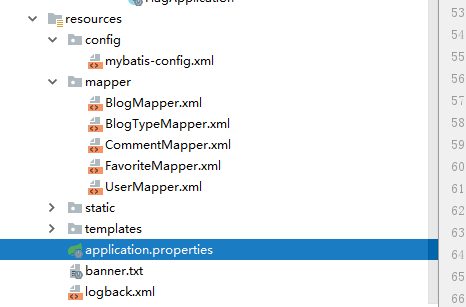
在resource文件夹下添加mapper,用来存放mybatis的xml.
config/mybatis-config.xml包下的文件暂时是空的,都在application.properties里面配置了.
然后就可以写业务了
到此,一个简单的项目搭建完成。
springboot+mybatis搭建web项目的更多相关文章
- 使用idea+springboot+Mybatis搭建web项目
使用idea+springboot+Mybatis搭建web项目 springboot的优势之一就是快速搭建项目,省去了自己导入jar包和配置xml的时间,使用非常方便. 1.创建项目project, ...
- idea+springboot+Mybatis搭建web项目
使用idea+springboot+Mybatis搭建一个简单的web项目. 首先新建一个项目: 在这里选择Maven项目也可以,但是IDEA为我们提供了一种更方便快捷的创建方法,即Spring In ...
- springboot +mybatis 搭建完整项目
springboot + mybatis搭建完整项目 1.springboot整合mybatis注解版 转:https://blog.csdn.net/u013187139/article/detai ...
- Spring-Boot快速搭建web项目详细总结
最近在学习Spring Boot 相关的技术,刚接触就有种相见恨晚的感觉,因为用spring boot进行项目的搭建是在太方便了,我们往往只需要很简单的几步,便可完成一个spring MVC项目的搭建 ...
- IDEA + SpringBoot + Java搭建Web项目
打开IDEA,选择Spring Initializr,默认配置,点击Next  添写GAV.(group.Artifact.Version)  选择Spring Boot版本,这里选2.1.4稳定 ...
- springboot+mybatis 非web项目构建
https://blog.csdn.net/wlittlefive/article/details/86157134 https://blog.csdn.net/ththcc/article/deta ...
- SpringBoot+Mybatis多模块项目搭建教程
一.前言 框架为SpringBoot+Mybatis,本篇主要记录了在IDEA中搭建SpringBoot多模块项目的过程. 1.开发工具及系统环境 IDE:IntelliJ IDEA 2018.2 系 ...
- springBoot 搭建web项目(前后端分离,附项目源代码地址)
springBoot 搭建web项目(前后端分离,附项目源代码地址) 概述 该项目包含springBoot-example-ui 和 springBoot-example,分别为前端与后端,前后端 ...
- Spring Boot搭建Web项目常用功能
搭建WEB项目过程中,哪些点需要注意: 1.技术选型: 前端:freemarker.vue 后端:spring boot.spring mvc 2.如何包装返回统一结构结果数据? 首先要弄清楚为什么要 ...
随机推荐
- 【HDOJ6614】AND Minimum Spanning Tree(签到)
题意:给定标号从1到n的n个点,链接两个点x,y的代价为x AND y,求最小生成树总代价与满足代价最小的前提下字典序最小的方案 n<=2e5 思路: #include<bits/stdc ...
- flutter中的表单使用
Flutter 中常见的表单有 TextField 单行文本框,TextField 多行文本框.CheckBox.Radio.Switch.CheckboxListTile.RadioListTile ...
- DataScope v1.0 多功能串口虚拟示波器使用介绍
DataScope v1.0 特性 1.无需安装,启动即用;2.支持同时刷新多达10个通道的单精度浮点型数据;3.支持多种格式的通道数据导入.导出及回放;4.支持全屏浏览;5.支持图表数据统计.测量及 ...
- spring cloud网关gateway
spring gateway使用基于netty异步io,第二代网关:zuul 1使用servlet 3,第一代网关,每个请求一个线程,同步Servlet,多线程阻塞模型.而spring貌似不想在支持z ...
- Git是目前世界上最先进的分布式版本控制系统(没有之一)。
http://zhidao.baidu.com/link?url=NSYPiSvtGTMoqMA9vt68FRRF8WbfYVmwWeMh47_2lkp0K3jFMl--1Co1tg1R4VshTQV ...
- js 数组相减 (一个数组去掉不符合条件的子数组)
数组相减?我也希望将来在ES8或者更好js版本能带来数组之间相互运算的方法,但是现在不能,咱们只能靠已有的方法实现: var arr1 = [2,3,5,88,99,444,66],arr2 = [2 ...
- linux下rpm包安装、配置和卸载mysq
l WIN10下虚拟机:VMware workstation 12 PRO 安装 # 1.查看系统版本 [root@vm-xiluhua][/home/xiluhua]$ cat /etc/red ...
- Windows 下手工搭建 LNMP 环境
参考资料 如果想方便,可以直接使用集成的 LNMP 环境(例如 PHPStudy). 下载 PHP 下载地址:https://windows.php.net/download 根据你的系统选择 32 ...
- Python算法每日一题--001--给定一个非空整数数组,除了某个元素只出现一次以外,其余每个元素均出现两次。找出那个只出现了一次的元素
给定一个非空整数数组,除了某个元素只出现一次以外,其余每个元素均出现两次.找出那个只出现了一次的元素. 说明: 你的算法应该具有线性时间复杂度. 你可以不使用额外空间来实现吗? 示例 1: 输入: [ ...
- IIS网站绑定域名
你新建的网站右键-->编辑绑定-->添加 -->类型:http,IP地址:全部未分配,端口号:80,主机名:你的域名,例如yangche.cn-->确定