
Pytest安装介绍--使用(html报告)
Pytes是 一个单元测试框架,可以生成html报告。
不要点击:https://item.taobao.com/item.htm?id=613711271112
安装pytest和allure:pip install pytest : pip install allure-pytest
pytest生成报告的插件:pip install pytest-html
#卸载
# pip uninstall pytest
#安装
# pip install -U pytest
# 查看
# pytest --version
2、===========================
2、pytest的运行“”(文件名是login.py)
import pytest
import allure
def test_login():
    print("正在登录")
if __name__ == "__main__":
    pytest.main("-s login.py")
#命令行(用的多,要进入当前文件夹的目录运行保险):pytest -s xxx.py
#如何快速打开当前项目目录?
#控制台下方有一个terminal的打开即可
3、pytest配置文件ini文件:pytest.ini (必须在同一字执行目录下 )
[pytest]
#添加参数
addopts = -s
#搜索那个文件夹
testpaths = ./app1
#文件
python_files = test_*.py
#类名
python_classes = Test*
#函数名
python_functions = test_*

4、生成测试报告html,命令行输入:pytest --html=report/report.html
生成report文件夹下reporr.htmld报告
修改pytest配置文件:pytest.ini (必须在同一字执行目录下 )
[pytest]
#添加命令参数
addopts = -s --html=report/report.html
#搜索那个文件夹
testpaths = ./scripts
#搜索文件名
python_files =test_*.py
#类名
python_classes = Test*
#函数名
python_functions = test_*
配置文件弄好了就可以在 命令行输入pytest就可以执行所以报告而且自动生成html报告
(用例和报告 文件夹必须分开)
 5、_pycache_出错
只要是复制过来的文件都可能自动生成_pycache_文件,执行pytest时会报错_pycache_
把_pycache_文件删掉即可。
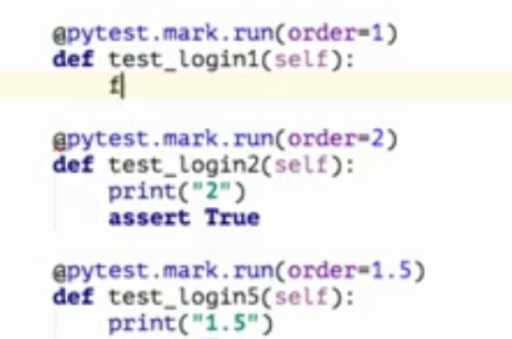
6、控制函数顺序@pytest.mark.run(order=XX)
@pytest.mark.run(order=1)
@pytest.mark.run(order=3)
@pytest.mark.run(order=2)
顺序123.
执行优先级:
0>较小的正数>较大的正数>无标记>较小的负数>较大的负数。如图:

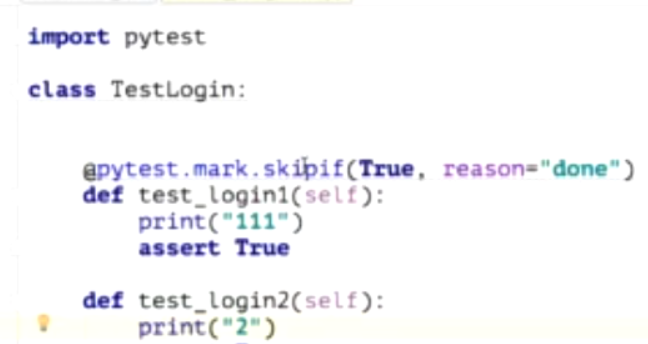
7跳过函数@pytest.mark.skipif(True,reason="done")
(和顺序函数一样,必须先导入 import pytest)
@pytest.mark.skipif(True,reason="done")
8、失败重试10次:在配置文件后面加10
[pytest]
#添加命令参数
addopts = -s --html=report/report.html --reruns 10
#搜索那个文件夹
testpaths = ./scripts
#搜索文件名
python_files =test_*.py
#类名
python_classes = test*
#函数名
python_functions = test_*
如图所示:

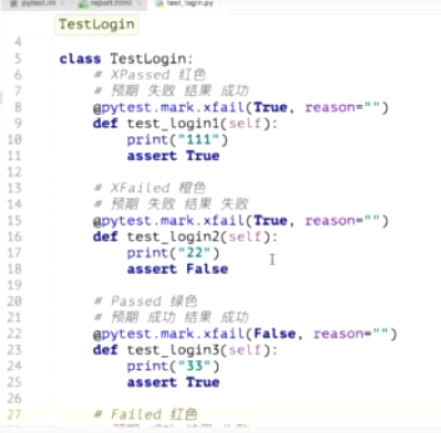
9、预期结果:
#写True表示预期是False,假,失败
@pytest.mark.xfail(True,reason="")
#写False表示预期是True,真,成功
@pytest.mark.xfail(False,reason="")
如图:
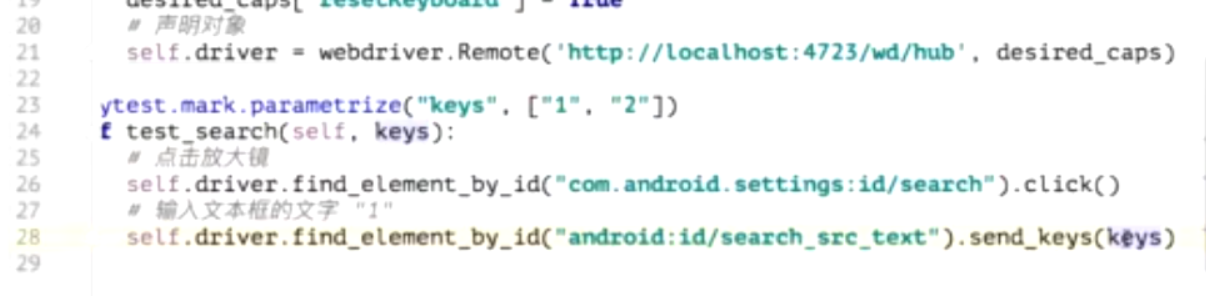
10、参数化:
keys是参数名,1和2是参数值
@pytest.mark.parametrize("keys",["1","2"])
如图所示:
11、多个参数化
@pytest.mark.parametrize(("username","password"),[("zhangsan","123"),("lisi","456")])


12、封装前置代码:
from appium import webdriver
def int_driver():
    #设置参数
    desired_caps = {}
    desired_caps['platformName'] = 'Android'  # Android系统 or IOS系统
    desired_caps['platformVersion'] = '5.1'  # Android系统版本
    desired_caps['deviceName'] = '1'  # (安卓随便写,苹果的写系统的型号)
    desired_caps['appPackage'] = 'com.android.settings'  # APP夜神模拟器包名
    desired_caps['appActivity'] = '.Settings'  # APP启动Activity
    # 解决中文不能输入问题
    desired_caps['unicodeKeyboard'] = True  # 每次打开APP不开启重置,否则每次都进入四个欢迎页
    desired_caps['resetKeyboard'] = True  # 隐藏键盘
    driver = webdriver.Remote('http://localhost:4723/wd/hub', desired_caps)  # 启动APP
    return driver
self.driver = init_driver() #在另一文件里调用此方法
#以下是解决用pytest执行报错的方法:需要导入os 和sys 模块
import os,sys
sys.path.append((os.getcwd()))



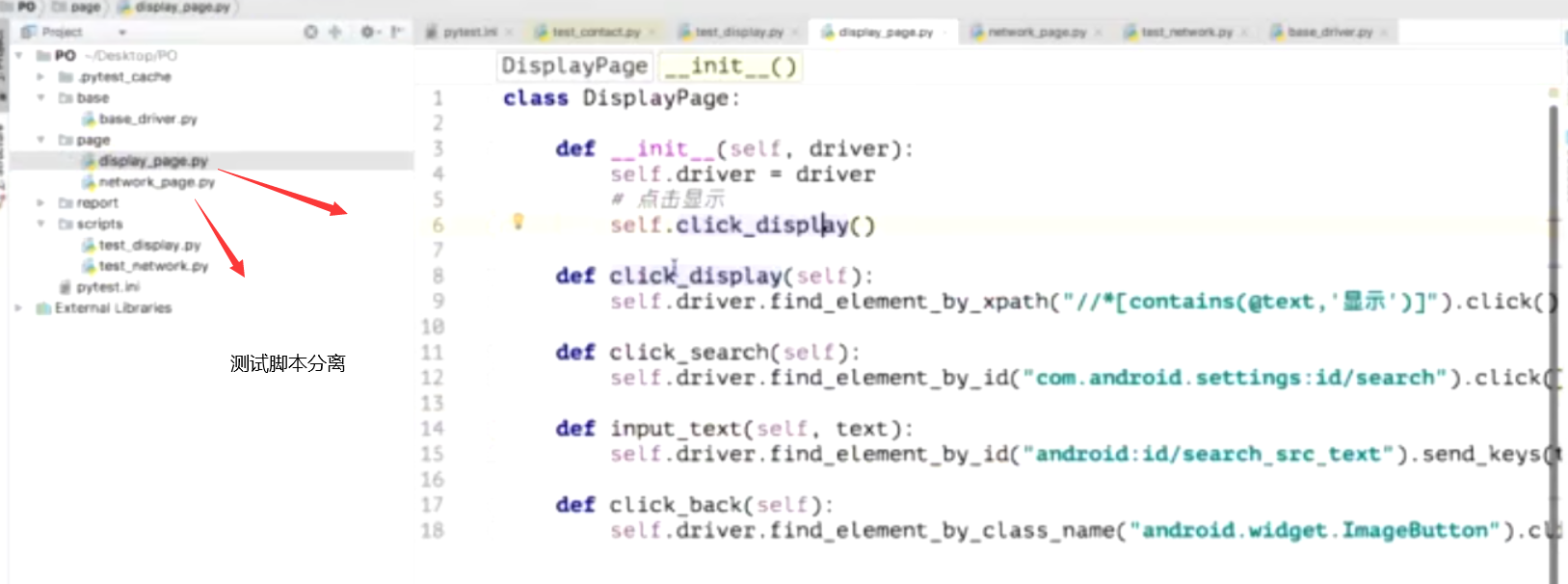
12、测试脚本分离技术

Pytest安装介绍--使用(html报告)的更多相关文章
- Pytest框架介绍
Pytest框架介绍.安装 pytest是python测试框架,与python自带的unittest测试框架类似,但是比unittest框架使用起来更简洁,功能更强大 pytest特征 1:断言提示信 ...
- Redis安装介绍
Redis安装介绍 一.Linux版本及配置 1. Linux版本:Red Hat Enterprise Linux 6虚拟机 2. 配置: 内存:1G:CPU:1核:硬盘:20G 二.Redis ...
- Docker版本与安装介绍
Docker版本与安装介绍 Docker-CE 和 Docker-EE Centos 上安装 Docker-CE Ubuntu 上安装 Docker-CE Docker-CE和Docker-EE Do ...
- 三、安装cmake,安装resin ,tars服务,mysql 安装介绍,安装jdk,安装maven,c++ 开发环境安装
三.安装cmake,安装resin 2018年07月01日 21:32:05 youz1976 阅读数:308 开发环境说明: centos7.2 ,最低配置:1核cpu,2G内存,1M带宽 1. ...
- iOS自动化探索(四)自动化测试框架pytest - 安装和使用
自动化测试框架 - pytest pytest是Python最流行的单元测试框架之一, 帮助更便捷的编写测试脚本, 并支持多种功能复杂的测试场景, 能用来做app测试也能用作函数测试 官方文档: ht ...
- Docker版本与centos和ubuntu环境下docker安装介绍
# Docker版本与安装介绍 * Docker-CE 和 Docker-EE * Centos 上安装 Docker-CE * Ubuntu 上安装 Docker-CE ## Docker-CE和D ...
- Pytest测试框架(一):pytest安装及用例执行
PyTest是基于Python的开源测试框架,语法简单易用,有大量的插件,功能非常多.自动检测测试用例,支持参数化,跳过特定用例,失败重试等功能. 安装 pip install -U pytest ...
- 一、pytest的介绍和安装
需要针对一个项目系统开发一套UI自动化测试脚本,自己结合着学习,采用了pytest去实现,这里留下记录. 什么是pytest pytest 是一个非常成熟的全功能的Python测试框架 可以胜任uni ...
- pytest一:pytest 框架介绍
pytest 是 python 的一种单元测试框架,与python 自带的 unittest测试框架类似,但是比 unittest 框架使用起来更简洁,效率更高.根据pytest 的官方网站介绍,它具 ...
随机推荐
- c++读取utf-8格式中英文混合string
最近项目中用到需要给出每一个字在string中的索引,但是又因为中文字符跟英文字符长度不一样,得分开处理, 在这里记录一下. 想要达到的效果如下: 将 “测试3.1415engEng”分割开 代码: ...
- 从企业版BOSS直聘,看求职简历技巧
有时候,不是我们不可以,而是我们连面试的机会都没有.希望这篇文章能帮助大家找工作,有一个展示自己的机会. [ ] 最近负责测试的面试工作,在等HR推简历的时候害怕错过优秀的伙伴,找HR拿到了公司在BO ...
- jenkins shell 取当前时间
now=`date +%Y%m%d%H%M%S` echo $now newfilename=abc_${now}.warfor i in `ls *.jmx`:dojmeter -n -t $i r ...
- HashMap底层为什么一定用数组
HashMap源码数据结构: Entry[] table = new Entry[capacity]; 其中,Entry就是一个链表节点.如果将数组替换成LinkedList是否可行?如下: List ...
- vue视图不更新情况详解
vue视图不更新情况详解:https://www.jb51.net/article/161371.htm
- [多校联考2019(Round 4 T2)][51nod 1288]汽油补给(ST表+单调栈)
[51nod 1288]汽油补给(ST表+单调栈) 题面 有(N+1)个城市,0是起点N是终点,开车从0 -> 1 - > 2...... -> N,车每走1个单位距离消耗1个单位的 ...
- 【NOI2007】项链工厂 ——老题新做.jpg
第一次是用 ODT 过的...(虽说跑得飞慢但它就是能过) 而且还写了发题解... 第二次是在考场上碰到了这道题,然后居然打了线段树,各种 bug 直接让代码爆零 但还是补好了代码重新交了一发,发现跑 ...
- DotNetCore知识栈
#..NET Core提供的特性 1.开源.免费 2.轻量级.跨平台 3.组件化.模块化.IOC+Nuget.中间件 4.高性能 5.统一了MVC和WebAPI编程模型 a) 比如:ASP.NET ...
- Linux安装 jdk&maven
JDK安装 1. 下载JDK压缩包http://www.oracle.com/technetwork/java/javase/downloads/jdk8-downloads-2133151.html ...
- javascript百度地图使用(根据地名定位、根据经纬度定位)
需要购买阿里云产品和服务的,点击此链接领取优惠券红包,优惠购买哦,领取后一个月内有效: https://promotion.aliyun.com/ntms/yunparter/invite.html? ...