
Pytest测试框架(一):pytest安装及用例执行
PyTest是基于Python的开源测试框架,语法简单易用,有大量的插件,功能非常多。自动检测测试用例,支持参数化,跳过特定用例,失败重试等功能。
安装
pip install -U pytest  # 安装

pytest --version # 查看版本

pytest -h # 查看帮助信息
用例识别
- pytest识别文件名为test_.py或者_test.py的测试文件
- 测试文件中可以在Test*类中写测试用例(测试用例以test_*开头,并且测试类不能有__init__方法)
- 不在Test类中的test_用例也可以被识别到。
识别包含“add”的用例:
pytest -k "add" --collect-only
(base) D:\ProgramWorkspace\TestingDemo>pytest -k "add" --collect-only

============================================== test session starts ==============================================

platform win32 -- Python 3.7.6, pytest-5.3.5, py-1.8.1, pluggy-0.13.1

rootdir: D:\ProgramWorkspace\TestingDemo

plugins: hypothesis-5.5.4, arraydiff-0.3, astropy-header-0.1.2, doctestplus-0.5.0, openfiles-0.4.0, remotedata-0.3

.2

collected 20 items / 11 deselected / 9 selected

<Package D:\ProgramWorkspace\TestingDemo\testing>

  <Module test_calc.py>

    <UnitTestCase TestCalc>

      <TestCaseFunction test_add_1>

      <TestCaseFunction test_add_2>

  <Module test_calc2.py>

    <Class TestCalc>

        <Function test_add[1-2-3]>

        <Function test_add[-1--2--3]>

        <Function test_add[0-1-1]>

        <Function test_add[0--1--1]>

        <Function test_add[0.1-0.2-0.3]>

        <Function test_add[999999-1000000-1999999]>

        <Function test_add_1>
打印文件下所有用例:
pytest --collect-only
(base) D:\ProgramWorkspace\TestingDemo>pytest --collect-only

============================================== test session starts ==============================================

platform win32 -- Python 3.7.6, pytest-5.3.5, py-1.8.1, pluggy-0.13.1

rootdir: D:\ProgramWorkspace\TestingDemo

plugins: hypothesis-5.5.4, arraydiff-0.3, astropy-header-0.1.2, doctestplus-0.5.0, openfiles-0.4.0, remotedata-0.3

.2

collected 20 items

<Module test_pytest.py>

  <Function test_one>

  <Function test_two>

  <Function test_three>

<Module test_pytest2.py>

  <Class Test_Demo>

      <Function test_one>

      <Function test_two>

      <Function test_three>

<Package D:\ProgramWorkspace\TestingDemo\testing>

  <Module test_calc.py>

    <UnitTestCase TestCalc>

      <TestCaseFunction test_add_1>

      <TestCaseFunction test_add_2>

  <Module test_calc2.py>

    <Class TestCalc>

        <Function test_add[1-2-3]>

        <Function test_add[-1--2--3]>

        <Function test_add[0-1-1]>

        <Function test_add[0--1--1]>

        <Function test_add[0.1-0.2-0.3]>

        <Function test_add[999999-1000000-1999999]>

        <Function test_div[1-2-0.5]>

        <Function test_div[-1--2-0.5]>

        <Function test_div[0-1-0]>

        <Function test_div[1-0-0]>

        <Function test_div[0.1-0.2-0.5]>

        <Function test_add_1>
Pytest执行
一个简单的测试用例test_pytest.py:
import pytest

def calc(a,b):

    return a + b

class TestDemo():

    def test_answer1(self):

        assert calc(1, 1) == 2

    def test_answer2(self):

        assert calc(2, 1) == 3

	@pytest.mark.answer3

    def test_answer3(self):

        assert calc(6, 6) == 12

if __name__=='__main__':

    pytest.main()
用例执行
# 执行test_pytest.py所有用例(模块)

pytest test_pytest.py

# 执行test_pytest.py里的TestDemo类

pytest test_pytest.py::TestDemo

# 执行test_pytest.py里的TestDemo类的test_answer2方法

pytest test_pytest.py::TestDemo::test_answer2
打印日志信息
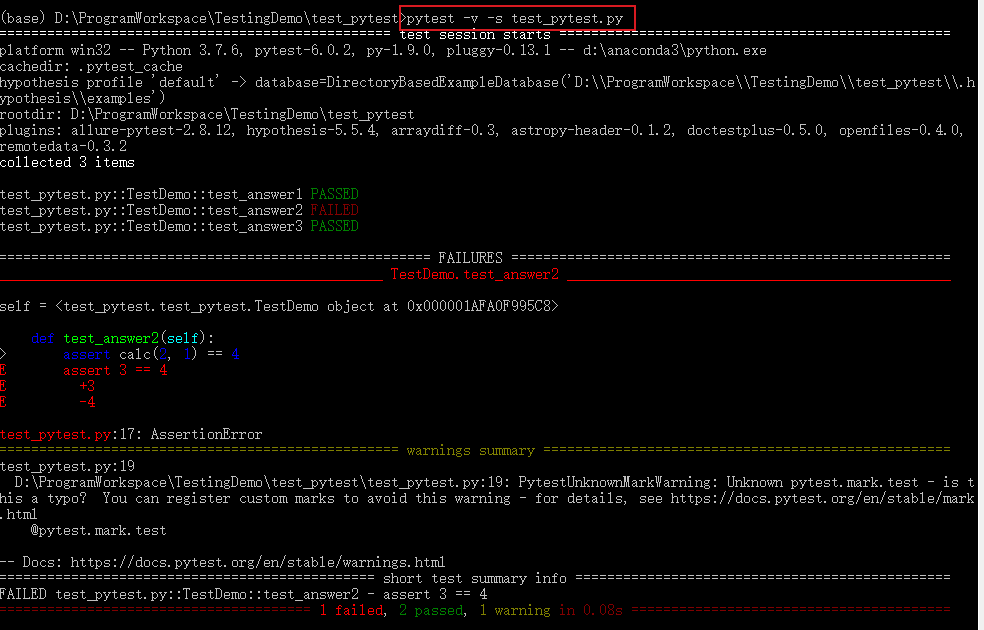
# 打印详细运行日志信息

pytest -v test_pytest.py

pytest -s test_pytest.py
跳过某个用例
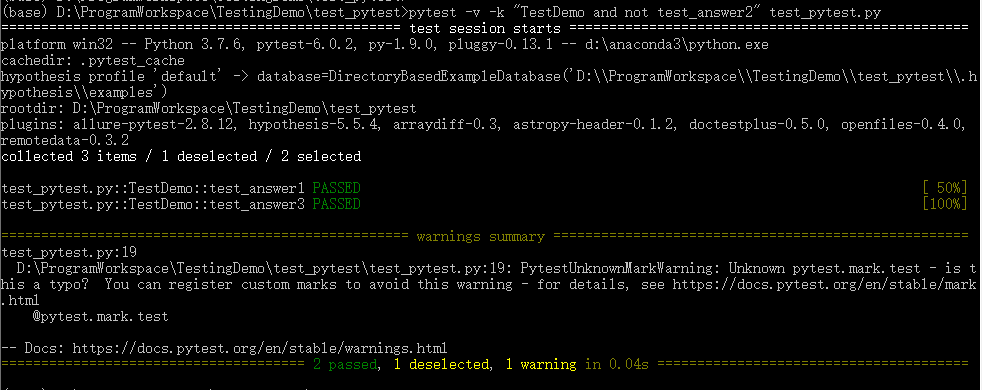
# 跳过运行某个用例

pytest -v -k "类名 and not方法名" 文件名

pytest -v -k "TestDemo and not test_answer2" test_pytest.py
运行某个标记的用例
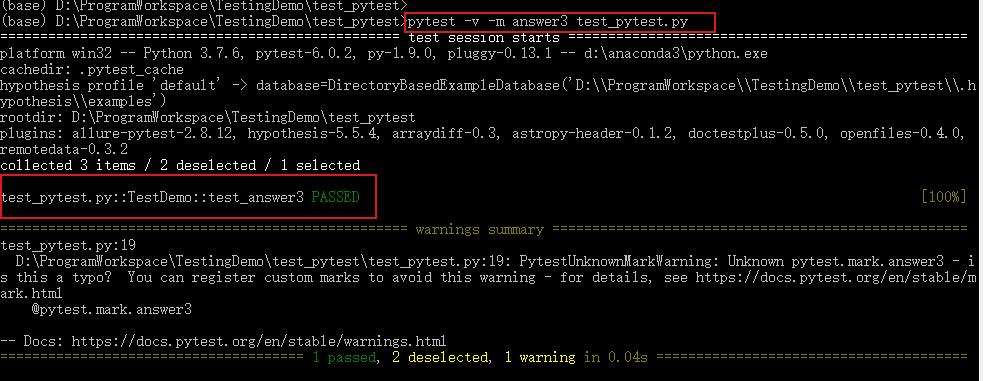
# 将运行有这个标记的测试用例:@pytest.mark.[标记名]

pytest -m [标记名] 文件名

pytest -m answer3 test_pytest.py
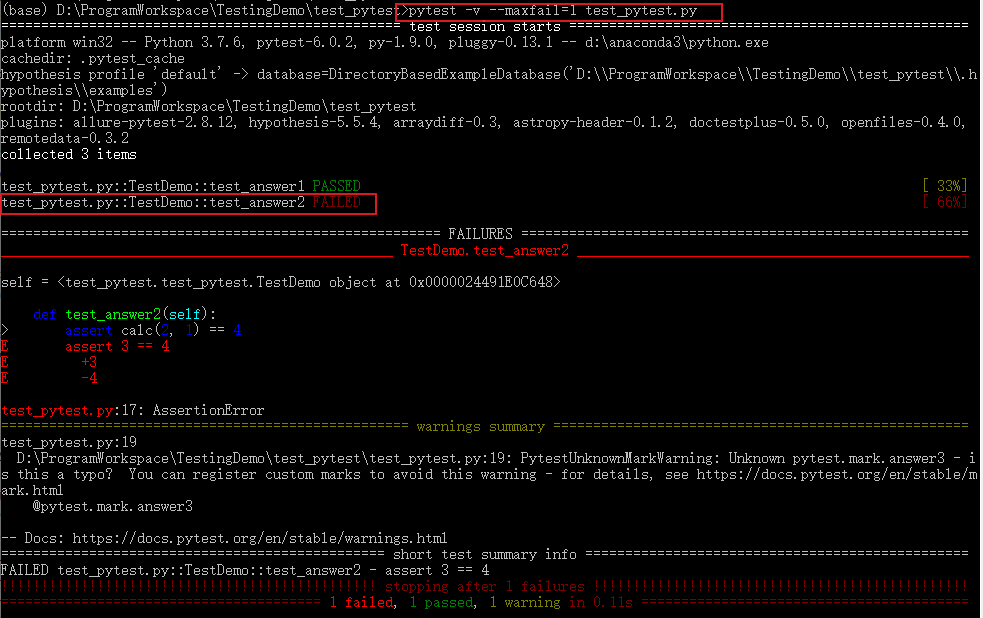
报错停止
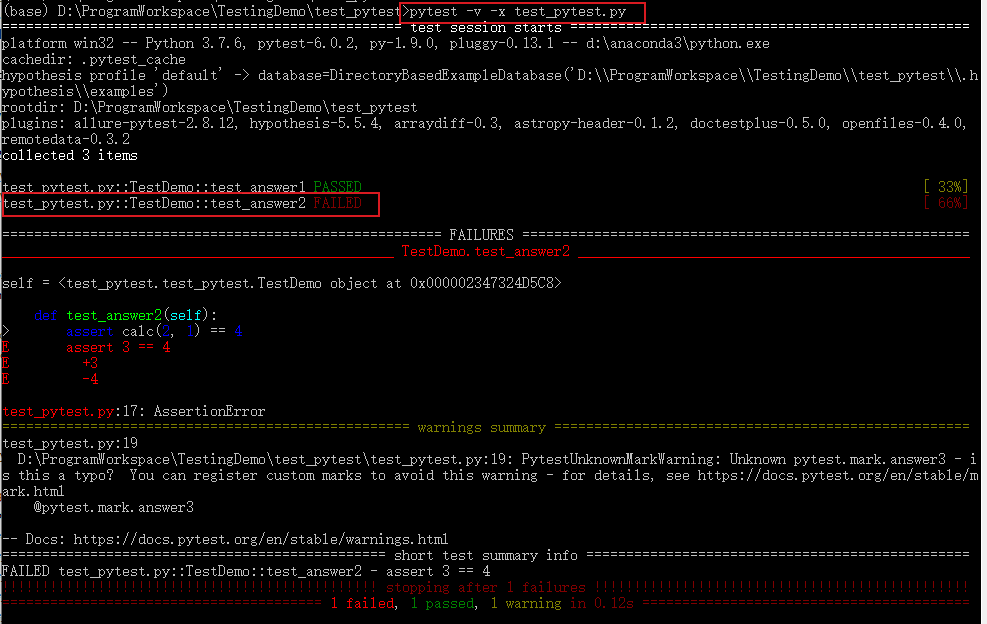
# 一旦运行到报错用例就停止运行

pytest -x 文件名

pytest -x test_pytest.py

# 当报错达到num的时候就停止运行

pytest --maxfail=[num] 文件名

pytest --maxfail=[num] test_pytest.py
失败重新运行
安装 pytest-rerunfailures 插件:
pip install pytest-rerunfailures
测试失败后重新运行n次,在重新运行间延迟n秒再运行:
# 重新运行3次

pytest --reruns 3 -v -s test_pytest.py

# 重新运行5次,延迟1s

pytest --reruns 5 --reruns-delay 1 -v test_pytest.py

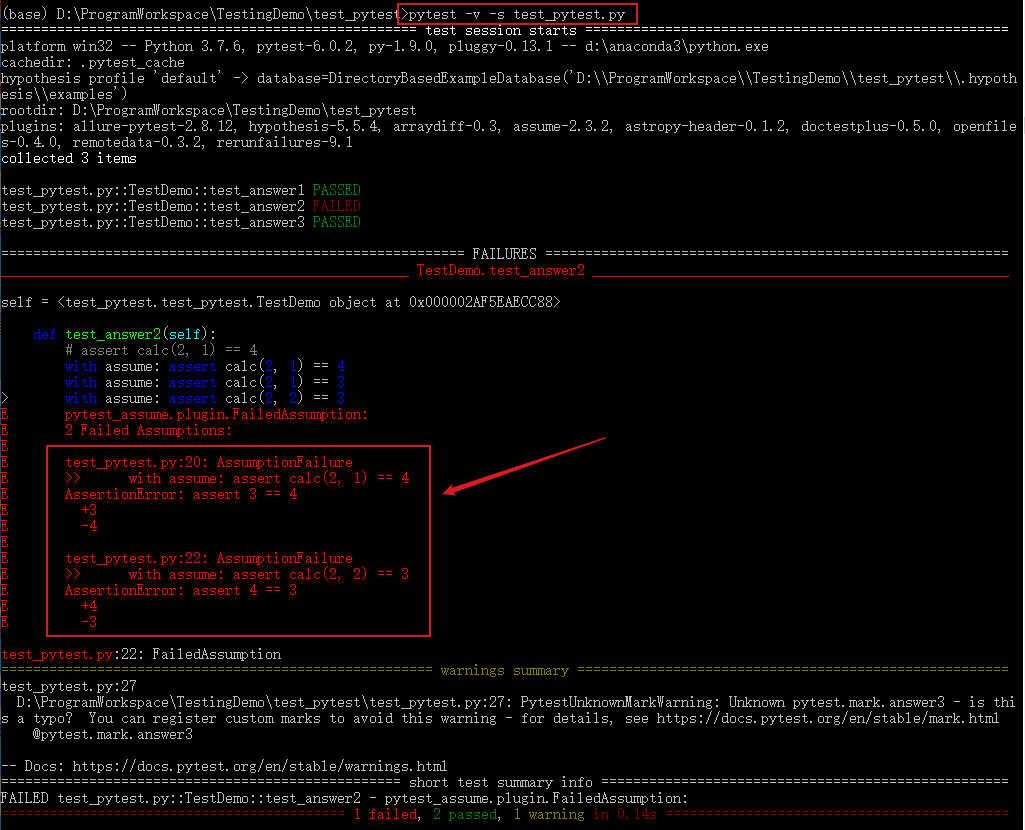
多条断言
一个方法中有多条断言,通常第一条失败后下面就不执行了,pytest-assume插件可以解决断言失败后继续执行断言的问题。
安装
pip install pytest-assume
执行多条断言:
# 写法1

pytest.assume(x == y)

pytest.assume(True)

pytest.assume(False)

# 写法2

with assume: assert calc(2, 1) == 4

with assume: assert calc(2, 1) == 3

with assume: assert calc(2, 2) == 3
修改测试用例test_pytest.py:
import pytest

from pytest import assume

def calc(a,b):

    return a + b

class TestDemo():

    def test_answer1(self):

        assert calc(1, 1) == 2

    def test_answer2(self):

  		with assume: assert calc(2, 1) == 4

		with assume: assert calc(2, 1) == 3

		with assume: assert calc(2, 2) == 3

	@pytest.mark.answer3

    def test_answer3(self):

        assert calc(6, 6) == 12

if __name__=='__main__':

    pytest.main()
测试结果:
pytest.main()
除了在终端执行外,也可以通过pytest.main()来执行,pytest.main() 自动查找当前目录下以test_开头的文件或者以_test结尾的py文件。
括号内可传入执行参数,通过[]进行分割,[]内的多个参数通过逗号分割,所有的参数和pytest命令行方式一样:
pytest.main(['-v', 'test_pytest.py']) # 执行test_pytest.py用例
或者直接在测试文件最后写如下代码,执行py文件。
if __name__=='__main__':

    pytest.main()

    # pytest.main(['-v', 'test_pytest.py'])
更多pytest执行方法可参考官方文档:https://docs.pytest.org/en/latest/contents.html#toc
--THE END--
文章标题:Pytest测试框架(一):pytest安装及用例执行
本文作者:hiyo
本文链接:https://hiyong.gitee.io/posts/install-pytest-and-run-test/
欢迎关注公众号:「测试开发小记」及时接收最新技术文章!
Pytest测试框架(一):pytest安装及用例执行的更多相关文章
- python nose测试框架全面介绍十二 ----用例执行顺序打乱
在实际执行自动化测试时,发现我们的用例在使用同一个资源的操作时,用例的执行顺序对测试结果有影响,在手工测试时是完全没法覆盖的. 但每一次都是按用例名字来执行,怎么打乱来执行的. 在网上看到一个有意思的 ...
- 『德不孤』Pytest框架 — 1、Pytest测试框架介绍
目录 1.什么是单元测试框架 2.单元测试框架主要做什么 3.单元测试框架和自动化测试框架有什么关系 4.Pytest测试框架说明 5.Pytest框架和Unittest框架区别 (1)Unittes ...
- pytest测试框架 -- 简介
一.pytest测试框架简介: (1)pytest是python的第三方测试框架,是基于unittest的扩展框架,比unittest更简洁,更高效. (2)pytest框架可以兼容unittest用 ...
- Pytest测试框架(五):pytest + allure生成测试报告
Allure 是一款轻量级.支持多语言的开源自动化测试报告生成框架,由Java语言开发,可以集成到 Jenkins. pytest 测试框架支持Allure 报告生成. pytest也可以生成juni ...
- Pytest测试框架(二):pytest 的setup/teardown方法
PyTest支持xUnit style 结构, setup() 和 teardown() 方法用于初始化和清理测试环境,可以保证测试用例的独立性.pytest的setup/teardown方法包括:模 ...
- Pytest测试框架(三):pytest fixture 用法
xUnit style 结构的 fixture用于初始化测试函数, pytest fixture是对传统的 xUnit 架构的setup/teardown功能的改进.pytest fixture为测试 ...
- python pytest测试框架介绍二
在介绍一中简单介绍了pytest的安装和简单使用,接下来我们就要实际了解pytest了 一.pytest的用例发现规则 pytest可以在不同的函数.包中发现用例,发现的规则如下 文件名以test_开 ...
- [翻译]pytest测试框架(一)
此文已由作者吴琪惠授权网易云社区发布. 欢迎访问网易云社区,了解更多网易技术产品运营经验. 纯官网译文而已... pytest是一个成熟的.全功能的python测试工具. pytest框架编写测试用例 ...
- 全功能Python测试框架:pytest
python通用测试框架大多数人用的是unittest+HTMLTestRunner,这段时间看到了pytest文档,发现这个框架和丰富的plugins很好用,所以来学习下pytest. imag ...
随机推荐
- 为什么SimpleDateFormat不是线程安全的?
一.前言 日期的转换与格式化在项目中应该是比较常用的了,最近同事小刚出去面试实在是没想到被 SimpleDateFormat 给摆了一道... 面试官:项目中的日期转换怎么用的?SimpleDateF ...
- 腾讯牛逼!终于开源了自家的 Tencent JDK——Kona!!.md
是的,继阿里 2019/03 开源基于 OpenJDK 的长期支持版本 Alibaba Dragonwell 之后,腾讯也发布了自家的开源免费的 JDK 版本--Tencent Kona,必须替小马哥 ...
- PyQt(Python+Qt)学习随笔:QDockWidget停靠窗相关的信号
专栏:Python基础教程目录 专栏:使用PyQt开发图形界面Python应用 专栏:PyQt入门学习 老猿Python博文目录 QDockWidget的信号包括与属性变更相关的allowedArea ...
- 老猿Python部分代码样例
老猿Python博文目录 专栏:使用PyQt开发图形界面Python应用 老猿Python博客地址 PyQt编程实战:通过eventFilter监视QScrollArea的widget()的Paint ...
- 第11.13节 Python正则表达式的转义符”\”功能介绍
为了支持特殊元字符在特定场景下能表示自身而不会被当成元字符进行匹配出来,可以通过字符集或转义符表示方法来表示,字符集表示方法前面在<第11.4节 Python正则表达式搜索字符集匹配功能及元字符 ...
- 第14.2节 HTML知识简介
一. HTML语言 HTML 指的是超文本标记语言 (Hyper Text Markup Language),它不是一种编程语言,而是一种使用一套标记标签(markup tag)来标记元素作用的标记语 ...
- 实验吧 Forms
0x1考察知识 html中value的作用 按钮中用的value 指的是 按钮上要显示的文本 比如'确定,删除 等等字样' 复选框用的value 指的是 这个复选框的值 单选框用的value 和复选框 ...
- java后端开发学习路线
思维导图(欢迎克隆):https://www.processon.com/mindmap/5f563cd31e08531762c4e32b 主要包括:编程基础.研发工具.应用框架.运维知识(主要学会配 ...
- 【NOI2018】你的名字(SAM & 线段树合并)
Description Hint Solution 不妨先讨论一下无区间限制的做法. 首先"子串"可以理解为"前缀的后缀",因此我们定义一个 \(\lim(i) ...
- 自己编写k8s
## 基于Docker和Kubernetes的企业级DevOps实践训练营 ### 课程准备 1. 离线镜像包 百度:https://pan.baidu.com/s/1N1AYGCYftYGn6L0Q ...