
ios -使用NSLayoutConstraint实现多个view等宽等高等间距
@interface ViewController ()

{

    UIView *firstView;

    UIView *secondView;

    UIView *thirdView;

}

@end

@implementation ViewController

- (void)viewDidLoad

{

    [super viewDidLoad];

    /**

      第一个view

     */

    firstView = [[UIView alloc]init];

    firstView.translatesAutoresizingMaskIntoConstraints = NO;

    firstView.backgroundColor = [UIColor blueColor];

    [self.view addSubview:firstView];

    /**

     第二个view

     */

    secondView = [[UIView alloc]init];

    secondView.translatesAutoresizingMaskIntoConstraints = NO;

    secondView.backgroundColor = [UIColor brownColor];

    [self.view addSubview:secondView];

    /**

     第三个view

     */

    thirdView = [[UIView alloc]init];

    thirdView.translatesAutoresizingMaskIntoConstraints = NO;

    thirdView.backgroundColor = [UIColor yellowColor];

    [self.view addSubview:thirdView];

    /**绑定三个view*/

    NSDictionary *dic_bind = NSDictionaryOfVariableBindings(firstView,secondView,thirdView);

    /**设置view之间的间距和高度*/

    NSDictionary *dic_Constraint = @{ @"padding":@(.f),

                                      @"height":@(.f)

                                     };

    /**

     *  第一个view添加约束

     */

    /**垂直方向居中对齐*/

    NSLayoutConstraint *first_CenterY = [NSLayoutConstraint constraintWithItem:firstView attribute:NSLayoutAttributeCenterY relatedBy:NSLayoutRelationEqual toItem:self.view attribute:NSLayoutAttributeCenterY multiplier: constant:];

    /**垂直方向添加高度约束*/

    NSArray *first_V = [NSLayoutConstraint constraintsWithVisualFormat:@"V:[firstView(height)]" options: metrics:dic_Constraint views:dic_bind];

    [self.view addConstraints:@[first_CenterY]];

    [self.view addConstraints:first_V];

    /**

     *  第二个view添加约束

     */

    /**垂直方向居中对齐*/

     NSLayoutConstraint *second_CenterY = [NSLayoutConstraint constraintWithItem:secondView attribute:NSLayoutAttributeCenterY relatedBy:NSLayoutRelationEqual toItem:self.view attribute:NSLayoutAttributeCenterY multiplier: constant:];

     /**垂直方向添加高度约束*/

    NSArray *second_V = [NSLayoutConstraint constraintsWithVisualFormat:@"V:[secondView(height)]" options: metrics:dic_Constraint views:dic_bind];

    [self.view addConstraint:second_CenterY];

    [self.view addConstraints:second_V];

    /**

     *  第三个view添加约束

     */

    /**垂直方向居中对齐*/

    NSLayoutConstraint *third_CenterY = [NSLayoutConstraint constraintWithItem:thirdView attribute:NSLayoutAttributeCenterY relatedBy:NSLayoutRelationEqual toItem:self.view attribute:NSLayoutAttributeCenterY multiplier: constant:];

     /**垂直方向添加高度约束*/

    NSArray *third_V = [NSLayoutConstraint constraintsWithVisualFormat:@"V:[thirdView(height)]" options: metrics:dic_Constraint views:dic_bind];

    [self.view addConstraints:@[third_CenterY]];

    [self.view addConstraints:third_V];

    /**给三个view添加水平约束等宽等间距*/

    NSArray * allConstraint_H = [NSLayoutConstraint constraintsWithVisualFormat:@"H:|-padding-[firstView]-10-[secondView(firstView)]-padding-[thirdView(secondView)]-padding-|" options: metrics:dic_Constraint views:dic_bind];

    [self.view addConstraints:allConstraint_H];

}
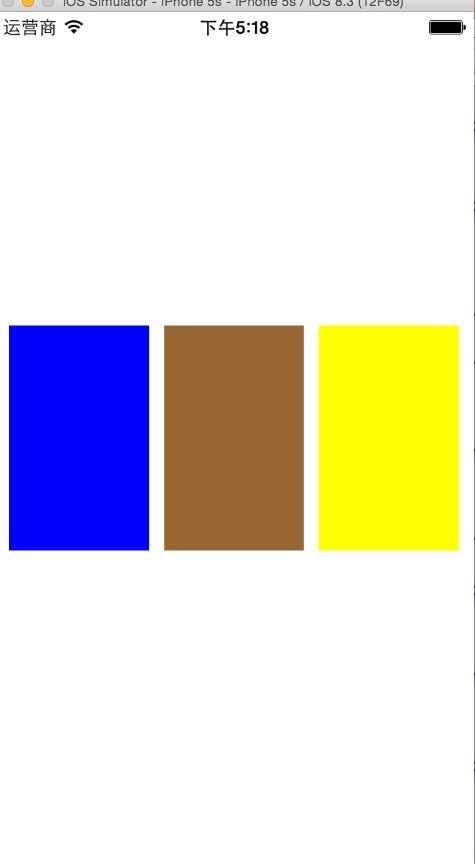
ios -使用NSLayoutConstraint实现多个view等宽等高等间距的更多相关文章
- iOS开发UI篇—控制器的View的创建
iOS开发UI篇—控制器的View的创建 一.6种创建控制器View的方式 #import "NJAppDelegate.h" #import "NJViewContro ...
- iOS开发UI篇—使用picker View控件完成一个简单的选餐应用
iOS开发UI篇—使用picker View控件完成一个简单的选餐应用 一.实现效果 说明:点击随机按钮,能够自动选取,下方数据自动刷新. 二.实现思路 1.picker view的有默认高度为162 ...
- 【IOS笔记】Creating Custom Content View Controllers
Creating Custom Content View Controllers 自定义内容视图控制器 Custom content view controllers are the heart of ...
- iOS 11 scroll滚动偏移,tableview偏移44,获取view的宽和高
1. tableview 的头部 有44的偏移量 1>.设置 tableview的 属性 tableView.scrollIndicatorInsets = UIEdgeInsets.zero ...
- 在渲染前获取 View 的宽高
在渲染前获取 View 的宽高 这是一个比较有意义的问题,或者说有难度的问题,问题的背景为:有时候我们需要在view渲染前去获取其宽高,典型的情形是,我们想在onCreate.onStart.onRe ...
- 【转】Android 获得view的宽和高
转自:http://blog.csdn.net/yangdeli888/article/details/25405263 Android 获得view的宽和高 分类: android 技术点项目20 ...
- Android查缺补漏(View篇)--在 Activity 的 onCreate() 方法中为什么获取 View 的宽和高为0?
在 Activity 的 onCreate() 方法中为什么获取 View 的宽和高为0 ? @Override protected void onCreate(Bundle savedInstanc ...
- 用addOnGlobalLayoutListener获取View的宽高
首先,我们在onCreate方法里调用getHeight()和 getWidth()是不能正确获取View的宽高的,因为onCreate方法执行完了,我们定义的控件才会被onMeasure()度量,所 ...
- Android中如何在代码中设置View的宽和高?
Android中如何在代码中设置View的宽和高?https://zhidao.baidu.com/question/536302117.htmlhttps://blog.csdn.net/u0141 ...
随机推荐
- [C#] DataTable 操作汇总(持续更新)
1.DataTable 分组操作 var grow = dt.Select().GroupBy((row1) => { return new { //分组的字段 fieldA = row1[&q ...
- SDWC 2018 day5
望得分:100+100+100 实际得分:100+100+100 Problem 1 晨跑(running.cpp/c/pas)[题目描述]为了响应学校的号召,模范好学生王队长决定晨跑.不过由于种种原 ...
- 如何在redhat 7上安装VNC服务器
平时我们基本上都是用xshell或者用putty远程我们的linux服务器,如果我们的linux服务器安装了图型化界面那我们又该如何远程使用我们的图形化界面呢?下面我们用vnc来实现远程我们的linu ...
- Linux之网络文件共享服务(FTP)
一.FTP概念 •File Transfer Protocol 早期的三个应用级协议之一 •基于C/S结构 •双通道协议:数据和命令连接 •数据传输格式:二进制(默认)和文本 •两种模式:服务器角度 ...
- 48.cartinality的基本用法
主要知识点 cartinality的用法 es去重用的是cartinality metric算法,对每个bucket中的指定的field进行去重,然后获取去重后的count,类似于count( ...
- 5.terms搜索多个值以及多值搜索结果优化
主要知识点 terms搜索多个值,并和term的比较 一.term和terms terms是在这个字段中搜索多个值,相当于sql中的in语法 (select * from tbl where ...
- zabbix 配置——bak
1.host 配置 create host Parameter Description Host name 主机名,只允许数字,空格,句号,下划线,非主流符号它不支持.zabbix客户端配置文件中的h ...
- C++ premier 中文版 学习笔记(第五章 表达式)
解应用和自增组合使用的理解 由于后自增操作的优先级高于解引用操作,因此 *iter++ 等效于*(iter++).子表达式 iter++ 使 iter 加 1,然后返回 iter 原值的副本作为该表达 ...
- hdu_1029-Ignatius and the Princess IV_201310180916
Ignatius and the Princess IV Time Limit: 2000/1000 MS (Java/Others) Memory Limit: 65536/32767 K ( ...
- [bzoj3192][JLOI2013]删除物品_树状数组_栈
删除物品 bzoj-3192 JLOI-2013 题目大意:给你n个物品,分成2堆.所有的物品有不同的优先级.我只可以将一堆中的堆顶移动到另一个堆的堆顶.而如果当前物品是全局所有物品中优先级最高的,我 ...