
iOS开发UI篇—使用picker View控件完成一个简单的选餐应用
iOS开发UI篇—使用picker View控件完成一个简单的选餐应用
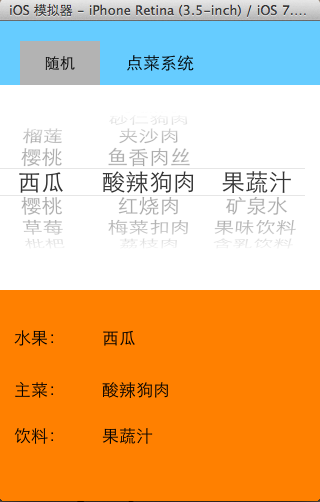
一、实现效果
说明:点击随机按钮,能够自动选取,下方数据自动刷新。
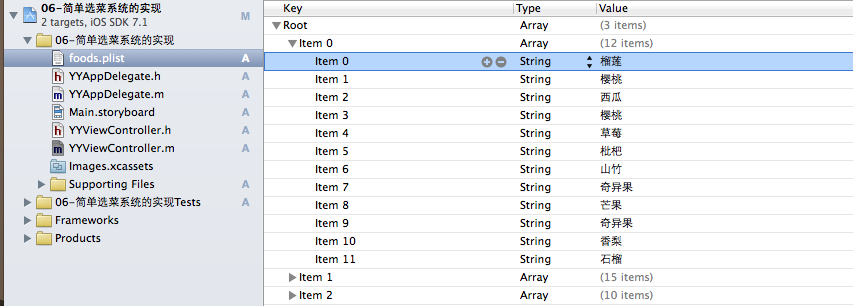
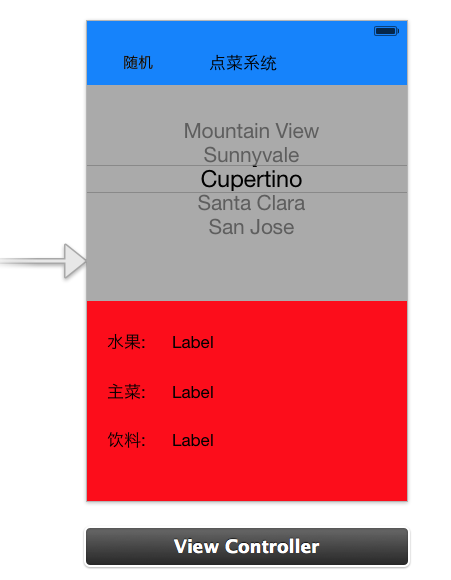
二、实现思路
 //

 //  YYViewController.m

 //  06-简单选菜系统的实现

 //

 //  Created by apple on 14-6-5.

 //  Copyright (c) 2014年 itcase. All rights reserved.

 //

 #import "YYViewController.h"

 //遵守数据源和代理协议

 @interface YYViewController ()<UIPickerViewDataSource,UIPickerViewDelegate>

 /**

  *  水果

  */

 @property (strong, nonatomic) IBOutlet UILabel *fruitLab;

 /**

  *  主菜

  */

 @property (strong, nonatomic) IBOutlet UILabel *stapleLab;

 /**

  *  饮料

  */

 @property (strong, nonatomic) IBOutlet UILabel *drinkLab;

 /**

  *  保存所有的数据

  */

 @property(nonatomic,strong)NSArray *foods;

 @property (weak, nonatomic) IBOutlet UIPickerView *pickerView;

 - (IBAction)randomFood:(id)sender;

 @end

 @implementation YYViewController

 - (void)viewDidLoad

 {

     [super viewDidLoad];

     //在这里设置下方数据刷新部分的初始显示

     for (int component = ; component<self.foods.count; component++) {

         [self pickerView:nil didSelectRow: inComponent:component];

     }

 }

 #pragma mark-使用懒加载,把数据信息加载进来

 -(NSArray *)foods

 {

     if (_foods==nil) {

         NSString *fullpath=[[NSBundle mainBundle]pathForResource:@"foods.plist" ofType:nil];

         NSArray *arrayM=[NSArray arrayWithContentsOfFile:fullpath];

         _foods=arrayM;

     }

     return _foods;

 }

 #pragma mark-处理随机按钮的点击事件

 - (IBAction)randomFood:(id)sender {

     // 让pickerView主动选中某一行

     // 让pickerView选中inComponent列的Row行

     //    [self.pickerView selectRow:1 inComponent:0 animated:YES];

     /*

      [self.pickerView selectRow: arc4random() % 12 inComponent:0 animated:YES];

      [self.pickerView selectRow: arc4random() % 15 inComponent:1 animated:YES];

      [self.pickerView selectRow: arc4random() % 10 inComponent:2 animated:YES];

      */

     //    [self.foods objectAtIndex:0]; == self.foods[0];

     //    [self.foods[0] count];

     /*

      // 根据每一列的元素个数生成随机值

      [self.pickerView selectRow: arc4random() % [self.foods[0] count] inComponent:0 animated:YES];

      [self.pickerView selectRow: arc4random() % [self.foods[1] count] inComponent:1 animated:YES];

      [self.pickerView selectRow: arc4random() % [self.foods[2] count] inComponent:2 animated:YES];

      */

     //设置一个随机数

     for (int component=; component<self.foods.count; component++) {

         //获取当前列对应的数据元素的个数

         int total=[self.foods[component] count];

         //根据每一列的总数生成随机数(当前生成的随机数)

         int randomNumber=arc4random()%total;

         //获取当前选中的行(上一次随机后移动到的行)

         int oldRow=[self.pickerView selectedRowInComponent:];

         //比较上一次的行号和当前生成的随机数是否相同,如果相同的话则重新生成

         while (oldRow==randomNumber) {

                 randomNumber=arc4random()%total;

         }

         //让pickerview滚动到指定的某一行

         [self.pickerView selectRow:randomNumber inComponent:component animated:YES];

         //模拟,通过代码选中某一行

         [self pickerView:nil didSelectRow:randomNumber inComponent:component];

     }

 }

 #pragma mark- 设置数据

 //一共多少列

 -(NSInteger)numberOfComponentsInPickerView:(UIPickerView *)pickerView

 {

     return self.foods.count;

 }

 //每列对应多少行

 -(NSInteger)pickerView:(UIPickerView *)pickerView numberOfRowsInComponent:(NSInteger)component

 {

     //1.获取当前的列

     NSArray *arayM= self.foods[component];

     //2.返回当前列对应的行数

     return arayM.count;

 }

 //每列每行对应显示的数据是什么

 -(NSString *)pickerView:(UIPickerView *)pickerView titleForRow:(NSInteger)row forComponent:(NSInteger)component

 {

     //1.获取当前的列

     NSArray *arayM= self.foods[component];

     //2.获取当前列对应的行的数据

     NSString *name=arayM[row];

     return name;

 }

 #pragma mark-设置下方的数据刷新

 // 当选中了pickerView的某一行的时候调用

 // 会将选中的列号和行号作为参数传入

 // 只有通过手指选中某一行的时候才会调用

 -(void)pickerView:(UIPickerView *)pickerView didSelectRow:(NSInteger)row inComponent:(NSInteger)component

 {

     //获取对应列,对应行的数据

     NSString *name=self.foods[component][row];

     //赋值

     if (==component) {

         self.fruitLab.text=name;

     }else if(==component)

     {

         self.stapleLab.text=name;

     }else

         self.drinkLab.text=name;

 }

 #pragma mark-隐藏状态栏

 -(BOOL)prefersStatusBarHidden

 {

     return YES;

 }

 @end
四、重要补充
请注意在代码实现中为什么使用 [self.foods[0] count]; 而不是直接使用点语法self.foods[0].count取值。
[self.foods objectAtIndex:0]; == self.foods[0];//这两句的效果等价,而self调用objectAtIndex:0这个方法,返回的是一个id类型的万能指针,它的真实类型要到实际运行的时候才能检测得到,因此不能直接使用self.foods[0].count。
iOS开发UI篇—使用picker View控件完成一个简单的选餐应用的更多相关文章
- iOS开发UI篇—Quartz2D(自定义UIImageView控件)
iOS开发UI篇—Quartz2D(自定义UIImageView控件) 一.实现思路 Quartz2D最大的用途在于自定义View(自定义UI控件),当系统的View不能满足我们使用需求的时候,自定义 ...
- ios开发UI篇—使用纯代码自定义UItableviewcell实现一个简单的微博界面布局
本文转自 :http://www.cnblogs.com/wendingding/p/3761730.html ios开发UI篇—使用纯代码自定义UItableviewcell实现一个简单的微博界面布 ...
- iOS开发UI篇—Date Picker和UITool Bar控件简单介绍
iOS开发UI篇—Date Picker和UITool Bar控件简单介绍 一.Date Picker控件 1.简单介绍: Date Picker显示时间的控件 有默认宽高,不用设置数据源和代理 如何 ...
- iOS开发UI篇—控制器的View的创建
iOS开发UI篇—控制器的View的创建 一.6种创建控制器View的方式 #import "NJAppDelegate.h" #import "NJViewContro ...
- 【转】 iOS开发UI篇—控制器的View的创建
最近对view的周期等还不是非常清楚,就找到顶哥的文章,非常不错,就搬运过来了. 原文: http://www.cnblogs.com/wendingding/p/3770760.html 一.6种创 ...
- iOS开发UI篇—CAlayer(创建图层)
iOS开发UI篇—CAlayer(创建图层) 一.添加一个图层 添加图层的步骤: 1.创建layer 2.设置layer的属性(设置了颜色,bounds才能显示出来) 3.将layer添加到界面上(控 ...
- iOS开发UI篇—UIScrollView控件实现图片缩放功能
iOS开发UI篇—UIScrollView控件实现图片缩放功能 一.缩放 1.简单说明: 有些时候,我们可能要对某些内容进行手势缩放,如下图所示 UIScrollView不仅能滚动显示大量内容,还能对 ...
- iOS开发UI篇—UIScrollView控件介绍
iOS开发UI篇—UIScrollView控件介绍 一.知识点简单介绍 1.UIScrollView控件是什么? (1)移动设备的屏幕⼤大⼩小是极其有限的,因此直接展⽰示在⽤用户眼前的内容也相当有限 ...
- iOS开发UI篇—UITableview控件基本使用
iOS开发UI篇—UITableview控件基本使用 一.一个简单的英雄展示程序 NJHero.h文件代码(字典转模型) #import <Foundation/Foundation.h> ...
随机推荐
- 笔记本自带 WiFi 功能
在寝室,动网速基本崩溃.平时打电话什么的都得到阳台,有时候还听不清声音.对于学校的环境,我不说什么了. 笔记本可以上网,那就要满足手机等移动电子设备上网的上网需求. WiFi 热点就显得尤为重要了. ...
- HTML 5 Canvas 参考手册
HTML 5 Canvas 参考手册 HTML 视频/音频 HTML 文档类型 描述 HTML5 <canvas> 标签用于绘制图像(通过脚本,通常是 JavaScript). 不过,&l ...
- ThinkPHP讲解(十二)——文本编辑器和ajax传址
一.文本编辑器 1.首先,在网上下载ueditor文件 2.在要添加文本编辑器的页面中引用ueditor文件中的js文件 <script type="text/javascript&q ...
- 【final】站立会议---11.28
名称:nice! 组长:李权 成员:韩媛媛 刘芳芳 宫丽君 于淼 项目名称:约跑app 时间:11月28日 12:30 内容: 新任务的分配 1.李权分配任务 2.韩媛媛写站立会议 3.刘芳芳修改BU ...
- 构建高性能的ASP.NET应用程序
看见大标题的时候,也许各位看官会自然而然的联想到如何在设计阶段考虑系统性能问题,如何编写高性能的程序代码.关于这一点,大家可以在MSDN和相关网站上找到非常多的介绍,不过大多是防患于未难,提供的是在设 ...
- 编译boost
参数意义: --build-dir: 编译的临时文件会放在builddir里(这样比较好管理,编译完就可以把它删除了) --stagedir: 存放编译后库文件的路径,默认是stage --bui ...
- Dynamics AX 2012 R2 从代码中调用SSRS Report
平时,我们制作SSRS Report的方法主要有两种:使用Query或RDP.如果需要为报表传递参数,就要在代码中为报表参数赋值,然后在代码中调用报表.下面我总结下这两种报表在代码中传参和调用的方式: ...
- Python之logging模块
一.引言 之前在写一些小程序的时候想把日志内容打到文件中,所以就自己写了一个logger.py的程序,如下: #!/usr/bin/python # -*- coding=utf-8 -*- impo ...
- PostgreSQL Hot Standby的主备切换
一. 简介: PG在9.*版本后热备提供了新的一个功能,那就是Stream Replication的读写分离,是PG高可用性的一个典型应用.其中备库是只读库:若主库出现故障:备库这个 ...
- SourceTree 免登录跳过初始设置
SourceTree 安装之后需要使用账号登陆以授权,以前是可以不登陆的,但是现在是强制登陆. 虽然是免费授权,但是碰上不可抗力因素,登陆不是很方便,这里记录一下跳过这个初始化的步骤. 安装之后,转到 ...