
[iOS微博项目 - 3.4] - 获取用户信息


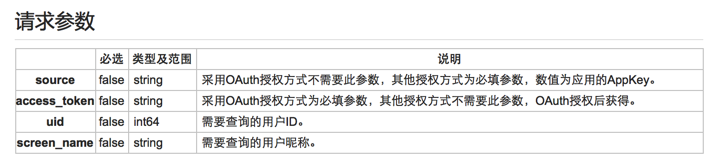

 //  HVWHomeViewController.m

 /** 获取用户信息 */

 - (void) setupUserInfo {

     // 设置参数

     NSMutableDictionary *param = [NSMutableDictionary dictionary];

     // 访问令牌

     HVWAccountInfo *accountInfo = [HVWAccountInfoTool accountInfo];

     param[@"access_token"] = accountInfo.access_token;

     // 用户uid

     param[@"uid"] = accountInfo.uid;

     // 发送请求

     [HVWNetworkTool get:@"https://api.weibo.com/2/users/show.json" parameters:param success:^(id responseObject) {

         // 获取用户信息

         HVWUser *user = [HVWUser objectWithKeyValues:responseObject];

         HVWAccountInfo *accountInfo = [HVWAccountInfoTool accountInfo];

         accountInfo.screen_name = user.screen_name;

         [HVWAccountInfoTool saveAccountInfo:accountInfo];

         // 设置导航栏标题

         [self.titleButton setTitle:accountInfo.screen_name forState:UIControlStateNormal];

     } failure:^(NSError *error) {

         HVWLog(@"获取用户信息失败!error:%@", error);

     }];

 }
 //  HVWAccountInfoTool.m

 /** 从文件获取accountInfo */

 + (HVWAccountInfo *) accountInfo {

     HVWAccountInfo *accountInfo = [NSKeyedUnarchiver unarchiveObjectWithData:[NSData dataWithContentsOfFile:accountInfoPath]];

     // 需要判断是否过期

     NSDate *now = [NSDate date];

     if ([now compare:accountInfo.expires_time] != NSOrderedAscending) { // now->expires_data 非升序, 已经过期

         accountInfo = nil;

     }

     return accountInfo;

 }

 /** 存储accountInfo到文件 */

 + (void) saveAccountInfo:(HVWAccountInfo *) accountInfo {

     [NSKeyedArchiver archiveRootObject:accountInfo toFile:accountInfoPath];

 }
 //  HVWAccountInfo.m

 #pragma mark - NSCoding

 /** 从文件解析对象调用 */

 - (id)initWithCoder:(NSCoder *)aDecoder {

     if (self = [super init]) {

         self.access_token = [aDecoder decodeObjectForKey:@"access_token"];

         self.expires_in = [aDecoder decodeObjectForKey:@"expires_in"];

         self.expires_time = [aDecoder decodeObjectForKey:@"expires_time"];

         self.uid = [aDecoder decodeObjectForKey:@"uid"];

         self.screen_name = [aDecoder decodeObjectForKey:@"screen_name"];

     }

     return self;

 }

 /** 把对象写入文件调用 */

 - (void)encodeWithCoder:(NSCoder *)aCoder {

     [aCoder encodeObject:self.access_token forKey:@"access_token"];

     [aCoder encodeObject:self.expires_in forKey:@"expires_in"];

     [aCoder encodeObject:self.expires_time forKey:@"expires_time"];

     [aCoder encodeObject:self.uid forKey:@"uid"];

     [aCoder encodeObject:self.screen_name forKey:@"screen_name"];

 }
 //  HVWNavigationBarTitleButton.m

 /** 重写setTitle,根据文本改变宽度 */

 - (void)setTitle:(NSString *)title forState:(UIControlState)state {

     [super setTitle:title forState:state];

     NSDictionary *param = @{NSFontAttributeName: self.titleLabel.font};

     CGFloat titleWidth = [title boundingRectWithSize:CGSizeMake(MAXFLOAT, self.height) options:NSStringDrawingUsesLineFragmentOrigin attributes:param context:nil].size.width;

     self.width = titleWidth + self.height + ;

 }
 //  HVWHomeViewController.m

 /** 设置导航栏 */

 - (void) setupNavigationBar {

     // 添加导航控制器按钮

     // 左边按钮

     self.navigationItem.leftBarButtonItem = [UIBarButtonItem itemWithImage:@"navigationbar_friendsearch" hightlightedImage:@"navigationbar_friendsearch_highlighted" target:self selector:@selector(searchFriend)];

     // 右边按钮

     self.navigationItem.rightBarButtonItem = [UIBarButtonItem itemWithImage:@"navigationbar_pop" hightlightedImage:@"navigationbar_pop_highlighted" target:self selector:@selector(pop)];

     // 设置标题按钮

     HVWNavigationBarTitleButton *titleButton = [[HVWNavigationBarTitleButton alloc] init];

     titleButton.height = ;

     // 保存到成员属性

     self.titleButton = titleButton;

     // 设置导航栏标题

     HVWAccountInfo *accountInfo = [HVWAccountInfoTool accountInfo];

     NSString *navTitle = @"首页";

     if (accountInfo.screen_name) {

         navTitle = accountInfo.screen_name;

     }

     [titleButton setTitle:navTitle forState:UIControlStateNormal];

     [titleButton setImage:[UIImage imageWithNamed:@"navigationbar_arrow_down"] forState:UIControlStateNormal];

     // 设置背景图片

     [titleButton setBackgroundImage:[UIImage resizedImage:@"navigationbar_filter_background_highlighted"] forState:UIControlStateHighlighted];

     // 监听按钮点击事件,替换图标

     [titleButton addTarget:self action:@selector(titleButtonClickd:) forControlEvents:UIControlEventTouchUpInside];

     self.navigationItem.titleView = titleButton;

 }
[iOS微博项目 - 3.4] - 获取用户信息的更多相关文章
- [iOS微博项目 - 2.6] - 获取微博数据
github: https://github.com/hellovoidworld/HVWWeibo A.新浪获取微博API 1.读取微博API 2.“statuses/home_time ...
- [iOS微博项目 - 3.6] - 获取未读消息
github: https://github.com/hellovoidworld/HVWWeibo A.获取登陆用户未读消息 1.需求 获取所有未读消息,包括新微博.私信.@.转发.关注等 把未 ...
- Android之QQ授权登录获取用户信息
有时候我们开发的app须要方便用户简单登录.能够让用户使用自己的qq.微信.微博登录到我们自己开发的app. 今天就在这里总结一下怎样在自己的app中集成QQ授权登录获取用户信息的功能. 首先我们打开 ...
- 微信第三方登陆,无需注册一键登录,获取用户信息,PHP实现方法
今天讲讲利用微信oauth2实现第三方登陆的实现方法. 先说说前提吧! 首先你得是服务号,并且是经过认证的.这样微信会给你很多第三方接口的权限,如果是订阅号或者没有认证的服务号那就不用想了! 一开始你 ...
- 菜鸟-手把手教你把Acegi应用到实际项目中(7)-缓存用户信息
首先讲讲EhCache.在默认情况下,即在用户未提供自身配置文件ehcache.xml或ehcache-failsafe.xml时,EhCache会依据其自身Jar存档包含的ehcache-fails ...
- Laravel OAuth2 (一) ---简单获取用户信息
前言 本来要求是使用微信进行第三方登陆,所以想着先用 github 测试成功再用微信测试,可是最近拖了好久都还没申请好微信开放平台的 AppID ,所以就只写 github 的第三方登陆吧,估计微信的 ...
- mpvue小程序开发之 wx.getUserInfo获取用户信息授权
一.背景 在使用美团的mpvue2.0框架搭建起小程序项目后,做获取用户信息时遇到一些问题:微信小程序更新api后,获取用户信息只能通过button上的绑定方法 来获取用户信息,vue上方法绑定不能直 ...
- PHP 微信公众号开发 - 获取用户信息
项目微信公众号开发,记录获取用户微信号信息,和用户openid 1,登录微信公众平台 点击登录微信公众平台 2,获取公众号开发信息 登陆之后在 开发->基本配置 3,设置IP白名单 在这里添加服 ...
- [iOS微博项目 - 4.3] - 设置每条微博边框样式
github: https://github.com/hellovoidworld/HVWWeibo A.设置每条微博边框样式 1.需求 不需要分割线 每个微博之间留有一定的间隙 2.思路 直接设 ...
随机推荐
- Mobile Assistant
闲来无事,分享一个小东西--手机小助手,历时两周,这里选择几个不错的界面以示效果! 如果有感兴趣的部分,欢迎随时交流!
- BZOJ 1415 聪聪和可可
f[i][j]表示i点追j点的期望步数... 这题必须spfa不能bfs. 且复杂度不会炸(仅1000条边) #include<iostream> #include<cstdio&g ...
- Azure PowerShell 1.0.0以上版本在中国Azure使用的注意事项
随着Azure PowerShell 1.0.0+的推出,越来越多的客户开始使用新的版本的Azure PowerShell.此版本的PowerShell最大的改变在于将原先的Switch-AzureM ...
- 模拟实现死亡之Ping(Ping of death)
需求描述 使用hping构造IP分片,模拟实现死亡之Ping 环境搭建 使用VMWare和Dynamips. 实现思路 构造重装后大于65535字节的IP分片 hping 192.168.1.1 -1 ...
- phonegap 清空页面缓存
访问页面添加 <meta HTTP-EQUIV="pragma" CONTENT="no-cache"> <meta HTTP-EQUIV=& ...
- IE6对CSS支持Bug收集
1.IE6双外边距 在IE6下,如果对元素设置了浮动,同时又设置了margin-left或者margin-right,margin值会加倍. 例如,设置margin-left:10px在IE6下会显示 ...
- css3 :nth-child 常用用法
前端的哥们想必都接触过css中一个神奇的玩意,可以轻松选取你想要的标签并给与修改添加样式,是不是很给力,它就是“:nth-child”. 下面我将用几个典型的实例来给大家讲解:nth-child的实际 ...
- php5.2转向 PHP 5.3 的 PHP 开发
PHP 5.3 开始,为了更好的向 PHP 的未来版本(PHP6) 过渡,将未来不再支持的函数标记为 DEPRECATED.在代码中使用这些函数,将毫不留情的在页面中显示警告信息:“使用了过时的函数… ...
- smarty缓存函数
原来在Smarty中在3.0以上版本中不在使用这个clear_all_cache(),而是以$smarty->clearAllCache(); 代替.其中$smarty->clear_ca ...
- hdu 2897(威佐夫博奕变形)
题意:容易理解. 分析:当n%(p+q)==0时,先取者必胜,必胜方案:先取q,然后对方去x个,先取者就取(p+q-x)个,最后对方就必须取玩p个, 当n%(p+q)==r(r<=p),先取者必 ...