
《DSP using MATLAB》示例Example 8.14
%% ------------------------------------------------------------------------

%%            Output Info about this m-file

fprintf('\n***********************************************************\n');

fprintf('        <DSP using MATLAB> Exameple 8.14 \n\n');

time_stamp = datestr(now, 31);

[wkd1, wkd2] = weekday(today, 'long');

fprintf('      Now is %20s, and it is %8s  \n\n', time_stamp, wkd2);

%% ------------------------------------------------------------------------

% Digital Filter Specifications:

wp = 0.2*pi;                 % digital passband freq in rad

ws = 0.3*pi;                 % digital stopband freq in rad

Rp = 1;                      % passband ripple in dB

As = 15;                     % stopband attenuation in dB

% Analog prototype specifications: Inverse Mapping for frequencies

T = 1;                       % set T = 1

OmegaP = wp/T;               % prototype passband freq

OmegaS = ws/T;               % prototype stopband freq

% Analog Elliptic Prototype Filter Calculation:

[cs, ds] = afd_elip(OmegaP, OmegaS, Rp, As);

% Impulse Invariance Transformation:

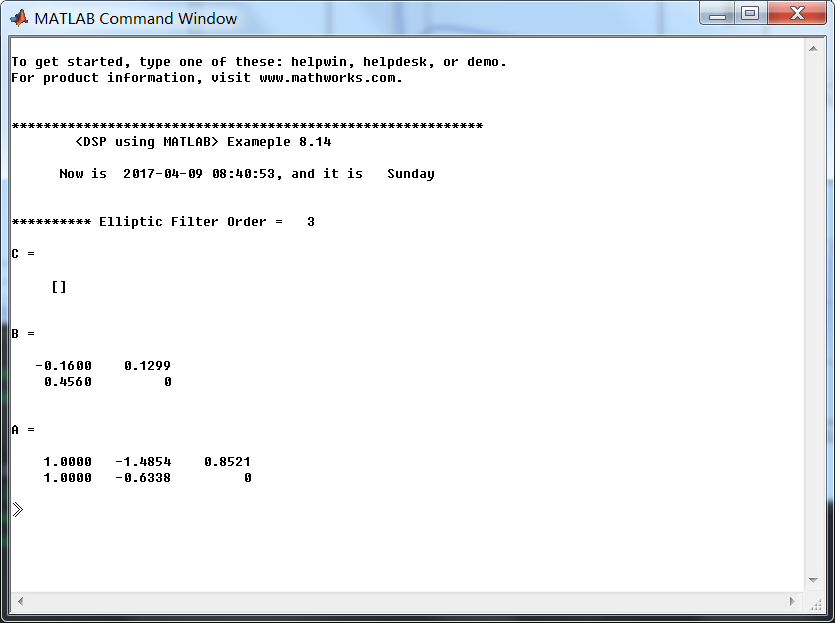
[b, a] = imp_invr(cs, ds, T); [C, B, A] = dir2par(b, a)

% Calculation of Frequency Response:

[db, mag, pha, grd, ww] = freqz_m(b, a);

%% -----------------------------------------------------------------

%%                             Plot

%% -----------------------------------------------------------------

figure('NumberTitle', 'off', 'Name', 'Exameple 8.14')

set(gcf,'Color','white');

M = 1;                          % Omega max

subplot(2,2,1); plot(ww/pi, mag); axis([0, M, 0, 1.2]); grid on;

xlabel(' frequency in \pi units'); ylabel('|H|'); title('Magnitude Response');

set(gca, 'XTickMode', 'manual', 'XTick', [0, 0.2, 0.3, M]);

set(gca, 'YTickMode', 'manual', 'YTick', [0, 0.1778, 0.8913, 1]);

subplot(2,2,2); plot(ww/pi, pha/pi); axis([0, M, -1.1, 1.1]); grid on;

xlabel('frequency in \pi nuits'); ylabel('radians in \pi units'); title('Phase Response');

set(gca, 'XTickMode', 'manual', 'XTick', [0, 0.2, 0.3, M]);

set(gca, 'YTickMode', 'manual', 'YTick', [-1:1:1]);

subplot(2,2,3); plot(ww/pi, db); axis([0, M, -30, 10]); grid on;

xlabel('frequency in \pi units'); ylabel('Decibels'); title('Magnitude in dB ');

set(gca, 'XTickMode', 'manual', 'XTick', [0, 0.2, 0.3, M]);

set(gca, 'YTickMode', 'manual', 'YTick', [-30, -15, -1, 0]);

subplot(2,2,4); plot(ww/pi, grd); axis([0, M, 0, 20]); grid on;

xlabel('frequency in \pi units'); ylabel('Samples'); title('Group Delay');

set(gca, 'XTickMode', 'manual', 'XTick', [0, 0.2, 0.3, M]);

set(gca, 'YTickMode', 'manual', 'YTick', [0:5:20]);
运行结果:
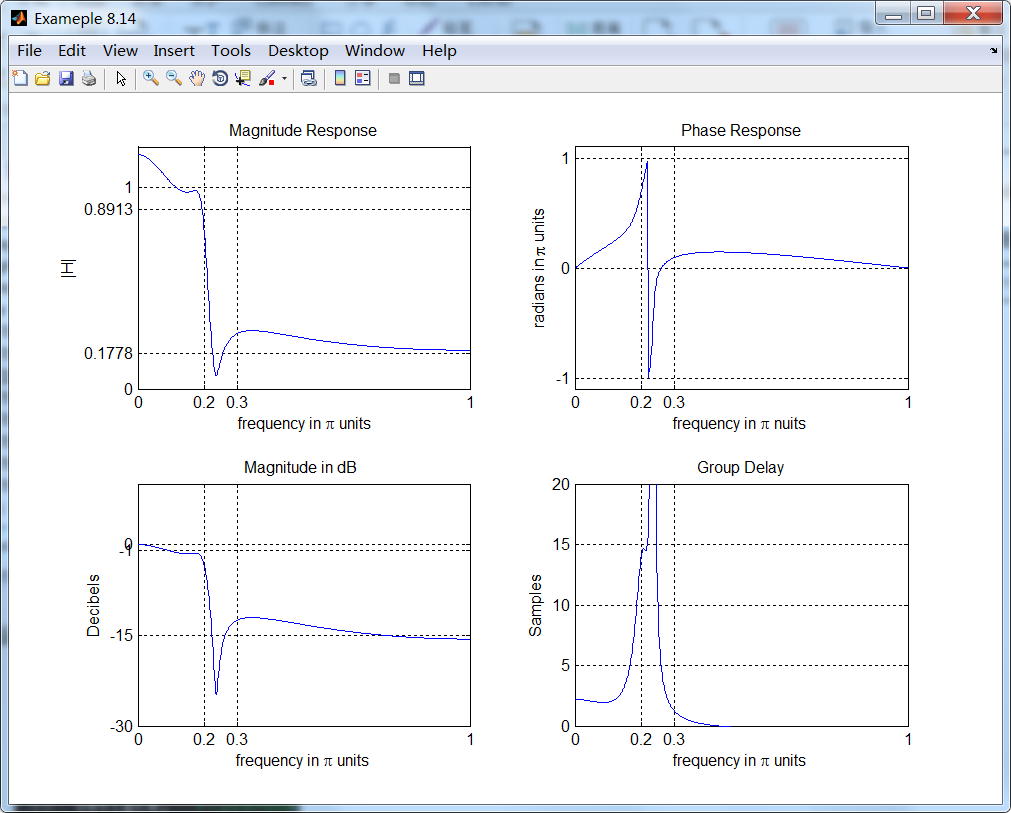
从图上看出,脉冲不变设计方法又失败了。
脉冲不变方法的优点是稳定的设计,频率Ω和ω是线性相关的。但是缺点是模拟频率响应中有一些假频,某些情况下假频是无法容忍的。
结论:该设计方法仅当模拟滤波器是带限到低通或带通的情况(阻带中没有振荡)。
《DSP using MATLAB》示例Example 8.14的更多相关文章
- 《DSP using MATLAB》Problem 7.14
代码: %% ++++++++++++++++++++++++++++++++++++++++++++++++++++++++++++++++++++++++++++++++ %% Output In ...
- 《DSP using MATLAB》Problem 6.14
代码: %% ++++++++++++++++++++++++++++++++++++++++++++++++++++++++++++++++++++++++++++++++ %% Output In ...
- 《DSP using MATLAB》Problem 5.14
说明:这两个小题的数学证明过程都不会,欢迎博友赐教. 直接上代码: %% +++++++++++++++++++++++++++++++++++++++++++++++++++++++++++++++ ...
- 《DSP using MATLAB》Problem 4.14
代码: %% ---------------------------------------------------------------------------- %% Output Info a ...
- 《DSP using MATLAB》Problem 2.14
代码: %% ------------------------------------------------------------------------ %% Output Info about ...
- 《DSP using MATLAB》Problem 8.14
代码: %% ------------------------------------------------------------------------ %% Output Info about ...
- DSP using MATLAB 示例Example3.21
代码: % Discrete-time Signal x1(n) % Ts = 0.0002; n = -25:1:25; nTs = n*Ts; Fs = 1/Ts; x = exp(-1000*a ...
- DSP using MATLAB 示例 Example3.19
代码: % Analog Signal Dt = 0.00005; t = -0.005:Dt:0.005; xa = exp(-1000*abs(t)); % Discrete-time Signa ...
- DSP using MATLAB示例Example3.18
代码: % Analog Signal Dt = 0.00005; t = -0.005:Dt:0.005; xa = exp(-1000*abs(t)); % Continuous-time Fou ...
- DSP using MATLAB 示例Example3.23
代码: % Discrete-time Signal x1(n) : Ts = 0.0002 Ts = 0.0002; n = -25:1:25; nTs = n*Ts; x1 = exp(-1000 ...
随机推荐
- mac下cordova的ios-deploy安装问题
mac下进行cordova项目编译部署到ios设备,这个时候需要安装ios-deploy,会失败: npm WARN lifecycle ios-deploy@1.8.6~preinstall: ca ...
- 虚拟机VMware搭建代码环境
安装git yum install git -y 安装nvm curl -o- https://raw.githubusercontent.com/creationix/nvm/v0.29.0/ins ...
- 简明 Nginx Location Url 配置笔记
基本配置 为了探究nginx的url配置规则,当然需要安装nginx.我使用了vagrant创建了一个虚拟环境的ubuntu,通过apt-get安装nginx.这样就不会污染mac的软件环境.通过vr ...
- ES6 HttpApplication Middleware
const HttpRequest = function() { this.query = '' } function HttpResponse() { this.body = [] this.sta ...
- day38 爬虫之Scrapy + Flask框架
s1617day3 内容回顾: Scrapy - 创建project - 创建爬虫 - 编写 - 类 - start_urls = ['http://www.xxx.com'] - def parse ...
- Linux 系统启动过程,Linux 系统目录结构
一.Linux 系统启动过程 linux启动时我们会看到许多启动信息. Linux系统的启动过程并不是大家想象中的那么复杂,其过程可以分为5个阶段: 内核的引导. 运行 init. 系统初始化. 建立 ...
- 不使用构造方法创建Java对象: objenesis的基本使用方法
转载:http://blog.csdn.net/codershamo/article/details/52015206 objenesis简介: objenesis是一个小型Java类库用来实例化一个 ...
- 【cf 483 div2 -C】Finite or not?(数论)
链接:http://codeforces.com/contest/984/problem/C 题意 三个数p, q, b, 求p/q在b进制下小数点后是否是有限位. 思路 题意转化为是否q|p*b^x ...
- UML_03_类图
一.前言 类图是UML结构图,在类和接口的层次上显示设计系统的结构,显示它们的特性.约束和关系等,是定义其它图的基础. 二.类图 如上图,在类图中表示方法如下: 斜体 :抽象类.抽象方法 下划线 :静 ...
- windows的虚拟磁盘(vhd,vhdx)使用
以前一直使用u盘或者移动硬盘接上usb直接拷贝文件,发觉速度一般.而且一般只有一个盘,分类也很不方便. 后来发现windows的虚拟磁盘可以解决我的问题... 经过一段时间的使用后发觉使用虚拟磁盘的方 ...