
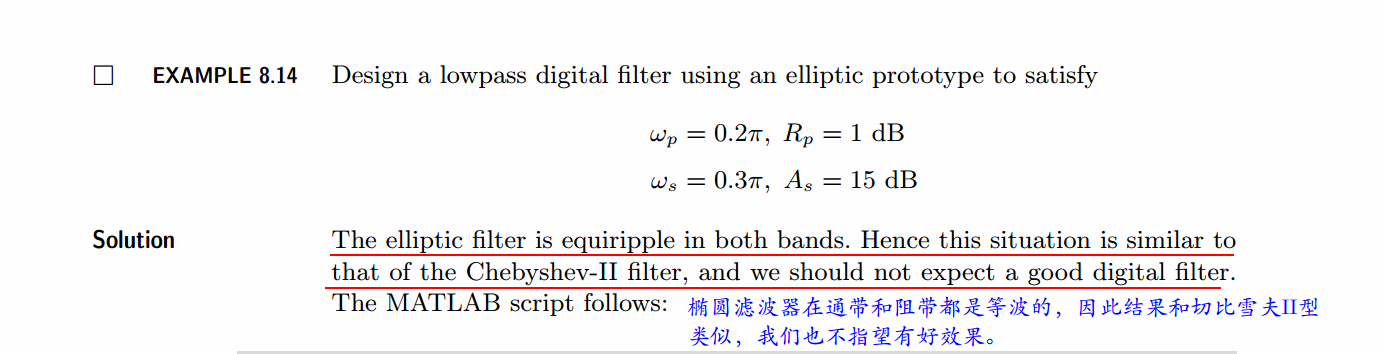
《DSP using MATLAB》示例Example 8.14
%% ------------------------------------------------------------------------

%%            Output Info about this m-file

fprintf('\n***********************************************************\n');

fprintf('        <DSP using MATLAB> Exameple 8.14 \n\n');

time_stamp = datestr(now, 31);

[wkd1, wkd2] = weekday(today, 'long');

fprintf('      Now is %20s, and it is %8s  \n\n', time_stamp, wkd2);

%% ------------------------------------------------------------------------

% Digital Filter Specifications:

wp = 0.2*pi;                 % digital passband freq in rad

ws = 0.3*pi;                 % digital stopband freq in rad

Rp = 1;                      % passband ripple in dB

As = 15;                     % stopband attenuation in dB

% Analog prototype specifications: Inverse Mapping for frequencies

T = 1;                       % set T = 1

OmegaP = wp/T;               % prototype passband freq

OmegaS = ws/T;               % prototype stopband freq

% Analog Elliptic Prototype Filter Calculation:

[cs, ds] = afd_elip(OmegaP, OmegaS, Rp, As);

% Impulse Invariance Transformation:

[b, a] = imp_invr(cs, ds, T); [C, B, A] = dir2par(b, a)

% Calculation of Frequency Response:

[db, mag, pha, grd, ww] = freqz_m(b, a);

%% -----------------------------------------------------------------

%%                             Plot

%% -----------------------------------------------------------------

figure('NumberTitle', 'off', 'Name', 'Exameple 8.14')

set(gcf,'Color','white');

M = 1;                          % Omega max

subplot(2,2,1); plot(ww/pi, mag); axis([0, M, 0, 1.2]); grid on;

xlabel(' frequency in \pi units'); ylabel('|H|'); title('Magnitude Response');

set(gca, 'XTickMode', 'manual', 'XTick', [0, 0.2, 0.3, M]);

set(gca, 'YTickMode', 'manual', 'YTick', [0, 0.1778, 0.8913, 1]);

subplot(2,2,2); plot(ww/pi, pha/pi); axis([0, M, -1.1, 1.1]); grid on;

xlabel('frequency in \pi nuits'); ylabel('radians in \pi units'); title('Phase Response');

set(gca, 'XTickMode', 'manual', 'XTick', [0, 0.2, 0.3, M]);

set(gca, 'YTickMode', 'manual', 'YTick', [-1:1:1]);

subplot(2,2,3); plot(ww/pi, db); axis([0, M, -30, 10]); grid on;

xlabel('frequency in \pi units'); ylabel('Decibels'); title('Magnitude in dB ');

set(gca, 'XTickMode', 'manual', 'XTick', [0, 0.2, 0.3, M]);

set(gca, 'YTickMode', 'manual', 'YTick', [-30, -15, -1, 0]);

subplot(2,2,4); plot(ww/pi, grd); axis([0, M, 0, 20]); grid on;

xlabel('frequency in \pi units'); ylabel('Samples'); title('Group Delay');

set(gca, 'XTickMode', 'manual', 'XTick', [0, 0.2, 0.3, M]);

set(gca, 'YTickMode', 'manual', 'YTick', [0:5:20]);
运行结果:
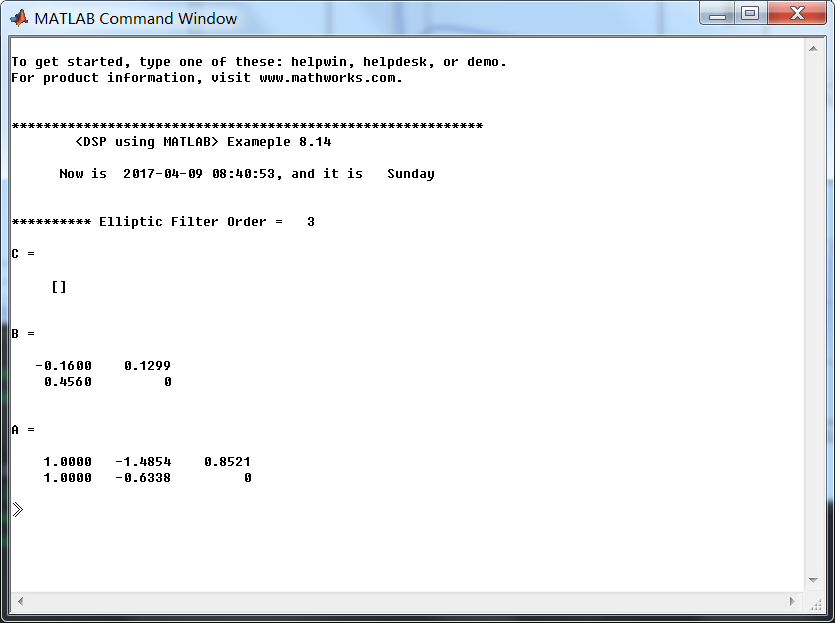
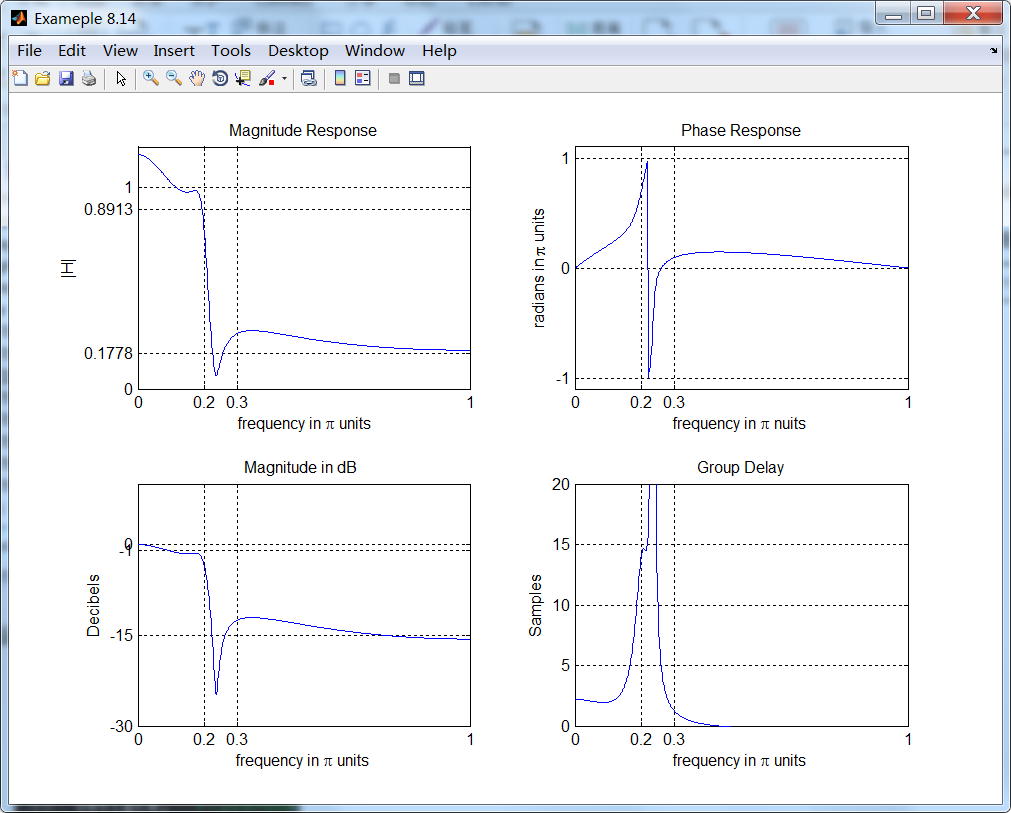
从图上看出,脉冲不变设计方法又失败了。
脉冲不变方法的优点是稳定的设计,频率Ω和ω是线性相关的。但是缺点是模拟频率响应中有一些假频,某些情况下假频是无法容忍的。
结论:该设计方法仅当模拟滤波器是带限到低通或带通的情况(阻带中没有振荡)。
《DSP using MATLAB》示例Example 8.14的更多相关文章
- 《DSP using MATLAB》Problem 7.14
代码: %% ++++++++++++++++++++++++++++++++++++++++++++++++++++++++++++++++++++++++++++++++ %% Output In ...
- 《DSP using MATLAB》Problem 6.14
代码: %% ++++++++++++++++++++++++++++++++++++++++++++++++++++++++++++++++++++++++++++++++ %% Output In ...
- 《DSP using MATLAB》Problem 5.14
说明:这两个小题的数学证明过程都不会,欢迎博友赐教. 直接上代码: %% +++++++++++++++++++++++++++++++++++++++++++++++++++++++++++++++ ...
- 《DSP using MATLAB》Problem 4.14
代码: %% ---------------------------------------------------------------------------- %% Output Info a ...
- 《DSP using MATLAB》Problem 2.14
代码: %% ------------------------------------------------------------------------ %% Output Info about ...
- 《DSP using MATLAB》Problem 8.14
代码: %% ------------------------------------------------------------------------ %% Output Info about ...
- DSP using MATLAB 示例Example3.21
代码: % Discrete-time Signal x1(n) % Ts = 0.0002; n = -25:1:25; nTs = n*Ts; Fs = 1/Ts; x = exp(-1000*a ...
- DSP using MATLAB 示例 Example3.19
代码: % Analog Signal Dt = 0.00005; t = -0.005:Dt:0.005; xa = exp(-1000*abs(t)); % Discrete-time Signa ...
- DSP using MATLAB示例Example3.18
代码: % Analog Signal Dt = 0.00005; t = -0.005:Dt:0.005; xa = exp(-1000*abs(t)); % Continuous-time Fou ...
- DSP using MATLAB 示例Example3.23
代码: % Discrete-time Signal x1(n) : Ts = 0.0002 Ts = 0.0002; n = -25:1:25; nTs = n*Ts; x1 = exp(-1000 ...
随机推荐
- webstorm的安装、激活码、更换主题颜色的修改、汉化
一.安装 1.解压webstorm11zh.rar,双击.exe文件,下一步安装,在安装结束前会提示输入激活码,这个从网上随便找一个可用的即可. 二.更换主题颜色: 1.先从网上找一个喜欢的主题颜色, ...
- 设置table的td宽度,不随文字变宽
页面中table宽度设置width="600px"之后,宽度仍然不是固定的,文字太长后不换行,把table都撑变形了. 解决办法: table 设置 宽度,绝对宽度和相对都可以 t ...
- HTML 参考手册- (HTML5 标准)
HTML 参考手册- (HTML5 标准) 功能排序 New : HTML5 新标签 标签 描述 基础 <!DOCTYPE> 定义文档类型. <html> 定义一个 HT ...
- 先安装ubuntu,后安装windows,修复启动grub
使用easybcd修复未果,直接使用启动盘修复,主要根据这个帖子来的,验证可用 http://blog.csdn.net/kevin6216/article/details/7764292 由于重装w ...
- Chrome自动化搭建
工具安装: 1.selenium-java-2.53.0-srcs.jar 2.selenium-java-2.53.0.jar 3.下载chromedriver.exe(下载地址:http://ch ...
- 5分钟弄懂Docker
尽管之前久闻Docker的大名了,但是天资愚钝,对其到底是个啥东西一直摸不清,最近花了一段时间整理了一下,算是整理出一点头绪来. 官网的介绍是这样的: Docker is an open platfo ...
- 设计模式--解释器模式C++实现
1定义 给定一门语言,定义他的文法的一种表示,并定义一个解释器,该解释器使用该表示来解释语言中的句子 2类图 角色分析 AbstractExpression抽象解释器,具体的解释任务由各个实现类完成, ...
- HDU5521-最短路-建图
Meeting Time Limit: 12000/6000 MS (Java/Others) Memory Limit: 262144/262144 K (Java/Others)Total ...
- day32 Python与金融量化分析(二)
第一部分:金融与量化投资 股票: 股票是股份公司发给出资人的一种凭证,股票的持有者就是股份公司的股东. 股票的面值与市值 面值表示票面金额 市值表示市场价值 上市/IPO: 企业通过证券交易所公开向社 ...
- ansible入门二(Ansible常见模块介绍)
本节内容: ansible命令基础 常见模块举例 一.ansible命令基础 语法: ansible <host-pattern> [-f forks] [-m module_name] ...