
QtGui.QLineEdit
A QtGui.QLineEdit is a widget that allows to enter and edit a single line of plain text. There are undo and redo, cut and paste, and drag & drop functions available for the widget.
#!/usr/bin/python

# -*- coding: utf-8 -*-

"""

ZetCode PyQt4 tutorial

This example shows text which

is entered in a QtGui.QLineEdit

in a QtGui.QLabel widget.

author: Jan Bodnar

website: zetcode.com

last edited: August 2011

"""

import sys

from PyQt4 import QtGui, QtCore

class Example(QtGui.QWidget):

    def __init__(self):

        super(Example, self).__init__()

        self.initUI()

    def initUI(self):

        self.lbl = QtGui.QLabel(self)

        qle = QtGui.QLineEdit(self)

        qle.move(60, 100)

        self.lbl.move(60, 40)

        qle.textChanged[str].connect(self.onChanged)

        self.setGeometry(300, 300, 280, 170)

        self.setWindowTitle('QtGui.QLineEdit')

        self.show()

    def onChanged(self, text):

        self.lbl.setText(text)

        self.lbl.adjustSize()

def main():

    app = QtGui.QApplication(sys.argv)

    ex = Example()

    sys.exit(app.exec_())

if __name__ == '__main__':

    main()
This example shows a line edit widget and a label. The text that we key in the line edit is displayed immediately in the label widget.
qle = QtGui.QLineEdit(self)
The QtGui.QLineEdit widget is created.
qle.textChanged[str].connect(self.onChanged)
If the text in the line edit widget changes, we call the onChanged() method.
def onChanged(self, text):

    self.lbl.setText(text)

    self.lbl.adjustSize()
Inside the onChanged() method, we set the typed text to the label widget. We call the adjustSize()method to adjust the size of the label to the length of the text.
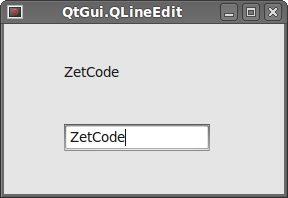 Figure: QtGui.QLineEdit
QtGui.QLineEdit的更多相关文章
- QLineEdit 自动完成(使用setCompleter,内含一个ListView)
-------------------------------------CompleteLineEdit.h------------------------------------- #ifndef ...
- pyqt pyside QLineEdit 重写键盘事件
pyqt pyside QLineEdit 重写键盘事件 def keyPressEvent(self, event): if (event.modifiers() & QtCore.Qt.S ...
- QtGui.QInputDialog
The QtGui.QInputDialog provides a simple convenience dialog to get a single value from the user. The ...
- PyQt4入门学习笔记(五)
PyQt4里的对话框 对话框是大多数GUI应用中不可分割的一部分.一个对话框是两者或多者的会话.在GUI内,对话框是应用向人说话的方式.一个对话框可以用来输入数据,修改数据,改变应用设置等等. QtG ...
- PyQt4入门学习笔记(三)
# PyQt4入门学习笔记(三) PyQt4内的布局 布局方式是我们控制我们的GUI页面内各个控件的排放位置的.我们可以通过两种基本方式来控制: 1.绝对位置 2.layout类 绝对位置 这种方式要 ...
- Pyqt+QRcode 生成 识别 二维码
1.生成二维码 python生成二维码是件很简单的事,使用第三方库Python QRCode就可生成二维码,我用Pyqt给QRcode打个壳 一.python-qrcode介绍 python-qrco ...
- linux下使用多线程编写的聊天室
自从开始学linux网络编程后就想写个聊天室,一开始原本打算用多进程的方式来写,可是发觉进程间的通信有点麻烦,而且开销也大,后来想用多线程能不能实现呢,于是便去看了一下linux里线程的用法,实际上只 ...
- python GUI输入窗口
为了解决 sublime text 下 python 的 raw_input() 函数无法起效,便萌生了个用 GUI 窗口来获取输入的想法,一开始想用 Tkinter,后来想了下还是用 PyQt 吧, ...
- Pyqt 一个简单的浏览器
使用QtWebKit 做一个简单的浏览器. mybrowserUI.ui <?xml version="1.0" encoding="UTF-8"?> ...
随机推荐
- ms08-067漏洞的复现
MS08-067漏洞重现 (1):MS08-067远程溢出漏洞描述 MS08-067漏洞的全称为“Windows Server服务RPC请求缓冲区溢出漏洞”,如果用户在受影响的系统上收到特制的 RPC ...
- 基于Java 生产者消费者模式(详细分析)
Java 生产者消费者模式详细分析 本文目录:1.等待.唤醒机制的原理2.Lock和Condition3.单生产者单消费者模式4.使用Lock和Condition实现单生产单消费模式5.多生产多消费模 ...
- 10.十进制转m进制
时间限制: 1 s 空间限制: 128000 KB 题目等级 : 白银 Silver 题解 查看运行结果 题目描述 Description 将十进制数n转换成m进制数 m<=16 n<=1 ...
- HDU 5670 Machine 水题
Machine 题目连接: http://acm.hdu.edu.cn/showproblem.php?pid=5670 Description There is a machine with m(2 ...
- HDU 4611 Balls Rearrangement 数学
Balls Rearrangement 题目连接: http://acm.hdu.edu.cn/showproblem.php?pid=4611 Description Bob has N balls ...
- GIT 提交步骤
1.提交 git add .
- Android 动画——属性动画Property Animation
Android在3.0之前只提供了两种动画:View Animation .Drawable Animation .也就是我们在<Android 动画——Frame Animation与Twee ...
- HTML、XML、XHTML 有什么区别?
HTML即是超文本标记语言(Hyper Text Markup Language),是最早写网页的语言,但是由于时间早,规范不是很好,大小写混写且编码不规范,是语法较为松散的.不严格的Web语言 XH ...
- mac os颜色拾取工具/软件/器推荐
软件名:ColorSnappe 目前我用的时1.1.0版本 该工具可以利用alt+command+c快捷键拾取颜色,拾取后可以自动把颜色代码放入剪切板 .我最喜欢它可以生成ios开发的代码,比如选择了 ...
- Spring MVC @ModelAttribute 详解
1.@ModelAttribute注释void返回值的方法 @Controller public class HelloModelController { @ModelAttribute public ...