
QtGui.QLineEdit
A QtGui.QLineEdit is a widget that allows to enter and edit a single line of plain text. There are undo and redo, cut and paste, and drag & drop functions available for the widget.
#!/usr/bin/python

# -*- coding: utf-8 -*-

"""

ZetCode PyQt4 tutorial

This example shows text which

is entered in a QtGui.QLineEdit

in a QtGui.QLabel widget.

author: Jan Bodnar

website: zetcode.com

last edited: August 2011

"""

import sys

from PyQt4 import QtGui, QtCore

class Example(QtGui.QWidget):

    def __init__(self):

        super(Example, self).__init__()

        self.initUI()

    def initUI(self):

        self.lbl = QtGui.QLabel(self)

        qle = QtGui.QLineEdit(self)

        qle.move(60, 100)

        self.lbl.move(60, 40)

        qle.textChanged[str].connect(self.onChanged)

        self.setGeometry(300, 300, 280, 170)

        self.setWindowTitle('QtGui.QLineEdit')

        self.show()

    def onChanged(self, text):

        self.lbl.setText(text)

        self.lbl.adjustSize()

def main():

    app = QtGui.QApplication(sys.argv)

    ex = Example()

    sys.exit(app.exec_())

if __name__ == '__main__':

    main()
This example shows a line edit widget and a label. The text that we key in the line edit is displayed immediately in the label widget.
qle = QtGui.QLineEdit(self)
The QtGui.QLineEdit widget is created.
qle.textChanged[str].connect(self.onChanged)
If the text in the line edit widget changes, we call the onChanged() method.
def onChanged(self, text):

    self.lbl.setText(text)

    self.lbl.adjustSize()
Inside the onChanged() method, we set the typed text to the label widget. We call the adjustSize()method to adjust the size of the label to the length of the text.
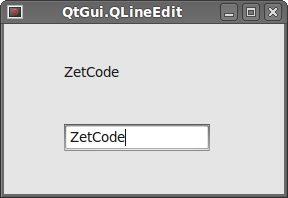 Figure: QtGui.QLineEdit
QtGui.QLineEdit的更多相关文章
- QLineEdit 自动完成(使用setCompleter,内含一个ListView)
-------------------------------------CompleteLineEdit.h------------------------------------- #ifndef ...
- pyqt pyside QLineEdit 重写键盘事件
pyqt pyside QLineEdit 重写键盘事件 def keyPressEvent(self, event): if (event.modifiers() & QtCore.Qt.S ...
- QtGui.QInputDialog
The QtGui.QInputDialog provides a simple convenience dialog to get a single value from the user. The ...
- PyQt4入门学习笔记(五)
PyQt4里的对话框 对话框是大多数GUI应用中不可分割的一部分.一个对话框是两者或多者的会话.在GUI内,对话框是应用向人说话的方式.一个对话框可以用来输入数据,修改数据,改变应用设置等等. QtG ...
- PyQt4入门学习笔记(三)
# PyQt4入门学习笔记(三) PyQt4内的布局 布局方式是我们控制我们的GUI页面内各个控件的排放位置的.我们可以通过两种基本方式来控制: 1.绝对位置 2.layout类 绝对位置 这种方式要 ...
- Pyqt+QRcode 生成 识别 二维码
1.生成二维码 python生成二维码是件很简单的事,使用第三方库Python QRCode就可生成二维码,我用Pyqt给QRcode打个壳 一.python-qrcode介绍 python-qrco ...
- linux下使用多线程编写的聊天室
自从开始学linux网络编程后就想写个聊天室,一开始原本打算用多进程的方式来写,可是发觉进程间的通信有点麻烦,而且开销也大,后来想用多线程能不能实现呢,于是便去看了一下linux里线程的用法,实际上只 ...
- python GUI输入窗口
为了解决 sublime text 下 python 的 raw_input() 函数无法起效,便萌生了个用 GUI 窗口来获取输入的想法,一开始想用 Tkinter,后来想了下还是用 PyQt 吧, ...
- Pyqt 一个简单的浏览器
使用QtWebKit 做一个简单的浏览器. mybrowserUI.ui <?xml version="1.0" encoding="UTF-8"?> ...
随机推荐
- 「NOI2017」游戏
「NOI2017」游戏 题目描述 小 L 计划进行 \(n\) 场游戏,每场游戏使用一张地图,小 L 会选择一辆车在该地图上完成游戏. 小 L 的赛车有三辆,分别用大写字母 \(A\).\(B\).\ ...
- [bzoj1021][SHOI2008]Debt 循环的债务 (动态规划)
Description Alice. Bob和Cynthia总是为他们之间混乱的债务而烦恼,终于有一天,他们决定坐下来一起解决这个问题.不过,鉴别钞票的真伪是一件很麻烦的事情,于是他 们决定要在清还债 ...
- 一个iframe注入漏洞,也是微软的 Application["error"] 漏洞
最近学校进行安全等级评估,有人给我打电话,说我之前写的一个网站存在iframe注入漏洞,页面是error页面.我于是用netsparker扫描了自己的网站,果然发现error页面存在漏洞,我写网站的时 ...
- 二叉树遍历-JAVA实现
二叉树遍历分为前序.中序.后序递归和非递归遍历.还有层序遍历. //二叉树节点 public class BinaryTreeNode { private int data; private Bina ...
- div中内容超出自动换行
下面以table中td的内容超出为例说明: 首先: td { display: block; } 然后:给td设置css样式: 1. td { word-wrap: break-word; } 2. ...
- Ext中的get、getDom、getCmp、getBody、getDoc的区别
Ext中的get.getDom.getCmp.getBody.getDoc的区别Ext中包含了几个以get开头的方法,这些方法可以用来得到文档中DOM.得到当前文档中的组件.得到Ext元素等,在使用中 ...
- iOS开发中虚拟键盘相关的坑
初学者在学习iOS开发时,遇到在一个textField中输入完内容后却发现虚拟键盘无法隐藏起来而不知所措的情况的人一定不占少数吧.这篇文章就说说我遇到的和虚拟键盘有关的三个问题及解决对策. 在模拟器测 ...
- 我弄的一些TASKER配置
http://tieba.baidu.com/p/2184969007 我弄的一些配置,需要的童鞋们找自己想要的吧,有些配置感觉还是很繁琐,请高手不吝赐教才好,图片太多,就发链接了. ◆保持屏幕开启, ...
- 升/降压转换器 (Buck-boost)
升/降压转换器 (Buck-boost) 当输入电压是变动的,有时比输出电压高.有时却比较低时(例如放电中的电池),升/降压转换器 (Buck-boost) 是最佳的电源解决方案. 升/降压转换器 ( ...
- ZEN056V130A24LS/ZEN132V130A24LS TVS 二极管 - 瞬态电压抑制器 5.6V/13.2V 保护