
oozie与sqoop的简单案例
1:拷贝模板
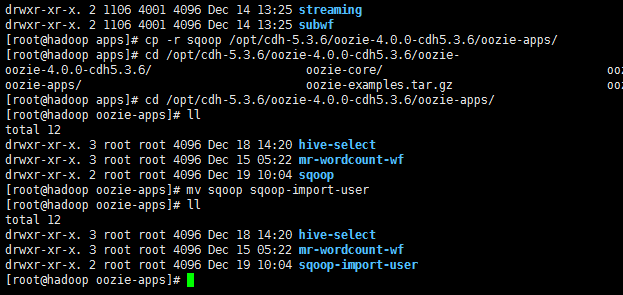
2:拷贝hive用的jar包

方式一:
3:编辑job.properties
 #

 # Licensed to the Apache Software Foundation (ASF) under one

 # or more contributor license agreements.  See the NOTICE file

 # distributed with this work for additional information

 # regarding copyright ownership.  The ASF licenses this file

 # to you under the Apache License, Version 2.0 (the

 # "License"); you may not use this file except in compliance

 # with the License.  You may obtain a copy of the License at

 #

 #      http://www.apache.org/licenses/LICENSE-2.0

 #

 # Unless required by applicable law or agreed to in writing, software

 # distributed under the License is distributed on an "AS IS" BASIS,

 # WITHOUT WARRANTIES OR CONDITIONS OF ANY KIND, either express or implied.

 # See the License for the specific language governing permissions and

 # limitations under the License.

 #

 nameNode=hdfs://hadoop:8020

 jobTracker=hadoop:8032

 queueName=default

 oozieAppsRoot=user/root/oozie-apps

 oozieDataRoot=user/root/oozie/datas

 oozie.use.system.libpath=true

 oozie.wf.application.path=${nameNode}/${oozieAppsRoot}/sqoop-import-user

 outputDir=sqoop-import-user/output
4.编辑workflow.xml
注意 在这里如果要指定sqoop导出数据的格式 要用双引号 单引号没效果的
而且只识别单字符 不识别多字符 这里的$$$ 导出的数据格式 是 $
 <?xml version="1.0" encoding="UTF-8"?>

 <!--

   Licensed to the Apache Software Foundation (ASF) under one

   or more contributor license agreements.  See the NOTICE file

   distributed with this work for additional information

   regarding copyright ownership.  The ASF licenses this file

   to you under the Apache License, Version 2.0 (the

   "License"); you may not use this file except in compliance

   with the License.  You may obtain a copy of the License at

        http://www.apache.org/licenses/LICENSE-2.0

   Unless required by applicable law or agreed to in writing, software

   distributed under the License is distributed on an "AS IS" BASIS,

   WITHOUT WARRANTIES OR CONDITIONS OF ANY KIND, either express or implied.

   See the License for the specific language governing permissions and

   limitations under the License.

 -->

 <workflow-app xmlns="uri:oozie:workflow:0.5" name="sqoop-wf">

     <start to="sqoop-node"/>

     <action name="sqoop-node">

         <sqoop xmlns="uri:oozie:sqoop-action:0.3">

             <job-tracker>${jobTracker}</job-tracker>

             <name-node>${nameNode}</name-node>

             <prepare>

                 <delete path="${nameNode}/${oozieDataRoot}/${outputDir}"/>

             </prepare>

             <configuration>

                 <property>

                     <name>mapred.job.queue.name</name>

                     <value>${queueName}</value>

                 </property>

             </configuration>

             <command>import --connect jdbc:mysql://172.16.71.27:3306/babasport --username root --password root --table bbs_buyer --target-dir /user/root/oozie/datas/sqoop-import-user/output --fields-terminated-by "$$$" --num-mappers 1</command>

         </sqoop>

         <ok to="end"/>

         <error to="fail"/>

     </action>

     <kill name="fail">

         <message>Sqoop failed, error message[${wf:errorMessage(wf:lastErrorNode())}]</message>

     </kill>

     <end name="end"/>

 </workflow-app>
5:上传到hdfs
bin/hdfs dfs -put /opt/cdh-5.3.6/oozie-4.0.0-cdh5.3.6/oozie-apps/sqoop-import-user /user/root/oozie-apps


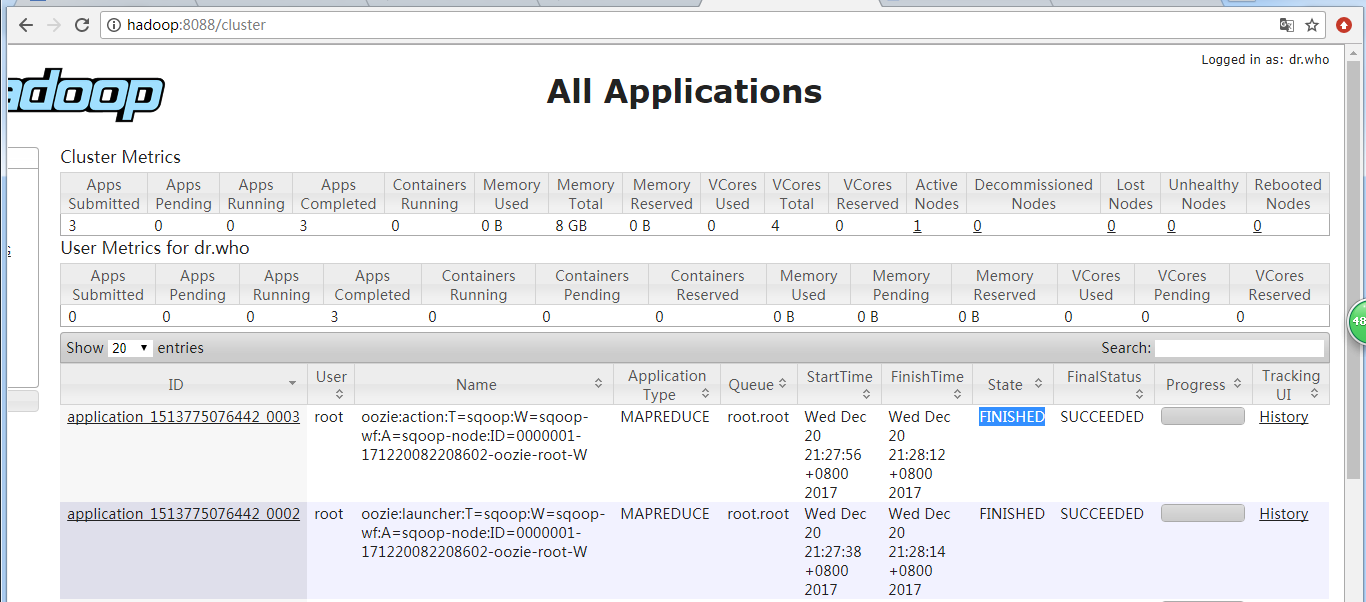
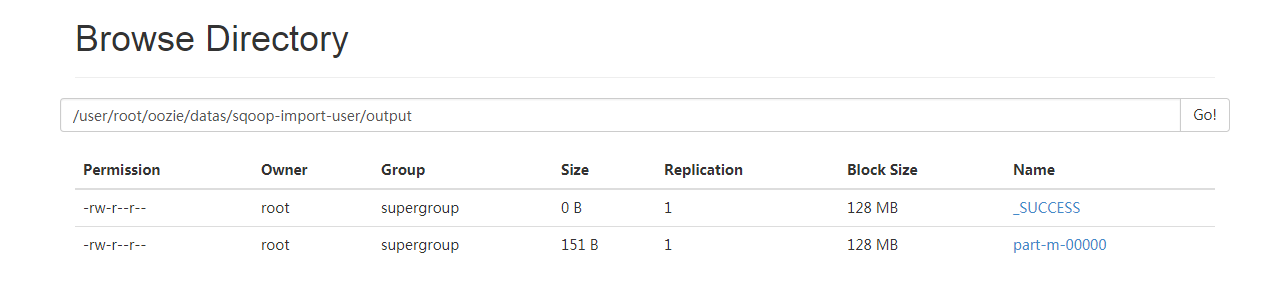
6:启动测试
  bin/oozied.sh start

  export OOZIE_URL=http://localhost:11000/oozie

  bin/oozie job -config oozie-apps/sqoop-import-user/job.properties -run



方式二 : 简化版
配置workflow.xml
 <?xml version="1.0" encoding="UTF-8"?>

 <!--

   Licensed to the Apache Software Foundation (ASF) under one

   or more contributor license agreements.  See the NOTICE file

   distributed with this work for additional information

   regarding copyright ownership.  The ASF licenses this file

   to you under the Apache License, Version 2.0 (the

   "License"); you may not use this file except in compliance

   with the License.  You may obtain a copy of the License at

        http://www.apache.org/licenses/LICENSE-2.0

   Unless required by applicable law or agreed to in writing, software

   distributed under the License is distributed on an "AS IS" BASIS,

   WITHOUT WARRANTIES OR CONDITIONS OF ANY KIND, either express or implied.

   See the License for the specific language governing permissions and

   limitations under the License.

 -->

 <workflow-app xmlns="uri:oozie:workflow:0.5" name="sqoop-wf">

     <start to="sqoop-node"/>

     <action name="sqoop-node">

         <sqoop xmlns="uri:oozie:sqoop-action:0.3">

             <job-tracker>${jobTracker}</job-tracker>

             <name-node>${nameNode}</name-node>

             <prepare>

                 <delete path="${nameNode}/${oozieDataRoot}/${outputDir}"/>

             </prepare>

             <configuration>

                 <property>

                     <name>mapred.job.queue.name</name>

                     <value>${queueName}</value>

                 </property>

             </configuration>

             <command>import --options-file imp-user.sql</command>

         </sqoop>

         <ok to="end"/>

         <error to="fail"/>

     </action>

     <kill name="fail">

         <message>Sqoop failed, error message[${wf:errorMessage(wf:lastErrorNode())}]</message>

     </kill>

     <end name="end"/>

 </workflow-app>
编辑sql脚本
 --connect

 jdbc:mysql://172.16.71.27:3306/babasport

 --username

 root

 --password

 root

 --table

 bbs_buyer

 --target-dir

 /user/root/oozie/datas/sqoop-import-user/output

 --fields-terminated-by

 "\t"

 --num-mappers

 1
下列步骤和上述一致
oozie与sqoop的简单案例的更多相关文章
- oozie与hive的简单案例
1.把oozie中自带的hive案例拷贝到 测试目录 /opt/cdh-5.3.6/oozie-4.0.0-cdh5.3.6/oozie-apps下 2. 编辑 job.properties # # ...
- Servlet请求头response应用简单案例
Servlet请求头response应用简单案例:访问AServlet重定向到BServlet,5秒后跳到CServlet,并显示图片: AServlet package cn.yzu; import ...
- winform 通过 html 与swf 交互 简单案例
在上一篇 winform 与 html 交互 简单案例 中讲了winform与html之间的简单交互,接下来的内容是在winform中以html为中转站,实现将swf嵌入winform中并实现交互. ...
- [Design Pattern] Front Controller Pattern 简单案例
Front Controller Pattern, 即前端控制器模式,用于集中化用户请求,使得所有请求都经过同一个前端控制器处理,处理内容有身份验证.权限验证.记录和追踪请求等,处理后再交由分发器把请 ...
- [Design Pattern] Observer Pattern 简单案例
Observer Pattern,即观察者模式,当存在一对多关系,例如一个对象一有变动,就要自动通知被依赖的全部对象得场景,属于行为类的设计模式. 下面是一个观察者模式的简单案例. Observer ...
- [Design Pattern] Mediator Pattern 简单案例
Meditor Pattern,即调解模式,用一个调解类类处理所有的沟通事件,使得降低多对象之间的沟通难度,属于行为类的设计模式.为了方便理解记忆,我也称其为,沟通模式. 下面是一个调解模式的简单案例 ...
- [Design Pattern] Iterator Pattern 简单案例
Iterator Pattern,即迭代时模式,按照顺序依次遍历集合内的每一个元素,而不用了解集合的底层实现,属于行为类的设计模式.为了方便理解记忆,我也会称其为遍历模式. 下面是一个迭代器模式的简单 ...
- [Design Pattern] Command Pattern 简单案例
Command Pattern, 即命令模式,把一个命令包裹在一个对象里面,将命令对象传递给命令的执行方,属于行为类的设计模式 下面是命令模式的一个简单案例. Stock 代表被操作的对象.Order ...
- [Design Pattern] Proxy Pattern 简单案例
Proxy Pattern, 即代理模式,用一个类代表另一个类的功能,用于隐藏.解耦真正提供功能的类,属于结构类的设计模式. 下面是 代理模式的一个简单案例. Image 定义接口,RealImage ...
随机推荐
- HTMLA内联框架
<head> <meta charset="utf-8" /> <title>内联框架</title> </head> ...
- (转)ActiveMQ的重连机制
花了一天的时间,终于搞明白了我的疑问. failover://(tcp://localhost:6168)?randomize=false&initialReconnectDelay=100& ...
- MySQL 分组排序问题
SQL好久不写了,有些生疏了,一个分组排序问题想了快半天,整理下. 学生表 CREATE TABLE `t_student` ( `id` bigint(20) NOT NULL AUTO_INCRE ...
- 【数据库】SQL两表之间:根据一个表的字段更新另一个表的字段
1. 写法轻松,更新效率高:update table1 set field1=table2.field1,field2=table2.field2from table2where table1.id= ...
- CF487E-Tourists
题意 给出一个\(n\)个点\(m\)条边的无向图,给出每个点的初始点权,\(q\)次操作: 修改一个点的点权 询问两点间的所有路径中最小点权最小的路径上的最小点权 \(n,m,q\le 10^5,w ...
- [Code Festival 2017 qual A] B: flip
题意 给出一个n行m列初始全白的矩阵,每次可以翻转一行/一列的全部格子的颜色.问任意次操作后能否使得恰好有k个黑色格子. n,m<=1000 分析 显然要么翻转一次要么不翻转. 最终黑色格子数只 ...
- 【bzoj1495】[NOI2006]网络收费 暴力+树形背包dp
题目描述 给出一个有 $2^n$ 个叶子节点的完全二叉树.每个叶子节点可以选择黑白两种颜色. 对于每个非叶子节点左子树中的叶子节点 $i$ 和右子树中的叶子节点 $j$ :如果 $i$ 和 $j$ 的 ...
- [三]SpringBoot 之 热部署
如下配置 <plugin> <groupId>org.springframework.boot</groupId> <artifactId>spring ...
- Day 2 笔记 数据结构
Day 2 笔记 数据结构 1.栈.队列.链表等数据结构都是线性数据结构 2.树状数据结构:二叉堆,线段树,树状数组,并查集,st表... 优先队列其实与二叉堆的存储方式并不相同. 一.二叉堆 1.二 ...
- 在洛谷3369 Treap模板题 中发现的Splay详解
本题的Splay写法(无指针Splay超详细) 前言 首先来讲...终于调出来了55555...调了整整3天..... 看到大部分大佬都是用指针来实现的Splay.小的只是按照Splay的核心思想和原 ...