
OpenGL位图函数
【OpenGL位图函数】
1、OpenGL中glBitmap用于绘制一个二值阵列。

When drawn, the bitmap is positioned relative to the current raster position, and framebuffer pixels corresponding to 1s in the bitmap are written using the current raster color or index. Frame-buffer pixels corresponding to zeros in the bitmap are not modified.
glBitmap常用于绘制字体。
下图是一个bitmap:
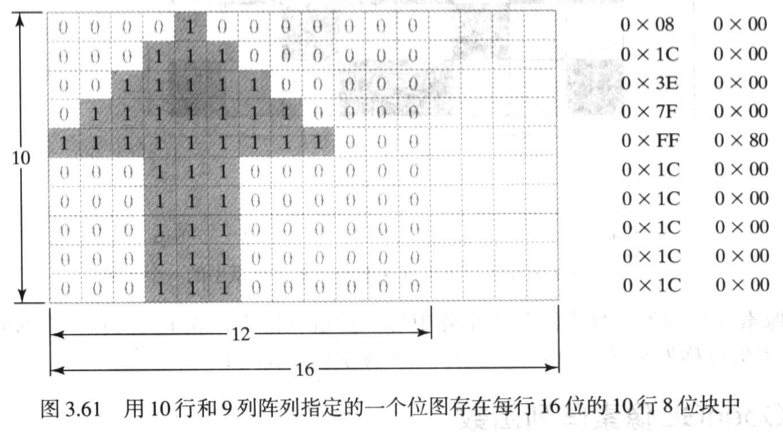
使用下同的程序段可将图3.61中的位图案应用于帧缓冲中:
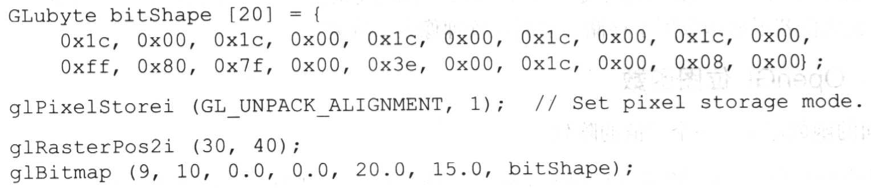
2、glRasterPos*()用于指定当前屏幕位置。
3、glPixelStorei(GL_UNPACK_ALIGNMENT, 1)。
Specifies the alignment requirements for the start of each pixel row in memory. The allowable values are 1 (byte-alignment), 2 (rows aligned to even-numbered bytes), 4 (word alignment), and 8 (rows start on double-word boundaries).
4、glDrawPixels。
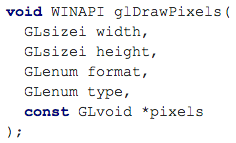
format:The format of the pixel data.
type:The data type for pixels.可取以下的值:
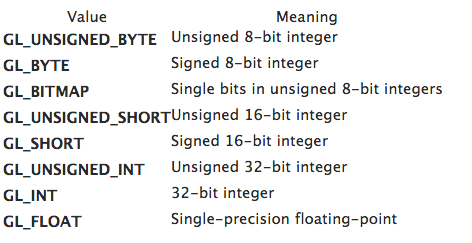
如果format为GL_RGB,同type指定每一个component的类型,如下:

5、glReadPixels(xmin, ymin, width, height, dataFormat, dataTpye, array)
dataFormat可取值为:GL_DEPTH_COMPONENT。
Depth values are read from the depth buffer. Each component is converted to floating point such that the minimum depth value maps to 0.0 and the maximum value maps to 1.0. Each component is then multiplied by GL_DEPTH_SCALE, added to GL_DEPTH_BIAS, and finally clamped to the range [0,1].
6、glReadBuffer(GLenum mode)、glDrawBuffer(GLenum mode)。
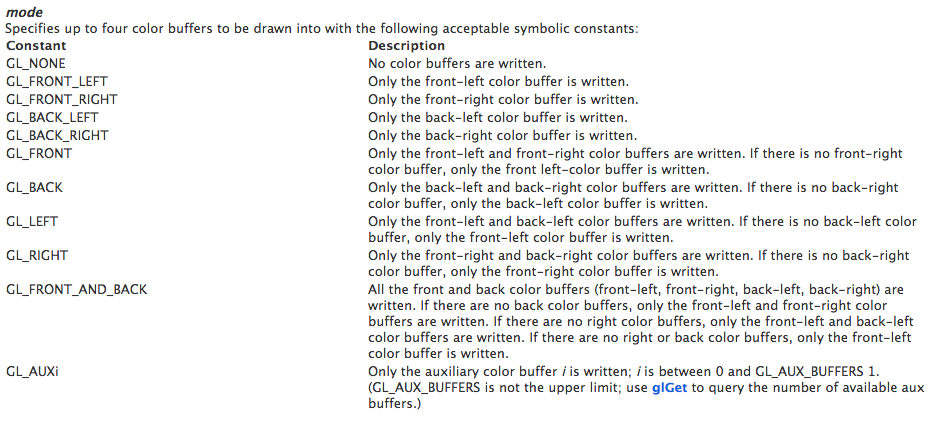
The default value is GL_FRONT for single-buffered contexts, and GL_BACK for double-buffered contexts.
当双缓冲时,默认的draw-buffer是GL_BACK。
7、glCopyPixels(xmin, ymin, width, height, pixelValues);
pixelValues被赋予GL_COLOR、GL_DEPTH、GL_STENCIL。
此函数将一块像素从源缓存复制到目标缓存。源缓存用glReadBuffer来选择,目标缓存用glDrawBuffer命令选择。
8、源像素与目标像素可混合,通过以下2个方法设置混合方式。

logicOp可被赋予多种符号常量,GL_AND、GL_OR、GL_XOR、GL_COPY_INVERTED、GL_INVERTED、GL_CLEAR。默认值为GL_COPY。
参考:
1、http://technet.microsoft.com/zh-cn/library/ms537014
2、http://technet.microsoft.com/zh-cn/library/ms537240
3、http://technet.microsoft.com/zh-cn/dd318840(v=vs.80).aspx
4、http://msdn.microsoft.com/zh-cn/subscriptions/ms537041(v=vs.85).aspx
5、http://technet.microsoft.com/zh-cn/library/ms537248
OpenGL位图函数的更多相关文章
- 【计算机图形学】openGL常用函数
OpenGL常用函数 glAccum 操作累加缓冲区 glAddSwapHintRectWIN 定义一组被 SwapBuffers拷贝的三角形 glAlphaFunc允许设置alpha检测 ...
- opengl常用函数
glAccum 操作累加缓冲区 glAddSwapHintRectWIN 定义一组被 SwapBuffers拷贝的三角形 glAlphaFunc允许设置alpha检测功能 glAreTex ...
- 【OpenGL游戏开发之三】OpenGl核心函数库汇总
OpenGl核心函数库 glAccum 操作累加缓冲区 glAddSwapHintRectWIN 定义一组被SwapBuffers拷贝的三角形 glAlphaFunc允许设置alpha检测功能 glA ...
- openGL初学函数解释汇总
openGL初学函数解释汇总 1.GLUT工具包提供的函数 //GLUT工具包所提供的函数 glutInit(&argc, argv);//对GLUT进行初始化,这个函数必须在其它的GLUT使 ...
- # OpenGL常用函数详解(持续更新)
OpenGL常用函数详解(持续更新) 初始化 void glutInit(int* argc,char** argv)初始化GULT库,对应main函数的两个参数 void gultInitWindo ...
- OpenGL一些函数详解(二)
OpenGL ES顶点数据绘制技巧 在OpenGL中,绘制一个长方体,需要将每个顶点的坐标放在一个数组中.保存坐标时有一些技巧(由于字母下标不好表示,因此将下标表示为单引号,如A1将在后文中表示为A' ...
- OpenGL位图变形问题
因为初次接触OpenGL,图形学也后悔当初在学校没有认真学,隐约记得教授当时讲过图像变形的问题,而且我的bitmap也是2的N次方:16*16的,在网络上找到的大多都是一句话:“视口的纵横比一般和视景 ...
- OpenGL glMatrixMode() 函数解释与例子
概述 glMatrixMode() 用以指定当前要操作的矩阵,可选值有 GL_MODELVIEW(模型视图,默认值),GL_PROJECTION(投影),GL_TEXTURE(纹理),GL_COLOR ...
- OpenGL——二次曲面函数(球面-圆锥面-圆柱面)
代码: #include<iostream> #include <math.h> #include<Windows.h> #include <GL/glut. ...
随机推荐
- functool.wraps and functools.partial
functools.partial 通过包装手法,允许我们 "重新定义" 函数签名. 通常是将函数的部分参数给固定下来, 从而形成一个输入参数更少的新函数. functool.w ...
- oracle之 RAC Interconnect之HAIP
0. 背景 Oracle 从11.2.0.2开始引入了一个新特性叫做Redundant Interconnect,简称HAIP.HAIP的目的用来代替操作系统级别的网卡绑定以实现Active-Acti ...
- Android 操作文件系统失败: Read-only file system
现象: $ adb push /d/Aaron/Desktop/libreference-ril-LS.so system/lib failed to copy 'D:/Aaron/Desktop/l ...
- proxool 连接池
今天配置proxool 连接池,发现可配置属性非常多,以前也只是用,没总结过,今天查了下网上的资料,总结一下 方便你我.其实网上很多英文资料都很全,网上很多人就是考翻译老外的文章赚些流量,其实也没啥意 ...
- Linux c- libevent
libevent是一个事件触发的网络库,适用于windows.linux.bsd等多种平台,内部使用select.epoll.kqueue等系统调用管理事件机制.著名分布式缓存软件memcached也 ...
- 黄聪:如何使用Add-on SDK开发一个自己的火狐扩展
火狐开放了扩展的开发权限给程序员们,相信很多人都会希望自己做一些扩展来方便一些使用. 我最近做一些项目也需要开发一个火狐扩展,方便收集自己需要的数据,因此研究了几天怎么开发,现在已经差不多完成了,就顺 ...
- Excel不同工作簿之间提取信息
Sub 不同工作簿间提取信息() '用于单个字段信息的提取: Dim w As Workbook, wb1 As Workbook, wb2 As Workbook, wb3 As Workbook ...
- rtmp发送H264及aac的音视频
RTMP推送的音视频流的封装形式和FLV格式相似,由此可知,向FMS推送H264和AAC直播流,需要首先发送"AVC sequence header"和"AAC sequ ...
- git 查看&修改用户名
$ git config user.name 查看用户名 $ git config user.email 查看邮箱 $ git config --global user.name " ...
- Appium+python自动化25-windows版appium_desktop_V1.7.1
appium_desktop_v1.2.6 1.appium_desktop在github上最新下载地址:releases/tag/v1.2.6 2.下载后傻瓜式安装,然后启动appium,这个界面跟 ...