
InstallShield Build Error -1014: Cannot rename directory <PATH> to <PATH>\folder.Bak.
InstallSheild执行Build结果错误:

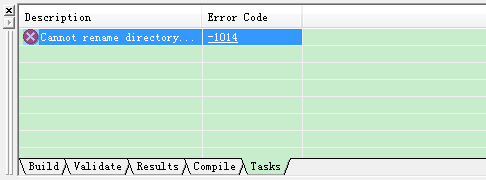
错误详细信息:
Cannot rename directory <PATH> to <PATH>\folder.Bak. Windows Explorer or a DOS prompt may be pointing to a subfolder of the release output folder (Disk1) or to the Interim folder, locking it. Change the current directory. Close any open files in the Disk1 folder. Close Msidb.exe if it is open.
解决办法:Open Release Folder

将Disk1文件夹删除
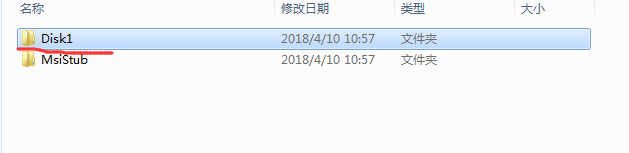
具体删除方法:
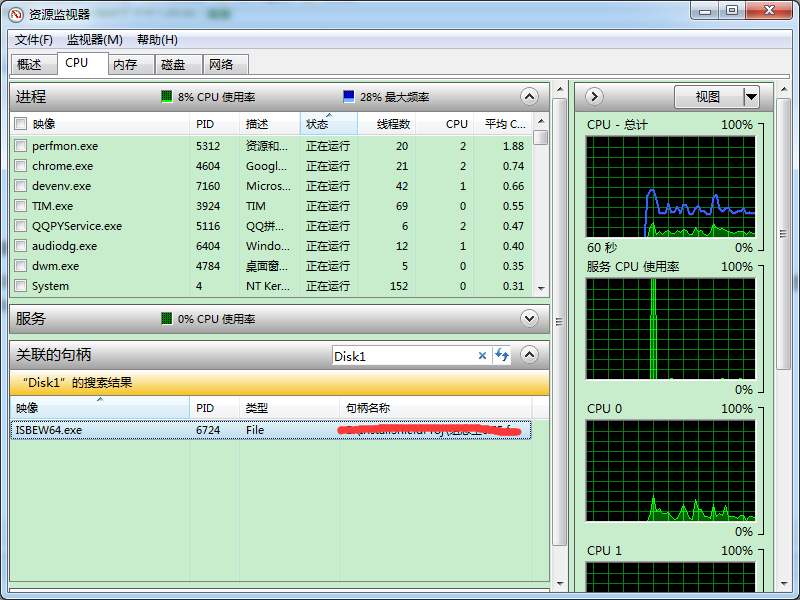
打开“任务管理器”——选择“性能”标签下的“资源监视器”——在“CPU”标签下的“关联的句柄”栏输入该文件或文件夹的名称。
比如,我要删除的文件夹叫“Disk1"——待搜索出结果后逐个右击关联的进程,并选择结束进程。——待所有的关联进程都结束完毕后(右击搜索出的进程,此时“结束进程”是灰色的),再对文件或文件夹进行操作就行了。
个人觉得,当你不知道哪个程序在占用时,这个方法很不错,很实用。亲测!
InstallShield Build Error -1014: Cannot rename directory <PATH> to <PATH>\folder.Bak.的更多相关文章
- virtualbox 安装 extension pack 方法以及出现 "The installer failed with exit code 1: VBoxExtPackHelperApp.exe: error: Failed to rename the temporary directory to the final one"的解决办法
virtualbox 的版本:5.1.26 下载地址:https://www.virtualbox.org/wiki/Downloads extension pack 的版本:5.1.26 ...
- rpm build error: invalid predicate
rpm build error error message:/usr/lib/rpm/find-debuginfo.sh /usr/src/redhat/BUILD/RPMS find: invali ...
- maven:log4j:WARN No appenders could be found for logger (loggerInfo).或者maven build error:org.apache.maven.lifecycle.LifecycleExecutionExceptio
maven在build构建时,加载资源文件时需要配置资源文件插件: 1,在pom.xml文件中加入 <build> <finalName>${project.build.tar ...
- Build Error 6041: Internal build error
Note: Following content is reprinted from the Original article Flexera : Build Error 6041. Only for ...
- Python3.6安装报错 configure: error: no acceptable C compiler found in $PATH
安装python的时候出现如下的错误: [root@master ~]#./configure --prefix=/usr/local/python3.6 checking build system ...
- 【linux】Python3.6安装报错 configure: error: no acceptable C compiler found in $PATH
安装python的时候出现如下的错误: [root@master ~]#./configure --prefix=/usr/local/python3.6 checking build system ...
- 关于configure: error: no acceptable C compiler found in $PATH
Linux系统在安装python3的时候报错: $ ./configure --prefix=/usr/local/python3 checking build system type... x86_ ...
- 【已解决】unity4.2.0f4 导出Android工程报错:Error building Player: ArgumentException: Illegal characters in path. [unity导出android工程 报错,路径含有非法字符]
使用unity3D开发的一个客户端,需要导出为Android工程,然后接入一些第三方android SDK. unity版本 操作系统为: OS 名称: Microsoft Windows 7 旗舰版 ...
- 用VS不同版本打开项目,报错:MS Build Error MSB4019: Microsoft.WebApplication.targets was not found
本例是在用VS2008打开项目是报错 未找到C:\Program Files\MSBuild\Microsoft\VisualStudio\V10.0 In the last article Buil ...
随机推荐
- java FileI(O)nputStream为什么比BufferedI(O)utputStream慢?
因为buffered多了一个缓冲区,读和写都是先把硬盘或者内存中的数据放到内存中一块缓存区域,到一定大小读写到硬盘或者内存 package io; import java.io.*; public ...
- 利用JMX统计远程JAVA进程的CPU和Memory---jVM managerment API
从JAVA 5开始,JDK提供了一些JVM检测的API,这就是有名的java.lang.management 包,包里提供了许多MXBean的接口类,可以很方便的获取到JVM的内存.GC.线程.锁.c ...
- Appium环境的安装与配置,Python测试脚本测试
Appium自动化测试系列1 - Appium环境的安装与配置 发表于4个月前(2015-01-27 14:34) 阅读(803) | 评论(0) 0人收藏此文章, 我要收藏 赞0 寻找 会’偷懒 ...
- Android -BLE蓝牙小DEMO
代码地址如下:http://www.demodashi.com/demo/13890.html 原文地址: https://blog.csdn.net/vnanyesheshou/article/de ...
- Android 图片混排富文本编辑器控件
概述 一个Android 图片混排富文本编辑器控件(仿兴趣部落) 详细 代码下载:http://www.demodashi.com/demo/12032.html 一.一个Android 图片混排富文 ...
- linux中echo的使用方法
1.echo命令我们经常使用的选项有两个,一个是-n,表示输出之后不换行.另外一个是-e,表示对于转义字符按对应的方式处理,假设不加-e那么对于转义字符会按普通字符处理. 2.echo输出时的转义字符 ...
- 【转帖】Service Discovery: 6 questions to 4 experts
https://highops.com/insights/service-discovery-6-questions-to-4-experts/ What’s Service Discovery? I ...
- Zookeeper研究和应用
http://www.searchtb.com/2011/01/zookeeper-research.html zookeeper简介 zookeeper是一个开源分布式的服务,它提供了分布式协作,分 ...
- 使用jquery的 uploadify,在谷歌浏览器上总会崩溃的解决方法
最近做的项目使用了jquery的uploadify,但是在谷歌浏览器测试总是会出现崩溃.如: 因为是java项目. 解决的办法是: 给引入的js加上一个参数,时间戳就可以,防止缓存,使每一次都请求.( ...
- Django URL中r的意思
例如: urlpatterns = patterns('', # ... (r'^time/plus/\d+/$', hours_ahead), # ... ) 正则表达式字符串的开头字母“r”. 它 ...