
Asp.net vNext 学习之路(二)
View component(视图组件)应该是MVC6 新加的一个东西,类似于分部视图。本文将演示在mvc 6中 怎么添加视图组件以及怎么在视图中注入一个服务。
本文包括以下内容:
1,创建一个新的asp.net vNext 项目。
2,安装 KVM(K version manager)。
3,如何运行EF 数据库迁移。
4,什么是 view component。
5,如何在 mvc 6 中添加一个view component 。
6,如何在view 中注入一个服务。
一 创建一个新的asp.net vNext 项目
打开vs 2015 。 File>New >Project>Templates>C#>Web>Asp.Net Application 点击OK。然后选择 New ASP.NET Project :
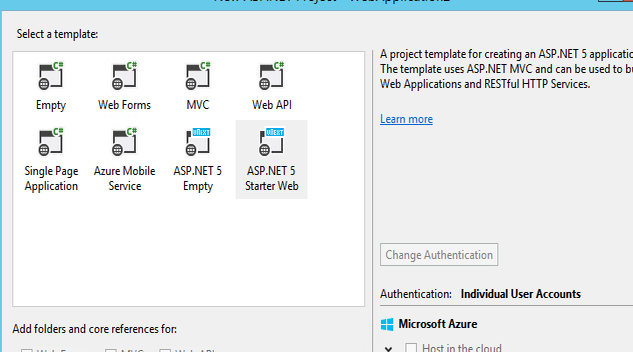
由于是演示我就在Home的文件下新建一个视图Test.cshtml 相应的HomeController 添加如下代码:
    public IActionResult Test()

    {

        return View();

     }
在Models 文件夹里新建一个TestModel类:
    public class TestModel

     {

         public int ID { get; set; }

         public string Title { get; set; }

     }
然后在 Models\IdentityModels.cs 文件的 ApplicationDbContext类中添加一句代码:
public DbSet<TestModel> TestItems { get; set; }
表示我们加了一张表在数据库中。但是现在运行肯定会报错,我们需要安装KVM。
二 安装 KVM(K version manager)
首先在管理员权限下运行cmd。然后把下面这句代码拷进去。
@powershell -NoProfile -ExecutionPolicy unrestricted -Command "iex ((new-object net.webclient).DownloadString('https://raw.githubusercontent.com/aspnet/Home/master/kvminstall.ps1'))"
如果成功的话说明KVM安装成功了。

然后重新打开一个cmd 。输入 KVM upgrade 成功之后我们就可以做EF的迁移了。
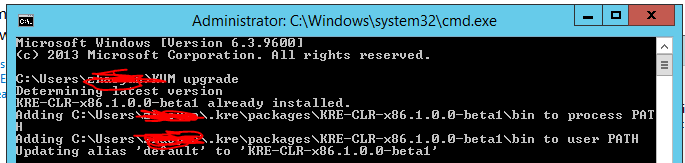
三 如何运行EF 数据库迁移
首先打开cmd 然后我们需要进入项目的当前目录:接下来运行 k ef migration add initial k ef migration applay
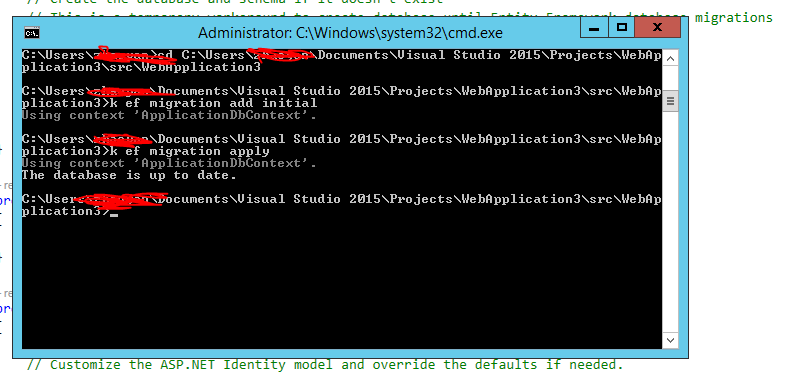
ok 这样 ef 就迁移好了,我们会发现项目中多了一些东西
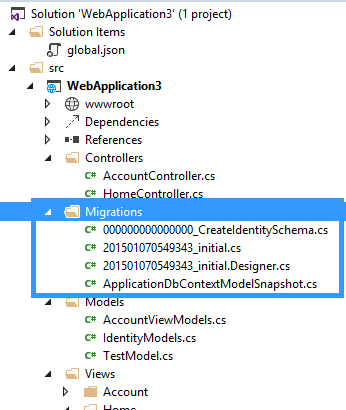
然后我们需要在Startup.cs 中的 Configure 方法中 添加如下代码:
     app.UseServices(service =>

             {

                 service.AddEntityFramework()

                           .AddSqlServer()

                           .AddDbContext<ApplicationDbContext>(options => options.UseSqlServer(

                               Configuration.Get("Data:DefaultConnection:ConnectionString")));

             });
在HomeController 中部分代码:
    ApplicationDbContext context = new ApplicationDbContext();

         public IActionResult Index()

         {

             return View();

         }

         public IActionResult Test()

         {

             context.Add(new TestModel() { Title = "test1" });

             context.SaveChanges();

             List<TestModel> list = context.Set<TestModel>().ToList();

             return View(list);

         }

         protected override void Dispose(bool disposing)

         {

             base.Dispose(disposing);

             context.Dispose();

         }
Test.cshtml 文件代码:
 @model List<WebApplication3.Models.TestModel>

 @{

     ViewBag.Title = "Test";

 }

 <table class="table  table-hover table-bordered  table-condensed">

     <thead>

         <tr>

             <th>ID</th>

             <th>Title</th>

         </tr>

     </thead>

     <tbody>

         @foreach (var item in Model)

         {

         <tr>

             <td>@item.ID</td>

             <td>@item.Title</td>

         </tr>

         }

     </tbody>

 </table>
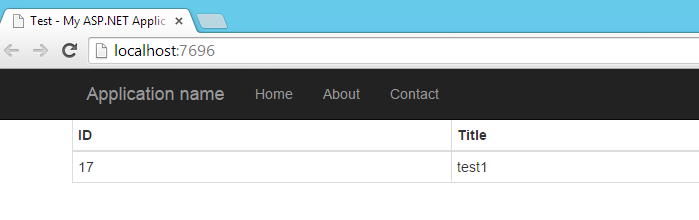
Ok 运行一下项目效果如下:
四 什么是 view component
作为Mvc6 新添加的东西和之前的partial view 还是比较类似的。但是要比partial view 更加的灵活和强大。和controller 和 view的关系一样是关注点分离的, component 相当于是一个mini的controller
它是去响应局部的模块而非是完整的。我们可以用view component 来解决更加复杂的页面上的问题。它有两部分组成 一个后台类和前台的Razor view (可以回掉后台类的方法)。
五 如何在 mvc 6 中添加一个view component
首先我在项目中新建一个ViewComponents的文件夹(这个文件夹名字可以随意命名),然后文件夹里新建一个 TestViewComponent 类 :
  public class TestViewComponent : ViewComponent

     {

         ApplicationDbContext context;

         public TestViewComponent(ApplicationDbContext context)

         {

             this.context = context;

         }

         public IViewComponentResult Invoke(int max)

         {

             var item = context.Set<TestModel>().Where(p => p.ID > max).ToList();

             return View(item);

         }

     }
然后我们需要添加一个 component view 。在 Home文件夹新建Components(必须这样命名)文件夹然后 里面新建一个文件夹 Test(这个名字是和之前的那个TestComponent 相匹配的)
Test 文件夹里新建 一个视图,随意命名 default.cshtml
 @model List<WebApplication3.Models.TestModel>

 @{

     // ViewBag.Title = "Home Page";

 }

 <h3>Priority Items</h3>

 <ul>

     @foreach (var item in Model)

     {

         <li>@item.ID ----- @item.Title</li>

     }

 </ul>
那么我们就可以去调这个view component了 在Test.cshtml
 @model List<WebApplication3.Models.TestModel>

 @{

     ViewBag.Title = "Test";

 }

 <table class="table  table-hover table-bordered  table-condensed">

     <thead>

         <tr>

             <th>ID</th>

             <th>Title</th>

         </tr>

     </thead>

     <tbody>

         @foreach (var item in Model)

         {

         <tr>

             <td>@item.ID</td>

             <td>@item.Title</td>

         </tr>

         }

     </tbody>

 </table>

 <div class="row">

     @Component.Invoke("Test", );

 </div>
Ok 看一下效果 :
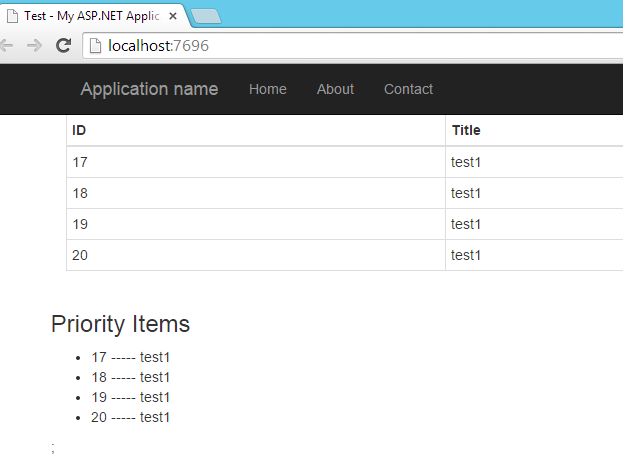
那个view components 的意思是所有ID>2的列表。
六 如何在view 中注入一个服务
首先新建一个StaticService 类
  public class StatisticsService

     {

         private ApplicationDbContext db;

         public StatisticsService(ApplicationDbContext db)

         {

             this.db = db;

         }

         public int GetCount()

         {

             return db.TestItems.Count();

         }

     }
然后Test.cshtml 代码:
 @model List<WebApplication3.Models.TestModel>

 @inject WebApplication3.Models.StatisticsService service

 <table class="table  table-hover table-bordered  table-condensed">

     <thead>

         <tr>

             <th>ID</th>

             <th>Title</th>

         </tr>

     </thead>

     <tbody>

         @foreach (var item in Model)

         {

         <tr>

             <td>@item.ID</td>

             <td>@item.Title</td>

         </tr>

         }

     </tbody>

 </table>

 <div class="row">

     @Component.Invoke("Test", 2);

 </div>

 <h1>

    Total: @service.GetCount()

 </h1>
在 startup.cs 中注册该类:
     public void ConfigureServices(IServiceCollection services)

         {

             // Add EF services to the services container.

             services.AddEntityFramework(Configuration)

                 .AddSqlServer()

                 .AddDbContext<ApplicationDbContext>();

             // Add Identity services to the services container.

             services.AddDefaultIdentity<ApplicationDbContext, ApplicationUser, IdentityRole>(Configuration);

             // Add MVC services to the services container.

             services.AddMvc();

             services.AddTransient<StatisticsService>();

             // Uncomment the following line to add Web API servcies which makes it easier to port Web API 2 controllers.

             // You need to add Microsoft.AspNet.Mvc.WebApiCompatShim package to project.json

             // services.AddWebApiConventions();

         }
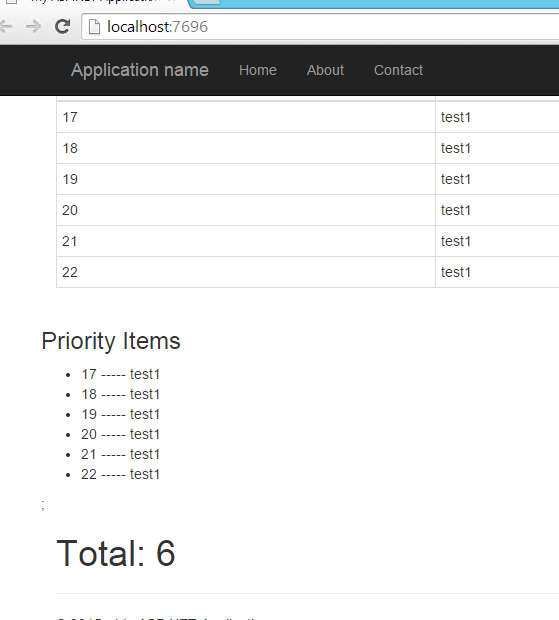
运行 看效果:
七 总结
Mvc 6 还是加了不少的东西的,不过只会让以后的开发会原来越简单。
Asp.net vNext 学习之路(二)的更多相关文章
- Asp.net vNext 学习之路(三)
asp.net vNext 对于构建asp.net 程序带来了一些重大的改变,让我们开发asp.net 程序的时候更加的方便和高效. 1,可以很容易的去管理客户端的包比如jquery,bootstra ...
- Asp.net vNext 学习之路(一)
概述 asp.net vNext 也叫 asp.net 5.0,意思是微软推出的下一个版本的asp.net.可以说是微软对asp.net的一个比较重大的重新设计, asp.net vNext是一 个比 ...
- Asp.net vNext 学习3
Asp.net vNext 学习之路(三) asp.net vNext 对于构建asp.net 程序带来了一些重大的改变,让我们开发asp.net 程序的时候更加的方便和高效. 1,可以很容易的去管理 ...
- Asp.net vNext 学习1
Asp.net vNext 学习之路(一) 概述 asp.net vNext 也叫 asp.net 5.0,意思是微软推出的下一个版本的asp.net.可以说是微软对asp.net的一个比较重大的重新 ...
- Redis——学习之路二(初识redis服务器命令)
上一章我们已经知道了如果启动redis服务器,现在我们来学习一下,以及如何用客户端连接服务器.接下来我们来学习一下查看操作服务器的命令. 服务器命令: 1.info——当前redis服务器信息 s ...
- [整理]ASP.NET vNext学习资源
http://www.hanselman.com/blog/IntroducingASPNETVNext.aspx http://blogs.msdn.com/b/dotnet/archive/201 ...
- zigbee学习之路(二)点亮LED
一.前言 今天,我来教大家如何点亮led,这也是学习开发板最基础的步骤了. 二.原理分析 cc2530芯片跟虽然是51的内核,但是它跟51单片机还是有区别的,51单片机不需要对IO口进行配置,而cc2 ...
- ASP.NET MVC 学习之路-4
本文在于巩固基础 模型绑定 从URL 获取值 public ActionResult About(int id) { ViewBag.Id = id; return View(); } @{ View ...
- ASP.NET MVC 学习之路-1
本文在于巩固基础 学习参考书籍:ASP.NET MVC4 Web编程 首先确定我们学习MVC的目标: 我们学习ASP.NET MVC的目的在于开发健壮的.可维护的Web应用,当然这需要一定的知识基础, ...
随机推荐
- PID控制算法的C语言实现五 积分分离的PID控制算法C语言实现
在普通PID控制中,引入积分环节的目的主要是为了消除静差,提高控制精度.但在过程的启动.结束或大幅度增减设定时,短时间内系统输出有很大的偏差,会造成PID运算的积分积累,致使控制量超过执行机构可能允许 ...
- java面试之闭包(closure)
今天在学习Openresty的时候回顾了下闭包这个问题,感觉很久没有深入的了解这块的内容的,只是之前js的时候学习过闭包,突然一问,感觉不记得闭包了: 看了一个比较有趣的答案: 闭包,顾名思义,就是把 ...
- socket--接受大数据
一.简单ssh功能 1.1 实现功能 在前面的一篇博客中,我们已经实现了一个简单的类似Linux服务器ssh功能的小程序,可以输入系统命令来返回命令运行结果,今天我们也以此开始,看看socket如何来 ...
- duilib 增加gif控件(基于gdi+,可控制播放暂停,自动设置大小)
转载请说明原出处,谢谢~~:http://blog.csdn.net/zhuhongshu/article/details/42502081 因为项目需要我需要给duilib增加一个gif控件,目前已 ...
- duilib 修复Text控件无法设置宽度的bug,增加自动加算宽度的属性
转载请说明原出处,谢谢~~: 今天有朋友反映CTextUI控件无法设置宽度,于是修复了这个bug,顺便给Text控件增加了一个自动计算宽度的属性,描述如下 <Attribute name=&qu ...
- Tensorflow实现学习率衰减
Tensorflow实现学习率衰减 觉得有用的话,欢迎一起讨论相互学习~Follow Me 参考文献 Deeplearning AI Andrew Ng Tensorflow1.2 API 学习率衰减 ...
- uva 1639 Candy (对数处理精度)
https://vjudge.net/problem/UVA-1639 有两个盒子各有n(n≤2*10 5 )个糖,每天随机选一个(概率分别为p,1-p),然后吃一颗糖. 直到有一天,打开盒子一看,没 ...
- 数学:FFT
在信息学竞赛中FFT只有一个用处那就是加速多项式的乘法 多项式乘法原本的时间复杂度是O(n^2)的,然后经过FFT之后可以优化为O(nlogn) FFT就是将系数表示法转化成点值表示法相乘,再由点值表 ...
- 遍历hashmap
转]Java中HashMap遍历的两种方式原文地址: http://www.javaweb.cc/language/java/032291.shtml 第一种: Map map = new HashM ...
- 更改gradle的java的class文件输出目录的结构
group 'com.thinkvenus.common'version '1.0-SNAPSHOT' apply plugin: 'java' sourceCompatibility = 1.8 r ...