
Kaggle系列1:手把手教你用tensorflow建立卷积神经网络实现猫狗图像分类
去年研一的时候想做kaggle上的一道题目:猫狗分类,但是苦于对卷积神经网络一直没有很好的认识,现在把这篇文章的内容补上去。(部分代码参考网上的,我改变了卷积神经网络的网络结构,其实主要部分我加了一层1X1的卷积层,至于作用,我会在后文详细介绍)
题目地址:猫狗大战
同时数据集也可以在上面下载到。
既然是手把手,那么就要从前期的导入数据开始:
- 导入数据
- #import sys, io
- #sys.stdout = io.TextIOWrapper(sys.stdout.buffer,encoding='utf8') # Change default encoding to utf8
- #coding=utf-8
- import tensorflow as tf
- import numpy as np
- import os
- train_dir='G:/data/CatVSdogtrain/train/' #训练数据的文件夹,这里你们要换成自己的
- file_dir=train_dir
- #定义一个函数把训练样本和测试样本集合起来
- def get_files(file_dir):
- '''''
- input:
- 训练图片放的图片集
- returns:
- 图片列表和标签列表
- '''
- cats=[]
- label_cats=[]
- dogs=[]
- label_dogs=[]
- # file=[]
- for file in os.listdir(file_dir):
- # file=np.hstack[files,file]
- name=file.split(sep='.')
- # print (name)
- if name[0]=='cat':
- cats.append(file_dir+file)
- label_cats.append(0)
- else:
- dogs.append(file_dir+file)
- label_dogs.append(1)
- print ('there is %d cats and %d dogs' %(len(cats),len(dogs)))
- #打乱文件的顺序,其实在获取batch的时候也可以做,但是为了方便还是在这里做了
- image_list=np.hstack((cats,dogs))
- label_list=np.hstack((label_cats,label_dogs))
- temp=np.array([image_list,label_list])
- temp=temp.transpose()
- np.random.shuffle(temp)#打乱顺序函数
- image_list=list(temp[:,0])
- label_list=list(temp[:,1])
- label_list = [int(i) for i in label_list]
- return image_list,label_list
其实这一段没什么好说的,无非就是做好训练样本,和标签。。。。代码仅供参考。
2 get_batch
def get_batch(image,label,image_W,image_H,batch_size,capacity):
#image, label:生成的batch的图像和标签list
#image_w, image_H:图片的大小
#batch_size: 每个batch共有多少张图片
#capacity :队列的容量
# return:图像和标签的batch
# image=image_list
# label=label_list
#转换格式,让python 可以识别的格式,其实就是两个tensor
image=tf.cast(image,tf.string)
label=tf.cast(label,tf.int32)
#生成队列
input_queue=tf.train.slice_input_producer([image,label])
label=input_queue[1]
image_contents=tf.read_file(input_queue[0])
image=tf.image.decode_jpeg(image_contents,channels=3)
##数据增强应该在这里
image = tf.image.resize_image_with_crop_or_pad(image, image_W, image_H)
image=tf.image.per_image_standardization(image)
image_batch,label_batch=tf.train.batch([image,label],batch_size=batch_size,
num_threads=64,capacity=capacity)
label_batch=tf.reshape(label_batch,[batch_size])
image_batch=tf.cast(image_batch,tf.float32)
return image_batch,label_batch
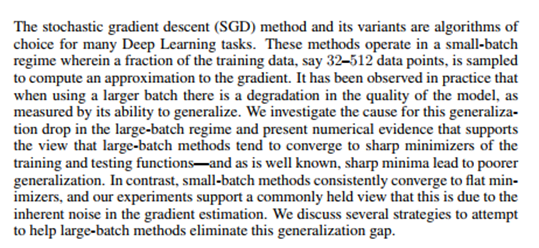
为什么要设置一个batch,一个batch 呢?
如果损失函数是非凸的话,整个样本就算在超级计算机上可以算的动,也会卡在局部最优上,分批训练表示全样本的抽样实现,也就相当于人为引入修正梯度上的采样噪声,使'一路不通找别路'更有可能搜索最优值。
其中LCLR 2017上有一篇文章专门讨论了这个问题:On Large-Batch Training for Deep Learning: Generalization Gap and Sharp Minima
3建立卷积神经网络
import tensorflow as tf
def inference(images,batch_size,n_classes):
''''Build the model
args:
images:images batch, 4D tensor ,tf,float32,[batch_size,width,height,channels]
returns:
output tensor with the computed logits,floar, [batch_size,n_classes]
#conv1,shape=[kernel size, kernel size,channels, kernel numbers]
'''
with tf.variable_scope('conv1') as scope:
weights=tf.get_variable('weights',shape=[1,1,3, 16],dtype=tf.float32,
initializer=tf.truncated_normal_initializer(stddev=0.1,dtype=tf.float32))
biases=tf.get_variable('biases',shape=[16],dtype=tf.float32,
initializer=tf.constant_initializer(0.1))
conv=tf.nn.conv2d(images,weights,strides=[1,1,1,1],padding='SAME')
pre_activation=tf.nn.bias_add(conv,biases)
conv1=tf.nn.relu(pre_activation,name=scope.name)
#poo11 and norm1
with tf.variable_scope('pooling1_lrn') as scope:
pool1=tf.nn.max_pool(conv1,ksize=[1,3,3,1],strides=[1,2,2,1],
padding='SAME',name='pooling1')
normal=tf.nn.lrn(pool1,depth_radius=4,bias=1.0,alpha=0.001/9.0,beta=0.75,name='norm1')
#conv2
with tf.variable_scope('conv2') as scope:
weights=tf.get_variable('weights',shape=[3,3,16, 16],dtype=tf.float32,
initializer=tf.truncated_normal_initializer(stddev=0.1,dtype=tf.float32))
biases=tf.get_variable('biases',shape=[16],dtype=tf.float32,
initializer=tf.constant_initializer(0.1))
conv=tf.nn.conv2d(normal,weights,strides=[1,1,1,1],padding='SAME')
pre_activation=tf.nn.bias_add(conv,biases)
conv2=tf.nn.relu(pre_activation,name=scope.name)
#pool2 and norm2
with tf.variable_scope('pooling1_2rn') as scope:
pool2=tf.nn.max_pool(conv2,ksize=[1,3,3,1],strides=[1,2,2,1],
padding='SAME',name='pooling2')
norma2=tf.nn.lrn(pool2,depth_radius=4,bias=1.0,alpha=0.001/9.0,beta=0.75,name='norm2')
##conv3
with tf.variable_scope('conv3') as scope:
weights=tf.get_variable('weights',shape=[3,3,16,16],dtype=tf.float32,
initializer=tf.truncated_normal_initializer(stddev=0.1,dtype=tf.float32))
biases=tf.get_variable('biases',shape=[16],dtype=tf.float32,
initializer=tf.constant_initializer(0.1))
conv=tf.nn.conv2d(norma2,weights,strides=[1,1,1,1],padding='SAME')
pre_activation=tf.nn.bias_add(conv,biases)
conv2=tf.nn.relu(pre_activation,name=scope.name)
#poo11 and norm1
with tf.variable_scope('pooling3_lrn') as scope:
norma3=tf.nn.lrn(conv2,depth_radius=4,bias=1.0,alpha=0.001/9.0,beta=0.75,name='norm3')
pool3=tf.nn.max_pool(norma3,ksize=[1,3,3,1],strides=[1,1,1,1],
padding='SAME',name='pooling3')
# # local3
with tf.variable_scope('local3') as scope:
reshape=tf.reshape(pool3,shape=[batch_size,-1])
dim=reshape.get_shape()[1].value
weights=tf.get_variable('weights',shape=[dim,128],dtype=tf.float32,
initializer=tf.truncated_normal_initializer(stddev=0.005,dtype=tf.float32))
biases=tf.get_variable('biases',shape=[128],dtype=tf.float32,
initializer=tf.constant_initializer(0.1))
local3=tf.nn.relu(tf.matmul(reshape,weights)+biases,name=scope.name)
# #local4
# with tf.variable_scope('local4') as scope:
# weights = tf.get_variable('weights',
# shape=[128,128],
# dtype=tf.float32,
# initializer=tf.truncated_normal_initializer(stddev=0.005,dtype=tf.float32))
# biases = tf.get_variable('biases',
# shape=[128],
# dtype=tf.float32,
# initializer=tf.constant_initializer(0.1))
# local4 = tf.nn.relu(tf.matmul(local3, weights) + biases, name='local4')
#local4
with tf.variable_scope('local4') as scope:
weights=tf.get_variable('weights',shape=[128,128],dtype=tf.float32,
initializer=tf.truncated_normal_initializer(stddev=0.005,dtype=tf.float32))
biases=tf.get_variable('biases',shape=[128],dtype=tf.float32,
initializer=tf.constant_initializer(0.1))
local4=tf.nn.relu(tf.matmul(local3,weights)+biases,name='local4')
#softmax
with tf.variable_scope('softmax_linear') as scope:
weights=tf.get_variable('softmax_linear',shape=[128,n_classes],dtype=tf.float32,
initializer=tf.truncated_normal_initializer(stddev=0.005,dtype=tf.float32))
biases = tf.get_variable('biases',
shape=[n_classes],
dtype=tf.float32,
initializer=tf.constant_initializer(0.1))
softmax_linear=tf.add(tf.matmul(local4,weights),biases,name='softmax_linear')
return softmax_linear
这里面,我建立了一个1X1的卷积核,建立这个卷积核的作用主要有以下几个方面考虑:
假设如果这个1X1卷积层的输入与输出都是一个平面,那么1X1卷积仅仅可以对数据进行非线性变化,但是它是完全不考虑像素与周边其他像素关系。但卷记得输入输出如果是长方体,所以1X1卷积实际上是对每个像素点在不同的channels上进行线性组合(信息整合),同时保留了图片原有的平面结构,通过调节depth,从而完成升维或者降维的功能。
如下图,如果选择2个filters 的1X1 卷积层,那么数据就从原本的depth3 降到2.若用4个filters ,那么就起到了升维的作用。
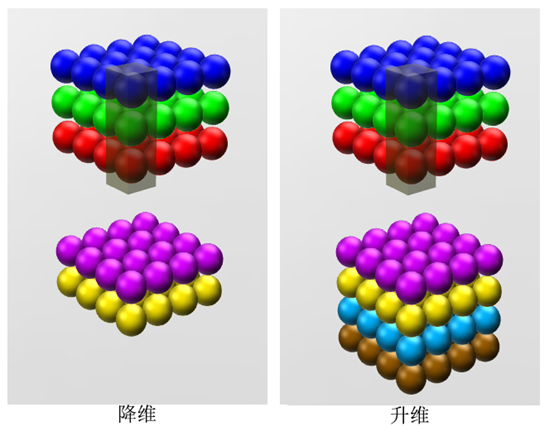
我的整个网络包括三个卷积层,三个全连接层。
4损失函数部分
def losses(logits,labels):
with tf.variable_scope('loss') as scope:
# cross_entropy=tf.nn.sparse_softmax_cross_entropy_with_logits\(logits=logits,labels=labels,name='xentropy_per_example')
cross_entropy = tf.nn.sparse_softmax_cross_entropy_with_logits(logits=logits, labels=labels, name='xentropy_per_example')
loss=tf.reduce_mean(cross_entropy,name='loss')
tf.summary.scalar(scope.name+'/loss',loss)
return loss
def training(loss,learning_rate):
with tf.name_scope('optimizer'):
optimizer=tf.train.AdamOptimizer(learning_rate=learning_rate)
global_step = tf.Variable(0, name='global_step', trainable=False)
train_op=optimizer.minimize(loss,global_step=global_step)
return train_op
def evaluation(logits,labels):
with tf.variable_scope('accuracy') as scope:
correct=tf.nn.in_top_k(logits,labels,1)
correct=tf.cast(correct,tf.float16)
accuracy=tf.reduce_mean(correct)
tf.summary.scalar(scope.name+'/accuracy',accuracy)
return accuracy
这部分没什么好讲的,从tensorflow官网上有相似的例程,就是按照那个编写的。损失函数就是最常用的softmax损失函数。优化方法是AdamOptimizer。。。感觉tensorflow最让我爽的点就是这里不用自己求梯度。。。曾经因为求梯度,头发掉了一地。。。。
5training
# -*- coding: utf-8 -*-
"""
Created on Fri Oct 13 08:42:54 2017
@author: Administrator
"""
import os
import numpy as np
import tensorflow as tf
import myinput_data
import mymodel
##
learning_rate=0.0001
##
def run_training():
train_dir='G:/data/CatVSdogtrain/train/'
logs_train_dir='G:/data/CatVSdogtrain/logits/train/'
train,train_label=myinput_data.get_files(train_dir)
train_batch,train_label_batch=myinput_data.get_batch(train,train_label,
IMAGE_W,
IMAGE_H,
BATCH_SIZE,
CAPACITY
)
train_logits=mymodel.inference(train_batch,BATCH_SIZE,N_CLASSES)
train_loss=mymodel.losses(train_logits,train_label_batch)
train_op=mymodel.training(train_loss,learning_rate)
train_acc=mymodel.evaluation(train_logits,train_label_batch)
summary_op=tf.summary.merge_all()
sess=tf.Session()
train_writer=tf.summary.FileWriter(logs_train_dir,sess.graph)
saver=tf.train.Saver()
sess.run(tf.global_variables_initializer())
coord=tf.train.Coordinator()
threads=tf.train.start_queue_runners(sess=sess,coord=coord)
try:
for step in np.arange(MAX_STEP):
if coord.should_stop():
break
_, tra_loss,tra_acc=sess.run([train_op,train_loss,train_acc])
if step % 50==0:
print ('Step %d,train loss=%.2f, train accuracy=%.2f%%'% (step,tra_loss,tra_acc*100.0))
summary_str = sess.run(summary_op)
train_writer.add_summary(summary_str, step)
if step % 2000 == 0 or (step + 1) == MAX_STEP:
checkpoint_path = os.path.join(logs_train_dir, 'model.ckpt')
saver.save(sess, checkpoint_path, global_step=step)
except tf.errors.OutOfRangeError:
print('Done training -- epoch limit reached')
finally:
coord.request_stop()
coord.join(threads)
sess.close()
这一部分就是保存训练结果,然后把损失函数调到最小。。。识别率就会高,编写可以参照tensorflow的例程。
6 mytest
from PIL import Image
import tensorflow as tf
import matplotlib.pyplot as plt
import numpy as np
import myinput_data
import mytraining
import mymodel
def get_one_image(train):
##随机的选取一张图片
##return :ndarry
n=len(train)
ind=np.random.randint(0,n)
img_dir=train[ind]
image=Image.open(img_dir)
plt.imshow(image)
image=image.resize([208,208])
image=np.array(image)
return image
def evaluate_one_image():
train_dir='G:/data/CatVSdogtrain/train/'
train,train_label=myinput_data.get_files(train_dir)
image_array=get_one_image(train)
with tf.Graph().as_default():
image=tf.cast(image_array, tf.float32)
image=tf.image.per_image_standardization(image)
image=tf.reshape(image,[1,208,208,3])
logit=mymodel.inference(image,BATCH_SIZE,N_CLASSES)
x=tf.placeholder(tf.float32,shape=[208,208,3])
logs_train_dir='G:/data/CatVSdogtrain/logits/train/'
saver=tf.train.Saver()
with tf.Session() as sess:
print("Reading checkpoints...")
ckpt = tf.train.get_checkpoint_state(logs_train_dir)
if ckpt and ckpt.model_checkpoint_path:
global_step = ckpt.model_checkpoint_path.split('/')[-1].split('-')[-1]
saver.restore(sess, ckpt.model_checkpoint_path)
print('Loading success, global_step is %s' % global_step)
# print(sess.run())
else:
print('No checkpoint file found')
prediction = sess.run(logit, feed_dict={x: image_array})
max_index = np.argmax(prediction)
if max_index==0:
print('This is a cat with possibility %.6f' %prediction[:, 0])
print('This is a dog with possibility %.6f' %prediction[:, 1])
else:
print('This is a dog with possibility %.6f' %prediction[:, 1])
print('This is a cat with possibility %.6f' %prediction[:, 0])
运行这一段代码,然后在命令行执行evaluate_one_image()
结果如下:
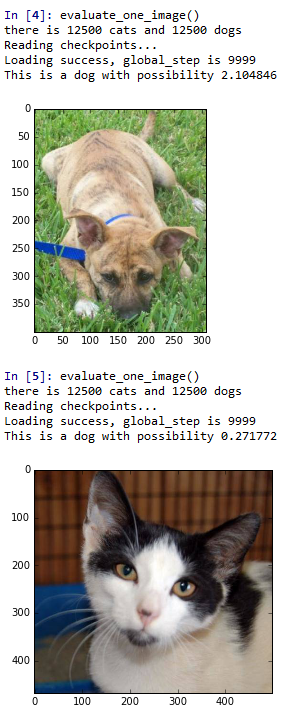
这个只是最简单的卷积神经网络,所以说整个实现过程很简单,但是追求远远不止这些,如果大家有什么对卷积的想法可以一起交流。
Kaggle系列1:手把手教你用tensorflow建立卷积神经网络实现猫狗图像分类的更多相关文章
- 使用TensorFlow的卷积神经网络识别自己的单个手写数字,填坑总结
折腾了几天,爬了大大小小若干的坑,特记录如下.代码在最后面. 环境: Python3.6.4 + TensorFlow 1.5.1 + Win7 64位 + I5 3570 CPU 方法: 先用MNI ...
- TensorFlow实现卷积神经网络
1 卷积神经网络简介 在介绍卷积神经网络(CNN)之前,我们需要了解全连接神经网络与卷积神经网络的区别,下面先看一下两者的结构,如下所示: 图1 全连接神经网络与卷积神经网络结构 虽然上图中显示的全连 ...
- tensorflow CNN 卷积神经网络中的卷积层和池化层的代码和效果图
tensorflow CNN 卷积神经网络中的卷积层和池化层的代码和效果图 因为很多 demo 都比较复杂,专门抽出这两个函数,写的 demo. 更多教程:http://www.tensorflown ...
- TensorFlow 实战卷积神经网络之 LeNet
欢迎大家关注我们的网站和系列教程:http://www.tensorflownews.com/,学习更多的机器学习.深度学习的知识! LeNet 项目简介 1994 年深度学习三巨头之一的 Yan L ...
- TensorFlow构建卷积神经网络/模型保存与加载/正则化
TensorFlow 官方文档:https://www.tensorflow.org/api_guides/python/math_ops # Arithmetic Operators import ...
- Tensorflow之卷积神经网络(CNN)
前馈神经网络的弊端 前一篇文章介绍过MNIST,是采用的前馈神经网络的结构,这种结构有一个很大的弊端,就是提供的样本必须面面俱到,否则就容易出现预测失败.如下图: 同样是在一个图片中找圆形,如果左边为 ...
- 跟我学算法-tensorflow 实现卷积神经网络
我们采用的卷积神经网络是两层卷积层,两层池化层和两层全连接层 我们使用的数据是mnist数据,数据训练集的数据是50000*28*28*1 因为是黑白照片,所以通道数是1 第一次卷积采用64个filt ...
- 字符型图片验证码,使用tensorflow实现卷积神经网络,进行验证码识别CNN
本项目使用卷积神经网络识别字符型图片验证码,其基于 TensorFlow 框架.它封装了非常通用的校验.训练.验证.识别和调用 API,极大地减低了识别字符型验证码花费的时间和精力. 项目地址: ht ...
- Python之TensorFlow的卷积神经网络-5
一.卷积神经网络(Convolutional Neural Networks, CNN)是一类包含卷积计算且具有深度结构的前馈神经网络(Feedforward Neural Networks),是深度 ...
随机推荐
- 标签页的切换方法(DOM)
效果: 1.点击“JAVA语言” 2.点击“C语言” 3.点击C++语言 代码: <!doctype html> <html> <head> <meta ch ...
- Unity -- 材质-Material和预设体-Prefabs
材质(Materials)用来把网格(Mesh)或粒子渲染器(Particle Renderers)贴到游戏对象上.他们在定义对象怎么被显示发挥重要组成部分.材质包括用于呈现网状或颗粒着色器的参考,所 ...
- php 列出当前目录
$path="."; //初使化用户所操作目录 $prevpath=dirname($path); //初使化当前脚本所在目录 $dir_handle=opendir($path) ...
- 15 THINGS ALL GIRLS SHOULD KNOW ABOUT THEIR VAGINA
Here are 15 facts that EVERY GIRL should know about her vagina. Don’t be shy! Your vagina is part of ...
- FTP经典常用命令
FTP命令是Internet用户使用最频繁的命令之一,不论是在DOS还是UNIX操作系统下使用FTP,都会遇到大量的FTP内部命令. 熟悉并灵活应用FTP的内部命令,可以大大方便使用者,并收到事半功倍 ...
- SQL must not be null(低级错误)
提醒一下: 数据库数据源配置出错,也会发生这种低级错误的.
- Linux内核——内存管理
内存管理 页 内核把物理页作为内存管理的基本单位.内存管理单元(MMU,管理内存并把虚拟地址转换为物理地址)通常以页为单位进行处理.MMU以页大小为单位来管理系统中的页表. 从虚拟内存的角度看,页就是 ...
- Linux下快速安装Mysql及使用
1.安装 查看有没有安装过: yum list installed mysql* rpm -qa | grep mysql* 查看有没有安装包: yum list mysql* 安装mysql客户端: ...
- AutoCAD如何设置A0A1图纸
可以从网上下载相应的图纸模板,下载之后可以发现有相应的文字和模板文件 随后我们新建并找到这个dwt文件模板(比如要做一个A1的模板) 随后即可发现模板的样式,包括每种颜色的粗细,颜色和明细栏等 ...
- TSRC挑战赛:WAF之SQL注入绕过挑战实录
转自腾讯 博文作者:TSRC白帽子 发布日期:2014-09-03 阅读次数:1338 博文内容: 博文作者:lol [TSRC 白帽子] 第二作者:Conqu3r.花开若相惜 来自团队:[Pax.M ...