
.NET CORE2.0后台管理系统(一)配置API
一:引用关系图
要写一个项目首先离不开的就是一个清晰的流程图,当然我这里很简单。
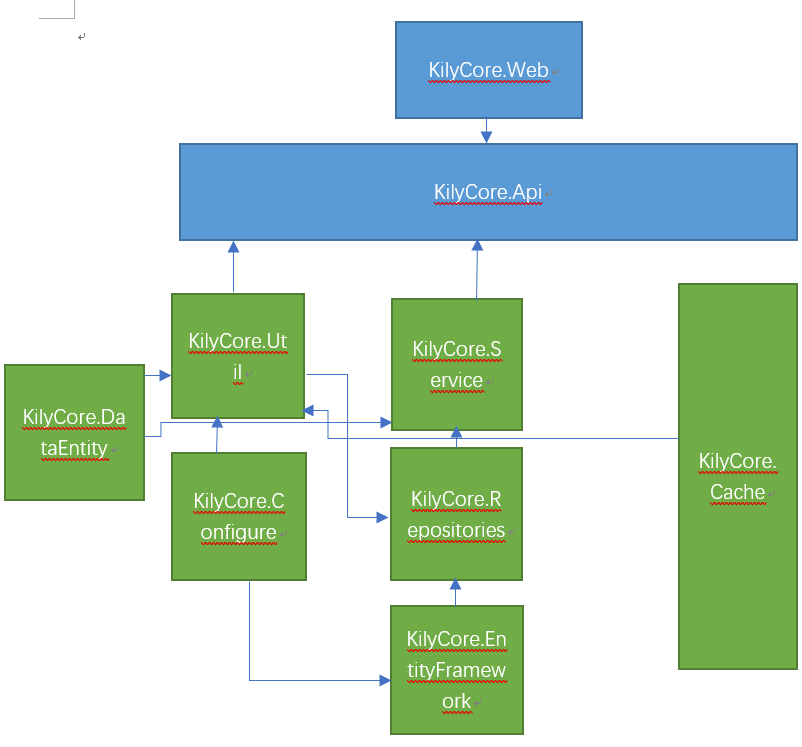
上诉完成后打开api下的Startup.cs文件,因为我是配置好了所在我直接上传代码然后介绍一下:
using System;

using System.Collections.Generic;

using System.Linq;

using System.Threading.Tasks;

using Microsoft.AspNetCore.Builder;

using Microsoft.AspNetCore.Hosting;

using Microsoft.Extensions.Configuration;

using Microsoft.Extensions.DependencyInjection;

using Microsoft.Extensions.DependencyModel;

using System.Runtime.Loader;

using System.Reflection;

using KilyCore.Util.FilterGroup;

using KilyCore.Configure;

using Microsoft.Extensions.Logging;

using NLog.Extensions.Logging;

using NLog.Web;

using KilyCore.Util.ApplicationService.DependencyIdentity;

namespace KilyCore.Api

{

    public class Startup

    {

        public IEngine Engine { get; private set; }

        public Startup(IHostingEnvironment env)

        {

            var builder = new ConfigurationBuilder()

                .SetBasePath(env.ContentRootPath)

                .AddJsonFile("appsettings.json", optional: false, reloadOnChange: true)

                .AddJsonFile($"appsettings.{env.EnvironmentName}.json", optional: true)

                .AddEnvironmentVariables();

            Configuration = builder.Build();

            GetAssembly();

            GetConfiger();

            Engine = EngineExtension.Context;

        }

        public IConfiguration Configuration { get; }

        // This method gets called by the runtime. Use this method to add services to the container.

        public IServiceProvider ConfigureServices(IServiceCollection services)

        {

            services.AddMvc(option =>

            {

                option.Filters.Add(typeof(AuthorizationFilter));

                option.Filters.Add(typeof(ResourceFilter));

                option.Filters.Add(typeof(ActionFilter));

                option.Filters.Add(typeof(ExceptionFilter));

                option.Filters.Add(typeof(ResultFilter));

                option.RespectBrowserAcceptHeader = true;

            });

            //添加跨域

            services.AddCors(option=>{

                option.AddPolicy("KilyCore", builder => builder.AllowAnyHeader().AllowAnyMethod().AllowAnyOrigin().AllowCredentials());

            });

            //添加Session

            services.AddSession();

            return Engine.ServiceProvider(services);

        }

        // This method gets called by the runtime. Use this method to configure the HTTP request pipeline.

        public void Configure(IApplicationBuilder app, IHostingEnvironment env, ILoggerFactory logger)

        {

            //Nlog

            logger.AddNLog();

            env.ConfigureNLog("Nlog.config");

            //设置全局跨域

            app.UseCors("KilyCore");

            //启用Session

            app.UseSession();

            if (env.IsDevelopment())

            {

                app.UseDeveloperExceptionPage();

            }

            app.UseMvc();

        }

        /// <summary>

        /// 加载所有程序集

        /// </summary>

        public void GetAssembly()

        {

            IList<Assembly> ass = new List<Assembly>();

            var lib = DependencyContext.Default;

            var libs = lib.CompileLibraries.Where(t => !t.Serviceable).Where(t => t.Type != "package").ToList();

            foreach (var item in libs)

            {

                Assembly assembly = AssemblyLoadContext.Default.LoadFromAssemblyName(new AssemblyName(item.Name));

                ass.Add(assembly);

            }

            Configer.Assembly = ass;

        }

        /// <summary>

        /// 获取连接字符串

        /// </summary>

        public void GetConfiger()

        {

            Configer.ConnentionString = Configuration.GetConnectionString("ConnectionString");

            Configer.RedisConnectionString = Configuration["RedisConnectionString:host"];

            Configer.ApiKey = Configuration["Key:ApiKey"];

        }

    }

}
因为我采用了5个过滤器所以在上诉代码上addmvc中添加了5个过滤器。
上面的代码我都有注解,都很简单,欢迎学习交流。
.NET CORE2.0后台管理系统(一)配置API的更多相关文章
- EntityFramework Core2.0 多对多关系配置
在EF6.0 中,多对多关系配置时,系统会自动生成第三张表,来将两张有互相约束关系的表联系起来,但是在EF Core2.0中,我们需要手动建立第三张表,比如说有两个模型Passage.cs和Cat ...
- 使用react全家桶制作博客后台管理系统 网站PWA升级 移动端常见问题处理 循序渐进学.Net Core Web Api开发系列【4】:前端访问WebApi [Abp 源码分析]四、模块配置 [Abp 源码分析]三、依赖注入
使用react全家桶制作博客后台管理系统 前面的话 笔者在做一个完整的博客上线项目,包括前台.后台.后端接口和服务器配置.本文将详细介绍使用react全家桶制作的博客后台管理系统 概述 该项目是基 ...
- 前后端分离后台管理系统 Gfast v3.0 全新发布
GFast V3.0 平台简介 基于全新Go Frame 2.0+Vue3+Element Plus开发的全栈前后端分离的管理系统 前端采用vue-next-admin .Vue.Element UI ...
- 从壹开始前后端分离【 .NET Core2.0 +Vue2.0 】框架之七 || API项目整体搭建 6.2 轻量级ORM
更新 1.在使用的时候,特别是更新数据的时候,如果不知道哪里有问题,可以查看数据库 和 实体类 的字段,是否大小写一致,比如 name 和 Name 2.在使用Sqlsugar 的 CodeFirst ...
- net core体系-web应用程序-4asp.net core2.0 项目实战(任务管理系统)-2项目搭建
系统要求 首先建议采用 Windows 10 专业版/企业版/教育版,且必须是64位操作系统,原因是docker装起来比较方便,Win7装起来比较麻烦,且不确定是否有其他问题(自己没有实践过) 其次W ...
- net core体系-web应用程序-4asp.net core2.0 项目实战(1)-12基于cookie登录授权认证并实现前台会员、后台管理员同时登录
1.登录的实现 登录功能实现起来有哪些常用的方式,大家首先想到的肯定是cookie或session或cookie+session,当然还有其他模式,今天主要探讨一下在Asp.net core 2.0下 ...
- 基于vue2.0 +vuex+ element-ui后台管理系统:包括本地开发调试详细步骤
效果演示地址, github地址: demo演示: 1.About 此项目是 vue2.0 + element-ui + node+mongodb 构建的后台管理系统,所有的数据都是从 ...
- Net Core2.0 基于QuartzNet任务管理系统
Net Core2.0 基于QuartzNet任务管理系统 Quartz.NET官网地址:https://www.quartz-scheduler.net/ Quartz.NET文档地址:https: ...
- GO 前后端分离开源后台管理系统 Gfast v2.0.4 版发布
更新内容:1.适配插件商城,开发环境从后台直接安装插件功能:2.代码生成细节修复及功能完善(支持生成上传文件.图片及富文本编辑器功能):3.增加swagger接口文档生成:4.更新goframe版本至 ...
随机推荐
- Typora +google + Markdown Here 公众号
一劳永逸的公众号排版方法 http://mp.weixin.qq.com/s/zb-YaacNLggG2-njF5HJ0A
- Odoo MRP 实际成本
Odoo MRP 8 对于 产成品并不支持 实际成本记账 本人开发了一个模块,支持此特性, 可以在 淘宝店铺 购买 https://item.taobao.com/item.htm?_u=85jr9d ...
- Redhat hadoop2.7.2安装笔记
本次安装是在windows7环境下安装redhat虚拟机进行的,所须要的软件例如以下: VirtualBox-5.0.16-105871-Win.exe rhel-server-5.4-x86_64- ...
- openCV—Python(1)——初始化环境
本系列博客主要參考自--Adrian Rosebrock:<Practical Python and OpenCV: An Introductory,Example Driven Guide t ...
- web前端面试系列 一 js闭包
一.什么是闭包? JavaScript高级程序设计第三版: 闭包是指有权访问另一个函数作用域中的变量的函数. 在js中定义在函数内部的子函数能够访问外部函数定义的变量,因此js内部函数就是一个闭包. ...
- How to reset your password in Ubuntu
There are many reasons you might want to reset a password: Someone gave you a computer with Ubuntu i ...
- 04 svn设置开机启动
一:设置开机启动[dos命令] 格式: sc create 服务名称 binPath=空格"安装目录/svnserve.exe -r 版本库地址目录 --service" star ...
- Spring AOP和IOC(转载)
spring 的优点?1.降低了组件之间的耦合性 ,实现了软件各层之间的解耦 2.可以使用容易提供的众多服务,如事务管理,消息服务等 3.容器提供单例模式支持 4.容器提供了AOP技术,利用它很容易实 ...
- OpenCV 入门示例之一:显示图像
前言 本文展示一个显示图像的示例程序,它用于从硬盘加载一副图像并在屏幕上显示. 代码示例 // 此头文件包含图像IO函数的声明 #include "highgui.h" int m ...
- Subversion基础:概念、安装、配置和基本操作(转)
本文转载至http://www.cnblogs.com/cokecoffe/archive/2012/06/01/2537130.html 转自:http://www.uml.org.cn/pzgl/ ...