
Elasticsearch官方安装
Installationedit
Elasticsearch requires at least Java 8. Specifically as of this writing, it is recommended that you use the Oracle JDK version 1.8.0_131. Java installation varies from platform to platform so we won’t go into those details here. Oracle’s recommended installation documentation can be found on Oracle’s website. Suffice to say, before you install Elasticsearch, please check your Java version first by running (and then install/upgrade accordingly if needed):
java -version

echo $JAVA_HOME
Once we have Java set up, we can then download and run Elasticsearch. The binaries are available from www.elastic.co/downloads along with all the releases that have been made in the past. For each release, you have a choice among a zip or tar archive, a DEB or RPM package, or a Windows MSI installation package.
Installation example with taredit
For simplicity, let’s use the tar file.
Let’s download the Elasticsearch 5.6.4 tar as follows:
curl -L -O https://artifacts.elastic.co/downloads/elasticsearch/elasticsearch-5.6.4.tar.gz
Then extract it as follows:
tar -xvf elasticsearch-5.6.4.tar.gz
It will then create a bunch of files and folders in your current directory. We then go into the bin directory as follows:
cd elasticsearch-5.6.4/bin
And now we are ready to start our node and single cluster:
./elasticsearch
Installation with Homebrewedit
On macOS, Elasticsearch can also be installed via Homebrew:
brew install elasticsearch
Installation example with MSI Windows Installeredit
For Windows users, we recommend using the MSI Installer package. The package contains a graphical user interface (GUI) that guides you through the installation process.
First, download the Elasticsearch 5.6.4 MSI fromhttps://artifacts.elastic.co/downloads/elasticsearch/elasticsearch-5.6.4.msi.
Then double-click the downloaded file to launch the GUI. Within the first screen, select the deployment directories:
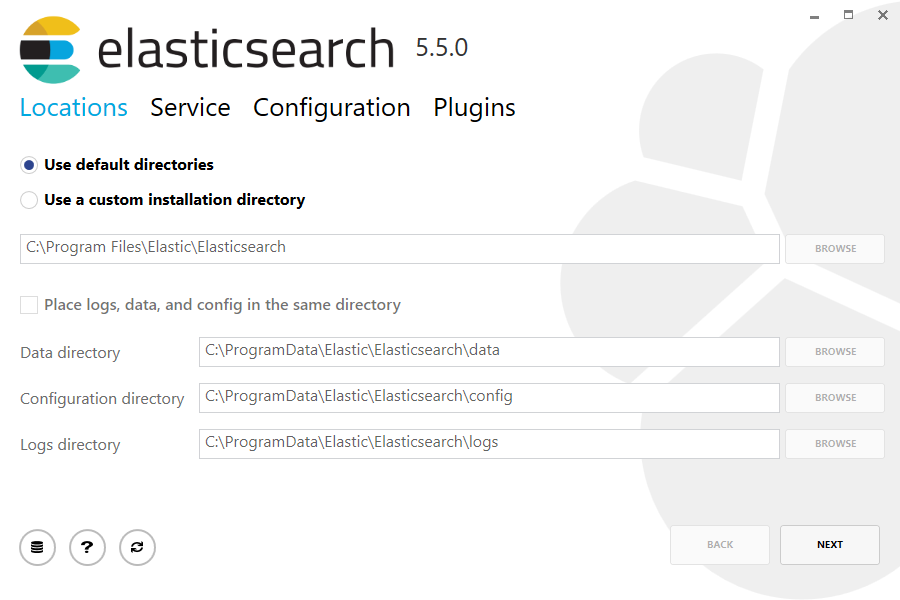
Then select whether to install as a service or start Elasticsearch manually as needed. To align with the tar example, choose not to install as a service:

For configuration, simply leave the default values:
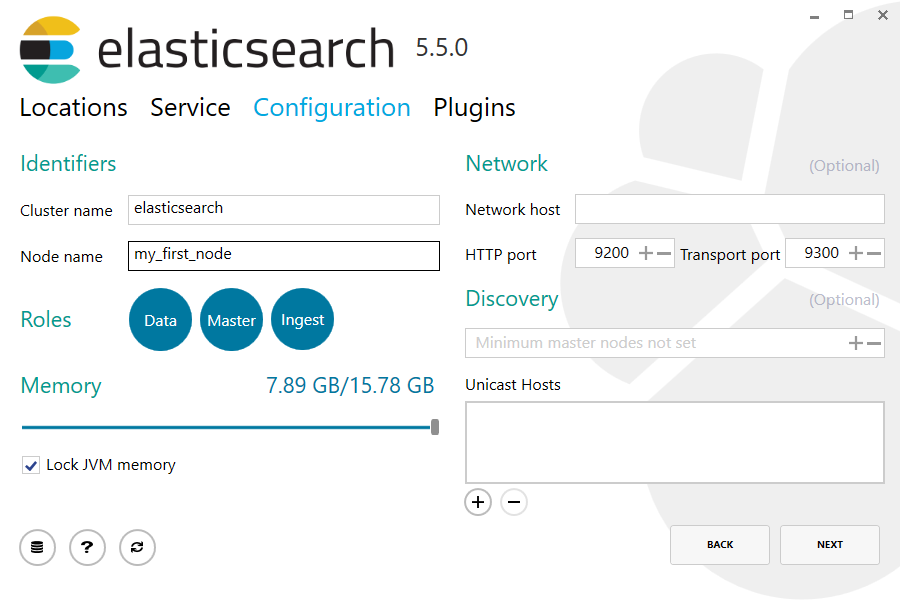
Again, to align with the tar example, uncheck all plugins to not install any plugins:

After clicking the install button, Elasticsearch will be installed:

By default, Elasticsearch will be installed at %PROGRAMFILES%\Elastic\Elasticsearch. Navigate here and go into the bin directory as follows:
with Command Prompt:
cd %PROGRAMFILES%\Elastic\Elasticsearch\bin
with PowerShell:
cd $env:PROGRAMFILES\Elastic\Elasticsearch\bin
And now we are ready to start our node and single cluster:
.\elasticsearch.exe
Successfully running nodeedit
If everything goes well with installation, you should see a bunch of messages that look like below:
[2016-09-16T14:17:51,251][INFO ][o.e.n.Node               ] [] initializing ...

[2016-09-16T14:17:51,329][INFO ][o.e.e.NodeEnvironment    ] [6-bjhwl] using [1] data paths, mounts [[/ (/dev/sda1)]], net usable_space [317.7gb], net total_space [453.6gb], spins? [no], types [ext4]

[2016-09-16T14:17:51,330][INFO ][o.e.e.NodeEnvironment    ] [6-bjhwl] heap size [1.9gb], compressed ordinary object pointers [true]

[2016-09-16T14:17:51,333][INFO ][o.e.n.Node               ] [6-bjhwl] node name [6-bjhwl] derived from node ID; set [node.name] to override

[2016-09-16T14:17:51,334][INFO ][o.e.n.Node               ] [6-bjhwl] version[5.6.4], pid[21261], build[f5daa16/2016-09-16T09:12:24.346Z], OS[Linux/4.4.0-36-generic/amd64], JVM[Oracle Corporation/Java HotSpot(TM) 64-Bit Server VM/1.8.0_60/25.60-b23]

[2016-09-16T14:17:51,967][INFO ][o.e.p.PluginsService     ] [6-bjhwl] loaded module [aggs-matrix-stats]

[2016-09-16T14:17:51,967][INFO ][o.e.p.PluginsService     ] [6-bjhwl] loaded module [ingest-common]

[2016-09-16T14:17:51,967][INFO ][o.e.p.PluginsService     ] [6-bjhwl] loaded module [lang-expression]

[2016-09-16T14:17:51,967][INFO ][o.e.p.PluginsService     ] [6-bjhwl] loaded module [lang-groovy]

[2016-09-16T14:17:51,967][INFO ][o.e.p.PluginsService     ] [6-bjhwl] loaded module [lang-mustache]

[2016-09-16T14:17:51,967][INFO ][o.e.p.PluginsService     ] [6-bjhwl] loaded module [lang-painless]

[2016-09-16T14:17:51,967][INFO ][o.e.p.PluginsService     ] [6-bjhwl] loaded module [percolator]

[2016-09-16T14:17:51,968][INFO ][o.e.p.PluginsService     ] [6-bjhwl] loaded module [reindex]

[2016-09-16T14:17:51,968][INFO ][o.e.p.PluginsService     ] [6-bjhwl] loaded module [transport-netty3]

[2016-09-16T14:17:51,968][INFO ][o.e.p.PluginsService     ] [6-bjhwl] loaded module [transport-netty4]

[2016-09-16T14:17:51,968][INFO ][o.e.p.PluginsService     ] [6-bjhwl] loaded plugin [mapper-murmur3]

[2016-09-16T14:17:53,521][INFO ][o.e.n.Node               ] [6-bjhwl] initialized

[2016-09-16T14:17:53,521][INFO ][o.e.n.Node               ] [6-bjhwl] starting ...

[2016-09-16T14:17:53,671][INFO ][o.e.t.TransportService   ] [6-bjhwl] publish_address {192.168.8.112:9300}, bound_addresses {{192.168.8.112:9300}

[2016-09-16T14:17:53,676][WARN ][o.e.b.BootstrapCheck     ] [6-bjhwl] max virtual memory areas vm.max_map_count [65530] likely too low, increase to at least [262144]

[2016-09-16T14:17:56,731][INFO ][o.e.h.HttpServer         ] [6-bjhwl] publish_address {192.168.8.112:9200}, bound_addresses {[::1]:9200}, {192.168.8.112:9200}

[2016-09-16T14:17:56,732][INFO ][o.e.g.GatewayService     ] [6-bjhwl] recovered [0] indices into cluster_state

[2016-09-16T14:17:56,748][INFO ][o.e.n.Node               ] [6-bjhwl] started
Without going too much into detail, we can see that our node named "6-bjhwl" (which will be a different set of characters in your case) has started and elected itself as a master in a single cluster. Don’t worry yet at the moment what master means. The main thing that is important here is that we have started one node within one cluster.
As mentioned previously, we can override either the cluster or node name. This can be done from the command line when starting Elasticsearch as follows:
./elasticsearch -Ecluster.name=my_cluster_name -Enode.name=my_node_name
Also note the line marked http with information about the HTTP address (192.168.8.112) and port (9200) that our node is reachable from. By default, Elasticsearch uses port 9200 to provide access to its REST API. This port is configurable if necessary.
Elasticsearch官方安装的更多相关文章
- ElasticSearch的安装
一.安装javaSE环境(已配java环境变量的请直接跳过) 1.从Java JDK 官网下载适合自己的jdk版本.(我自己用的jdk1.7) 2.安装jdk后,配置java环境变量(ps:比较喜欢简 ...
- elasticsearch 的安装配置与spring boot的整合应用
linux上的elasticsearch安装 一.下载elasticsearch 直接进入elasticsearch的官网,下载最新的安装包:https://www.elastic.co/downlo ...
- Elasticsearch 使用-安装
Elasticsearch 使用-安装 官方网站 https://www.elastic.co/cn/elasticsearch/ 什么是 Elasticsearch? Elasticsearch 是 ...
- 如何在Elasticsearch中安装中文分词器(IK+pinyin)
如果直接使用Elasticsearch的朋友在处理中文内容的搜索时,肯定会遇到很尴尬的问题--中文词语被分成了一个一个的汉字,当用Kibana作图的时候,按照term来分组,结果一个汉字被分成了一组. ...
- elasticsearch rpm 安装
参考:http://www.elasticsearch.org/guide/en/elasticsearch/reference/current/setup-repositories.html Dow ...
- Linux初学 - Elasticsearch环境安装
下载 https://www.elastic.co/downloads/elasticsearch 安装 rpm -ivh 也可以双击rpm包安装 修改elastaticsearch host配置 修 ...
- centos 6.7下 elasticsearch的安装
1.下载elasticsearch的安装包,用ftp上传到linux系统下目录中,如在当前用户root的目录下新建目录elasticsearch,放入安装包 不要忘了添加执行权限 chmod +x * ...
- Windows 7 SP1 x64 旗舰版 微软官方安装U盘的制作
[ 本主题由 中山艹泥喵 于 2013-08-20 23:14:33 设为精华1,原因:不错~ ] 最后由 风中枯萎 于 2015-12-15 17:44:15 修改 安装Windows 7操作系统主 ...
- 转:ElasticSearch的安装和相关插件的安装
原文来自于:http://blog.csdn.net/whxaing2011/article/details/18237733 本文主要介绍如下内容: 1.ElasticSearch ...
随机推荐
- 可执行Jar包调用动态链接库(DLL/SO)
踩过了很多的坑,查了很多资料,在此记录一下,以SpringBoot项目为基础. Maven加入JNA依赖 <!-- JNA start --> <dependency> < ...
- IPv4(四)子网和子网掩码
为了完成路由选择,每个数据链路(网络)都必须有一个惟一的地址: 另外,数据链路上的每台主机也必须有一个地址,这个地址不仅标识主机为一个网络成员,还可以把主机与网络上的其他主机区分开来. 粗放使用IPv ...
- a标签javascript传参不正确的解决办法!
代码部分: <a href="javascript:void(0);" onClick="findList(${goodsClassify.id})"&g ...
- OpenCV 中的三大数据类型:CvMat 类型
前言 本文将介绍 OpenCV 中的矩阵结构 CvMat 并提供几个很常用的矩阵使用方法. 更多的矩阵处理函数还请参阅相关资料. CvMat 的类型定义 typedef struct CvMat { ...
- Python学习总结之五 -- 入门函数式编程
函数式编程 最近对Python的学习有些怠慢,最近的学习态度和学习效率确实很不好,目前这种病况正在好转. 今天,我把之前学过的Python中函数式编程简单总结一下,分享给大家,也欢迎并感谢大家提出意见 ...
- 多媒体开发之---live555的多线程支持,原本只是单线程,单通道
1)我对Live555进行了一次封装,但是Live555 是单线程的,里面定义的全局变量太多,我封装好dll库后,在客户端调用,因为多个对话框中要使用码流,我就定义了多个对象从设备端接收码流,建立多个 ...
- struts2_6_多个struts配置文件的应用
在大部分应用里,随着应用规模的添加,系统中Action的数量也会大量添加.导致struts.xml配置文件变的很臃肿,为了避免struts.xml文件过于庞大.臃肿,提高struts.xml文件的可读 ...
- 从symbol link和hard link 到 unlink函数的一点记录
之前一直对Linux的文件类型中的 “l” 类型的了解不是很深入,最近经过“圣经”指点,略知一二,在此先记录一下,以便以后查阅,之后会对文件和目录.文件I/O这部分再扩充. 首先需明确,Unix在查阅 ...
- 九度OJ 1036:Old Bill (老比尔) (基础题)
时间限制:1 秒 内存限制:32 兆 特殊判题:否 提交:2691 解决:1432 题目描述: Among grandfather's papers a bill was found. 72 ...
- 搭建vps***
快速搭建ShadowSocks wget --no-check-certificate -O shadowsocks.sh https://raw.githubusercontent.com/tedd ...