
springboot+vue+elementui实现文件上传下载删除DEMO
说明
前面搜索了几个关于springboot+vue+elementui上传下载的文章,感觉写的都不尽如人意。要么是功能不完善,不好用。再者就是源码提供的实在差劲,都不完整。一气之下,自己搞了一个实用的完整版DEMO,有需要的朋友拿走稍加改动就能使用。
项目源码
源码已经整理好了,如何运行直接看根路径下的README.md。
https://gitee.com/indexman/springbootdemo
效果展示
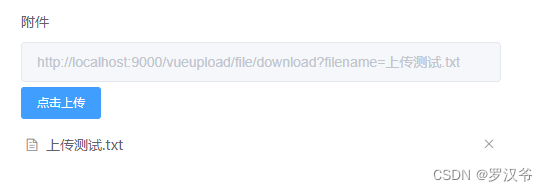
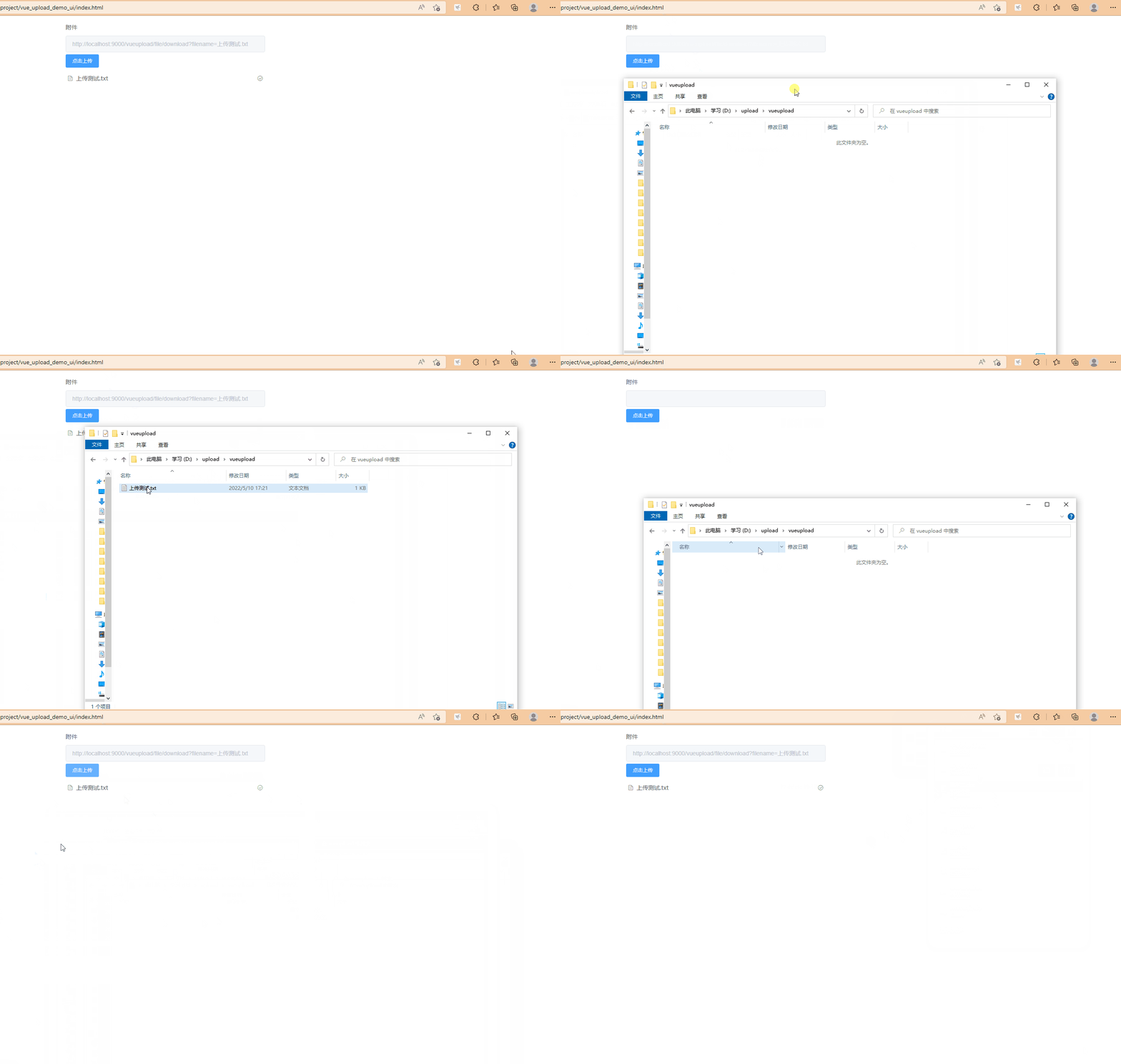
工程结构
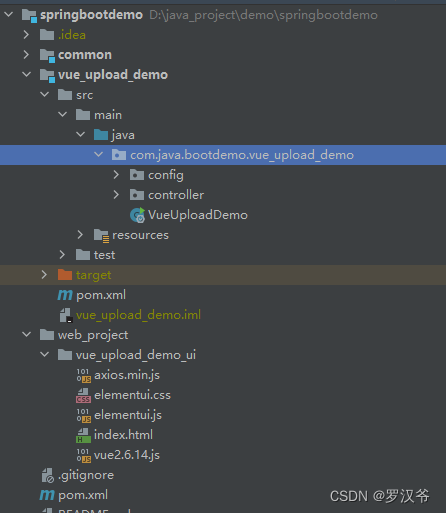
前端代码
<!DOCTYPE html>

<html lang="en" xmlns:th="http:www.thymeleaf.org">

<head>

    <meta charset="UTF-8">

    <link rel="stylesheet" href="https://unpkg.com/element-ui/lib/theme-chalk/index.css">

    <title>Vue文件上传下载删除DEMO</title>

    <style>

        #app {

            z-index: 1;

            left: 0;

            right: 0;

            top: 0;

            bottom: 0;

            display: flex;

            justify-content: center;

            align-items: center;

            color: #ffffff;

        }

    </style>

</head>

<body>

    <div id="app">

        <el-form :label-width="120">

            <el-form-item label="附件" prop="fileUrl">

                <el-input v-model="fileUrl" :disabled="true"></el-input>

                <el-upload style="width:480px;" class="upload-demo" :action="uploadUrl" :limit="1"

                    :show-file-list="true" :file-list="fileList" :on-remove="handleRemove" :before-remove="beforeRemove"

                    :on-success="uploadSuccess" :on-preview="handlePreview">

                    <el-button size="small" type="primary">点击上传</el-button>

                </el-upload>

            </el-form-item>

        </el-form>

    </div>

    <script src="vue2.6.14.js"></script>

    <script src="elementui.js"></script>

    <script src="axios.min.js"></script>

    <script>

        var baseUrl = 'http://localhost:9000/vueupload/file/';

        var app = new Vue({

            el: '#app',

            data: {

                uploadUrl: baseUrl + 'upload',

                attach: '', // 附件名称

                fileUrl: '', // 附件下载地址

                fileList: []

            },

            methods: {

                handlePreview(file) {

                    let a = document.createElement('a')

                    a.target = '_blank';

                    a.href = this.fileUrl;

                    a.click();

                },

                handleExceed(files, fileList) {

                    this.$message.warning(`当前限制选择 5 个文件,本次选择了 ${files.length} 个文件,共选择了 ${files.length + fileList.length} 个文件`);

                },

                handleRemove(file, fileList) {

                    axios.post(baseUrl + 'remove?filename=' + this.attach).then((res) => {

                        console.log(res);

                        this.attach = '';

                        this.fileUrl = '';

                    }).catch(err => {

                        console.log(err);    //打印响应数据(错误信息)

                    });

                    console.log('删除文件:' + file.name)

                },

                beforeRemove(file, fileList) {

                    return this.$confirm(`确定移除 ${file.name}?`);

                },

                handleUploadError(error, file) {

                    console.log("文件上传出错:" + error)

                },

                uploadSuccess: function (response, file, fileList) {

                    console.log(response);

                    this.attach = response.data.filename;

                    this.fileUrl = baseUrl + 'download?filename=' + file.name

                }

            }

        });

    </script>

</body>

</html>
后端代码
package com.java.bootdemo.vue_upload_demo.controller;

import com.java.bootdemo.common.util.Result;

import org.slf4j.Logger;

import org.slf4j.LoggerFactory;

import org.springframework.beans.factory.annotation.Value;

import org.springframework.web.bind.annotation.*;

import org.springframework.web.multipart.MultipartFile;

import javax.servlet.http.HttpServletRequest;

import javax.servlet.http.HttpServletResponse;

import java.io.*;

import java.net.URLEncoder;

import java.text.SimpleDateFormat;

import java.util.HashMap;

import java.util.Map;

@RestController

@RequestMapping("/file")

public class FileController {

    // 设置固定的日期格式

    SimpleDateFormat sdf = new SimpleDateFormat("yyyy-MM-dd");

    // 将 yml 中的自定义配置注入到这里

    @Value("${app.uploadPath}")

    private String uploadPath;

    // 日志打印

    private Logger log = LoggerFactory.getLogger("FileController");

    // 文件上传 (可以多文件上传)

    @PostMapping("/upload")

    public Result fileUploads(HttpServletRequest request, @RequestParam("file") MultipartFile file) throws IOException {

        // 获取上传的文件名称

        String fileName = file.getOriginalFilename();

        // 得到文件保存的位置以及新文件名

        File dest = new File(uploadPath + fileName);

        // 判断Path是否存在,不存在就创建

        if (!dest.getParentFile().exists()) {

            dest.getParentFile().mkdir();

        }

        try {

            // 上传的文件被保存了

            file.transferTo(dest);

            // 打印日志

            log.info("上传成功,当前上传的文件保存在 {}",uploadPath + fileName);

            // 自定义返回的统一的 JSON 格式的数据,可以直接返回这个字符串也是可以的。

            Map map = new HashMap<>();

            map.put("filename",fileName);

            return new Result<>().ok(map);

        } catch (IOException e) {

            log.error(e.toString());

        }

        // 待完成 —— 文件类型校验工作

        return new Result().error("上传失败");

    }

    @PostMapping("/remove")

    public Result remove(@RequestParam String filename){

        File dest = new File(uploadPath + filename);

        if(dest.exists()){

            // 上传的文件被保存了

            dest.delete();

            // 打印日志

            log.info("{}删除成功",filename);

            return new Result<>().ok("删除成功");

        }

        // 待完成 —— 文件类型校验工作

        return new Result().error("删除失败");

    }

    @GetMapping("/download")

    public void download(@RequestParam String filename, HttpServletResponse response) throws UnsupportedEncodingException {

        File dest = new File(uploadPath + filename);

        if(dest.exists()){

            response.reset();

            response.setContentType("application/octet-stream");

            response.setCharacterEncoding("utf-8");

            response.setContentLength((int) dest.length());

            response.setHeader("Content-Disposition", "attachment;filename="+ URLEncoder.encode( filename , "UTF-8"));

            try(BufferedInputStream bis = new BufferedInputStream(new FileInputStream(dest));) {

                byte[] buff = new byte[1024];

                OutputStream os  = response.getOutputStream();

                int i = 0;

                while ((i = bis.read(buff)) != -1) {

                    os.write(buff, 0, i);

                    os.flush();

                }

            } catch (IOException e) {

                log.error("{}",e);

            }

        }

    }

}
springboot+vue+elementui实现文件上传下载删除DEMO的更多相关文章
- SpringMVC ajax技术无刷新文件上传下载删除示例
参考 Spring MVC中上传文件实例 SpringMVC结合ajaxfileupload.js实现ajax无刷新文件上传 Spring MVC 文件上传下载 (FileOperateUtil.ja ...
- SpringBoot后台如何实现文件上传下载
1.单文件上传: @RequestMapping(value = "/upload") @ResponseBody public String upload(@RequestPar ...
- Struts2 文件上传,下载,删除
本文介绍了: 1.基于表单的文件上传 2.Struts 2 的文件下载 3.Struts2.文件上传 4.使用FileInputStream FileOutputStream文件流来上传 5.使用Fi ...
- java操作FTP,实现文件上传下载删除操作
上传文件到FTP服务器: /** * Description: 向FTP服务器上传文件 * @param url FTP服务器hostname * @param port FTP服务器端口,如果默认端 ...
- [java]文件上传下载删除与图片预览
图片预览 @GetMapping("/image") @ResponseBody public Result image(@RequestParam("imageName ...
- SpringBoot入门一:基础知识(环境搭建、注解说明、创建对象方法、注入方式、集成jsp/Thymeleaf、logback日志、全局热部署、文件上传/下载、拦截器、自动配置原理等)
SpringBoot设计目的是用来简化Spring应用的初始搭建以及开发过程.该框架使用了特定的方式来进行配置,从而使开发人员不再需要定义样板化的配置.通过这种方式,SpringBoot致力于在蓬勃发 ...
- nodejs+express-实现文件上传下载管理的网站
Nodejs+Express-实现文件上传下载管理的网站 项目Github地址(对你有帮助记得给星哟):https://github.com/qcer/updo 后端:基于nodejs的express ...
- Spring Boot2(十四):单文件上传/下载,文件批量上传
文件上传和下载在项目中经常用到,这里主要学习SpringBoot完成单个文件上传/下载,批量文件上传的场景应用.结合mysql数据库.jpa数据层操作.thymeleaf页面模板. 一.准备 添加ma ...
- SpringMVC文件上传下载(单文件、多文件)
前言 大家好,我是bigsai,今天我们学习Springmvc的文件上传下载. 文件上传和下载是互联网web应用非常重要的组成部分,它是信息交互传输的重要渠道之一.你可能经常在网页上传下载文件,你可能 ...
- 一、手把手教你docker搭建fastDFS文件上传下载服务器
在搭建fastDFS文件上传下载服务器之前,你需要准备的有一个可连接的linux服务器,并且该linux服务器上已经安装了docker,若还有没安装docker的,先百度自行安装docker. 1.执 ...
随机推荐
- [转帖]L4LB for Kubernetes: Theory and Practice with Cilium+BGP+ECMP
http://arthurchiao.art/blog/k8s-l4lb/ Published at 2020-04-10 | Last Update 2020-08-22 1. Problem De ...
- [转帖]总成本降低80%,支付宝使用OceanBase的历史库实践
https://open.oceanbase.com/blog/5377309696 为解决因业务增长引发的数据库存储空间问题,支付宝基于 OceanBase 数据库启动历史库项目,通过历史数据归档. ...
- [转帖]容器化 TCP Socket 缓存、接收窗口参数
https://blog.mygraphql.com/zh/notes/low-tec/network/tcp-mem/#rmem_default 最近需要支持一个单 POD 的 TCP 连接数上 1 ...
- [转帖]linux shell 中数组的定义和for循环遍历的方法
https://www.cnblogs.com/ysk123/p/11510718.html linux 中定义一个数据的语法为: variable=(arg1 arg2 arg3 ....) 中间用 ...
- [转帖]expect 实现 ssh免密登录的脚本
expect 实现 ssh免密登录的脚本 #!/bin/bash #Author:cosann #Version:0.2 #date:2022/7/27 #description:批量部署SSH免密登 ...
- [转帖]vdbench
https://www.cnblogs.com/AgainstTheWind/p/9869513.html 一.vdbench安装1.安装java:java -version(vdbench的运行依赖 ...
- [转帖]Linux下的I/O复用与epoll详解
https://blog.csdn.net/weixin_39094034/article/details/110393127 前言 I/O多路复用有很多种实现.在linux上,2.4内核前主要是se ...
- [转帖]linux 系统级性能分析工具 perf 的介绍与使用
目录 1. 背景知识 1.1 tracepoints 1.2 硬件特性之cache 2. 主要关注点 3. perf的使用 3.0 perf引入的overhead 3.1 perf list 3.2 ...
- [转帖]一起来体验96核心、192线程CPU——第四代AMD EPYC处理器独家测试
http://k.sina.com.cn/article_1882475282_70344b12027010s1x.html 与第三代EPYC 7003系列处理器相比,新一代EPYC 9004系列处理 ...
- 【JS 逆向百例】医保局 SM2+SM4 国产加密算法实战
关注微信公众号:K哥爬虫,QQ交流群:808574309,持续分享爬虫进阶.JS/安卓逆向等技术干货! 声明 本文章中所有内容仅供学习交流,抓包内容.敏感网址.数据接口均已做脱敏处理,严禁用于商业用途 ...