
el-table 设置合并行或列时,显示错乱问题
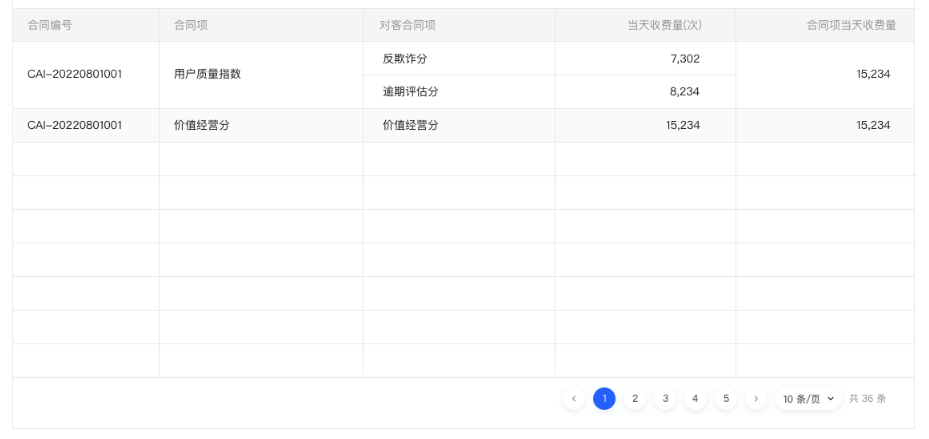
1. 需求效果图:
2. 接口数据格式:
点击查看代码
  const list = [

    {

      contractNo: "CAI-20220801001",

      contractItem: "用户质量指数",

      count: 15234,

      customerItems: [

        {

          contractNo: null,

          contractItem: "反欺诈分",

          price: null,

          priceType: null,

          count: 7302,

          amount: null,

        },

        {

          contractNo: null,

          contractItem: "逾期评估分",

          price: null,

          priceType: null,

          count: 8234,

          amount: null,

        },

      ],

    },

    {

      contractNo: "CAI-20220801001",

      contractItem: "价值经营分",

      count: 900,

      customerItems: [

        {

          contractNo: null,

          contractItem: "价值经营分",

          price: null,

          priceType: null,

          count: 15234,

          amount: null,

        },

      ],

    },

  ];
3. 实现过程:
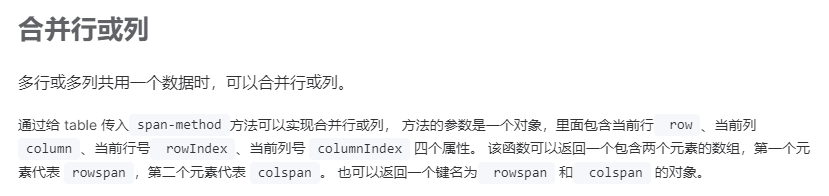
element plus 官网中有描述合并表格行列的方法:点此查看文档
表格部分代码如下:
  <el-table

    class="table-box"

    border

    m-t-27px

    :data="tableData"

    style="width: 100%"

    height="605px"

    :header-cell-style="{

      background: '#FAFAFA',

      color: 'rgba(0, 0, 0, 0.40)',

    }"

    :span-method="spanMethod"

  >

    <el-table-column prop="contractNo" label="合同编号" />

    <el-table-column prop="contractItem" label="合同项:" />

    <el-table-column prop="customerItemsContractItem" label="对客合同项" />

    <el-table-column

      prop="customerItemsCount"

      label="当天收费量(次)"

      align="right"

    >

      <template #default="scope">

        <span>{{ $utils.addCommas(scope.row.customerItemsCount) }}</span>

      </template>

    </el-table-column>

    <el-table-column prop="count" label="合同项当天收费量" align="center">

      <template #default="scope">

        <span>{{ $utils.addCommas(scope.row.count) }}</span>

      </template>

    </el-table-column>

  </el-table>
根据element文档所给的示例结合需求分析,需要把接口返回的数据进行格式化处理,把嵌套数据进行拆分,这里开始我是这样实现的(坑):
const formatListFn = (list) => {

  let arr = [];

  for (let i = 0; i < list.length; i++) {

    const item = list[i];

    for (let j = 0; j < item["customerItems"].length; j++) {

      const itm = item["customerItems"][j];

      arr.push({

        customerItemsContractItem: itm.contractItem,

        customerItemsCount: itm.count,

        ...item,

      });

    }

  }

  // console.log(arr);

  return arr;

};
此处把嵌套数组中需要使用的字段提取了出来,自定义了属性名
customerItemsContractItem和customerItemsCount。其他属性原样复制即可,不需要进行额外操作。
然后定义并给 table 传入span-method方法来实现合并行或列:
const spanMethod = ({ row, column, rowIndex, columnIndex }) => {

  const len = row["customerItems"].length;

  if (columnIndex > 3 || columnIndex < 2) {

    return {

      rowspan: len,

      colspan: 1,

    };

  }

};
根据索引给需要合并的部分设置rowspan,值为嵌套数组的长度。
此时以为大功告成,结果保存后查看页面如下:

可以看到框选处的展示是有问题的,对比需求效果如下:


4. 问题排查处理:
经过多处排查后发现问题出在spanMethod中。在spanMethod方法中,只判断了列索引,所以同一列可能会重复多次执行rowspan,导致合并错乱。
嵌套行被拆分后,原来两行数据被拆分成了三行,因此rowspan操作会多次执行。
解决办法就是让多行嵌套数据只执行一次rowspan操作。可以给每行数据添加标识,区分是否进行合并操作。这里我是这样处理的:
首先给每行数据设置rowspan值
const formatListFn = (list) => {

  let arr = [];

  for (let i = 0; i < list.length; i++) {

    const item = list[i];

    for (let j = 0; j < item["customerItems"].length; j++) {

      const itm = item["customerItems"][j];

      arr.push({

        customerItemsContractItem: itm.contractItem,

        customerItemsCount: itm.count,

        ...item,

        rowspan: j === 0 ? item.customerItems.length : 0,

      });

    }

  }

  // console.log(arr);

  return arr;

};
注意这行
rowspan: j === 0 ? item.customerItems.length : 0,,每次遍历customerItems时,给第一项设置rowspan为customerItems.length。否则设置为0,不让它合并。
然后修改spanMethod方法
const spanMethod = ({ row, column, rowIndex, columnIndex }) => {

  if (columnIndex > 3 || columnIndex < 2) {

    return {

      rowspan: row.rowspan,

      colspan: 1,

    };

  }

};
注意这行
rowspan: row.rowspan
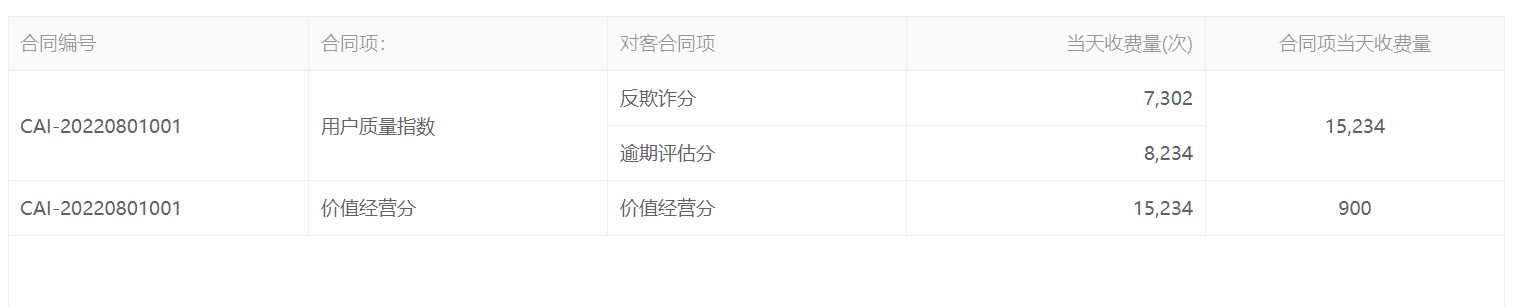
刷新页面查看,问题解决:
el-table 设置合并行或列时,显示错乱问题的更多相关文章
- ABAP ALV 颜色设置(行,列,单元格)
BCALV_EDIT_03 http://blog.sina.com.cn/s/blog_a87b19300102who3.html 关于ALV表格颜色,这种需求在项目中会经常用到. 列颜色 列的颜色 ...
- ALV 颜色设置(行,列,单元格)
[转自:https://www.cnblogs.com/mingdashu/p/color_alv.html] BCALV_EDIT_03 http://blog.sina.com.cn/s/blog ...
- Unity中调用Windows窗口句柄以及根据需求设置并且解决扩展屏窗体显示错乱/位置错误的Bug
问题背景: 现在在搞PC端应用开发,我们开发中需要调用系统的窗口以及需要最大化最小化,缩放窗口拖拽窗口,以及设置窗口位置,去边框等功能 解决根据: 使用user32.dll解决 具体功能: Unity ...
- js 创建Table,每行3列的方式
table: <table style="width:100%" id="appDatas"></table> 1. var table ...
- WebDataGrid设置某行某列的值
<ig:WebDataGrid ID="grid" OnRowSelectionChanged="grid_RowSelectionChanged" O ...
- table中超过长度的列,显示省略号
<style type="text/css"> .table-ellipsis { table-layout: fixed; width: 100%; } .table ...
- Unity3d 帧率设置 及在游戏执行时显示帧率
在Unity3d 中能够通过代码设置 来限定游戏帧率. Application.targetFrameRate=-1; 设置为 -1 表示不限定帧率. 转自http://blog.csdn.net/h ...
- SQL查询语句行转列横向显示
http://blog.163.com/dreamman_yx/blog/static/26526894201121595846270/
- layui点击table表格的每一格时显示相应的内容
$(document).on('click','.layui-table-cell',function(){ // $("p").css({"background-col ...
- 用JavaScript,获取Table中指定的行、列
前言: 先要谢谢George Wing的慷慨赠书<悟透JavaScript>,让我更加感受到了技术交流的重要性,呵呵~ 进入正题,面试题中有一题:如何通过JavaScript获取Table ...
随机推荐
- Llama2-Chinese项目:3.1-全量参数微调
提供LoRA微调和全量参数微调代码,训练数据为data/train_sft.csv,验证数据为data/dev_sft.csv,数据格式如下所示: "<s>Human: &q ...
- 其它——各主流Linux系统解决pip安装mysqlclient报错
文章目录 一 CentOS(红帽) 二 Ubuntu 三 Windows 一 CentOS(红帽) #CentOS有Python.Mysql的开发工具包,安装后使用pip安装mysqlclient即可 ...
- ElasticSearch系列——介绍、安装、插件介绍、安装ElasticSearch插件、安装Kibana、安装中文分词器、倒排索引、索引操作、映射管理
文章目录 ElasticSearch之介绍 一 Elasticsearch产生背景 1.1 大规模数据如何检索 1.2 传统数据库的应对解决方案 1.3 非关系型数据库解决方案 1.4 内存数据库解决 ...
- 43道Python经典案例题(有答案)
1.有四个数字:1.2.3.4,能组成多少个互不相同且无重复数字的三位数?各是多少? for x in range(0,5): for y in range(0,5): for z in range( ...
- Redis主从复制部署小结
Redis主从 搭建主从架构 单节点Redis的并发能力是有上限的,要进一步提高Redis的并发能力,就需要搭建主从集群,实现读写分离. 主从数据同步原理 全量同步 主从第一次建立连接时,会执行全量同 ...
- python 安装包时 ERROR: Failed building wheel for webrtcvad
报错信息: error: subprocess-exited-with-error × Building wheel for webrtcvad (pyproject.toml) did not ru ...
- JAVA多线程(2)——锁(对象锁和类锁)
1.如下代码 1 public class TestSync1 implements Runnable { 2 Timer1 timer = new Timer1(); 3 public static ...
- 互联网那些技术 | 扒一扒互联网Markdown的那些事儿
最近感觉到 Markdown 似乎已成为各大社区的编辑器标配所支持的格式,侧面看来其设计之初的目标 " to be used as a format for writing for the ...
- 聊聊魔塔社区MGeo模型的部署与运行
从现今与今后的发展来看,单一的业务不再仅仅依靠于传统的技术开发,而是应该结合AI模型来应用.实践.只有这样,才能更数智化,更高效化,更贴合时代的发展. 魔塔 社区就类似国外的Hugging Face, ...
- 有一种浪漫,叫接触Linux
大家好,我是五月. 嵌入式开发 嵌入式开发产品必须依赖硬件和软件. 硬件一般使用51单片机,STM32.ARM,做成的产品以平板,手机,智能机器人,智能小车居多. 软件用的当然是以linux系统为蓝 ...