
el-table 设置合并行或列时,显示错乱问题
1. 需求效果图:
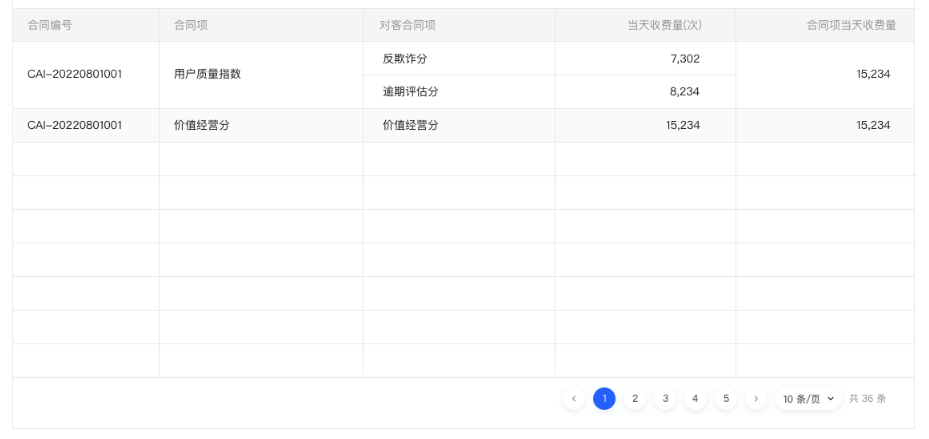
2. 接口数据格式:
点击查看代码
  const list = [

    {

      contractNo: "CAI-20220801001",

      contractItem: "用户质量指数",

      count: 15234,

      customerItems: [

        {

          contractNo: null,

          contractItem: "反欺诈分",

          price: null,

          priceType: null,

          count: 7302,

          amount: null,

        },

        {

          contractNo: null,

          contractItem: "逾期评估分",

          price: null,

          priceType: null,

          count: 8234,

          amount: null,

        },

      ],

    },

    {

      contractNo: "CAI-20220801001",

      contractItem: "价值经营分",

      count: 900,

      customerItems: [

        {

          contractNo: null,

          contractItem: "价值经营分",

          price: null,

          priceType: null,

          count: 15234,

          amount: null,

        },

      ],

    },

  ];
3. 实现过程:
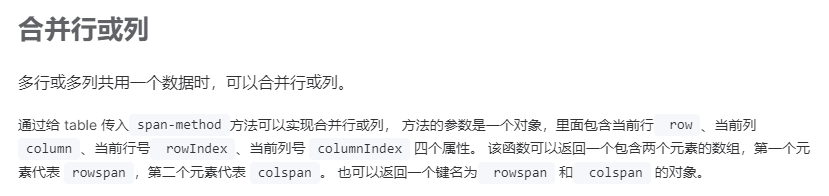
element plus 官网中有描述合并表格行列的方法:点此查看文档
表格部分代码如下:
  <el-table

    class="table-box"

    border

    m-t-27px

    :data="tableData"

    style="width: 100%"

    height="605px"

    :header-cell-style="{

      background: '#FAFAFA',

      color: 'rgba(0, 0, 0, 0.40)',

    }"

    :span-method="spanMethod"

  >

    <el-table-column prop="contractNo" label="合同编号" />

    <el-table-column prop="contractItem" label="合同项:" />

    <el-table-column prop="customerItemsContractItem" label="对客合同项" />

    <el-table-column

      prop="customerItemsCount"

      label="当天收费量(次)"

      align="right"

    >

      <template #default="scope">

        <span>{{ $utils.addCommas(scope.row.customerItemsCount) }}</span>

      </template>

    </el-table-column>

    <el-table-column prop="count" label="合同项当天收费量" align="center">

      <template #default="scope">

        <span>{{ $utils.addCommas(scope.row.count) }}</span>

      </template>

    </el-table-column>

  </el-table>
根据element文档所给的示例结合需求分析,需要把接口返回的数据进行格式化处理,把嵌套数据进行拆分,这里开始我是这样实现的(坑):
const formatListFn = (list) => {

  let arr = [];

  for (let i = 0; i < list.length; i++) {

    const item = list[i];

    for (let j = 0; j < item["customerItems"].length; j++) {

      const itm = item["customerItems"][j];

      arr.push({

        customerItemsContractItem: itm.contractItem,

        customerItemsCount: itm.count,

        ...item,

      });

    }

  }

  // console.log(arr);

  return arr;

};
此处把嵌套数组中需要使用的字段提取了出来,自定义了属性名
customerItemsContractItem和customerItemsCount。其他属性原样复制即可,不需要进行额外操作。
然后定义并给 table 传入span-method方法来实现合并行或列:
const spanMethod = ({ row, column, rowIndex, columnIndex }) => {

  const len = row["customerItems"].length;

  if (columnIndex > 3 || columnIndex < 2) {

    return {

      rowspan: len,

      colspan: 1,

    };

  }

};
根据索引给需要合并的部分设置rowspan,值为嵌套数组的长度。
此时以为大功告成,结果保存后查看页面如下:

可以看到框选处的展示是有问题的,对比需求效果如下:


4. 问题排查处理:
经过多处排查后发现问题出在spanMethod中。在spanMethod方法中,只判断了列索引,所以同一列可能会重复多次执行rowspan,导致合并错乱。
嵌套行被拆分后,原来两行数据被拆分成了三行,因此rowspan操作会多次执行。
解决办法就是让多行嵌套数据只执行一次rowspan操作。可以给每行数据添加标识,区分是否进行合并操作。这里我是这样处理的:
首先给每行数据设置rowspan值
const formatListFn = (list) => {

  let arr = [];

  for (let i = 0; i < list.length; i++) {

    const item = list[i];

    for (let j = 0; j < item["customerItems"].length; j++) {

      const itm = item["customerItems"][j];

      arr.push({

        customerItemsContractItem: itm.contractItem,

        customerItemsCount: itm.count,

        ...item,

        rowspan: j === 0 ? item.customerItems.length : 0,

      });

    }

  }

  // console.log(arr);

  return arr;

};
注意这行
rowspan: j === 0 ? item.customerItems.length : 0,,每次遍历customerItems时,给第一项设置rowspan为customerItems.length。否则设置为0,不让它合并。
然后修改spanMethod方法
const spanMethod = ({ row, column, rowIndex, columnIndex }) => {

  if (columnIndex > 3 || columnIndex < 2) {

    return {

      rowspan: row.rowspan,

      colspan: 1,

    };

  }

};
注意这行
rowspan: row.rowspan
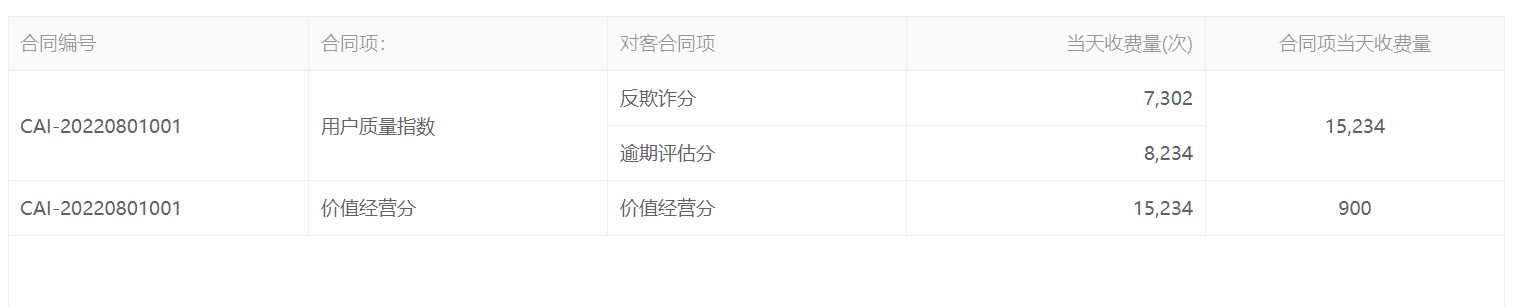
刷新页面查看,问题解决:
el-table 设置合并行或列时,显示错乱问题的更多相关文章
- ABAP ALV 颜色设置(行,列,单元格)
BCALV_EDIT_03 http://blog.sina.com.cn/s/blog_a87b19300102who3.html 关于ALV表格颜色,这种需求在项目中会经常用到. 列颜色 列的颜色 ...
- ALV 颜色设置(行,列,单元格)
[转自:https://www.cnblogs.com/mingdashu/p/color_alv.html] BCALV_EDIT_03 http://blog.sina.com.cn/s/blog ...
- Unity中调用Windows窗口句柄以及根据需求设置并且解决扩展屏窗体显示错乱/位置错误的Bug
问题背景: 现在在搞PC端应用开发,我们开发中需要调用系统的窗口以及需要最大化最小化,缩放窗口拖拽窗口,以及设置窗口位置,去边框等功能 解决根据: 使用user32.dll解决 具体功能: Unity ...
- js 创建Table,每行3列的方式
table: <table style="width:100%" id="appDatas"></table> 1. var table ...
- WebDataGrid设置某行某列的值
<ig:WebDataGrid ID="grid" OnRowSelectionChanged="grid_RowSelectionChanged" O ...
- table中超过长度的列,显示省略号
<style type="text/css"> .table-ellipsis { table-layout: fixed; width: 100%; } .table ...
- Unity3d 帧率设置 及在游戏执行时显示帧率
在Unity3d 中能够通过代码设置 来限定游戏帧率. Application.targetFrameRate=-1; 设置为 -1 表示不限定帧率. 转自http://blog.csdn.net/h ...
- SQL查询语句行转列横向显示
http://blog.163.com/dreamman_yx/blog/static/26526894201121595846270/
- layui点击table表格的每一格时显示相应的内容
$(document).on('click','.layui-table-cell',function(){ // $("p").css({"background-col ...
- 用JavaScript,获取Table中指定的行、列
前言: 先要谢谢George Wing的慷慨赠书<悟透JavaScript>,让我更加感受到了技术交流的重要性,呵呵~ 进入正题,面试题中有一题:如何通过JavaScript获取Table ...
随机推荐
- Ds100p -「数据结构百题」61~70
61.P5355 [Ynoi2017]由乃的玉米田 由乃在自己的农田边散步,她突然发现田里的一排玉米非常的不美. 这排玉米一共有 \(N\) 株,它们的高度参差不齐. 由乃认为玉米田不美,所以她决定出 ...
- Strimzi Kafka Bridge(桥接)实战之一:简介和部署
欢迎访问我的GitHub 这里分类和汇总了欣宸的全部原创(含配套源码):https://github.com/zq2599/blog_demos 关于<Strimzi Kafka Bridge( ...
- 在线问诊 Python、FastAPI、Neo4j — 生成 Cypher 语句
目录 构建节点字典 构建Cypher CQL语句 Test 这边只是为了测试,演示效果和思路,实际应用中,可以通过NLP构建CQL 接上一篇的问题分类 question = "请问最近看东西 ...
- Blazor前后端框架Known-V1.2.16
V1.2.16 Known是基于C#和Blazor开发的前后端分离快速开发框架,开箱即用,跨平台,一处代码,多处运行. Gitee: https://gitee.com/known/Known Git ...
- Redis系列之——Redis介绍安装配置
文章目录 第一章 redis初识 1.1 Redis是什么 1.2 Redis特性(8个) 1.3 Redis单机安装 1.3.1下载安装 1.3.2三种启动方式 1.3.2.1 最简启动 1.3.2 ...
- Chromium Mojo通信
Mojo 是一个跨平台 IPC 框架,它诞生于 chromium ,用来实现 chromium 进程内/进程间的通信.目前,它也被用于 ChromeOS. 在我们代码应用中,如何使用Mojo来作进程间 ...
- Hyper-V 下的 Debian 双网卡配置
Debian 双网卡配置 因为 Hyper-v 不能在 Hyper-v Manger 里设置网卡的静态 IP, 而每次开机自启之后又要连接 Debian 虚拟机,所以使用了双网卡. 双网卡分为内网网卡 ...
- IOI2020 国家集训队作业 Part 1
日期不对,但要保证顺序正确方便查找少了啥题. 计算几何和实在不会的题没写. 9.20 CF504E Misha and LCP on Tree *3000 二分,hash,树剖 CF505E Mr. ...
- CF1789D Serval and Shift-Shift-Shift 题解
题目链接 题目分析 首先,看到题目中的左移右移之后再异或,我们自然可以想到在移动的过程中字符串的一段前缀和后缀不会改变,考虑通过这个性质逐位还原. 因为异或 0 不会改变原本的值,所以我们可以找到整个 ...
- 四个id 生成器性能比较记录
IdGenerator Seata 优化的雪花算法 Seata基于改良版雪花算法的分布式UUID生成器分析 关于新版雪花算法的答疑 csharp 移植代码 public class IdGenerat ...