
Vu3+Element-Plus根据路由配置生成菜单导航栏
先看效果,整体界面结构如下
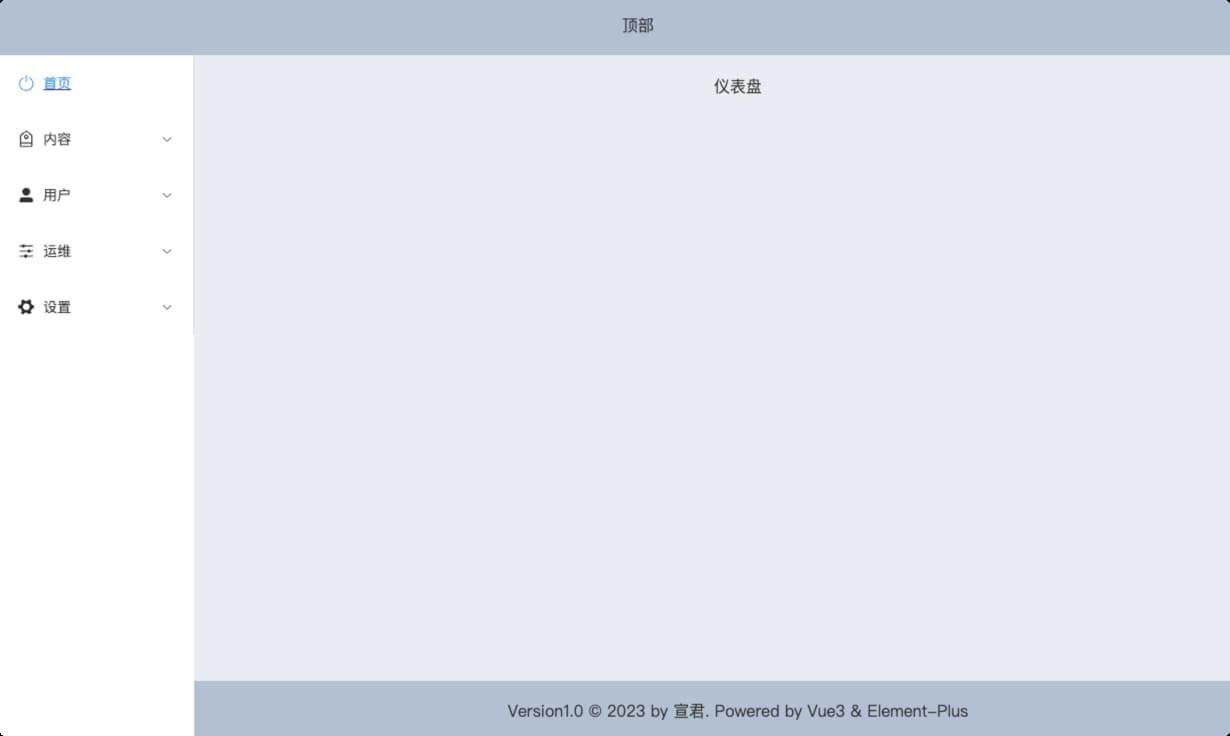
点击左侧菜单栏,右侧切换显示不同页面内容。
1 路由配置
路由配置如下:
const routes = [

  {

    path: "",

    component: () => import("@/layout/baseView.vue"),

    redirect: "/index",

    children: [

      {

        path: "/index",

        name: "首页",

        icon: "SwitchButton",

        hidden: false,

        component: () => import("@/page/dashboard/dashboard.vue"),

      },

      {

        path: "/content",

        name: "内容",

        icon: "Discount",

        hidden: false,

        component: () => import("@/layout/rightView.vue"),

        children: [

          {

            path: "manage-comment",

            icon: "MessageBox",

            name: "管理评论",

            hidden: false,

            component: () => import("@/page/content/manageComment.vue"),

          },

          {

            path: "manage-image",

            icon: "Odometer",

            name: "管理图片",

            hidden: false,

            component: () => import("@/page/content/manageImage.vue"),

          },

        ],

      },

      {

        path: "/user",

        icon: "UserFilled",

        name: "用户",

        hidden: false,

        component: () => import("@/layout/rightView.vue"),

        children: [

          {

            path: "list",

            icon: "User",

            name: "用户列表",

            hidden: false,

            component: () => import("@/page/user/list.vue"),

          },

          {

            path: "reset-pwd",

            icon: "Unlock",

            name: "重置密码",

            hidden: false,

            component: () => import("@/page/user/resetPwd.vue"),

          },

         // ....

        ],

      },

      {

        path: "/operation",

        icon: "Operation",

        name: "运维",

        hidden: false,

        component: () => import("@/layout/rightView.vue"),

        children: [

          {

            path: "mange-category",

            icon: "Edit",

            hidden: false,

            name: "管理分类",

            component: () => import("@/page/operation/manageCategory.vue"),

          },

          {

            path: "mange-carousel",

            icon: "Crop",

            name: "管理轮播图",

            hidden: false,

            component: () => import("@/page/operation/manageCarousel.vue"),

          },

        ],

      },

    ],

  },

  {

    path: "/login",

    hidden: true,

    component: () => import("@/page/login/login.vue"),

  },

];
说明:
@/layout/baseView.vue是整体页面结构
@/layout/rightView.vue是公共页面用于显示数据内容。
@/page/login/login.vue是登陆页面
2 页面结构
右侧数据内容视图是动态的,其它整个页面结构是固定的,因此提取baseView.vue作为页面基本结构。
登录界面是另一个页面整体,因此login.vue和基本结构页面baseView.vue都在App.vue页面中通过路由进行切换,因此App.vue中添加router-view进行动态路由渲染。
<template>

  <div id="app">

    <router-view></router-view>

  </div>

</template>
左侧菜单导航,菜单是根据路由进行动态渲染的,所以将路由生成菜单抽取为独立组组件leftMenuBar.vue。在mounted()中获取路由配置
export default {

  data() {

    return {

      menuList: [],

    };

  },

  mounted() {

    let routes = router.options.routes;

    this.menuList = routes[0].children;

    console.log(this.menuList);

  },

};
️Vue3通过router.options.routes 获取配置的路由
在右侧数据视图页面rightView.vue添加router-view标签
<template>

  <div class="right-view">

    <div class="header"></div>

    <div class="content">

      <router-view></router-view>

    </div>

  </div>

</template>
3 结合Element-plus 生成菜单导航
遍历路由通过element-plus的Menu组件生成菜单导航,完整的代码如下:
<template>

  <div>

    <el-menu

      default-active="0"

      :unique-opened="true"

      class="el-menu-vertical-demo"

    >

      <template v-for="(item, index) in menuList" :key="index">

        <router-link :to="item.path" v-if="!item.children" :key="index">

          <el-menu-item :index="index + ''">

            <el-icon><component :is="item.icon"></component></el-icon>

            <span>{{ item.name }}</span>

          </el-menu-item>

        </router-link>

        <el-sub-menu :index="index + ''" v-else>

          <template #title>

            <el-icon><component :is="item.icon"></component></el-icon>

            <span>{{ item.name }}</span>

          </template>

          <router-link

            :to="item.path + '/' + sub.path"

            v-for="(sub, subIndex) in item.children"

            :key="subIndex"

          >

            <el-menu-item :index="index + '-' + subIndex">

              <el-icon><component :is="sub.icon"></component></el-icon>

              <span>{{ sub.name }}</span>

            </el-menu-item>

          </router-link>

        </el-sub-menu>

      </template>

    </el-menu>

  </div>

</template>
4 设置菜单图标
由于element-plus使用svg 图标,复制的代码是<el-icon><Search /></el-icon>这样的,因此在遍历路由时,就不能通过<i :calss = "xxxx"></i>设置了,要通过<el-icon><component :is="xxxx"></component></el-icon>来设置,:is绑定的是icon的名称
<el-icon><component :is="item.icon"></component></el-icon>
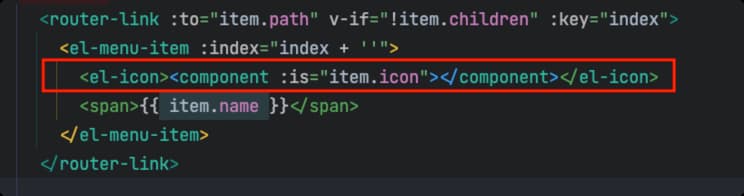
️这个地方element不同,element使用的是font-class的图标,可用 直接绑定
Vu3+Element-Plus根据路由配置生成菜单导航栏的更多相关文章
- jquery自定义插件-参数化配置多级菜单导航栏插件
1 自定义菜单导航栏插件的必要性 看图说话,下面是利用自定义的菜单导航栏插件simpleMenu创建的网站导航示例: 插件默认提供的是如上图的导航栏样式,即一二级菜单为横向分布:三四级菜单为纵向分布. ...
- 小程序配置单个页面导航栏的属性(微信小程序交流群:604788754)
配置单个页面导航栏的属性: 就在所要配置页面相对应的json文件中写入以下想要设置的属性: { "navigationBarBackgroundColor": "#fff ...
- 【原创】js实现一个可随意拖拽排序的菜单导航栏
1.想做这个效果的原因主要是用在UC上看新闻发现他们的导航菜单很有趣.无聊的时候在哪划着玩了很久.所以就干脆自己写一个.原效果如下 2.整体效果如下,在已推荐和未添加里面每个小方块可以触摸移动位置互换 ...
- 仿淘宝左侧菜单导航栏纯Html + css 写的
这俩天闲来没事淘宝逛了一圈看到淘宝的左侧导航菜单做的是真心的棒啊,一时兴起,查了点资料抓了几个图片仿淘宝写了个css,时间紧写的不太好,大神勿喷,给小白做个参考 废话不多说先来个效果图 接下来直接上代 ...
- jQuery 效果 - slideDown() 方法[菜单导航栏常用]
实例 以滑动方式显示隐藏的 <p> 元素: $(".btn2").click(function(){ $("p").slideDown(); }); ...
- vue根据路由变换,切换导航栏样式
<ul> <li> <router-link :to="{name: 'home'}" class="active_item" e ...
- ios开发之自己定义默认生成的导航栏 标题 颜色 返回button
一 改动导航栏颜色 导航栏在哪个页面代码放在那里面 self.navigationController.navigationBar.tintColor = [UIColor colorWithR ...
- Markdown使用TOC自动生成导航栏
经常使用markdown 的玩家一定很想要一个自动生成的导航栏吧,自己写的基本思路就是 轮询监听滚动条的位置,通过抛锚和跳锚实现,这里介绍一下今天的主角,markdown-toc插件: https:/ ...
- Vue结合路由配置递归实现菜单栏
作者:小土豆biubiubiu 博客园:https://www.cnblogs.com/HouJiao/ 掘金:https://juejin.im/user/58c61b4361ff4b005d9e8 ...
- 从壹开始 [vueAdmin后台] 之三 || 动态路由配置 & 项目快速开发
回顾 今天VS 2019正式发布,实验一波,你安装了么?Blog.Core 预计今天会升级到 Core 3.0 版本. 哈喽大家周三好!本来今天呢要写 Id4 了,但是写到了一半,突然有人问到了关于 ...
随机推荐
- 2020-09-08:KVM和OpenStack的区别?
福哥答案2020-09-08:[此答案来自知乎](https://www.zhihu.com/question/419987391)KVM只是一个虚拟机技术,别的还有xen,商业的vmware.vir ...
- 2021-06-04:给定三个参数:二叉树的头节点head,树上某个节点target,正数K,从target开始,可以向上走或者向下走。返回与target的距离是K的所有节点。
2021-06-04:给定三个参数:二叉树的头节点head,树上某个节点target,正数K,从target开始,可以向上走或者向下走.返回与target的距离是K的所有节点. 福大大 答案2021- ...
- 2021-11-05:摆动排序 II。给你一个整数数组 nums,将它重新排列成 nums[0] < nums[1] > nums[2] < nums[3]... 的顺序。你可以假设所有输入数组都可以
2021-11-05:摆动排序 II.给你一个整数数组 nums,将它重新排列成 nums[0] < nums[1] > nums[2] < nums[3]- 的顺序.你可以假设所有 ...
- mysql 5.7 json 类型 json 数组类型 普通字符串类型 10w数据 查询速度差异
json 非数组 建表语句ddl CREATE TABLE tb_json_test ( id INT NOT NULL AUTO_INCREMENT, user_no VARCHAR(100), u ...
- Django4全栈进阶之路14 项目实战(用户管理):base.html基础模板设计
在 Django 中,我们可以使用模板继承来避免代码的重复.模板继承是指我们可以在一个模板中定义一些公共的 HTML 代码,然后在其他模板中继承这个基础模板,并根据需要添加或覆盖一些内容. 通常情况下 ...
- ICLR 2017-RL2: Fast Reinforcement Learning via Slow Reinforcement Learning
Key GRUs+TRPO+GAE 解决的主要问题 现有RL方法需要手动设置特定领域的算法 DRL学习的过程需要大量的试验牺牲了高样本复杂度(每个task需要数万次经验),相比人来说,这是由于缺乏先验 ...
- Flutter三棵树系列之详解各种Key
简介 key是widget.element和semanticsNode的唯一标识,同一个parent下的所有element的key不能重复,但是在特定条件下可以在不同parent下使用相同的key,比 ...
- ODOO13之七:Odoo 13开发之记录集 – 使用模型数据
在上一篇文章中,我们概览了模型创建以及如何从模型中载入和导出数据.现在我们已有数据模型和相关数据,是时候学习如何编程与其进行交互 了.模型的 ORM(Object-Relational Mapping ...
- day09-SpringCloud Sleuth+Zipkin-链路追踪
SpringCloud Sleuth+Zipkin-链路追踪 官网:spring-cloud/spring-cloud-sleuth: Distributed tracing for spring c ...
- 明解STM32—GPIO应用设计篇之IO外部中断EXTI原理及使用方法
一.前言 在之前针对STM32的GPIO相关API函数及配置使用进行了详细的介绍,GPIO作为输入引脚时,调用相关读信号引脚函数接口就可以在程序的循环中,轮询的对输入信号进行读取检测操作,除了轮询的 ...