
mybatis-plus自动生成代码
1.背景
本教程将介绍如何使用 mybatis-plus 工具自动给我们生成 Controller、Service、Entity、Mapper、Mapper.xml 层代码;
给出一个便于于学习理解的的最基础版本,
同时为了便于大家快速在实际生产同时也给出一个更符合生产使用的生产版本,
在这个版本中会有常用的框架整合,
比如框架中使用了
自定义模板、
自定义mapper基类、
自定义service基类、
自定义controller基类、
生成的代码默认单表的CRUD接口已全部实现、
整合了swagger接口文档、
日志输出等......
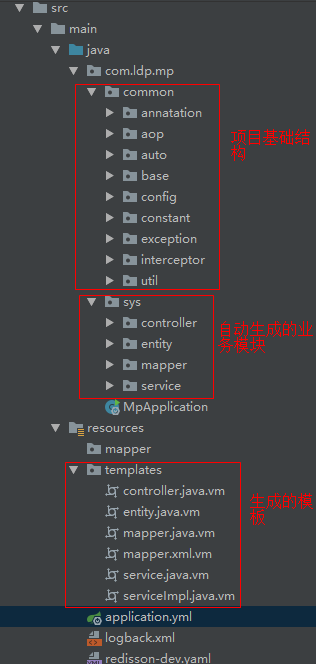
2.生成代码结构如下
demo环境:

实际生产:
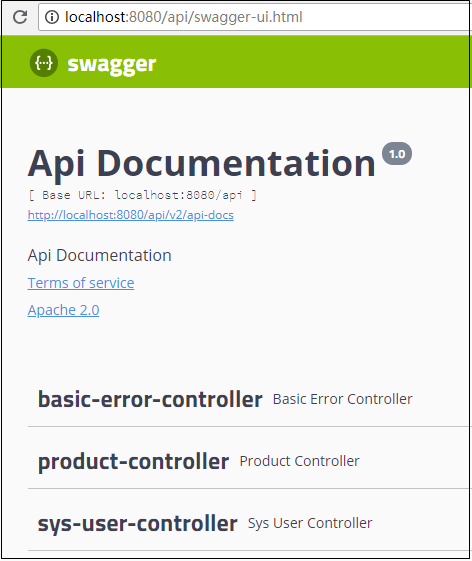
启动项目swagger文档:
3.简单demo实现
步骤一:数据库表准备


CREATE TABLE `sys_user` (

  `id` int(32) NOT NULL AUTO_INCREMENT COMMENT '主键',

  `name` varchar(64) DEFAULT NULL,

  `parent_id` int(32) DEFAULT NULL COMMENT '领导id',

  `version` int(64) DEFAULT NULL,

  `gender` int(32) DEFAULT NULL,

  `age` int(32) DEFAULT NULL,

  `position` varchar(64) DEFAULT NULL,

  `account` varchar(255) DEFAULT NULL,

  `we_chat` varchar(255) DEFAULT NULL,

  `password` varchar(225) DEFAULT NULL,

  `status` varchar(64) DEFAULT NULL,

  `create_time` datetime DEFAULT NULL,

  `type` varchar(64) DEFAULT NULL COMMENT '类型',

  `update_time` datetime DEFAULT NULL,

  `deleted` int(255) DEFAULT '0' COMMENT '逻辑删除字段:0-没有删除,1-已删除',

  PRIMARY KEY (`id`)

) ENGINE=InnoDB AUTO_INCREMENT=32 DEFAULT CHARSET=utf8mb4;
步骤二:构建maven项目
步骤三:pom.xml文件
<?xml version="1.0" encoding="UTF-8"?>

<project xmlns="http://maven.apache.org/POM/4.0.0" xmlns:xsi="http://www.w3.org/2001/XMLSchema-instance"

         xsi:schemaLocation="http://maven.apache.org/POM/4.0.0 https://maven.apache.org/xsd/maven-4.0.0.xsd">

    <modelVersion>4.0.0</modelVersion>

    <parent>

        <groupId>org.springframework.boot</groupId>

        <artifactId>spring-boot-starter-parent</artifactId>

        <version>2.3.4.RELEASE</version>

        <relativePath/> <!-- lookup parent from repository -->

    </parent>

    <groupId>com.ldp.mpGenerator</groupId>

    <artifactId>mp-generator</artifactId>

    <version>0.0.1-SNAPSHOT</version>

    <name>mp-generator</name>

    <description>Demo project for Spring Boot</description>

    <properties>

        <java.version>11</java.version>

    </properties>

    <dependencies>

        <!-- springmvc容器-->

        <dependency>

            <groupId>org.springframework.boot</groupId>

            <artifactId>spring-boot-starter-web</artifactId>

        </dependency>

        <!-- mysql驱动包 -->

        <dependency>

            <groupId>mysql</groupId>

            <artifactId>mysql-connector-java</artifactId>

            <version>8.0.22</version>

        </dependency>

        <!-- druid链接池 -->

        <dependency>

            <groupId>com.alibaba</groupId>

            <artifactId>druid</artifactId>

            <version>1.2.3</version>

        </dependency>

        <!-- mybatis-plus-->

        <dependency>

            <groupId>com.baomidou</groupId>

            <artifactId>mybatis-plus-boot-starter</artifactId>

            <version>3.4.1</version>

        </dependency>

        <!--代码生成器依赖-->

        <dependency>

            <groupId>com.baomidou</groupId>

            <artifactId>mybatis-plus-generator</artifactId>

            <version>3.4.1</version>

        </dependency>

        <!-- velocity 模板 -->

        <dependency>

            <groupId>org.apache.velocity</groupId>

            <artifactId>velocity</artifactId>

            <version>1.7</version>

        </dependency>

        <!-- fastjson -->

        <dependency>

            <groupId>com.alibaba</groupId>

            <artifactId>fastjson</artifactId>

            <version>1.2.75</version>

        </dependency>

        <!-- 多功能工具类 -->

        <dependency>

            <groupId>cn.hutool</groupId>

            <artifactId>hutool-all</artifactId>

            <version>5.5.2</version>

        </dependency>

        <dependency>

            <groupId>org.projectlombok</groupId>

            <artifactId>lombok</artifactId>

            <optional>true</optional>

        </dependency>

        <dependency>

            <groupId>org.springframework.boot</groupId>

            <artifactId>spring-boot-starter-test</artifactId>

            <scope>test</scope>

        </dependency>

    </dependencies>

    <build>

        <plugins>

            <plugin>

                <groupId>org.springframework.boot</groupId>

                <artifactId>spring-boot-maven-plugin</artifactId>

            </plugin>

        </plugins>

        <resources>

            <resource>

                <!-- xml放在java目录下-->

                <directory>src/main/java</directory>

                <includes>

                    <include>**/*.xml</include>

                </includes>

            </resource>

            <!--指定资源的位置(xml放在resources下,可以不用指定)-->

            <resource>

                <directory>src/main/resources</directory>

            </resource>

        </resources>

    </build>

</project>
步骤四:启动文件配置
# 配置端口

server:

  port: 8080

  servlet:

    context-path: /api

spring:

  # 配置数据源

  datasource:

    type: com.alibaba.druid.pool.DruidDataSource

    driver-class-name: com.mysql.cj.jdbc.Driver

    url: jdbc:mysql://localhost:3306/mp-data?useUnicode=true&characterEncoding=utf8&useSSL=false&serverTimezone=Asia/Shanghai&

    username: root

    password: admin

# mybatis-plus相关配置

mybatis-plus:

  # xml扫描,多个目录用逗号或者分号分隔(告诉 Mapper 所对应的 XML 文件位置)

  mapper-locations: classpath:mapper/*.xml

  # 以下配置均有默认值,可以不设置

  global-config:

    db-config:

      #主键类型 AUTO:"数据库ID自增" INPUT:"用户输入ID",ID_WORKER:"全局唯一ID (数字类型唯一ID)", UUID:"全局唯一ID UUID";

      id-type: auto

      #字段策略 IGNORED:"忽略判断"  NOT_NULL:"非 NULL 判断")  NOT_EMPTY:"非空判断"

      insertStrategy: NOT_EMPTY

      updateStrategy: NOT_EMPTY

  configuration:

    # 是否开启自动驼峰命名规则映射:从数据库列名到Java属性驼峰命名的类似映射

    map-underscore-to-camel-case: true

    # 如果查询结果中包含空值的列,则 MyBatis 在映射的时候,不会映射这个字段

    call-setters-on-nulls: true

    # 这个配置会将执行的sql打印出来,在开发或测试的时候可以用

    log-impl: org.apache.ibatis.logging.stdout.StdOutImpl

logging:

  config: classpath:logback.xml
步骤五:自动代码工具类
package com.ldp.mpgenerator;

import cn.hutool.core.collection.CollUtil;

import com.baomidou.mybatisplus.annotation.DbType;

import com.baomidou.mybatisplus.annotation.FieldFill;

import com.baomidou.mybatisplus.generator.AutoGenerator;

import com.baomidou.mybatisplus.generator.config.DataSourceConfig;

import com.baomidou.mybatisplus.generator.config.GlobalConfig;

import com.baomidou.mybatisplus.generator.config.PackageConfig;

import com.baomidou.mybatisplus.generator.config.StrategyConfig;

import com.baomidou.mybatisplus.generator.config.po.TableFill;

import com.baomidou.mybatisplus.generator.config.rules.NamingStrategy;

import java.util.List;

/**

 * @Copyright (C) XXXXXXX科技有限公司

 * @Author: LI DONG PING

 * @Date: 2020-10-14 13:09

 * @Description:

 */

public class AutoGeneratorUtil {

    /**

     * 启动生成代码

     *

     * @param args

     */

    public static void main(String[] args) {

        System.out.println("------开始---------");

        doGenerator();

        System.out.println("------结束---------");

    }

    /**

     * 基础配置

     */

    private static String outputDir = System.getProperty("user.dir") + "/src/main/java";

    private static String author = "lidongping";

    /**

     * 数据库配置

     */

    private static DbType dbType = DbType.MYSQL;

    private static String driverName = "com.mysql.cj.jdbc.Driver";

    private static String userName = "root";

    private static String password = "admin";

    private static String url = "jdbc:mysql://localhost:3306/mp-data?useUnicode=true&characterEncoding=utf8&useSSL=false&serverTimezone=Asia/Shanghai&";

    private static String[] tables = {"sys_user"};

    /**

     * 生成包路径

     */

    private static String packageParent = "com.ldp.mpgenerator";

    private static String entity = "sys.entity";

    private static String mapper = "sys.mapper";

    private static String mapperXml = "sys.mapper.mappers";

    private static String service = "sys.service";

    private static String serviceImpl = "sys.service.impl";

    private static String controller = "sys.controller";

    public static void doGenerator() {

        AutoGenerator mpg = new AutoGenerator();

        // 全局配置

        GlobalConfig gc = new GlobalConfig();

        //代码生成存放位置

        gc.setOutputDir(outputDir);

        gc.setFileOverride(true);

        gc.setActiveRecord(false);

        gc.setEnableCache(false);

        gc.setBaseResultMap(true);

        gc.setBaseColumnList(false);

        gc.setOpen(true);

        gc.setAuthor(author);

        gc.setMapperName("%sMapper");

        gc.setXmlName("%sMapper");

        gc.setServiceImplName("%sService");

        gc.setServiceName("I%sService");

        gc.setControllerName("%sController");

        mpg.setGlobalConfig(gc);

        // 数据源配置

        DataSourceConfig dsc = new DataSourceConfig();

        dsc.setDbType(dbType);

        dsc.setDriverName(driverName);

        dsc.setUsername(userName);

        dsc.setPassword(password);

        dsc.setUrl(url);

        mpg.setDataSource(dsc);

        // 策略配置

        StrategyConfig strategy = new StrategyConfig();

        strategy.setNaming(NamingStrategy.underline_to_camel);

        strategy.setInclude(tables);

        strategy.setSuperEntityColumns(new String[]{});

        //strategy.setSuperMapperClass("com.baomidou.mybatisplus.core.mapper.BaseMapper");

        List<TableFill> tableFillList = CollUtil.newArrayList();

        TableFill fill = new TableFill("update_time", FieldFill.INSERT_UPDATE);

        tableFillList.add(fill);

        fill = new TableFill("create_time", FieldFill.INSERT);

        tableFillList.add(fill);

        strategy.setTableFillList(tableFillList);

        mpg.setStrategy(strategy);

        // 包配置

        PackageConfig pc = new PackageConfig();

        pc.setParent(packageParent);

        // 代码生成包路径

        pc.setEntity(entity);

        pc.setMapper(mapper);

        pc.setXml(mapperXml);

        pc.setService(service);

        pc.setServiceImpl(serviceImpl);

        pc.setController(controller);

        mpg.setPackageInfo(pc);

        // 注入自定义配置,可以在 VM 中使用 ${cfg.packageMy} 设置值

        // InjectionConfig cfg = new InjectionConfig() {

        //     public void initMap() {

        //         Map<String, Object> map = new HashMap<String, Object>();

        //         map.put("packageMy", packageBase);

        //         this.setMap(map);

        //     }

        // };

        // mpg.setCfg(cfg);

        // TemplateConfig tc = new TemplateConfig();

        // tc.setEntity("templates/entity.java.vm");

        // tc.setMapper("templates/mapper.java.vm");

        // tc.setXml("templates/mapper.xml.vm");

        // tc.setServiceImpl("templates/serviceImpl.java.vm");

        // tc.setService("templates/service.java.vm");

        // tc.setController("templates/controller.java.vm");

        // mpg.setTemplate(tc);

        // 执行生成

        mpg.execute();

    }

}
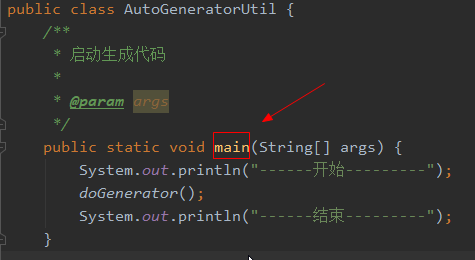
第六步:执行生产自动代码
4.实际生产案例
构建步骤与上面的思路一致,只是多了一些封装等,具体代码过多,请自己下载
5.代码下载
mybatis-plus系统化学习教程:https://www.cnblogs.com/newAndHui/p/14141950.html
完美!
mybatis-plus自动生成代码的更多相关文章
- SpringBoot 添加mybatis generator 自动生成代码插件
自动生成数据层代码,提高开发效率 1.pom添加插件,并指定配置文件路径 <!-- mybatis generator 自动生成代码插件 --> <plugin> <gr ...
- idea中mybatis generator自动生成代码配置 数据库是sqlserver
好长时间没有写博客了,最近公司要用java语言,开始学习java,属于初学者,今天主要记录一下mybatis generator自动生成代码,首先在如下图的目录中新建两个文件,如下图 generato ...
- SpringBoot入门篇--整合mybatis+generator自动生成代码+druid连接池+PageHelper分页插件
原文链接 我们这一篇博客讲的是如何整合Springboot和Mybatis框架,然后使用generator自动生成mapper,pojo等文件.然后再使用阿里巴巴提供的开源连接池druid,这个连接池 ...
- IDEA Maven Mybatis generator 自动生成代码
IDEA Maven Mybatis generator 自动生成代码 一.安装配置maven以及在Idea中配置maven 安装过程步骤可以看上面的博文,里面介绍得很详细. 二.建数据表 DROP ...
- IDEA Maven Mybatis generator 自动生成代码(实例讲解)(转)
IDEA Maven Mybatis generator 自动生成代码(实例讲解) MyBatis Generator • 简称MBG,是一个专门为MyBatis框架使用者定制的代码生成器,可以快速的 ...
- (转)MyBatis框架的学习(七)——MyBatis逆向工程自动生成代码
http://blog.csdn.net/yerenyuan_pku/article/details/71909325 什么是逆向工程 MyBatis的一个主要的特点就是需要程序员自己编写sql,那么 ...
- 使用mybatis插件自动生成代码以及问题处理
1.pom.xml中加入依赖插件 <!-- mybatis generator 自动生成代码插件 --> <plugin> <groupId>org.mybatis ...
- MyBatis框架之mybatis逆向工程自动生成代码
http://www.jb51.net/article/82062.htm Mybatis属于半自动ORM,在使用这个框架中,工作量最大的就是书写Mapping的映射文件,由于手动书写很容易出错,我们 ...
- SpringBoot+Mybatis+MySql 自动生成代码 自动分页
一.配置文件 <!-- 通用mapper --> <dependency> <groupId>tk.mybatis</groupId> <arti ...
- 使用Mybatis Generator自动生成代码
MyBatis Generator(MBG)是MyBatis MyBatis 和iBATIS的代码生成器.它将为所有版本的MyBatis以及版本2.2.0之后的iBATIS版本生成代码.它将内省数据库 ...
随机推荐
- github fork后对上游仓库的做rebase
想对上游仓库做更新同步 先添加上游仓库 git remote add upstream https://github.com/原始作者/原始仓库.git 其中这里的upstream 是一个命名,和 o ...
- mysql时间字段新增和修改默认时间,删除字段
mysql时间字段新增和修改默认时间,删除字段##新增字段ALTER TABLE tbl_test ADD COLUMN `create_time` DATETIME NULL DEFAULT CUR ...
- windows离线部署VSCode在Centos7上的远程开发环境
前言 公司一直使用的是ssh+vim的远程开发方式,习惯了vim之后已经非常方便了.但是还是想尝试一下VSCode的开发方式.就我而言,原因如下 漂亮的语法高亮,并且有补全 基于语法解析的引用查找(尽 ...
- 从github下好dirsearch后出现要下载文件依赖错误
pip3 install -r requirements.txt
- 同时开启firewall和iptables
使用向导 With the iptables service, every single change means flushing all the old rules and reading all ...
- .NET 中使用RabbitMQ初体验
在.NET Core中使用RabbitMQ 前言 逛园子的时候看到一篇.NET 学习RabbitMq的文章(视频地址和文章地址放在文章底部了),写的不错,我也来实现一下. 我是把RabbitMQ放在服 ...
- Ubuntu 下 python 安装pip
背景 python的强大在于它的第三方库. 安装 python2 sudo apt-get install python-pip python3 curl https://bootstrap.pypa ...
- Node.js 的ORM(Sequelize) 的使用
Sequelize是一个Node.js 的ORM.什么是ORM呢?对象关系映射(Object Relational Mapping).什么意思?就是在编程语言中,很容易创建对象,如果在面向对象的语言中 ...
- 如何在 Windows 使用 Podman Desktop 取代 Docker Desktop
Podman Desktop 是 Docker Desktop 的免费替代品,是本地开发使用的另一个绝佳选择.它提供了类似的功能集,同时保持完全开源,让您避免使用 Docker 产品的许可问题.在本文 ...
- iOS开发基础99-内购in_app
今天后台支付校验模块报错,拿到凭证去苹果校验返回的结果如下: { "receipt": { "receipt_type": "Production&q ...