
MyBatis框架之mybatis逆向工程自动生成代码
http://www.jb51.net/article/82062.htm
Mybatis属于半自动ORM,在使用这个框架中,工作量最大的就是书写Mapping的映射文件,由于手动书写很容易出错,我们可以利用Mybatis-Generator来帮我们自动生成文件。
逆向工程
1.什么是逆向工程
mybaits需要程序员自己编写sql语句,mybatis官方提供逆向工程 可以针对单表自动生成mybatis执行所需要的代码(mapper.java,mapper.xml、po..)
企业实际开发中,常用的逆向工程方式:
由于数据库的表生成java代码。
2.下载逆向工程
mybatis-generator-core-1.3.2-bundle.zip
3.使用方法(会用)
3.1运行逆向工程
官方文档中提供的运行逆向工程的几种方法
Running MyBatis Generator
MyBatis Generator (MBG) can be run in the following ways:
(1)From the command prompt with an XML configuration
(2)As an Ant task with an XML configuration
(3)As a Maven Plugin
(4)From another Java program with an XML configuration
(5)From another Java program with a Java based configuration
(6)还可以通过eclipse的插件生成代码
建议使用java程序方式(From another Java program with an XML configuration),不依赖开发工具。
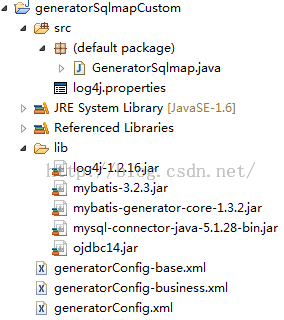
下面创建一个生成逆向文件的工程,将自动生成的文件再拷贝到原工程中去(这么做是为了放止直接在源文件中生成会覆盖掉同名文件)导入的jar包和工程结构截图如下:
如图
3.2生成代码配置文件
generatorConfig.xml:
|
1
2
3
4
5
6
7
8
9
10
11
12
13
14
15
16
17
18
19
20
21
22
23
24
25
26
27
28
29
30
31
32
33
34
35
36
37
38
39
40
41
42
43
44
45
46
47
48
49
50
51
52
53
54
55
56
57
58
59
60
61
62
|
<?xml version="1.0" encoding="UTF-8"?><!DOCTYPE generatorConfigurationPUBLIC "-//mybatis.org//DTD MyBatis Generator Configuration 1.0//EN"<generatorConfiguration><context id="testTables" targetRuntime="MyBatis3"><commentGenerator><!-- 是否去除自动生成的注释 true:是 : false:否 --><property name="suppressAllComments" value="true" /></commentGenerator><!--数据库连接的信息:驱动类、连接地址、用户名、密码 --><jdbcConnection driverClass="com.mysql.jdbc.Driver"password="1234"></jdbcConnection><!-- <jdbcConnection driverClass="oracle.jdbc.OracleDriver"connectionURL="jdbc:oracle:thin:@127.0.0.1:1521:yycg"userId="yycg"password="yycg"></jdbcConnection> --><!-- 默认false,把JDBC DECIMAL 和 NUMERIC 类型解析为 Integer,为 true时把JDBC DECIMAL 和 NUMERIC 类型解析为java.math.BigDecimal --><javaTypeResolver><property name="forceBigDecimals" value="false" /></javaTypeResolver><!-- targetProject:生成PO类的位置 --><javaModelGenerator targetPackage="cn.edu.hpu.ssm.po"targetProject=".\src"><!-- enableSubPackages:是否让schema作为包的后缀 --><property name="enableSubPackages" value="false" /><!-- 从数据库返回的值被清理前后的空格 --><property name="trimStrings" value="true" /></javaModelGenerator><!-- targetProject:mapper映射文件生成的位置 --><sqlMapGenerator targetPackage="cn.edu.hpu.ssm.mapper"targetProject=".\src"><!-- enableSubPackages:是否让schema作为包的后缀 --><property name="enableSubPackages" value="false" /></sqlMapGenerator><!-- targetPackage:mapper接口生成的位置 --><javaClientGenerator type="XMLMAPPER"targetPackage="cn.edu.hpu.ssm.mapper"targetProject=".\src"><!-- enableSubPackages:是否让schema作为包的后缀 --><property name="enableSubPackages" value="false" /></javaClientGenerator><!-- 指定数据库表 --><table tableName="items"></table><table tableName="orders"></table><table tableName="orderdetail"></table><table tableName="user"></table><!-- <table schema="" tableName="sys_user"></table><table schema="" tableName="sys_role"></table><table schema="" tableName="sys_permission"></table><table schema="" tableName="sys_user_role"></table><table schema="" tableName="sys_role_permission"></table> --><!-- 有些表的字段需要指定java类型<table schema="" tableName=""><columnOverride column="" javaType="" /></table> --></context></generatorConfiguration> |
3.3执行生成程序
GeneratorSqlmap.java:
|
1
2
3
4
5
6
7
8
9
10
11
12
13
14
15
16
17
18
19
20
21
22
23
24
25
26
27
28
29
|
import java.io.File;import java.util.ArrayList;import java.util.List;import org.mybatis.generator.api.MyBatisGenerator;import org.mybatis.generator.config.Configuration;import org.mybatis.generator.config.xml.ConfigurationParser;import org.mybatis.generator.internal.DefaultShellCallback;public class GeneratorSqlmap {public void generator() throws Exception{List<String> warnings = new ArrayList<String>();boolean overwrite = true;//加载配置文件File configFile = new File("generatorConfig.xml"); ConfigurationParser cp = new ConfigurationParser(warnings);Configuration config = cp.parseConfiguration(configFile);DefaultShellCallback callback = new DefaultShellCallback(overwrite);MyBatisGenerator myBatisGenerator = new MyBatisGenerator(config,callback, warnings);myBatisGenerator.generate(null);} public static void main(String[] args) throws Exception {try {GeneratorSqlmap generatorSqlmap = new GeneratorSqlmap();generatorSqlmap.generator();} catch (Exception e) {e.printStackTrace();}}} |
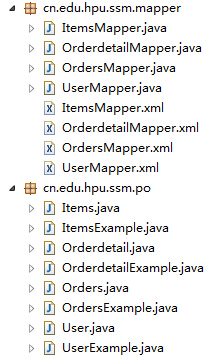
生成后的代码:
3.4使用生成的代码
需要将生成工程中所生成的代码拷贝到自己的工程中。我们这里吧ItemsMapper.java和ItemsMapper.xml、Items、ItemsExample类拷入我们的原工程。
测试ItemsMapper中的方法
|
1
2
3
4
5
6
7
8
9
10
11
12
13
14
15
16
17
18
19
20
21
22
23
24
25
26
27
28
29
30
31
32
33
34
35
36
37
38
39
40
41
42
43
44
45
46
47
48
49
50
51
52
53
54
55
56
57
58
59
60
61
62
63
64
65
66
67
|
package cn.edu.hpu.ssm.test;import static org.junit.Assert.fail;import java.util.Date;import java.util.List;import org.junit.Before;import org.junit.Test;import org.springframework.context.ApplicationContext;import org.springframework.context.support.ClassPathXmlApplicationContext;import cn.edu.hpu.ssm.mapper.ItemsMapper;import cn.edu.hpu.ssm.po.Items;import cn.edu.hpu.ssm.po.ItemsExample;public class ItemsMapperTest {private ApplicationContext applicationContext;private ItemsMapper itemsMapper;//注解Before是在执行本类所有测试方法之前先调用这个方法@Beforepublic void setup() throws Exception{applicationContext=new ClassPathXmlApplicationContext("classpath:spring/applicationContext.xml");itemsMapper=(ItemsMapper)applicationContext.getBean("itemsMapper");}//根据主键删除@Testpublic void testDeleteByPrimaryKey() {fail("Not yet implemented");}//插入@Testpublic void testInsert() {Items items=new Items();items.setName("iPhone-5S");items.setPrice(3999f);items.setDetail("正品行货");items.setPic("sdasd.jpg");items.setCreatetime(new Date());itemsMapper.insert(items);}//自定义条件来查询@Testpublic void testSelectByExample() {ItemsExample itemsExample=new ItemsExample();//通过Criteria构造查询条件ItemsExample.Criteria criteria=itemsExample.createCriteria();criteria.andNameEqualTo("电视机");//可能返回多条记录List<Items> list=itemsMapper.selectByExample(itemsExample);for (int i = 0; i < list.size(); i++) {Items it=list.get(i);System.out.println(it.getId()+":"+it.getName());}}//根据主键来查询@Testpublic void testSelectByPrimaryKey() {Items items=itemsMapper.selectByPrimaryKey(1);System.out.println(items.getName());}//更新数据@Testpublic void testUpdateByPrimaryKey() {//对所有字段进行更新,需要先查询出来再更新Items items = itemsMapper.selectByPrimaryKey(1); items.setName("iPhone"); itemsMapper.updateByPrimaryKey(items);//如果传入字段不空为才更新,在批量更新中使用此方法,不需要先查询再更新//itemsMapper.updateByPrimaryKeySelective(record);}} |
以上所述是小编给大家介绍的MyBatis框架之mybatis逆向工程自动生成代码,希望对大家有所帮助!
MyBatis框架之mybatis逆向工程自动生成代码的更多相关文章
- (转)MyBatis框架的学习(七)——MyBatis逆向工程自动生成代码
http://blog.csdn.net/yerenyuan_pku/article/details/71909325 什么是逆向工程 MyBatis的一个主要的特点就是需要程序员自己编写sql,那么 ...
- 02 使用Mybatis的逆向工程自动生成代码
1.逆向工程的作用 Mybatis 官方提供了逆向工程,可以针对数据库表自动生成Mybatis执行所需要的代码(包括mapper.xml.Mapper.java.pojo). 2.逆向工程的使用方法 ...
- 使用Mybatis的逆向工程自动生成代码
1.逆向工程的作用 Mybatis 官方提供了逆向工程,可以针对数据库表自动生成Mybatis执行所需要的代码(包括mapper.xml.Mapper.java.pojo). 2.逆向工程的使用方法 ...
- Mybatis配置、逆向工程自动生成代码(CRUD案例)
目的: mybatis简介 搭建mybatis环境 基于SSM逆向工程的使用 Mybatis增删改查案例 mybatis简介 MyBatis 是一款优秀的持久层框架,它支持定制化 SQL.存储过程以及 ...
- Mybatis逆向工程自动生成代码(Ubuntu18.04-idea环境)
最近在学习taotao商城项目,有一节是关于mybatis逆向工程的,参考了这个博文,https://blog.csdn.net/yerenyuan_pku/article/details/71909 ...
- MyBatis逆向工程自动生成代码
MyBatis逆向工程根据数据库表自动生成mapper.xml,entity类,mapper类,简直不要 太方便好嘛 下面贴上关键配置代码,以免以后找不到 generator.xml <?xml ...
- 回顾一下MyBatis逆向工程——自动生成代码
前言 最近做的项目(SSM+Shiro)的数据库表已经创建完成,一共有15张表,如果我们一个个去写pojo/bean的代码以及各种sql语句的话未免太过麻烦而且很容易出错,这个时候我们就需要MyBat ...
- Mybatis 逆向工程 自动生成代码
Mybatis 可以通过一定的代码,自动生成包括mapper.xml.mapper.java.po等文件: 一.环境准备: 用到的JAR包如下: 文件只有两个:GenMain.java和generat ...
- 使用MyBatis Generator 1.3.7自动生成代码
MyBatis Generator是一款mybatis自动代码生成工具,可以通过配置后自动生成文件. MyBatis Generator有几种方法可以生成代码,下面是其中一种. 一.官网下载 MyB ...
随机推荐
- sql server 角度与弧度相互转换的函数radians(x)和degrees(x)
--RANDIANS(x)将参数x由角度转换为弧度 --DEGREES(x)将参数x由弧度转换为角度. 示例:select RADIANS(90.0), RADIANS(180.0), DEGREES ...
- BZOJ 4141 [Thu Summer Camp 2013]魔塔
权限题qwq 以下设值域大小为\(m\) 先考虑枚举攻击力,因为首先攻击力决定每个怪物的攻击次数,然后对于每个怪物,攻击次数为\(\lceil\frac{hp_i}{ATK-def_i}\rceil\ ...
- Filter实现登录功能限制
public void doFilter(ServletRequest arg0,ServletResponse arg1,FilterChain chain) throws IOException, ...
- 修改jar包package目录结构操作方法
开发中会遇到用第三方的jar包,有时候会出现不同的jar包,包名一致的情况,这就会引发运行时异常,找不到相应的jar包. 这种问题时常困扰我们很长时间.下面提出一种解决办法,例如gson.jar. 1 ...
- js中过滤在输入框中过滤掉特殊表情
在页面输入text 时,经常会出现某些特殊符号例如:❤
- 关于在docker中配置elasticsearch容器的方法
一.关于docker的安装,注意几点 1.如果系统是Win10家庭版,是没有Hyper-V的,所以无法安装docker(运行docker安装包会报错),为此docker官网提供的解决方法是安装dock ...
- pycharm使用已经配置好的virtualenv环境
前面已经介绍过基本的virtualenv使用方法,如想要了解的同学可以跳转https://www.cnblogs.com/weilijie/p/10964872.html 下面进入正题,我使用的是py ...
- JavaScript调试技巧之断点调试
首先,在各个浏览器中,断点调试支持的最好的当然是Firefox,Firefox不仅可以使用Firebug调试页面js脚本,还可以用高级调试工具例如JavaScript Debugger (Venkma ...
- php字符串大小写转换
strtoupper().strtolower().ucfirst().ucfirst().ucwords().mb_strtoupper().mb_strtolower()和mb_convert_c ...
- Java基本的程序结构设计 整形和浮点型
整形: int 4字节 short 2字节 long 8字节 byte 1字节 int的大小差不多是20亿. 整形计算 如果两个int进行加减乘除数学运算的时候,最终的结果仍然是int,有可能出现了溢 ...