
uniapp中实现简易计算器
uniapp中实现简易计算器
主要问题:在计算器的实现过程中会遇到小数点计算精度;
此计算器是依赖了uni-popup的弹出层插件,可在uniapp官方组件中查找扩展插件popup弹窗层下载,也可直接点击该(https://ext.dcloud.net.cn/plugin?id=329)链接直接下载
计算器效果图
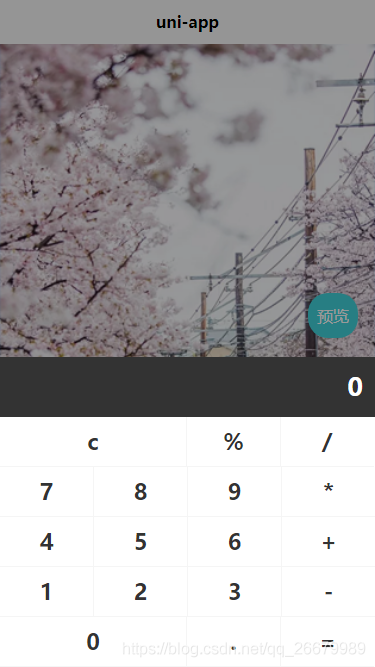
话不多说上代码:
HTML源码
<template>

    <view class="uni-popup-calculator">

        <view class="uni-popup-calculator-title">

            <text>{{number}}</text>

        </view>

        <view class="uni-popup-content">

            <view class="uni-popup-cell" :class="[item.flag?'active':'',item.width == 2?'cur':'',item.border?'border':'']"

             @click.stop="calculationTwo(item)" v-for="(item,idx) in calculator" :key="idx">

                {{item.name}}

            </view>

        </view>

    </view>

</template>
Js源码
<script>
export default {
name: 'UniPopupCalculator',
inject: ['popup'],
data() {
return {
number: '0',//计算器显示区域值
calculator: [{ //计算器各按键
name: 'c',
flag: false,
type: 'clear',
width: 2,
border: true
}, {
name: '%',
flag: false,
type: 'operator',
width: 1,
border: false
}, {
name: '/',
flag: false,
type: 'operator',
width: 1,
border: false
}, {
name: '7',
flag: false,
type: 'number',
width: 1,
border: true
}, {
name: '8',
flag: false,
type: 'number',
width: 1,
border: false
}, {
name: '9',
flag: false,
type: 'number',
width: 1,
border: false
}, {
name: '*',
flag: false,
type: 'operator',
width: 1,
border: false
}, {
name: '4',
flag: false,
type: 'number',
width: 1,
border: true
}, {
name: '5',
flag: false,
type: 'number',
width: 1,
border: false
}, {
name: '6',
flag: false,
type: 'number',
width: 1,
border: false
}, {
name: '+',
flag: false,
type: 'operator',
width: 1,
border: false
}, {
name: '1',
flag: false,
type: 'number',
width: 1,
border: true
}, {
name: '2',
flag: false,
type: 'number',
width: 1,
border: false
}, {
name: '3',
flag: false,
type: 'number',
width: 1,
border: false
}, {
name: '-',
flag: false,
type: 'operator',
width: 1,
border: false
}, {
name: '0',
flag: false,
type: 'number',
width: 2,
border: true
}, {
name: '.',
flag: false,
type: 'string',
width: 1,
border: false
}, {
name: '=',
flag: false,
type: 'equal',
width: 1,
border: false
}],
numberOne: '',//变量一
numberTwo: '',//变量二
symbol: '',//运算符
complete: false,//判断是否完成一次计算
current: -1
}
},
created() {},
methods: {
//计算器方法二:
calculationTwo: function(item) {
let that = this;
//按键点击效果
item.flag = true;
setTimeout(() => {
item.flag = false;
}, 200);
//判断输入的第一位是否是小数点
switch (item.type) {
case 'string': //小数点
if (that.complete) {
that.number = '0';
that.complete = false;
}
if (that.symbol) {
if ((that.number).indexOf('.') == -1) {
that.numberTwo = that.numberTwo + '.';
that.number = that.numberTwo;
}
} else {
if ((that.number).indexOf('.') == -1) {
that.number = that.number + '.';
}
}
break;
case 'number': //数字
if (that.complete) {
that.number = '0';
that.complete = false;
}
if (that.symbol) {
that.numberTwo += item.name;
that.number = that.numberTwo;
} else {
if (that.number == '0') {
that.number = item.name;
} else {
that.number += item.name;
}
}
break;
case 'operator': //运算符
that.symbol = item.name;
if (item.name != '%') {
that.numberOne = that.number;
that.numberTwo = '';
} else {
that.number = parseFloat(that.number) / 100;
}
break;
case 'equal': //等号
if (that.symbol == '-') {
that.number = that.subtraction(that.numberOne, that.numberTwo);
} else if (that.symbol == '+') {
that.number = that.addition(that.numberOne, that.numberTwo);
} else if (that.symbol == '*') {
that.number = that.multiplication(that.numberOne, that.numberTwo);
} else if (that.symbol == '/') {
that.number = that.division(that.numberOne, that.numberTwo);
} else if (that.symbol == '%') {
that.number = parseFloat(that.number) / 1;
}
that.complete = true;
that.numberOne = '';
that.numberTwo = '';
that.symbol = '';
break;
case 'clear': //清除符
that.clear();
break;
}
},
/**
* 清除
* */
clear: function() {
let that = this;
that.number = '0';
that.numberOne = '';
that.numberTwo = '';
that.symbol = '';
that.compile = false;
},
/**
* 除法
* */
division: function(arg1, arg2) {
var t1 = 0,
t2 = 0,
r1, r2;
try {
t1 = arg1.toString().split(".")[1].length
} catch (e) {}
try {
t2 = arg2.toString().split(".")[1].length
} catch (e) {}
Math.r1 = Number(arg1.toString().replace(".", ""))
Math.r2 = Number(arg2.toString().replace(".", ""))
return (Math.r1 / Math.r2) * Math.pow(10, t2 - t1);
},
/**
* 乘法
* */
multiplication: function(arg1, arg2) {
var m = 0,
s1 = arg1.toString(),
s2 = arg2.toString();
try {
m += s1.split(".")[1].length
} catch (e) {}
try {
m += s2.split(".")[1].length
} catch (e) {}
return Number(s1.replace(".", "")) * Number(s2.replace(".", "")) / Math.pow(10, m)
},
/**
* 加法
* */
addition: function(arg1, arg2) {
var r1, r2, m;
try {
r1 = arg1.toString().split(".")[1].length;
} catch (e) {
r1 = 0;
}
try {
r2 = arg2.toString().split(".")[1].length;
} catch (e) {
r2 = 0;
}
m = Math.pow(10, Math.max(r1, r2));
return (arg1 * m + arg2 * m) / m;
},
/**
* 减法
* */
subtraction: function(arg1, arg2) {
var r1, r2, m, n;
try {
r1 = arg1.toString().split(".")[1].length;
} catch (e) {
r1 = 0;
}
try {
r2 = arg2.toString().split(".")[1].length;
} catch (e) {
r2 = 0;
}
m = Math.pow(10, Math.max(r1, r2));
//last modify by deeka
//动态控制精度长度
n = (r1 >= r2) ? r1 : r2;
return ((arg1 * m - arg2 * m) / m).toFixed(n);
}
}
}
</script>
Css源码
<style lang="less">

    .uni-popup-calculator {

        background-color: #333333;

    }

    .uni-popup-calculator-title {

        width: 702rpx;

        height: 120rpx;

        line-height: 120rpx;

        padding: 0 24rpx;

        text-align: right;

        background-color: #333333;

        font-size: 50rpx;

        font-weight: 600;

        color: #FFFFFF;

    }

    .uni-popup-content {

        width: 750rpx;

        background-color: #FFFFFF;

        display: flex;

        flex-direction: row;

        justify-content: flex-start;

        align-items: flex-start;

        flex-wrap: wrap;

        .uni-popup-cell {

            width: 186rpx;

            height: 98rpx;

            line-height: 98rpx;

            text-align: center;

            font-size: 44rpx;

            font-weight: 600;

            color: #333333;

            border-bottom: 1px solid #f5f5f5;

            border-left: 1px solid #f5f5f5;

        }

        .uni-popup-cell.cur {

            width: 372rpx;

        }

        .uni-popup-cell.border {

            border-left: none;

        }

        .uni-popup-cell.active {

            background-color: #f5f5f5;

        }

    }

</style>
实现计算器的基本功能,希望能帮到你谢谢!记着点赞哦!
uniapp中实现简易计算器的更多相关文章
- C#Windows Form简易计算器实现(中)
昨天花了一天的时间弄计算器.也算是做出来了,还是简易的(怀疑猿生!!).在此先感谢昨天被我骚扰的朋友. 先贴一张界面看看 其实健壮性还是挺差的,用户体验也是极差的.比如说用户输入了不合理运算式子,我就 ...
- 剖析简易计算器带你入门微信小程序开发
写在前面,但是重点在后面 这是教程,也不是教程. 可以先看Demo的操作动图,看看是个什么玩意儿,GitHub地址(https://github.com/dunizb/wxapp-sCalc) 自从微 ...
- Python之实现一个简易计算器
自己动手写计算器 一.功能分析 用户输入一个类似这样 3*( 4+ 50 )-(( 100 + 40 )*5/2- 3*2* 2/4+9)*((( 3 + 4)-4)-4) 这样的表达式,假设表达式里 ...
- C#Windows Form简易计算器实现(上)
第一次写博客,来分享一个简易计算器的代码.作为一名准程序员,就是要多写代码才能孰能生巧.重视基础知识才能飞的更快更高以及更稳. 代码可能会写的很糟糕,不完美不安全之处希望发现的越多越好 c#编写计算器 ...
- JavaScript简易计算器
JavaScript一种直译式脚本语言,是一种动态类型.弱类型.基于原型的语言,内置支持类型.它的解释器被称为JavaScript引擎,为浏览器的一部分,广泛用于客户端的脚本语言,最早是在HTML(标 ...
- mini dc与简易计算器 20165235
mini dc 任务内容 本次mini dc任务就是通过补充代码来实现整型数据的后缀表达式计算 相关知识 通过利用堆栈这一先进后出的数据结构来实现后缀表达式的计算.通过Stack<Integer ...
- 《Java 程序设计》课堂实践项目-简易计算器
<Java 程序设计>课堂实践项目简易计算器 课后学习总结 目录 改变 简易计算器实验要求 课堂实践成果 课后思考 改变 修改了博客整体布局,过去就贴个代码贴个图很草率,这次布局和内容都有 ...
- 微信小程序-简易计算器
代码地址如下:http://www.demodashi.com/demo/14210.html 一.前期准备工作 软件环境:微信开发者工具 官方下载地址:https://mp.weixin.qq.co ...
- 课堂限时训练-简易计算器·mini dc
课堂限时训练-简易计算器·mini dc 实验题目 采用后缀表达式法,设计一个建议计算器,实现+.-.*./四种运算. 代码实现 码云链接 关键代码部分及结果如下: 实验分析 首先,分析一下后缀表达式 ...
- 用js制作简易计算器及猜随机数字游戏
<!doctype html><html><head> <meta charset="utf-8"> <title>JS ...
随机推荐
- nginx rewrite 语法
nginx rewrite 语法 一 定义 Rewrite主要实现url地址重写, 以及地址重定向,就是将用户请求web服 务器的地址重新定向到其他URL的过程. 二 语法格式 reweite fia ...
- TR069-STUN
原理 1.NAT穿越技术,为了解决NAT设备对P2P网络的通信限制 2.作用:检测网络中是否存在NAT设备,并获取两个通信端点经NAT设备分配的IP地址和端口号,然后建立一条可穿越NAT的P2P链 ...
- Swing 使用 beautyeye_lnf.jar 美化
Springboot整合Swing制作简单GUI客户端项目记录 https://blog.csdn.net/Youdmeng/article/details/106549991
- HDU 2056:Rectangles(两个矩形交点的性质)
一.原题链接 Problem - 2056 (hdu.edu.cn) 二.题面 Given two rectangles and the coordinates of two points on th ...
- 优雅的处理挂载window上的函数可能不存在的情况
背景 在做一个Web JS SDK(A)时,内部会用到另一个Web JS SDK(B)的方法.(文中后续用A/B代替两者) B通常会提供Script和NPM包两种使用方式 使用npm pkg的缺点 增 ...
- vim下删除swp文件
vim下删除swp文件 几个选项的内涵 [O]pen Read-Only 只读的方式打开 (E)dit anyway 编辑模式打开,但是不会载入存盘的内容 (R)ecover 编辑模式打开并且加载暂存 ...
- getClass()方法----getName()方法
public class Test { public static void main(String[] args) { Person p = new Person(1,"刘德华" ...
- 关于dapper in查询很慢
dynamicParams.Add("sitecode", new string[]{ "abc","efd","ert" ...
- Linux下配置node环境与failed to create symbolic link ‘/usr/bin/utserver’: File exists跟Error: Cannot find module '/root/node-v10.16.3-linux-x64/install'解决方法
NodeJS下载地址(官网) https://nodejs.org/en/download/ 下载下来后是个tar,xz压缩包 通过xftp将压缩包上传到Linux服务器上 如我放在root目录下 使 ...
- flink scala 从Oracle同步数据到MySql
pom <properties> <project.build.sourceEncoding>UTF-8</project.build.sourceEncoding> ...