
[转帖]kubernetes calico网络
https://plantegg.github.io/2022/01/19/kubernetes%20calico%E7%BD%91%E7%BB%9C/
cni 网络
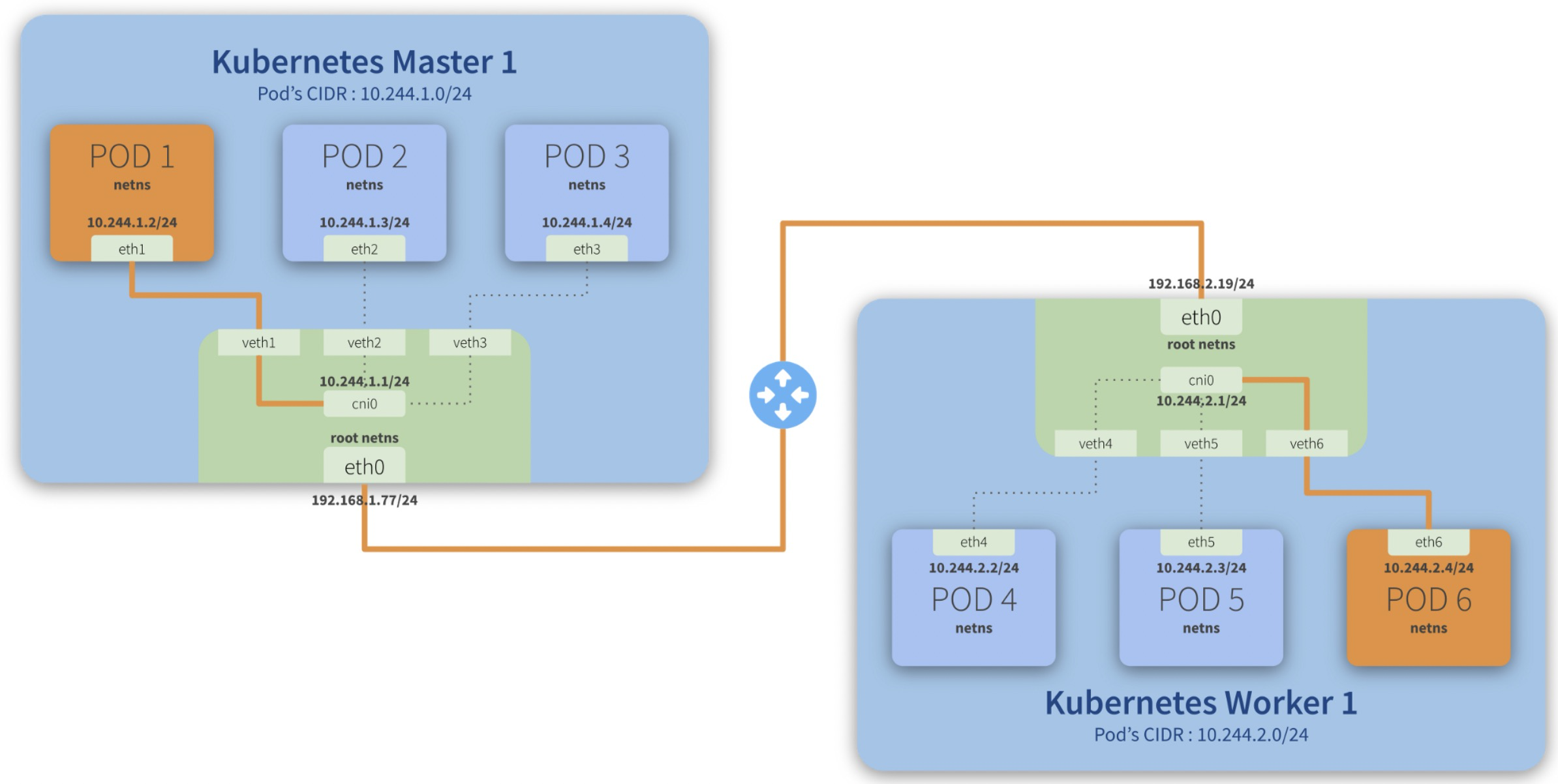
cni0 is a Linux network bridge device, all veth devices will connect to this bridge, so all Pods on the same node can communicate with each other, as explained in Kubernetes Network Model and the hotel analogy above.
cni(Container Network Interface)
CNI 全称为 Container Network Interface,是用来定义容器网络的一个 规范。containernetworking/cni 是一个 CNCF 的 CNI 实现项目,包括基本额 bridge,macvlan等基本网络插件。
一般将cni各种网络插件的可执行文件二进制放到 /opt/cni/bin ,在 /etc/cni/net.d/ 下创建配置文件,剩下的就交给 K8s 或者 containerd 了,我们不关心也不了解其实现。
比如:
|
1
2
3
4
5
6
7
8
9
10
11
12
13
14
15
16
17
|
#ls -lh /opt/cni/bin/
总用量 90M
-rwxr-x--- 1 root root 4.0M 12月 23 09:39 bandwidth
-rwxr-x--- 1 root root 35M 12月 23 09:39 calico
-rwxr-x--- 1 root root 35M 12月 23 09:39 calico-ipam
-rwxr-x--- 1 root root 3.0M 12月 23 09:39 flannel
-rwxr-x--- 1 root root 3.5M 12月 23 09:39 host-local
-rwxr-x--- 1 root root 3.1M 12月 23 09:39 loopback
-rwxr-x--- 1 root root 3.8M 12月 23 09:39 portmap
-rwxr-x--- 1 root root 3.3M 12月 23 09:39 tuning
[root@hygon3 15:55 /root]
#ls -lh /etc/cni/net.d/
总用量 12K
-rw-r--r-- 1 root root 607 12月 23 09:39 10-calico.conflist
-rw-r----- 1 root root 292 12月 23 09:47 10-flannel.conflist
-rw------- 1 root root 2.6K 12月 23 09:39 calico-kubeconfig
|
CNI 插件都是直接通过 exec 的方式调用,而不是通过 socket 这样 C/S 方式,所有参数都是通过环境变量、标准输入输出来实现的。
Step-by-step communication from Pod 1 to Pod 6:
- Package leaves Pod 1 netns\ through the eth1\ interface and reaches the root netns\ through the virtual interface veth1*;*
- Package leaves veth1\ and reaches cni0*, looking for **Pod 6***’s address;
- Package leaves cni0\ and is redirected to eth0*;*
- Package leaves eth0\ from Master 1\ and reaches the gateway*;*
- Package leaves the gateway\ and reaches the root netns\ through the eth0\ interface on Worker 1*;*
- Package leaves eth0\ and reaches cni0*, looking for **Pod 6***’s address;
- Package leaves cni0\ and is redirected to the veth6\ virtual interface;
- Package leaves the root netns\ through veth6\ and reaches the Pod 6 netns\ though the eth6\ interface;
kubernetes calico 网络
|
1
2
3
4
|
kubectl apply -f https://docs.projectcalico.org/manifests/calico.yaml
#或者老版本的calico
curl https://docs.projectcalico.org/v3.15/manifests/calico.yaml -o calico.yaml
|
默认calico用的是ipip封包(这个性能跟原生网络差多少有待验证,本质也是overlay网络,比flannel那种要好很多吗?)
跨宿主机的两个容器之间的流量链路是:
cali-容器eth0->宿主机cali27dce37c0e8->tunl0->内核ipip模块封包->物理网卡(ipip封包后)—远程–> 物理网卡->内核ipip模块解包->tunl0->cali-容器
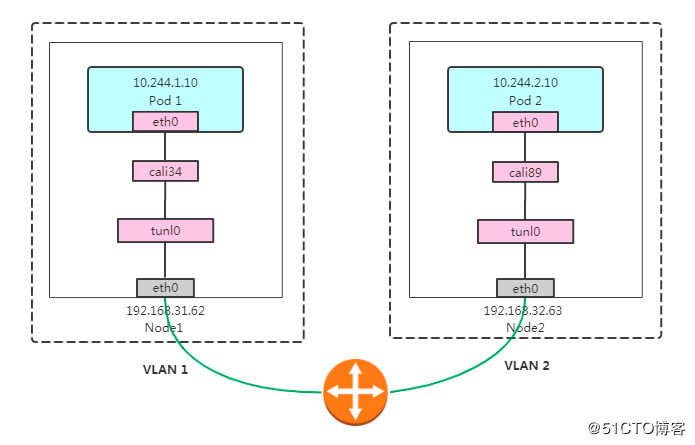
Calico IPIP模式对物理网络无侵入,符合云原生容器网络要求;使用IPIP封包,性能略低于Calico BGP模式;无法使用传统防火墙管理、也无法和存量网络直接打通。Pod在Node做SNAT访问外部,Pod流量不易被监控。
calico ipip网络不通
集群有五台机器192.168.0.110-114, 同时每个node都有另外一个ip:192.168.3.110-114,部分节点之间不通。每台机器部署好calico网络后,会分配一个 /26 CIRD 子网(64个ip)。
案例1
目标机是10.122.127.128(宿主机ip 192.168.3.112),如果从10.122.17.64(宿主机ip 192.168.3.110) ping 10.122.127.128不通,查看10.122.127.128路由表:
|
1
2
3
4
5
6
|
[root@az3-k8s-13 ~]# ip route |grep tunl0
10.122.17.64/26 via 10.122.127.128 dev tunl0 //这条路由不通
[root@az3-k8s-13 ~]# ip route del 10.122.17.64/26 via 10.122.127.128 dev tunl0 ; ip route add 10.122.17.64/26 via 192.168.3.110 dev tunl0 proto bird onlink
[root@az3-k8s-13 ~]# ip route |grep tunl0
10.122.17.64/26 via 192.168.3.110 dev tunl0 proto bird onlink //这样就通了
|
在10.122.127.128抓包如下,明显可以看到icmp request到了 tunl0网卡,tunl0网卡也回复了,但是回复包没有经过kernel ipip模块封装后发到eth1上:
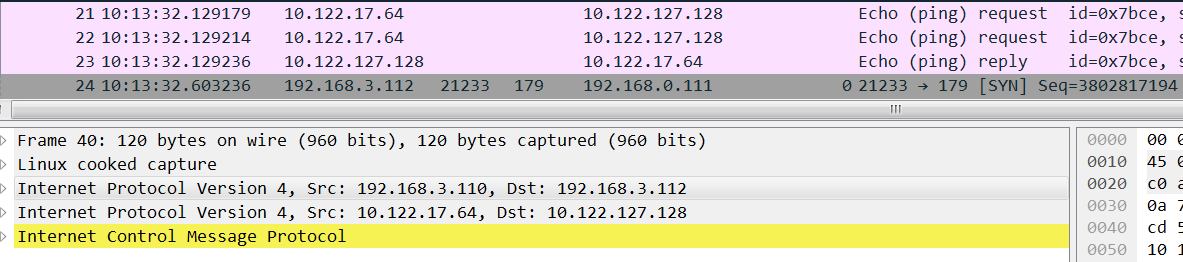
正常机器应该是这样,上图不正常的时候缺少红框中的reply:
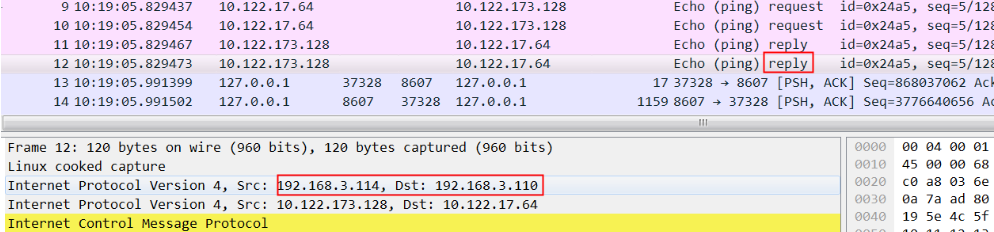
解决:
|
1
2
|
ip route del 10.122.17.64/26 via 10.122.127.128 dev tunl0 ;
ip route add 10.122.17.64/26 via 192.168.3.110 dev tunl0 proto bird onlink
|
删除错误路由增加新的路由就可以了,新增路由的意思是从tunl0发给10.122.17.64/26的包下一跳是 192.168.3.110。
via 192.168.3.110 表示下一跳的ip
onlink参数的作用:
使用这个参数将会告诉内核,不必检查网关是否可达。因为在linux内核中,网关与本地的网段不同是被认为不可达的,从而拒绝执行添加路由的操作。
因为tunl0网卡ip的 CIDR 是32,也就是不属于任何子网,那么这个网卡上的路由没有网关,配置路由的话必须是onlink, 内核存也没法根据子网来选择到这块网卡,所以还会加上 dev 指定网卡。
案例2
集群有五台机器192.168.0.110-114, 同时每个node都有另外一个ip:192.168.3.110-114,只有node2没有192.168.3.111这个ip,结果node2跟其他节点都不通:
|
1
2
3
4
5
6
7
8
9
10
11
12
|
#calicoctl node status
Calico process is running.
IPv4 BGP status
+---------------+-------------------+-------+------------+-------------+
| PEER ADDRESS | PEER TYPE | STATE | SINCE | INFO |
+---------------+-------------------+-------+------------+-------------+
| 192.168.0.111 | node-to-node mesh | up | 2020-08-29 | Established |
| 192.168.3.112 | node-to-node mesh | up | 2020-08-29 | Established |
| 192.168.3.113 | node-to-node mesh | up | 2020-08-29 | Established |
| 192.168.3.114 | node-to-node mesh | up | 2020-08-29 | Established |
+---------------+-------------------+-------+------------+-------------+
|
从node4 ping node2,然后在node2上抓包,可以看到 icmp request都发到了node2上,但是node2收到后没有发给tunl0:
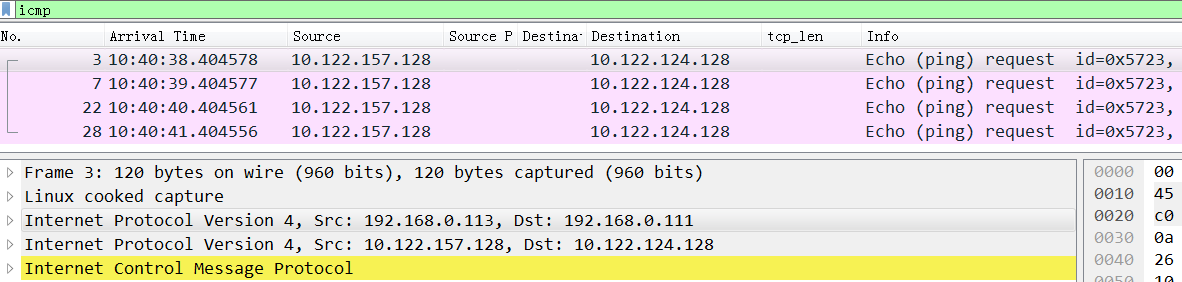
所以icmp没有回复,这里的问题在于kernel收到包后为什么不给tunl0
同样,在node2上ping node4,同时在node2上抓包,可以看到发给node4的request包和reply包:
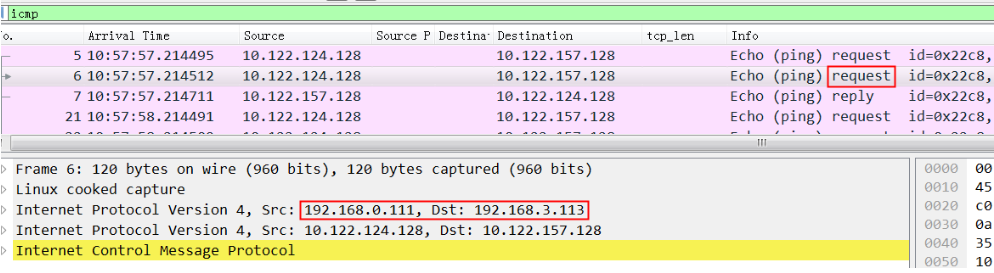
从request包可以看到src ip 是0.111, dest ip是 3.113,因为 node2 没有192.168.3.111这个ip
非常关键的我们看到node4的回复包 src ip 不是3.113,而是0.113(根据node4的路由就应该是0.113)
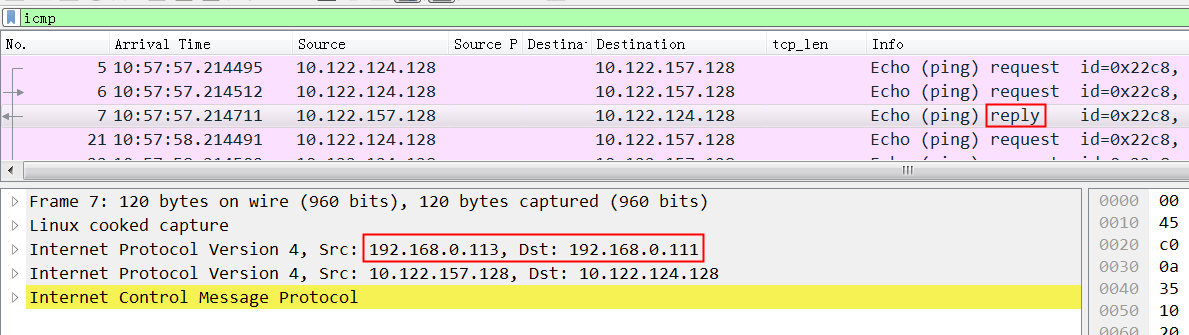
这就是问题所在,从node4过来的ipip包src ip都是0.113,实际这里ipip能认识的只是3.113.
如果这个时候在3.113机器上把0.113网卡down掉,那么3.113上的:
10.122.124.128/26 via 192.168.0.111 dev tunl0 proto bird onlink 路由被自动删除,3.113将不再回复request。这是因为calico记录的node2的ip是192.168.0.111,所以会自动增加
解决办法,在node4上删除这条路由记录,也就是强制让回复包走3.113网卡,这样收发的ip就能对应上了
|
1
2
3
4
|
ip route del 192.168.0.0/24 dev eth0 proto kernel scope link src 192.168.0.113
//同时将默认路由改到3.113
ip route del default via 192.168.0.253 dev eth0;
ip route add default via 192.168.3.253 dev eth1
|
最终OK后,node4上的ip route是这样的:
|
1
2
3
4
5
6
7
8
9
10
11
12
13
14
15
|
[root@az3-k8s-14 ~]# ip route
default via 192.168.3.253 dev eth1
10.122.17.64/26 via 192.168.3.110 dev tunl0 proto bird onlink
10.122.124.128/26 via 192.168.0.111 dev tunl0 proto bird onlink
10.122.127.128/26 via 192.168.3.112 dev tunl0 proto bird onlink
blackhole 10.122.157.128/26 proto bird
10.122.157.129 dev cali19f6ea143e3 scope link
10.122.157.130 dev cali09e016ead53 scope link
10.122.157.131 dev cali0ad3225816d scope link
10.122.157.132 dev cali55a5ff1a4aa scope link
10.122.157.133 dev cali01cf8687c65 scope link
10.122.157.134 dev cali65232d7ada6 scope link
10.122.173.128/26 via 192.168.3.114 dev tunl0 proto bird onlink
172.17.0.0/16 dev docker0 proto kernel scope link src 172.17.0.1
192.168.3.0/24 dev eth1 proto kernel scope link src 192.168.3.113
|
正常后的抓包, 注意这里drequest的est ip 和reply的 src ip终于一致了:
|
1
2
3
4
5
6
7
8
9
|
//request
00:16:3e:02:06:1e > ee:ff:ff:ff:ff:ff, ethertype IPv4 (0x0800), length 118: (tos 0x0, ttl 64, id 57971, offset 0, flags [DF], proto IPIP (4), length 104)
192.168.0.111 > 192.168.3.110: (tos 0x0, ttl 64, id 18953, offset 0, flags [DF], proto ICMP (1), length 84)
10.122.124.128 > 10.122.17.64: ICMP echo request, id 22001, seq 4, length 64
//reply
ee:ff:ff:ff:ff:ff > 00:16:3e:02:06:1e, ethertype IPv4 (0x0800), length 118: (tos 0x0, ttl 64, id 2565, offset 0, flags [none], proto IPIP (4), length 104)
192.168.3.110 > 192.168.0.111: (tos 0x0, ttl 64, id 26374, offset 0, flags [none], proto ICMP (1), length 84)
10.122.17.64 > 10.122.124.128: ICMP echo reply, id 22001, seq 4, length 64
|
总结下来这两个案例都还是对路由不够了解,特别是案例2,因为有了多个网卡后导致路由更复杂。calico ipip的基本原理就是利用内核进行ipip封包,然后修改路由来保证网络的畅通。
netns 操作
以下case创建一个名为 ren 的netns,然后在里面增加一对虚拟网卡veth1 veth1_p, veth1放置在ren里面,veth1_p 放在物理机上,给他们配置上ip并up就能通了。
|
1
2
3
4
5
6
7
8
9
10
11
12
13
14
15
16
17
18
19
20
21
22
23
24
25
26
27
28
29
30
31
32
33
34
35
36
37
38
39
40
41
42
43
44
45
46
47
48
49
50
51
52
53
|
1004 [2021-10-27 10:49:08] ip netns add ren
1005 [2021-10-27 10:49:12] ip netns show
1006 [2021-10-27 10:49:22] ip netns exec ren route //为空
1007 [2021-10-27 10:49:29] ip netns exec ren iptables -L
1008 [2021-10-27 10:49:55] ip link add veth1 type veth peer name veth1_p //此时宿主机上能看到这两块网卡
1009 [2021-10-27 10:50:07] ip link set veth1 netns ren //将veth1从宿主机默认网络空间挪到ren中,宿主机中看不到veth1了
1010 [2021-10-27 10:50:18] ip netns exec ren route
1011 [2021-10-27 10:50:25] ip netns exec ren iptables -L
1012 [2021-10-27 10:50:39] ifconfig
1013 [2021-10-27 10:50:51] ip link list
1014 [2021-10-27 10:51:29] ip netns exec ren ip link list
1017 [2021-10-27 10:53:27] ip netns exec ren ip addr add 172.19.0.100/24 dev veth1
1018 [2021-10-27 10:53:31] ip netns exec ren ip link list
1019 [2021-10-27 10:53:39] ip netns exec ren ifconfig
1020 [2021-10-27 10:53:42] ip netns exec ren ifconfig -a
1021 [2021-10-27 10:54:13] ip netns exec ren ip link set dev veth1 up
1022 [2021-10-27 10:54:16] ip netns exec ren ifconfig
1023 [2021-10-27 10:54:22] ping 172.19.0.100
1024 [2021-10-27 10:54:35] ifconfig -a
1025 [2021-10-27 10:55:03] ip netns exec ren ip addr add 172.19.0.101/24 dev veth1_p
1026 [2021-10-27 10:55:10] ip addr add 172.19.0.101/24 dev veth1_p
1027 [2021-10-27 10:55:16] ifconfig veth1_p
1028 [2021-10-27 10:55:30] ip link set dev veth1_p up
1029 [2021-10-27 10:55:32] ifconfig veth1_p
1030 [2021-10-27 10:55:38] ping 172.19.0.101
1031 [2021-10-27 10:55:43] ping 172.19.0.100
1032 [2021-10-27 10:55:53] ip link set dev veth1_p down
1033 [2021-10-27 10:55:54] ping 172.19.0.100
1034 [2021-10-27 10:55:58] ping 172.19.0.101
1035 [2021-10-27 10:56:08] ifconfig veth1_p
1036 [2021-10-27 10:56:32] ping 172.19.0.101
1037 [2021-10-27 10:57:04] ip netns exec ren route
1038 [2021-10-27 10:57:52] ip netns exec ren ping 172.19.0.101
1039 [2021-10-27 10:57:58] ip link set dev veth1_p up
1040 [2021-10-27 10:57:59] ip netns exec ren ping 172.19.0.101
1041 [2021-10-27 10:58:06] ip netns exec ren ping 172.19.0.100
1042 [2021-10-27 10:58:14] ip netns exec ren ifconfig
1043 [2021-10-27 10:58:19] ip netns exec ren route
1044 [2021-10-27 10:58:26] ip netns exec ren ping 172.19.0.100 -I veth1
1045 [2021-10-27 10:58:58] ifconfig veth1_p
1046 [2021-10-27 10:59:10] ping 172.19.0.100
1047 [2021-10-27 10:59:26] ip netns exec ren ping 172.19.0.101 -I veth1
把网卡加入到docker0的bridge下
1160 [2021-10-27 12:17:37] brctl show
1161 [2021-10-27 12:18:05] ip link set dev veth3_p master docker0
1162 [2021-10-27 12:18:09] ip link set dev veth1_p master docker0
1163 [2021-10-27 12:18:13] ip link set dev veth2 master docker0
1164 [2021-10-27 12:18:15] brctl show
brctl showmacs br0
brctl show cni0
brctl addif cni0 veth1 veth2 veth3 //往cni bridge添加多个容器peer 网卡
|
Linux 上存在一个默认的网络命名空间,Linux 中的 1 号进程初始使用该默认空间。Linux 上其它所有进程都是由 1 号进程派生出来的,在派生 clone 的时候如果没有额外特别指定,所有的进程都将共享这个默认网络空间。
所有的网络设备刚创建出来都是在宿主机默认网络空间下的。可以通过 ip link set 设备名 netns 网络空间名 将设备移动到另外一个空间里去,socket也是归属在某一个网络命名空间下的,由创建socket进程所在的netns来决定socket所在的netns
|
1
2
3
4
5
6
7
8
9
10
11
12
|
//file: net/socket.c
int sock_create(int family, int type, int protocol, struct socket **res)
{
return __sock_create(current->nsproxy->net_ns, family, type, protocol, res, 0);
}
//file: include/net/sock.h
static inline
void sock_net_set(struct sock *sk, struct net *net)
{
write_pnet(&sk->sk_net, net);
}
|
内核提供了三种操作命名空间的方式,分别是 clone、setns 和 unshare。ip netns add 使用的是 unshare,原理和 clone 是类似的。
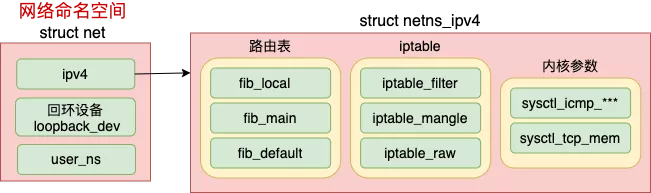
每个 net 下都包含了自己的路由表、iptable 以及内核参数配置等等
参考资料
https://morven.life/notes/networking-3-ipip/
https://www.cnblogs.com/bakari/p/10564347.html
[转帖]kubernetes calico网络的更多相关文章
- [转帖]Kubernetes CNI网络最强对比:Flannel、Calico、Canal和Weave
Kubernetes CNI网络最强对比:Flannel.Calico.Canal和Weave https://blog.csdn.net/RancherLabs/article/details/88 ...
- [转帖]calico网络原理及与flannel对比
calico网络原理及与flannel对比 https://blog.csdn.net/ganpuzhong42/article/details/77853131 2017年09月05日 16:34: ...
- Kubernetes 安装网络插件(calico)
简介 Calico是Kubernetes生态系统中另一种流行的网络选择.虽然Flannel被公认为是最简单的选择,但Calico以其性能.灵活性而闻名.Calico的功能更为全面,不仅提供主机和pod ...
- kubernetes(k8s)安装BGP模式calico网络支持IPV4和IPV6
kubernetes(k8s)安装BGP模式calico网络支持IPV4和IPV6 BGP是互联网上一个核心的去中心化自治路由协议,它通过维护IP路由表或"前缀"表来实现自治系统A ...
- [转帖]记一次KUBERNETES/DOCKER网络排障
记一次KUBERNETES/DOCKER网络排障 https://coolshell.cn/articles/18654.html 记得之前在一个公众号里面看过这个文章 讲的挺好的.. 物理机直接跑d ...
- k8s网络之Calico网络
k8s网络主题系列: 一.k8s网络之设计与实现 二.k8s网络之Flannel网络 三.k8s网络之Calico网络 简介 Calico 是一种容器之间互通的网络方案.在虚拟化平台中,比如 Open ...
- calico 网络流量 过程 分析 apt-get install telnet
1.calico node 容器在kubernetes中以DaemonSet 的方式运行,容器的网络模式为hostNetwor,与host共享网络栈,拥有相同的Ip和hostname 2.查看某个po ...
- Calico网络方案
参考文档: Difficulties with traditional overlay networks:https://www.projectcalico.org/learn/ Get Start( ...
- Calico网络策略实践
因为Kubernetes官方用的flannel无法实现多租户环境下的网络隔离,建立起来的pod之间实际可以相互访问,而Calico可以实现,因此周末找个时间试了一下大概的过程. 前面的kubernet ...
- kubeadm单集群部署k8s1.15.1&calico网络
说明 本次实验在Windows下的VMware进行 系统配置及初始化配置在所有的主机执行 容器镜像全部替换为国内可拉取的 pod网络采用calico 实验环境 主机名 IP地址 角色 OS CPU/M ...
随机推荐
- 一图看懂华为云CodeArts Link六大特性
本文分享自华为云社区<一图看懂华为云CodeArts Link六大特性,带你体验一站式跨平台数据互联>,作者:华为云PaaS服务小智 . 能够打破不同研发工具之间的壁垒,实现数据的无缝集成 ...
- 看这里!带你快速体验MindSpore V1.0(For ubuntu 18.04)
摘要: 本文介绍了如何在Ubuntu 18.04上安装CPU版本的MindSpore V1.0.并使用安装好的MindSpore进行了LeNet的模型训练. Part One:引言 在HC2020大会 ...
- 华为API战略:规范、组织和流程驱动企业大循环
摘要:构建一套完善的API规范流程体系变得至关重要,用方法论驱动整个API变革,用API变革驱动共享经济模式,以共享模式反推数字化转型. 本文分享自华为云社区<API战略--华为在数字化浪潮下的 ...
- DarkMode(5):深色模式不同实现方案切换
sass自定义函数转 sass预处理 在<DarkMode(2):深色模式解决方案--css颜色变量实现Dark Mode>与<DarkMode(3):深色模式解决方案--颜色反转与 ...
- 火山引擎 DataTester 为企业降本增效:1 个人也能成为一支 A/B 实验团队
更多技术交流.求职机会,欢迎关注字节跳动数据平台微信公众号,回复[1]进入官方交流群 今年天猫电商.京东均表示交易规模与 2021 年持平,跟往年急剧增长的销售额相比,今年的双十一显得略微" ...
- 低至200元 / 月,火山引擎DataLeap帮你搭建企业级数据中台
更多技术交流.求职机会,欢迎关注字节跳动数据平台微信公众号,回复[1]进入官方交流群 企业数字化转型正席卷全球,这不仅是趋势所在,也是企业发展必然面对的考题.数字化不仅仅考验企业的技术"硬& ...
- Python办公自动化_Excel篇
Python办公自动化_Excel篇 库名 作用 xlrd 从excel中读取数据,支持xls,xlsx xlwt 从excel进行修改操作,不支持对xlsx格式的修改 xlutils 在xlrd和x ...
- Windows下的Linux子系统(WSL)
什么是WSLWSL:Windows subsystem for Linux,是用于Windows上的Linux的子系统作用很简单,可以在Windows系统中获取Linux系统环境,并完全直连计算机硬件 ...
- ME51N 创建采购申请
1业务说明 当寻源后,将寻源结果汇总,并创建采购申请,之后据此创建采购订单. 此文档使用BAPI:BAPI_REQUISITION_CREATE创建采购申请 2前台实现 事务代码:ME51N 3代码实 ...
- PS CJ34预算转借
一.CJ34,输入发出预算和接收预算的WBS 二.调用BAPI "-----------------------------------------@斌将军----------------- ...