
【日常收支账本】【Day04】优化编辑动账记录的操作——QTableWidget单元格设置QComboBox控件
一、项目地址
https://github.com/LinFeng-BingYi/DailyAccountBook
二、新增
1. 在表格中设置选项列表,让用户更快地编辑动账记录
1.1 功能详述
为表格中以下字段设置选项列表:
1. 需求强度(由"基本需求"更名)
温饱:基本维持生存且不铺张浪费的消费行为
小康:在温饱的基础上,可以使生活变得比较舒适的消费行为
奢华:可有可无的,或超出自身消费水平的消费行为
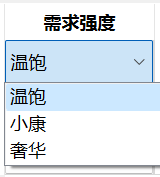
该属性意在于让用户更好地明白基本消费与超额消费占比,以便遏制不必要的消费行为
2. 类别(支出表、收入表)
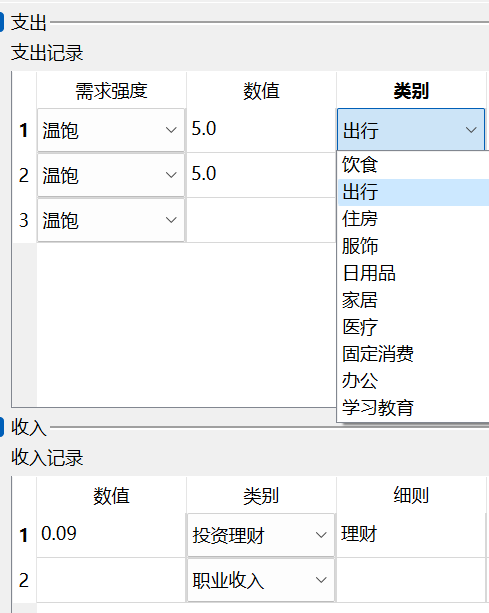
计划在将来支持用户自定义支出或收入类别。目前写死在代码中,可以在CommonFiles/ConstArgs.py文件中修改后使用
3. 支出账户、收入账户、关联账户
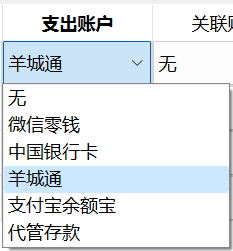
计划在将来支持用户自定义账户列表。目前写死在代码中,可以在CommonFiles/ConstArgs.py文件中修改后使用
1.2 代码实现
思路分析
支出、收入、转移表格中的列名有大量重复,因此将所有列的初始化集中到一个函数中,根据列名执行对应初始化方式。同时,还要区分已存在记录的行和空白行。综上,实现了三个函数:
| 函数名 | 作用 |
|---|---|
| setExistTableCell | 为已存在记录的表格行设置单元格 |
| setBlankTableCell | 为表格的空白行设置单元格 |
| getExistTableCell | 获取某行记录的数据,组装成字典 |
代码
    def setExistTableCell(self, tableWidget, current_row, value_dict: dict, const_class):

        """

        Describe: 为已存在记录的表格行设置单元格。根据列名设置对应类型(格式)的单元格

        Args:

            tableWidget: QTableWidget

                涉及的表格

            current_row: int

                本条记录所在行号

            value_dict: dict

                记录字典

            const_class: Union[ExpenseConst, IncomeConst, MovementConst]

                记录类型对应的常量类

        """

        keys_list = list(value_dict.keys())

        for key, value in value_dict.items():

            if key == 'necessity':

                comboBox = ComboBoxInTableWidget(NECESSITY, value)

                tableWidget.setCellWidget(current_row, keys_list.index(key), comboBox)

            elif key == 'value':

                tableWidget.setItem(current_row, keys_list.index(key), QTableWidgetItem(str(value)))

            elif key == 'category':

                comboBox = ComboBoxInTableWidget(const_class.CATEGORY, value)

                tableWidget.setCellWidget(current_row, keys_list.index(key), comboBox)

            elif key == 'detail':

                tableWidget.setItem(current_row, keys_list.index(key), QTableWidgetItem(value))

            elif key == 'describe':

                tableWidget.setItem(current_row, keys_list.index(key), QTableWidgetItem(value))

            elif key == 'from':

                comboBox = ComboBoxInTableWidget(fundConst.CATEGORY, value)

                tableWidget.setCellWidget(current_row, keys_list.index(key), comboBox)

            elif key == 'to':

                comboBox = ComboBoxInTableWidget(fundConst.CATEGORY, value)

                tableWidget.setCellWidget(current_row, keys_list.index(key), comboBox)

            elif key == 'associatedFund':

                comboBox = ComboBoxInTableWidget(fundConst.CATEGORY, value)

                tableWidget.setCellWidget(current_row, keys_list.index(key), comboBox)

            else:

                print("未知的记录属性!!")

                return

        tableWidget.setCellWidget(current_row, len(keys_list), self.buttonsForExistRow(tableWidget))

    def setBlankTableCell(self, tableWidget, current_row, const_class):

        """

        Describe: 为表格的空白行设置单元格。根据列名设置对应类型(格式)的单元格

        Args:

            tableWidget: QTableWidget

                涉及的表格

            current_row: int

                本条记录所在行号

            const_class: Union[ExpenseConst, IncomeConst, MovementConst]

                记录类型对应的常量类

        """

        keys_list = [const_class.TABLEWIDGET_COLUMN_HEAD[tableWidget.horizontalHeaderItem(i).text()] for i in range(tableWidget.columnCount()-1)]

        for key in keys_list:

            if key == 'necessity':

                comboBox = ComboBoxInTableWidget(NECESSITY, 'True')

                tableWidget.setCellWidget(current_row, keys_list.index(key), comboBox)

            elif key == 'value':

                tableWidget.setItem(current_row, keys_list.index(key), QTableWidgetItem(''))

            elif key == 'category':

                comboBox = ComboBoxInTableWidget(const_class.CATEGORY, 0)

                tableWidget.setCellWidget(current_row, keys_list.index(key), comboBox)

            elif key == 'detail':

                tableWidget.setItem(current_row, keys_list.index(key), QTableWidgetItem(''))

            elif key == 'describe':

                tableWidget.setItem(current_row, keys_list.index(key), QTableWidgetItem(' '))

            elif key == 'from':

                comboBox = ComboBoxInTableWidget(fundConst.CATEGORY, 0)

                tableWidget.setCellWidget(current_row, keys_list.index(key), comboBox)

            elif key == 'to':

                comboBox = ComboBoxInTableWidget(fundConst.CATEGORY, 0)

                tableWidget.setCellWidget(current_row, keys_list.index(key), comboBox)

            elif key == 'associatedFund':

                comboBox = ComboBoxInTableWidget(fundConst.CATEGORY, None)

                tableWidget.setCellWidget(current_row, keys_list.index(key), comboBox)

            else:

                print("未知的记录属性!!: {}", format(key))

                return

        tableWidget.setCellWidget(current_row, len(keys_list), self.buttonsForNewRow(tableWidget))

    def getExistTableCell(self, tableWidget, current_row, const_class):

        new_data_dict = OrderedDict()

        for i in range(tableWidget.columnCount() - 1):

            key = const_class.TABLEWIDGET_COLUMN_HEAD[tableWidget.horizontalHeaderItem(i).text()]

            if key == 'necessity':

                comboBox: ComboBoxInTableWidget = tableWidget.cellWidget(current_row, i)

                new_data_dict[key] = str(comboBox.getKeyByCurrentText())

            elif key == 'value':

                new_data_dict[key] = tableWidget.item(current_row, i).text()

            elif key == 'category':

                comboBox: ComboBoxInTableWidget = tableWidget.cellWidget(current_row, i)

                new_data_dict[key] = str(comboBox.getKeyByCurrentText())

            elif key == 'detail':

                new_data_dict[key] = tableWidget.item(current_row, i).text()

            elif key == 'describe':

                new_data_dict[key] = tableWidget.item(current_row, i).text()

            elif key == 'from':

                comboBox: ComboBoxInTableWidget = tableWidget.cellWidget(current_row, i)

                new_data_dict[key] = str(comboBox.getKeyByCurrentText())

            elif key == 'to':

                comboBox: ComboBoxInTableWidget = tableWidget.cellWidget(current_row, i)

                new_data_dict[key] = str(comboBox.getKeyByCurrentText())

            elif key == 'associatedFund':

                comboBox: ComboBoxInTableWidget = tableWidget.cellWidget(current_row, i)

                new_data_dict[key] = str(comboBox.getKeyByCurrentText())

            else:

                print("未知的记录属性!!: {}", format(key))

                return None

        return new_data_dict
【日常收支账本】【Day04】优化编辑动账记录的操作——QTableWidget单元格设置QComboBox控件的更多相关文章
- 在网页中编辑报表的报表设计器Stimulsoft Reports Designer.Web报表控件
Stimulsoft Reports Designer.Web报表控件是一款网页报表设计器.您想在网页中编辑您的报表吗?现在是可能的! Stimulsoft Reports Designer.Web ...
- ABAP 将单元格设置编辑状态 FORM
FORM set_style USING fieldname style TYPE string CHANGING ...
- html5--移动端视频video的android兼容,去除播放控件、全屏等
html5 中的video 在手机浏览器中的总结所有页面播放时, 如果选择全屏播放, 播放画面将浮动到屏幕的最上层 IOS 手机 自动播放 播放界面浮动文字 播放时是否自动全屏 能否嵌入在页面中播 ...
- QRowTable表格控件(三)-效率优化之-合理使用QStandardItem
目录 一.开心一刻 二.概述 三.效果展示 四.QStandardItem 1.QStandardItem是什么鬼 2.性能分析 3.QStandardItem使用上的坑 五.相关文章 原文链接:QR ...
- easyui datagrid动态设置行、列、单元格不允许编辑
Easyui datagrid 行编辑.列编辑.单元格编辑设置 功能: 动态对datagrid 进行行.列.单元格编辑进行设置不允许编辑. 禁用行编辑: 在编辑方法调用前,对选择的行进行判断,如果不允 ...
- QRowTable表格控件(四)-效率优化之-优化数据源
目录 一.开心一刻 二.问题分析 三.重写数据源 1.自己存储数据 2.重写data接口 四.比较 五.相关文章 原文链接:QRowTable表格控件(四)-效率优化之-优化数据源 一.开心一刻 一程 ...
- [C1] 优化 C1FlexGrid 单元格边框
一 优化理由 如下图所示,如果按照 C1FlexGrid 自带的单元格边框设置,即对每个单元格的 CellStyle 的 BorderThickness 进行设置,会得到如下图的效果: 其中,明显可 ...
- 基于MVC4+EasyUI的Web开发框架经验总结(5)--使用HTML编辑控件CKEditor和CKFinder
Web开发上有很多HTML的编辑控件,如CKEditor.kindeditor等等,很多都做的很好,本文主要介绍在MVC界面里面,CKEditor的配置和使用.CKEditor的前身是FCKEdito ...
- Cxgrid获取选中行列,排序规则,当前正在编辑的单元格内的值
Delphi Cxgrid获取选中行列,排序规则,当前正在编辑的单元格内的值 cxGrid1DBTableView1.Controller.FocusedRowIndex 当前行号 cxGrid1DB ...
- MFC List Control 控件添加单元格编辑,实现可编辑重写
在实现随机生成四则运算的个人项目中,目前已经完成基本功能,想要把程序变成一个Windows界面的程序.原本以为学习过MFC,应该很快就能完成.但是由于以前用的都是VC6.0,这次用了VS2010,稍微 ...
随机推荐
- JAVA小白找工作必备建议
如果您是一名刚入门的JAVA小白,正在寻求工作机会,那么恭喜您来对地方!本文将为您提供一些建议,帮助您在求职过程中更好地展现自己的优势和准备迎接新的挑战. 1.基础知识打牢 在找工作前,务必确保您对J ...
- docker安装8版本elasticsearch遇到的问题FileSystemException
docker安装8版本elasticsearch遇到的问题 Exception in thread "main" java.nio.file.FileSystemException ...
- DolphinScheduler3.1.7离线手册
DolphinScheduler3.1.7 DolphinScheduler简介 Apache DolphinScheduler 是一个分布式易扩展的可视化DAG工作流任务调度开源系统.适用于企业级场 ...
- 离线自动化部署CDH
离线CDH集群自动化部署工具 离线CDH集群安装与部署的自动化脚本工具,简单支持「离线一键装机」. 脚本将对系统配置做出一定修改,使用前请务必确认当前服务器无其他人员.任务使用,以免造成不必要的麻烦, ...
- FAQ:Linux 查看服务器型号(R730为例)
命令:dmidecode -t system | grep -e Manufacturer -e Product 查询结果: Manufacturer: Dell Inc. Product Name: ...
- asp.net core之配置
简介 配置在asp.net core中可以说是我们必不可少一部分.ASP.NET Core 中的应用程序配置是使用一个或多个配置提供程序执行的. 配置提供程序使用各种配置源从键值对读取配置数据,普通最 ...
- lazarus、delphi文件Http下载断点续传的实现
下载大文件时,断点续传是很有必要的,特别是网速度慢且不稳定的情况下,很难保证不出意外,一旦意外中断,又要从头下载,会很让人抓狂.断点续传就能很好解决意外中断情况,再次下载时不需要从头下载,从上次中断处 ...
- 《CTFshow-Web入门》06. Web 51~60
@ 目录 web51 题解 web52 题解 原理 web53 题解 原理 web54 题解 原理 web55 题解 原理 web56 题解 原理 web57 题解 原理 web58 题解 原理 we ...
- Nextcloud 维护管理
Nextcloud 维护管理 目录 Nextcloud 维护管理 1.管理员被禁用怎么办 2.管理员密码忘了怎么办 1.管理员被禁用怎么办 通过命令行解禁管理员用户: 方法一:通过命令行解禁管理员用户 ...
- web组态可视化编辑器
随着工业智能制造的发展,工业企业对设备可视化.远程运维的需求日趋强烈,传统的单机版组态软件已经不能满足越来越复杂的控制需求,那么实现web组态可视化界面成为了主要的技术路径. 行业痛点 对于软件服务商 ...