
【日常收支账本】【Day04】优化编辑动账记录的操作——QTableWidget单元格设置QComboBox控件
一、项目地址
https://github.com/LinFeng-BingYi/DailyAccountBook
二、新增
1. 在表格中设置选项列表,让用户更快地编辑动账记录
1.1 功能详述
为表格中以下字段设置选项列表:
1. 需求强度(由"基本需求"更名)
温饱:基本维持生存且不铺张浪费的消费行为
小康:在温饱的基础上,可以使生活变得比较舒适的消费行为
奢华:可有可无的,或超出自身消费水平的消费行为
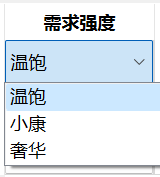
该属性意在于让用户更好地明白基本消费与超额消费占比,以便遏制不必要的消费行为
2. 类别(支出表、收入表)
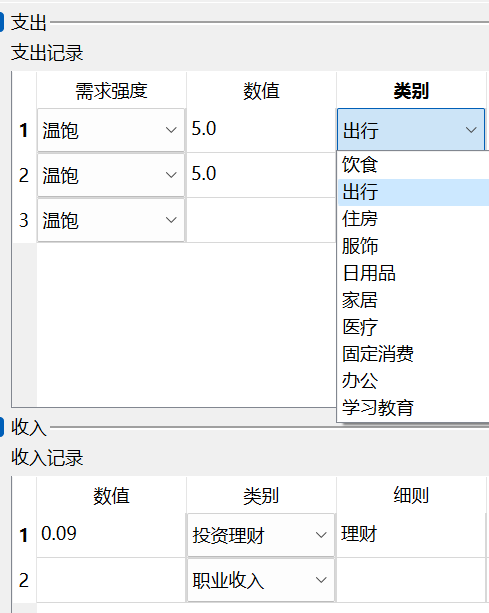
计划在将来支持用户自定义支出或收入类别。目前写死在代码中,可以在CommonFiles/ConstArgs.py文件中修改后使用
3. 支出账户、收入账户、关联账户
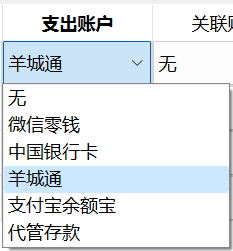
计划在将来支持用户自定义账户列表。目前写死在代码中,可以在CommonFiles/ConstArgs.py文件中修改后使用
1.2 代码实现
思路分析
支出、收入、转移表格中的列名有大量重复,因此将所有列的初始化集中到一个函数中,根据列名执行对应初始化方式。同时,还要区分已存在记录的行和空白行。综上,实现了三个函数:
| 函数名 | 作用 |
|---|---|
| setExistTableCell | 为已存在记录的表格行设置单元格 |
| setBlankTableCell | 为表格的空白行设置单元格 |
| getExistTableCell | 获取某行记录的数据,组装成字典 |
代码
    def setExistTableCell(self, tableWidget, current_row, value_dict: dict, const_class):

        """

        Describe: 为已存在记录的表格行设置单元格。根据列名设置对应类型(格式)的单元格

        Args:

            tableWidget: QTableWidget

                涉及的表格

            current_row: int

                本条记录所在行号

            value_dict: dict

                记录字典

            const_class: Union[ExpenseConst, IncomeConst, MovementConst]

                记录类型对应的常量类

        """

        keys_list = list(value_dict.keys())

        for key, value in value_dict.items():

            if key == 'necessity':

                comboBox = ComboBoxInTableWidget(NECESSITY, value)

                tableWidget.setCellWidget(current_row, keys_list.index(key), comboBox)

            elif key == 'value':

                tableWidget.setItem(current_row, keys_list.index(key), QTableWidgetItem(str(value)))

            elif key == 'category':

                comboBox = ComboBoxInTableWidget(const_class.CATEGORY, value)

                tableWidget.setCellWidget(current_row, keys_list.index(key), comboBox)

            elif key == 'detail':

                tableWidget.setItem(current_row, keys_list.index(key), QTableWidgetItem(value))

            elif key == 'describe':

                tableWidget.setItem(current_row, keys_list.index(key), QTableWidgetItem(value))

            elif key == 'from':

                comboBox = ComboBoxInTableWidget(fundConst.CATEGORY, value)

                tableWidget.setCellWidget(current_row, keys_list.index(key), comboBox)

            elif key == 'to':

                comboBox = ComboBoxInTableWidget(fundConst.CATEGORY, value)

                tableWidget.setCellWidget(current_row, keys_list.index(key), comboBox)

            elif key == 'associatedFund':

                comboBox = ComboBoxInTableWidget(fundConst.CATEGORY, value)

                tableWidget.setCellWidget(current_row, keys_list.index(key), comboBox)

            else:

                print("未知的记录属性!!")

                return

        tableWidget.setCellWidget(current_row, len(keys_list), self.buttonsForExistRow(tableWidget))

    def setBlankTableCell(self, tableWidget, current_row, const_class):

        """

        Describe: 为表格的空白行设置单元格。根据列名设置对应类型(格式)的单元格

        Args:

            tableWidget: QTableWidget

                涉及的表格

            current_row: int

                本条记录所在行号

            const_class: Union[ExpenseConst, IncomeConst, MovementConst]

                记录类型对应的常量类

        """

        keys_list = [const_class.TABLEWIDGET_COLUMN_HEAD[tableWidget.horizontalHeaderItem(i).text()] for i in range(tableWidget.columnCount()-1)]

        for key in keys_list:

            if key == 'necessity':

                comboBox = ComboBoxInTableWidget(NECESSITY, 'True')

                tableWidget.setCellWidget(current_row, keys_list.index(key), comboBox)

            elif key == 'value':

                tableWidget.setItem(current_row, keys_list.index(key), QTableWidgetItem(''))

            elif key == 'category':

                comboBox = ComboBoxInTableWidget(const_class.CATEGORY, 0)

                tableWidget.setCellWidget(current_row, keys_list.index(key), comboBox)

            elif key == 'detail':

                tableWidget.setItem(current_row, keys_list.index(key), QTableWidgetItem(''))

            elif key == 'describe':

                tableWidget.setItem(current_row, keys_list.index(key), QTableWidgetItem(' '))

            elif key == 'from':

                comboBox = ComboBoxInTableWidget(fundConst.CATEGORY, 0)

                tableWidget.setCellWidget(current_row, keys_list.index(key), comboBox)

            elif key == 'to':

                comboBox = ComboBoxInTableWidget(fundConst.CATEGORY, 0)

                tableWidget.setCellWidget(current_row, keys_list.index(key), comboBox)

            elif key == 'associatedFund':

                comboBox = ComboBoxInTableWidget(fundConst.CATEGORY, None)

                tableWidget.setCellWidget(current_row, keys_list.index(key), comboBox)

            else:

                print("未知的记录属性!!: {}", format(key))

                return

        tableWidget.setCellWidget(current_row, len(keys_list), self.buttonsForNewRow(tableWidget))

    def getExistTableCell(self, tableWidget, current_row, const_class):

        new_data_dict = OrderedDict()

        for i in range(tableWidget.columnCount() - 1):

            key = const_class.TABLEWIDGET_COLUMN_HEAD[tableWidget.horizontalHeaderItem(i).text()]

            if key == 'necessity':

                comboBox: ComboBoxInTableWidget = tableWidget.cellWidget(current_row, i)

                new_data_dict[key] = str(comboBox.getKeyByCurrentText())

            elif key == 'value':

                new_data_dict[key] = tableWidget.item(current_row, i).text()

            elif key == 'category':

                comboBox: ComboBoxInTableWidget = tableWidget.cellWidget(current_row, i)

                new_data_dict[key] = str(comboBox.getKeyByCurrentText())

            elif key == 'detail':

                new_data_dict[key] = tableWidget.item(current_row, i).text()

            elif key == 'describe':

                new_data_dict[key] = tableWidget.item(current_row, i).text()

            elif key == 'from':

                comboBox: ComboBoxInTableWidget = tableWidget.cellWidget(current_row, i)

                new_data_dict[key] = str(comboBox.getKeyByCurrentText())

            elif key == 'to':

                comboBox: ComboBoxInTableWidget = tableWidget.cellWidget(current_row, i)

                new_data_dict[key] = str(comboBox.getKeyByCurrentText())

            elif key == 'associatedFund':

                comboBox: ComboBoxInTableWidget = tableWidget.cellWidget(current_row, i)

                new_data_dict[key] = str(comboBox.getKeyByCurrentText())

            else:

                print("未知的记录属性!!: {}", format(key))

                return None

        return new_data_dict
【日常收支账本】【Day04】优化编辑动账记录的操作——QTableWidget单元格设置QComboBox控件的更多相关文章
- 在网页中编辑报表的报表设计器Stimulsoft Reports Designer.Web报表控件
Stimulsoft Reports Designer.Web报表控件是一款网页报表设计器.您想在网页中编辑您的报表吗?现在是可能的! Stimulsoft Reports Designer.Web ...
- ABAP 将单元格设置编辑状态 FORM
FORM set_style USING fieldname style TYPE string CHANGING ...
- html5--移动端视频video的android兼容,去除播放控件、全屏等
html5 中的video 在手机浏览器中的总结所有页面播放时, 如果选择全屏播放, 播放画面将浮动到屏幕的最上层 IOS 手机 自动播放 播放界面浮动文字 播放时是否自动全屏 能否嵌入在页面中播 ...
- QRowTable表格控件(三)-效率优化之-合理使用QStandardItem
目录 一.开心一刻 二.概述 三.效果展示 四.QStandardItem 1.QStandardItem是什么鬼 2.性能分析 3.QStandardItem使用上的坑 五.相关文章 原文链接:QR ...
- easyui datagrid动态设置行、列、单元格不允许编辑
Easyui datagrid 行编辑.列编辑.单元格编辑设置 功能: 动态对datagrid 进行行.列.单元格编辑进行设置不允许编辑. 禁用行编辑: 在编辑方法调用前,对选择的行进行判断,如果不允 ...
- QRowTable表格控件(四)-效率优化之-优化数据源
目录 一.开心一刻 二.问题分析 三.重写数据源 1.自己存储数据 2.重写data接口 四.比较 五.相关文章 原文链接:QRowTable表格控件(四)-效率优化之-优化数据源 一.开心一刻 一程 ...
- [C1] 优化 C1FlexGrid 单元格边框
一 优化理由 如下图所示,如果按照 C1FlexGrid 自带的单元格边框设置,即对每个单元格的 CellStyle 的 BorderThickness 进行设置,会得到如下图的效果: 其中,明显可 ...
- 基于MVC4+EasyUI的Web开发框架经验总结(5)--使用HTML编辑控件CKEditor和CKFinder
Web开发上有很多HTML的编辑控件,如CKEditor.kindeditor等等,很多都做的很好,本文主要介绍在MVC界面里面,CKEditor的配置和使用.CKEditor的前身是FCKEdito ...
- Cxgrid获取选中行列,排序规则,当前正在编辑的单元格内的值
Delphi Cxgrid获取选中行列,排序规则,当前正在编辑的单元格内的值 cxGrid1DBTableView1.Controller.FocusedRowIndex 当前行号 cxGrid1DB ...
- MFC List Control 控件添加单元格编辑,实现可编辑重写
在实现随机生成四则运算的个人项目中,目前已经完成基本功能,想要把程序变成一个Windows界面的程序.原本以为学习过MFC,应该很快就能完成.但是由于以前用的都是VC6.0,这次用了VS2010,稍微 ...
随机推荐
- Java 中怎样将 bytes 转换为 long 类型?
将bytes 转换为long类型: 第一种方式: String 接收 bytes 的构造器转成 String,再 Long.parseLong: 但此种情况需要注意:字节数组中的每个字节都必须是有效的 ...
- 磁盘问题和解决: fsck,gdisk,fdisk等
错误: Resize inode not valid 对于gpt分区的硬盘一般fsck只能检查分区, 不能用于检查整个硬盘, 但是如果对硬盘设备运行时遇到这样的错误 $ sudo fsck -n /d ...
- 压缩CSS样式与js样式
方法一: 使用插件:JS & CSS Minifier (Minify) 使用方法: 效果: 或者按下F1,输入命令:Minify:Document
- 2、Spring之IOC概述
2.1.IOC思想 2.1.1.传统方式获取资源 组件主动地从容器中获取所需要的资源,在这样的模式下开发人员往往需要知道在具体容器中特定资源的获取方式: 提高了学习成本,同时也降低了开发的效率. 2. ...
- Go 并发编程 - runtime 协程调度(三)
Go Runtime Go runtime 可以形象的理解为 Go 程序运行时的环境,类似于 JVM.不同于 JVM 的是,Go 的 runtime 与业务程序直接打包在一块,是一个可执行文件,直接运 ...
- 《Web安全基础》01. 基础知识
@ 目录 1:概念名词 1.1:域名 1.2:DNS 1.3:网站开发语言 1.4:后门 1.5:Web 1.6:Web 相关安全漏洞 2:数据包 2.1:HTTP 2.2:HTTPS 2.3:请求数 ...
- 《Linux基础》08. 日志管理 · 备份与恢复
@ 目录 1:日志管理 1.1:系统常用日志 1.2:日志管理 1.2.1:日志服务 1.2.2:配置文件 1.2.3:自定义日志管理 1.3:日志轮替 1.3.1:轮替服务 1.3.2:配置文件 1 ...
- 如何对MongoDB进行测试
一.环境搭建 关于环境搭建,最好的搭建方式,当然是脚本一键式搭建 我这里是centos6 x64版本的linux上进行构建,这个linux版本现在应该是大部分的主流服务器的标配版本 下面是安装脚本的编 ...
- excel的烦恼
Smiling & Weeping ---- 他未对我好半分,偏巧这感情疯长似野草 题目链接:https://www.matiji.net 思路:与新三进制2思路相似,转化为纯26进制,然后往 ...
- 使用 Python ssh 远程登陆服务器的最佳方案
在使用 Python 写一些脚本的时候,在某些情况下,我们需要频繁登陆远程服务去执行一次命令,并返回一些结果. 在 shell 环境中,我们是这样子做的. sshpass -p ${passwd} s ...