
Introduction to 3D Game Programming with DirectX 12 学习笔记之 --- 第十七章:拾取
原文:Introduction to 3D Game Programming with DirectX 12 学习笔记之 --- 第十七章:拾取
代码工程地址:
https://github.com/jiabaodan/Direct12BookReadingNotes
学习目标
学习如何实现拾取算法,我们将它分解为下面几个步骤:
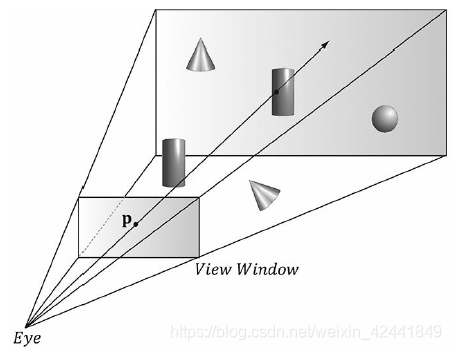
- 当点击屏幕上s点时,计算对应的透视窗口上的点p;
- 在视景坐标系下计算拾取射线;
- 将射线和要进行检测的模型变换到同一个坐标系下;
- 检测模型是否和射线相交,取深度值最小的那个。
1 屏幕透视窗口的变换
第一个需要变换的是,从点击的屏幕变换到NDC,回顾之前从视景坐标系变换到NDC的变换矩阵:
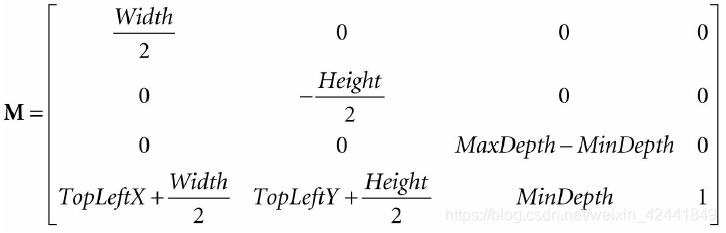
它是通过D3D12_VIEWPORT结构中的数据组成:
typedef struct D3D12_VIEWPORT

{

	FLOAT TopLeftX;

	FLOAT TopLeftY;

	FLOAT Width;

	FLOAT Height;

	FLOAT MinDepth;

	FLOAT MaxDepth;

} D3D12_VIEWPORT;
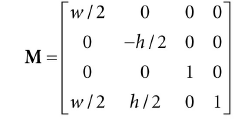
一般情况下视景是整个后置缓冲,深度缓冲范围是0~1,所以TopLeftX = 0, TopLeftY = 0, MinDepth = 0, MaxDepth = 1, Width = w, Height = h,那么变换矩阵可以简化为:
现在令pndc = (xndc, yndc, zndc, 1)是NDC的一个点(−1 ≤ xndc ≤ 1, −1 ≤ yndc ≤ 1, and 0 ≤ zndc ≤ 1),变换pndc到屏幕坐标系:
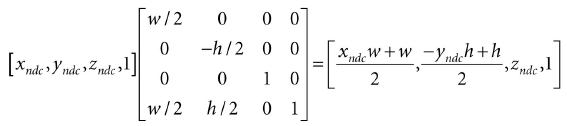
我们不修改Z值,因为拾取计算不关系深度值在哪个坐标系,那么2D屏幕上的点ps = (xs, ys)就对应于NDC下的pndc:
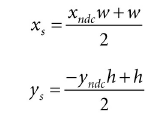
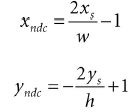
上面的方式通过NDC点找到了屏幕坐标系下的点ps,但是拾取算法中我们需要通过屏幕上的点找打NDC下的点:
现在我们拥有了NDC下面的点,但是为了发射射线,我们需要得到视景坐标系下面的点,回顾第五章6.3.3,我们映射点从视景坐标系到NDC是通过x坐标除以宽高比r:
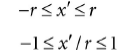
所以直接在X坐标上乘以宽高比即可:
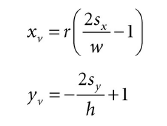
再回顾第五章6.3.1,透视窗口是距离原点d=(α2)d = (\frac{\alpha}{2} )d=(2α),其中a是竖直方向上的角度。那么我们就可以通过点(xv, yv, d )发射射线,只要计算出d:
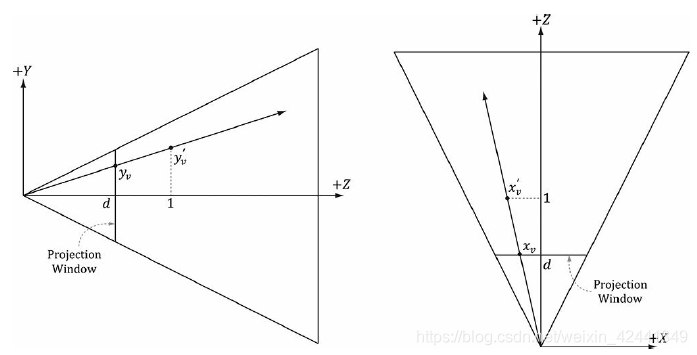
通过相似三角形:
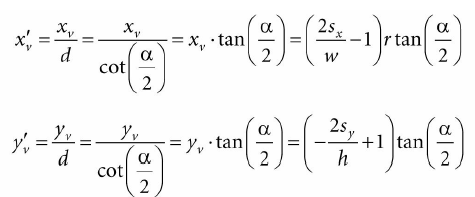
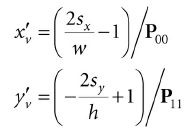
那么我们可以通过点(x′v, y′v, 1)发射射线,和(xv, yv, d )发射的射线是一样的,在视景坐标系下计算发射射线的代码如下:
void PickingApp::Pick(int sx, int sy)

{

	XMFLOAT4X4 P = mCamera.GetProj4x4f();

	// Compute picking ray in view space.

	float vx = (+2.0f*sx / mClientWidth - 1.0f) / P(0, 0);

	float vy = (-2.0f*sy / mClientHeight + 1.0f) / P(1, 1);

	// Ray definition in view space.

	XMVECTOR rayOrigin = XMVectorSet(0.0f, 0.0f, 0.0f, 1.0f);

	XMVECTOR rayDir = XMVectorSet(vx, vy, 1.0f, 0.0f);
2 世界/局部坐标系拾取射线
如果rv(t) = q + tu是世界坐标系下的拾取射线,V是世界坐标系到视景坐标系的变换矩阵,那么世界坐标系下的拾取射线为:
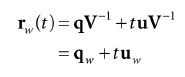
世界坐标系拾取射线对于在世界坐标系下定义的物体比较有用,但是大部分情况下,物体是在它自己的局部坐标系下定义的。如果W是局部坐标系到世界坐标系的变换矩阵,那么局部坐标系下的射线为:

如果在世界坐标系下做检测,就需要将物体都变换到世界坐标系下;通常情况下物体拥有很多顶点,都变换过去的计算量非常大,所以只把射线变换到每个物体的局部坐标系下做检测就比较高效。
下面的代码展示了将一个射线变换到一个物体的局部坐标系:
// Assume nothing is picked to start, so the picked render-item is invisible.

mPickedRitem->Visible = false;

// Check if we picked an opaque render item. A real app might keep a separate

// "picking list" of objects that can be selected.

for(auto ri : mRitemLayer[(int)RenderLayer::Opaque])

{

	auto geo = ri->Geo;

	// Skip invisible render-items.

	if(ri->Visible == false)

		continue;

	XMMATRIX V = mCamera.GetView();

	XMMATRIX invView = XMMatrixInverse(&XMMatrixDeterminant(V), V);

	XMMATRIX W = XMLoadFloat4x4(&ri->World);

	XMMATRIX invWorld = XMMatrixInverse(&XMMatrixDeterminant(W), W);

	// Tranform ray to vi space of Mesh.

	XMMATRIX toLocal = XMMatrixMultiply(invView, invWorld);

	rayOrigin = XMVector3TransformCoord(rayOrigin, toLocal);

	rayDir = XMVector3TransformNormal(rayDir, toLocal);

	// Make the ray direction unit length for the intersection tests.

	rayDir = XMVector3Normalize(rayDir);
XMVector3TransformNormal和XMVector3TransformCoord函数都是传入3D向量,但是XMVector3TransformNormal里w = 0,XMVector3TransformCoord里w=1,所以XMVector3TransformNormal用来变换向量,XMVector3TransformCoord用来变换点。
3 射线/网格的相交检测
下面的代码展示了射线和三角形的相交检测,如果有多个三角形相交,取最近的那个三角形:
// If we hit the bounding box of the Mesh, then we might have

// picked a Mesh triangle, so do the ray/triangle tests.

//

// If we did not hit the bounding box, then it is impossible that we hit

// the Mesh, so do not waste effort doing ray/triangle tests.

float tmin = 0.0f;

if(ri->Bounds.Intersects(rayOrigin, rayDir, tmin))

{

	// NOTE: For the demo, we know what to cast the vertex/index data to.

	// If we were mixing formats, some metadata would be needed to figure

	// out what to cast it to.

	auto vertices = (Vertex*)geo->VertexBufferCPU->GetBufferPointer();

	auto indices = (std::uint32_t*)geo->IndexBufferCPU->GetBufferPointer();

	UINT triCount = ri->IndexCount / 3;

	// Find the nearest ray/triangle intersection.

	tmin = MathHelper::Infinity;

	for(UINT i = 0; i < triCount; ++i)

	{

		// Indices for this triangle.

		UINT i0 = indices[i * 3 + 0];

		UINT i1 = indices[i * 3 + 1];

		UINT i2 = indices[i * 3 + 2];

		// Vertices for this triangle.

		XMVECTOR v0 = XMLoadFloat3(&vertices[i0].Pos);

		XMVECTOR v1 = XMLoadFloat3(&vertices[i1].Pos);

		XMVECTOR v2 = XMLoadFloat3(&vertices[i2].Pos);

		// We have to iterate over all the triangles in order to find

		// the nearest intersection.

		float t = 0.0f;

		if(TriangleTests::Intersects(rayOrigin, rayDir, v0, v1, v2, t))

		{

			if(t < tmin)

			{

				// This is the new nearest picked triangle.

				tmin = t;

				UINT pickedTriangle = i;

				// Set a render item to the picked triangle so that

				// we can render it with a special "highlight" material.

				mPickedRitem->Visible = true;

				mPickedRitem->IndexCount = 3;

				mPickedRitem->BaseVertexLocation = 0;

				// Picked render item needs same world matrix as object picked.

				mPickedRitem->World = ri->World;

				mPickedRitem->NumFramesDirty = gNumFrameResources;

				// Offset to the picked triangle in the mesh index buffer.

				mPickedRitem->StartIndexLocation = 3 * pickedTriangle;

			}

		}

	}

}
上面的算法中,我们先进行了物体的包围体的检测,这样可以对性能进行很大的优化;因为只有通过包围体检测的物体,才进行逐三角形的相交检测。
观察上面的拾取,我们使用系统内存拷贝保存网格几何数据在MeshGeometry类中。这是因为我们无法读取vertex/index缓冲。
3.1 射线/AABB的相交检测
DirectX碰撞检测库中BoundingBox::Intersects函数可以用来检测,返回true就代表已经相交:
bool XM_CALLCONV BoundingBox::Intersects(

	FXMVECTOR Origin, // ray origin

	FXMVECTOR Direction, // ray direction (must be unit length)

	float& Dist ); const // ray intersection parameter
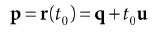
给出射线r(t) = q + tu,最后一个参数就是t0计算出点P:
3.2 射线/球体的相交检测
DirectX碰撞检测库中的函数:
bool XM_CALLCONV BoundingSphere::Intersects(

	FXMVECTOR Origin,

	FXMVECTOR Direction,

	float& Dist ); const
3.3 射线/三角形的相交检测
DirectX碰撞检测库中的函数:
bool XM_CALLCONV TriangleTests::Intersects(

	FXMVECTOR Origin, // ray origin

	FXMVECTOR Direction, // ray direction (unit length)

	FXMVECTOR V0, // triangle vertex v0

	GXMVECTOR V1, // triangle vertex v1

	HXMVECTOR V2, // triangle vertex v2

	float& Dist ); // ray intersection parameter
4 Demo应用
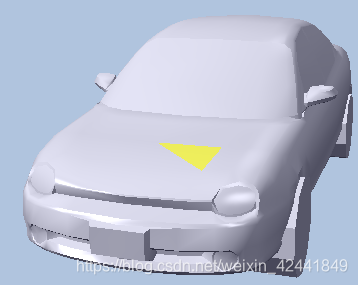
本例子中渲染了一个小车,可以让用户使用右键拾取网格中的三角形。为了实现拾取的三角形的高亮显示,本例中的Render-Item和以前的有些不同,只能部分在初始化中填充。我们添加了一个Visible属性,不可见的Render-Item将不绘制。下面的代码展示了如何根据拾取设置Render-Item属性:
// Cache a pointer to the render-item of the picked

// triangle in the PickingApp class.

RenderItem* mPickedRitem;

if(TriangleTests::Intersects(rayOrigin, rayDir, v0, v1, v2, t))

{

	if(t < tmin)

	{

		// This is the new nearest picked triangle.

		tmin = t;

		UINT pickedTriangle = i;

		// Set a render item to the picked triangle so that

		// we can render it with a special "highlight" material.

		mPickedRitem->Visible = true;

		mPickedRitem->IndexCount = 3;

		mPickedRitem->BaseVertexLocation = 0;

		// Picked render item needs same world matrix as object picked.

		mPickedRitem->World = ri->World;

		mPickedRitem->NumFramesDirty = gNumFrameResources;

		// Offset to the picked triangle in the mesh index buffer.

		mPickedRitem->StartIndexLocation = 3 * pickedTriangle;

	}

}
这个render-item是在绘制完不透明render-item后绘制的,使用一个高亮度的PSO。需要注意的是深度测试使用的是D3D12_COMPARISON_FUNC_LESS_EQUAL,因为如果使用D3D12_COMPARISON_FUNC_LESS会导致深度测试失败而不绘制:
DrawRenderItems(mCommandList.Get(), mRitemLayer[(int)RenderLayer::Opaque]);

mCommandList->SetPipelineState(mPSOs["highlight"].Get());

DrawRenderItems(mCommandList.Get(), mRitemLayer[(int)RenderLayer::Highlight]);
5 总结
- 拾取技术是判定用户在屏幕上点击的2D投射的物体,与之对应的3D物体;
- 拾取射线是从视景坐标系的原点发射出的一条射线,经过透视窗口上与用户点击屏幕的点对应的点;
- 我们可以用过变换射线的原点和方向向量来变换射线所在的坐标系(顶点w = 1,向量w = 0);
- 为了判定射线和物体是否相交,我们对物体的每一个三角形进行射线/三角形判定,如果有多个三角形相交,我们选择最近的那一个;
- 为了优化考虑,我们先进行物体包围体检测,只有检测通过的物体再遍历每个三角形检测。
6 练习
调查八叉树,优化拾取检测;之前提到的截头锥体剔除,也可以优化拾取检测。
(物理和碰撞也同理)
Introduction to 3D Game Programming with DirectX 12 学习笔记之 --- 第十七章:拾取的更多相关文章
- Introduction to 3D Game Programming with DirectX 12 学习笔记之 --- 第二十三章:角色动画
原文:Introduction to 3D Game Programming with DirectX 12 学习笔记之 --- 第二十三章:角色动画 学习目标 熟悉蒙皮动画的术语: 学习网格层级变换 ...
- Introduction to 3D Game Programming with DirectX 12 学习笔记之 --- 第二十一章:环境光遮蔽(AMBIENT OCCLUSION)
原文:Introduction to 3D Game Programming with DirectX 12 学习笔记之 --- 第二十一章:环境光遮蔽(AMBIENT OCCLUSION) 学习目标 ...
- Introduction to 3D Game Programming with DirectX 12 学习笔记之 --- 第十三章:计算着色器(The Compute Shader)
原文:Introduction to 3D Game Programming with DirectX 12 学习笔记之 --- 第十三章:计算着色器(The Compute Shader) 代码工程 ...
- Introduction to 3D Game Programming with DirectX 12 学习笔记之 --- 第十一章:模板测试
原文:Introduction to 3D Game Programming with DirectX 12 学习笔记之 --- 第十一章:模板测试 代码工程地址: https://github.co ...
- Introduction to 3D Game Programming with DirectX 12 学习笔记之 --- 第七章:在Direct3D中绘制(二)
原文:Introduction to 3D Game Programming with DirectX 12 学习笔记之 --- 第七章:在Direct3D中绘制(二) 代码工程地址: https:/ ...
- Introduction to 3D Game Programming with DirectX 12 学习笔记之 --- 第六章:在Direct3D中绘制
原文:Introduction to 3D Game Programming with DirectX 12 学习笔记之 --- 第六章:在Direct3D中绘制 代码工程地址: https://gi ...
- Introduction to 3D Game Programming with DirectX 12 学习笔记之 --- 第五章:渲染流水线
原文:Introduction to 3D Game Programming with DirectX 12 学习笔记之 --- 第五章:渲染流水线 学习目标 了解几个用以表达真实场景的标志和2D图像 ...
- Introduction to 3D Game Programming with DirectX 12 学习笔记之 --- 第四章:Direct 3D初始化
原文:Introduction to 3D Game Programming with DirectX 12 学习笔记之 --- 第四章:Direct 3D初始化 学习目标 对Direct 3D编程在 ...
- Introduction to 3D Game Programming with DirectX 12 学习笔记之 --- 第三章:变换
原文:Introduction to 3D Game Programming with DirectX 12 学习笔记之 --- 第三章:变换 学习目标 理解如何用矩阵表示线性变换和仿射变换: 学习在 ...
随机推荐
- leetcode 843. Guess the Word
我做过的第一个 interactive problem 给一个候选词列表,每次猜测可以猜里面的词,会返回猜中匹配的个数, 可以猜10次, 加上随机化策略之后几乎可以一定通过测试(尽管不是100%) c ...
- virtualenv简单使用
前提 在开发过程中,经常需要使用各种第三方库,而且python又提供了pip,easy_install等工具来简化库的安装,所以很容易就会在系统python的site-packages目录中装满各种各 ...
- 15分钟构建超低成本数据大屏:DataV + DLA
第一步:准备低成本存储的业务数据和DLA表 OSS(https://www.aliyun.com/product/oss)是云上低成本数据存储的优选方案 DLA(https://www.aliyun. ...
- 洛谷P3300 城市规划
题意:给你一个6 * n的网格题,单点修改,询问区间联通块数.n <= 10w 解:看起来就很显然的一道题......线段树每个点用一个ufs维护连通性.完了. 我为了方便思考把图转成横着的了. ...
- Java问题解读系列之String相关---String、StringBuffer、StringBuilder的区别
今天的题目是String.StringBuffer和StringBuilder的区别: 首先还是去官方的API看看对这三种类型的介绍吧,Go...... 一.继承类和实现接口情况 1.String类 ...
- HTML 和 XHTML 区别
1.初级改善 为页面添加正确的DOCTYPE 很多设计师和开发者都不知道什么是DOCTYPE,DOCTYPE有什么用. DOCTYPE是document type的简写.主要用来说明你用的XHTML或 ...
- JAVA短信验证码 工具类
MsgCodeUtil.java package com.hg.util; import com.soyea.enums.ResultEnum; import com.soyea.exception. ...
- java-异常进阶-包的使用
一 finally 1.1 异常执行的顺序 package test; public class Test { public static void main(String[] args) { Dem ...
- input输入框校验
1.只能输入数字,当输入不符字符删除,光标位置不变 //只能输入数字 function onlyNumTrue(obj){ var reg = /[^\d]/g; var pos = obj.sele ...
- QT应用qmake添加应用图标
总体解决方案: 1.搜索 [Setting the Application Icon]帮助 2.http://doc.qt.io/qt-5/appicon.html 3.可以在主pro文件中加入如下语 ...