
React Native知识2-Text组件
Text用于显示文本的React组件,并且它也支持嵌套、样式,以及触摸处理。在下面的例子里,嵌套的标题和正文文字会继承来自styles.baseText的fontFamily字体样式,不过标题上还附加了它自己额外的样式。标题和文本会在顶部依次堆叠,并且被代码中内嵌的换行符分隔开。
一:属性
1:allowFontScaling bool(iOS特有):控制字体是否要根据iOS的“文本大小”辅助选项来进行缩放。
2:numberOfLines number :用来当文本过长的时候裁剪文本。包括折叠产生的换行在内,总的行数不会超过这个属性的限制;
3:onLayout function:当挂载或者布局变化以后调用,参数为如下的内容:{nativeEvent: {layout: {x, y, width, height}}}
4:onPress function:当文本被点击以后调用此回调函数
5:testID string:用来在端到端测试中标记这个视图。
6:suppressHighlighting bool(iOS特有):当为true时,如果文本被按下,则没有任何视觉效果。默认情况下,文本被按下时会有一个灰色的、椭圆形的高光
二:样式style
1:color string
2:fontFamily string
3:fontSize number
4:fontStyle enum('normal', 'italic')
5:fontWeight enum("normal", 'bold', '100', '200', '300', '400', '500', '600', '700', '800', '900')
指定字体的粗细。大多数字体都支持'normal'和'bold'值。并非所有字体都支持所有的数字值。如果某个值不支持,则会自动选择最接近的值。
6:letterSpacing number 字符间距
7:lineHeight number 行高
8:textAlign enum("auto", 'left', 'right', 'center', 'justify')
指定文本的对齐方式。其中'justify'值仅iOS支持。
9:(android) textAlignVertical enum('auto', 'top', 'bottom', 'center')
10:(ios)textDecorationColor string 线的颜色
11:textDecorationLine enum("none", 'underline', 'line-through', 'underline line-through') 横线位置
12:(ios)textDecorationStyle enum("solid", 'double', 'dotted', 'dashed') 线的样式
13:(ios)writingDirection enum("auto", 'ltr', 'rtl') 文字方向
三:实例代码:
1:Text属性的运用
import React, { Component } from 'react';

import {

  AppRegistry,

  StyleSheet,

  AlertIOS,

  Text,

  View

} from 'react-native';

class ReactNativeProject extends Component {

  render() {

    return (

      <View style={styles.container}>

        <Text style={styles.textTopStyle}>

            我开始学习react native内容,此实例是关于如何运用Text的运用,包含相关属性跟事件;

        </Text>

         <Text style={styles.textCenterStyle} numberOfLines={}>

            numberOfLines:该属性的值是一个数字,用于规定最多显示多少行,如果超过该数值,则以省略号(...)表示,跟原生类似效果

         </Text>

         <Text style={styles.textBottomStyle} onPress={() => AlertIOS.prompt('Secure Text', null, null, 'secure-text')}>

            点击事件的运用

         </Text>

         <Text style={{fontWeight: 'bold',marginTop:40}}>

              我是关于

              <Text style={{color: 'red'}}>

              嵌套文本

              </Text>

              的运用;

        </Text>

      </View>

    );

  }

}

const styles = StyleSheet.create({

  container: {

    flex: 1,

    height:300,

    justifyContent:'center'

  },

  textTopStyle:

  {

    fontSize:20,

    fontWeight:'bold',

    textAlign:'center',

    color:'red'

  },

  textCenterStyle:

  {

    fontSize:14,

    textAlign:'center',

    color:'blue'

  },

  textBottomStyle:

  {

    fontSize:17,

    textAlign:'right',

    color:'red',

    marginTop:50,

    marginRight:20,

    borderWidth:1,

    borderColor:'red'

  }

});

AppRegistry.registerComponent('ReactNativeProject', () => ReactNativeProject);
效果图:

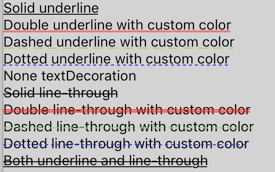
2:常见文本样式
<Text style={{textDecorationLine: 'underline', textDecorationStyle: 'solid'}}>

Solid underline

</Text>

<Text style={{textDecorationLine: 'underline', textDecorationStyle: 'double', textDecorationColor: '#ff0000'}}>

Double underline with custom color

</Text>

<Text style={{textDecorationLine: 'underline', textDecorationStyle: 'dashed', textDecorationColor: '#9CDC40'}}>

Dashed underline with custom color

</Text>

<Text style={{textDecorationLine: 'underline', textDecorationStyle: 'dotted', textDecorationColor: 'blue'}}>

Dotted underline with custom color

</Text>

<Text style={{textDecorationLine: 'none'}}>

None textDecoration

</Text>

<Text style={{textDecorationLine: 'line-through', textDecorationStyle: 'solid'}}>

Solid line-through

</Text>

<Text style={{textDecorationLine: 'line-through', textDecorationStyle: 'double', textDecorationColor: '#ff0000'}}>

Double line-through with custom color

</Text>

<Text style={{textDecorationLine: 'line-through', textDecorationStyle: 'dashed', textDecorationColor: '#9CDC40'}}>

Dashed line-through with custom color

</Text>

<Text style={{textDecorationLine: 'line-through', textDecorationStyle: 'dotted', textDecorationColor: 'blue'}}>

Dotted line-through with custom color

</Text>

<Text style={{textDecorationLine: 'underline line-through'}}>

Both underline and line-through

</Text>
效果图:
四:知识点
1:Text可以当容器,<Text>元素在布局上不同于其它组件:在Text内部的元素不再使用flexbox布局,而是采用文本布局。这意味着<Text>内部的元素不再是一个个矩形,而可能会在行末进行折叠。
2:<View>下不能直接放一段文本,而是要在<View></View>里面包含一个<Text></Text>,然后把文字内容放在Textj里面;
最近有个妹子弄的一个关于扩大眼界跟内含的订阅号,每天都会更新一些深度内容,在这里如果你感兴趣也可以关注一下(嘿对美女跟知识感兴趣),当然可以关注后输入:github 会有我的微信号,如果有问题你也可以在那找到我;当然不感兴趣无视此信息;

React Native知识2-Text组件的更多相关文章
- React Native知识5-Touchable类组件
React Native 没有像web那样可以给元素绑定click事件,前面我们已经知道Text组件有onPress事件,为了给其他组件 也绑定点击事件,React Native提供了3个组件来做这件 ...
- React Native知识
http://www.cnblogs.com/wujy/tag/React%20Native/ React Native知识12-与原生交互 React Native知识11-Props(属性) ...
- React Native 项目常用第三方组件汇总
React Native 项目常用第三方组件汇总 https://www.jianshu.com/p/d9cd9a868764?utm_campaign=maleskine&utm_conte ...
- React Native知识6-NavigatorIOS组件
NavigatorIOS包装了UIKit的导航功能,可以使用左划功能来返回到上一界面.本组件并非由Facebook官方开发组维护.这一组件的开发完全由社区主导.如果纯js的方案能够满足你的需求的话,那 ...
- React Native知识10-ListView组件
ListView - 一个核心组件,用于高效地显示一个可以垂直滚动的变化的数据列表.最基本的使用方式就是创建一个ListView.DataSource数据源,然后给它传递一个普通的数据数组,再使用数据 ...
- React Native知识9-ScrollView组件
一个包装了平台的ScrollView(滚动视图)的组件,同时还集成了触摸锁定的“响应者”系统. 记住ScrollView必须有一个确定的高度才能正常工作,因为它实际上所做的就是将一系列不确定高度的子组 ...
- React Native知识7-TabBarIOS组件
一:简介 两个TabBarIOS和TabBarIOS.Item组件可以实现页面Tab切换的功能,Tab页面切换的架构在应用开发中还是非常常见的.如:腾讯QQ,淘宝,美团外卖等等 二:TabBarIOS ...
- React Native知识4-Image组件
一个用于显示多种不同类型图片的React组件,包括网络图片.静态资源.临时的本地图片.以及本地磁盘上的图片(如相册)等 一:属性 1:onLayout function 当元素挂载或者布局改变的时候调 ...
- React Native知识8-WebView组件
创建一个原生的WebView,可以用于访问一个网页.可以加载一个URL也可以加载一段html代码: 一:属性 1:iosallowsInlineMediaPlayback bool 指定HTML5视频 ...
随机推荐
- Python标准库14 数据库 (sqlite3)
作者:Vamei 出处:http://www.cnblogs.com/vamei 欢迎转载,也请保留这段声明.谢谢! Python自带一个轻量级的关系型数据库SQLite.这一数据库使用SQL语言.S ...
- gsoap设置超时
1.修改gsoap自动生成的代码才能进行超时设置(我这边访问web service的代码都是gsoap工具自动生成.根据wsdl接口) 2.找到生成的soapwwwsdlBindingProxy.cp ...
- Rust初步(六):在C#中使用Rust组件
上一篇文章,我们通过实例比较了一下C#和Rust的性能表现,应该说在Release模式下面,Rust进行计算密集型的运算还是有些比较明显的优势的.那么,我们有没有可能,在C#中做一些快速应用开发,而一 ...
- 在ubuntu上面配置nginx实现反向代理和负载均衡
上一篇文章(http://www.cnblogs.com/chenxizhang/p/4684260.html),我做了一个实验,就是利用Visual Studio,基于Nancy框架,开发了一个自托 ...
- Android随笔之——静默安装、卸载
随笔之所以叫随笔,就是太随意了,说起来,之前的闹钟系列随笔还没写完,争取在十月结束之前找时间把它给写了吧.今天要讲的Android APK的静默安装.卸载.网上关于静默卸载的教程有很多,更有说要调用隐 ...
- 关于多字节、宽字节、WideCharToMultiByte和MultiByteToWideChar函数的详解
所谓的短字符,就是用8bit来表示的字符,典型的应用是ASCII码. 而宽字符,顾名思义,就是用16bit表示的字符,典型的有UNICODE. **************************** ...
- c++编译器对多态的实现原理总结
问题:定义一个空的类型,里面没有任何的成员变量或者成员函数,对这个类型进行 sizeof 运算,结果是? 结果是1,因为空类型的实例不包含任何信息,按道理 sizeof 计算之后结果是0,但是在声明任 ...
- hibernate笔记--实体类映射文件"*.hbm.xml"详解
实体类就是指普通的POJO,Hibernate并不知道那个实体类对应数据库的哪一张表,所以还需要配置一下,常用的方式就是*.hbm.xml文件[配置与@注解配置,这里介绍前者的详细属性: <?x ...
- 编写.gitignore文件的几个小技巧
记录几个编写.gitignore文件的小技巧,可能你早就知道了,但我是google了一番才找到写法. 忽略所有名称为bin的文件夹 bin/ 只忽略第一级目录中,名称为bin的文件夹 /bin/ 忽略 ...
- 2.第一个Struts2程序-HelloWorld程序
1.新建Web Project项目:Study_Struts2 2.新建HelloWordAction.java类 3.复制struts.xml文件到src目录下,配置struts.xml文件内容如下 ...