
NX二次开发-NXOPEN找相切面方法ScRuleFactory()->CreateRuleFaceTangent
 #include <uf_defs.h>

 #include <uf_ui_types.h>

 #include <iostream>

 #include <NXOpen/Session.hxx>

 #include <NXOpen/UI.hxx>

 #include <NXOpen/NXMessageBox.hxx>

 #include <NXOpen/Callback.hxx>

 #include <NXOpen/NXException.hxx>

 #include <NXOpen/BlockStyler_UIBlock.hxx>

 #include <NXOpen/BlockStyler_BlockDialog.hxx>

 #include <NXOpen/BlockStyler_PropertyList.hxx>

 #include <NXOpen/BlockStyler_Group.hxx>

 #include <NXOpen/BlockStyler_FaceCollector.hxx>

 #include <uf.h>

 #include <uf_obj.h>

 #include <NXOpen/NXObjectManager.hxx>

 #include <NXOpen/PartCollection.hxx>

 #include <NXOpen/Face.hxx>

 #include <NXOpen/FaceTangentRule.hxx>

 #include <NXOpen/ScCollectorCollection.hxx>

 #include <NXOpen/ScRuleFactory.hxx>

         UF_initialize();

         //NXOPEN初始化

         NXOpen::Session *theSession = NXOpen::Session::GetSession();

         NXOpen::Part *workPart(theSession->Parts()->Work());

         NXOpen::Part *displayPart(theSession->Parts()->Display());

         //选择面控件

         PropertyList* FaceSelectProps = face_select0->GetProperties();

         std::vector<NXOpen::TaggedObject*> faces = FaceSelectProps->GetTaggedObjectVector("SelectedObjects");

         delete FaceSelectProps;

         FaceSelectProps = NULL;

         tag_t FaceTag = faces[]->Tag();

         //对选中的面设置颜色

         UF_OBJ_set_color(FaceTag, );

         //给入一个面

         NXOpen::Face *face1(dynamic_cast<NXOpen::Face *>(NXOpen::NXObjectManager::Get(FaceTag)));

         //使用NXOPEN相切面规则

         std::vector<NXOpen::Face *> boundaryFaces1();

         NXOpen::FaceTangentRule *faceTangentRule1;

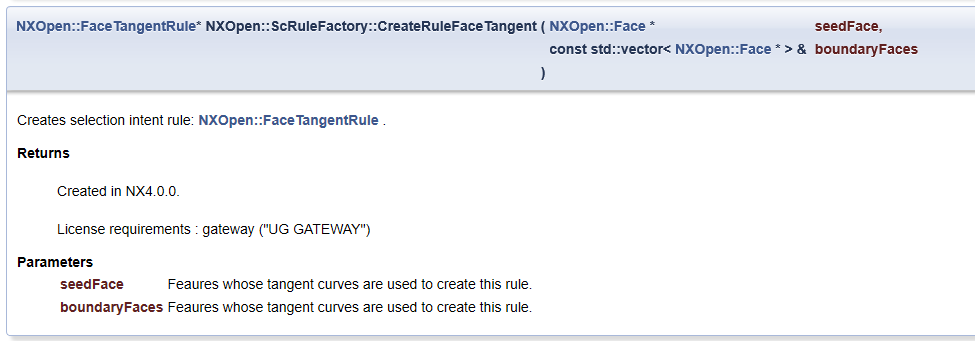
         faceTangentRule1 = workPart->ScRuleFactory()->CreateRuleFaceTangent(face1, boundaryFaces1, 0.050000000000000003);

         std::vector<NXOpen::SelectionIntentRule *> rules1();

         rules1[] = faceTangentRule1;

         NXOpen::ScCollector* scCollector1 = workPart->ScCollectors()->CreateCollector();

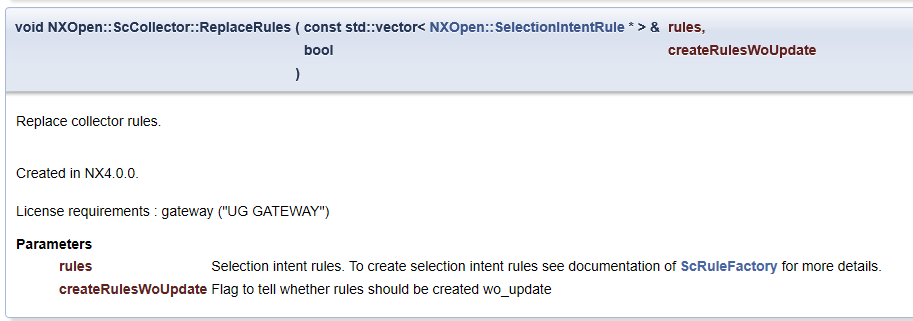
         scCollector1->ReplaceRules(rules1, false);

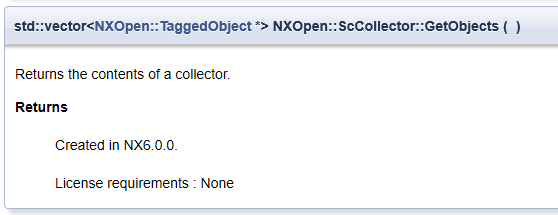
         std::vector<NXOpen::TaggedObject*> BB = scCollector1->GetObjects();

         for (int i = ; i < BB.size(); i++)

         {

             UF_OBJ_set_color(BB[i]->Tag(), );

         }

         UF_terminate();

NX二次开发-NXOPEN找相切面方法ScRuleFactory()->CreateRuleFaceTangent的更多相关文章
- NX二次开发-NXOPEN自动切换到工程图模块
UFUN的API里是没有切换到工程图的函数的,NXOPEN里是有方法可以用的.不过应该是不支持NX9以下的版本. NX9的不能录制出来,在UI类里有方法 NX9+VS2012 #include < ...
- NX二次开发-NXOPEN更改工程图视图名字baseView1->SetName("LSY");
NX9+VS2012 #include <uf.h> #include <uf_draw.h> #include <uf_obj.h> #include <u ...
- NX二次开发-NXOpen获取边的端点NXOpen::Edge::GetVertices
NX9+VS2012 #include <NXOpen/Features_BlockFeatureBuilder.hxx> #include <NXOpen/Features_Fea ...
- NX二次开发-NXOpen::Drawings::DrawingSheet Class Reference
NX11+VS2013 #include <NXOpen/Section.hxx> #include <NXOpen/SectionCollection.hxx> #inclu ...
- NX二次开发-NXOpen::CoordinateSystemCollection Class Reference
NX11+VS2013 #include <NXOpen/Section.hxx> #include <NXOpen/SectionCollection.hxx> #inclu ...
- NX二次开发-NXOpen::WCS Class Reference
NX11+VS2013 #include <NXOpen/Part.hxx> #include <NXOpen/PartCollection.hxx> #include < ...
- NX二次开发-NXOpen中Point3d类型转换成point类型
NX9+VS2012 #include <NXOpen/NXObject.hxx> #include <NXOpen/Part.hxx> #include <NXOpen ...
- NX二次开发-NXOPEN设置工程图表格注释字体workPart->Fonts()->AddFont("chinesef_fs", NXOpen::FontCollection::TypeNx);
NX9+VS2012 #include <uf.h> #include <uf_tabnot.h> #include <NXOpen/Part.hxx> #incl ...
- NX二次开发-NXOPEN获取所有工程图和所有视图DrawingSheet,DrawingSheetCollection,DraftingView
NX11+VS2013 #include <NXOpen/Part.hxx> #include <NXOpen/PartCollection.hxx> #include < ...
随机推荐
- React中Class的概念
Class的概念 一.简介 javaScript是面向对象的编程语言,可以说所以的能够被描述的事.物或抽象的东西,都是可以是对象.而我们记录的对象,会有具有同样的属性和行为. 为了节省重写相同的代码. ...
- 如何重置Magento管理用户、角色和资源的权限
场景1:所有的资源权限被设置为管理角色 步骤1:获取当前的管理角色详细信息 SELECT * FROM admin_role WHERE role_name = 'Administrators' /* ...
- IntelliJ IDEA下载地址
http://www.jetbrains.org/display/IJOS/Download
- Oracle删除修改字段
Oracle 增加修改删除字段 添加字段的语法:alter table tablename add (column datatype [default value][null/not null],…. ...
- 高级运维(三):部署Lnmp环境、构建Lnmp平台、地址重写
一.部署LNMP环境 目标: 安装部署Nginx.MariaDB.PHP环境 1> 安装部署Nginx.MariaDB.PHP.PHP-FPM: 2> 启动Nginx.MariaDB.FP ...
- [NOIP模拟14]题解
当垃圾已经成为一种常态233333 A.旋转子段 考场上的$n^2$手残少了20分,555 (主要是因为实在打不出来$n^3$的做法所以写不了对拍?ccc为什么考场上没有想起有reverse()这么 ...
- python_way day15 HTML-DAY2、 回顾HTML-CSS 标签(css强制生效),JS(数据类型,时间处理,作用域)
python_way day15 HTML-DAY2 html-css回顾 javascript 一.html-css回顾 增加默认值: . 强制生效,就算在上面,被覆盖上了也会生效 解决缩小页面混乱 ...
- 剑指offer——03二维数组中的查找
题目描述 给定一个数组A[0,1,...,n-1],请构建一个数组B[0,1,...,n-1],其中B中的元素B[i]=A[0]*A[1]*...*A[i-1]*A[i+1]*...*A[n-1].不 ...
- 在webpack开发中利用bootstrap4中的字体图标
在webpack项目开发中,难免会需要一些图标,如果用到bootstrap4的话,就会碰到一些问,因为bootstrap 4.x版本把icon分离出来作为一个单独的项目open-iconic,所以cn ...
- Codeforces Round #536 E. Lunar New Year and Red Envelopes /// 贪心 记忆化搜索 multiset取最大项
题目大意: 给定n m k:(1≤n≤1e5, 0≤m≤200, 1≤k≤1e5) 表示n个时间长度内 最多被打扰m次 k个红包 接下来k行描述红包 s t d w:(1≤s≤t≤d≤n , 1≤w≤ ...