
NX二次开发-NXOPEN找相切面方法ScRuleFactory()->CreateRuleFaceTangent
 #include <uf_defs.h>

 #include <uf_ui_types.h>

 #include <iostream>

 #include <NXOpen/Session.hxx>

 #include <NXOpen/UI.hxx>

 #include <NXOpen/NXMessageBox.hxx>

 #include <NXOpen/Callback.hxx>

 #include <NXOpen/NXException.hxx>

 #include <NXOpen/BlockStyler_UIBlock.hxx>

 #include <NXOpen/BlockStyler_BlockDialog.hxx>

 #include <NXOpen/BlockStyler_PropertyList.hxx>

 #include <NXOpen/BlockStyler_Group.hxx>

 #include <NXOpen/BlockStyler_FaceCollector.hxx>

 #include <uf.h>

 #include <uf_obj.h>

 #include <NXOpen/NXObjectManager.hxx>

 #include <NXOpen/PartCollection.hxx>

 #include <NXOpen/Face.hxx>

 #include <NXOpen/FaceTangentRule.hxx>

 #include <NXOpen/ScCollectorCollection.hxx>

 #include <NXOpen/ScRuleFactory.hxx>

         UF_initialize();

         //NXOPEN初始化

         NXOpen::Session *theSession = NXOpen::Session::GetSession();

         NXOpen::Part *workPart(theSession->Parts()->Work());

         NXOpen::Part *displayPart(theSession->Parts()->Display());

         //选择面控件

         PropertyList* FaceSelectProps = face_select0->GetProperties();

         std::vector<NXOpen::TaggedObject*> faces = FaceSelectProps->GetTaggedObjectVector("SelectedObjects");

         delete FaceSelectProps;

         FaceSelectProps = NULL;

         tag_t FaceTag = faces[]->Tag();

         //对选中的面设置颜色

         UF_OBJ_set_color(FaceTag, );

         //给入一个面

         NXOpen::Face *face1(dynamic_cast<NXOpen::Face *>(NXOpen::NXObjectManager::Get(FaceTag)));

         //使用NXOPEN相切面规则

         std::vector<NXOpen::Face *> boundaryFaces1();

         NXOpen::FaceTangentRule *faceTangentRule1;

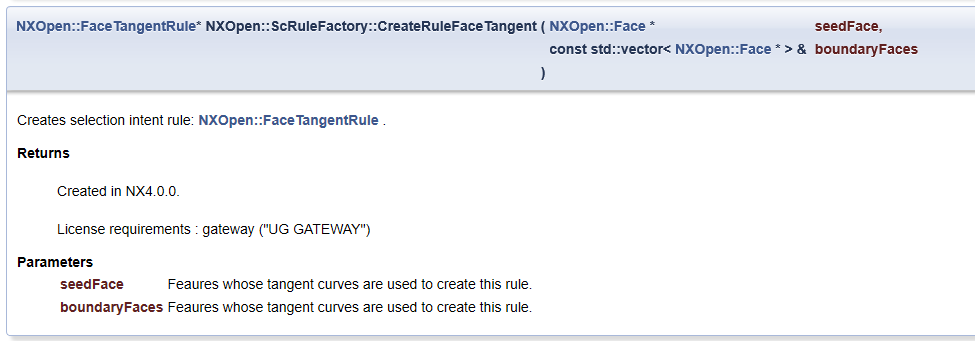
         faceTangentRule1 = workPart->ScRuleFactory()->CreateRuleFaceTangent(face1, boundaryFaces1, 0.050000000000000003);

         std::vector<NXOpen::SelectionIntentRule *> rules1();

         rules1[] = faceTangentRule1;

         NXOpen::ScCollector* scCollector1 = workPart->ScCollectors()->CreateCollector();

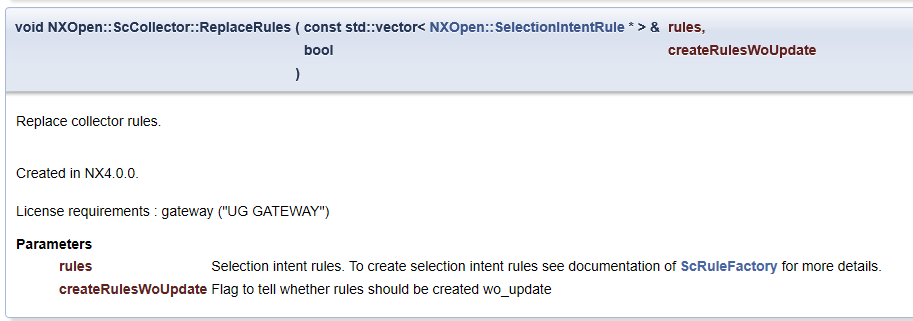
         scCollector1->ReplaceRules(rules1, false);

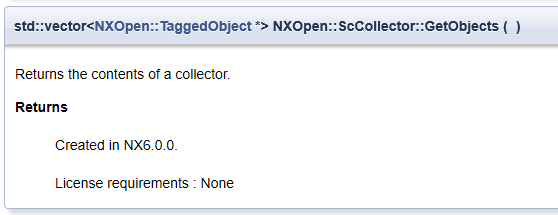
         std::vector<NXOpen::TaggedObject*> BB = scCollector1->GetObjects();

         for (int i = ; i < BB.size(); i++)

         {

             UF_OBJ_set_color(BB[i]->Tag(), );

         }

         UF_terminate();

NX二次开发-NXOPEN找相切面方法ScRuleFactory()->CreateRuleFaceTangent的更多相关文章
- NX二次开发-NXOPEN自动切换到工程图模块
UFUN的API里是没有切换到工程图的函数的,NXOPEN里是有方法可以用的.不过应该是不支持NX9以下的版本. NX9的不能录制出来,在UI类里有方法 NX9+VS2012 #include < ...
- NX二次开发-NXOPEN更改工程图视图名字baseView1->SetName("LSY");
NX9+VS2012 #include <uf.h> #include <uf_draw.h> #include <uf_obj.h> #include <u ...
- NX二次开发-NXOpen获取边的端点NXOpen::Edge::GetVertices
NX9+VS2012 #include <NXOpen/Features_BlockFeatureBuilder.hxx> #include <NXOpen/Features_Fea ...
- NX二次开发-NXOpen::Drawings::DrawingSheet Class Reference
NX11+VS2013 #include <NXOpen/Section.hxx> #include <NXOpen/SectionCollection.hxx> #inclu ...
- NX二次开发-NXOpen::CoordinateSystemCollection Class Reference
NX11+VS2013 #include <NXOpen/Section.hxx> #include <NXOpen/SectionCollection.hxx> #inclu ...
- NX二次开发-NXOpen::WCS Class Reference
NX11+VS2013 #include <NXOpen/Part.hxx> #include <NXOpen/PartCollection.hxx> #include < ...
- NX二次开发-NXOpen中Point3d类型转换成point类型
NX9+VS2012 #include <NXOpen/NXObject.hxx> #include <NXOpen/Part.hxx> #include <NXOpen ...
- NX二次开发-NXOPEN设置工程图表格注释字体workPart->Fonts()->AddFont("chinesef_fs", NXOpen::FontCollection::TypeNx);
NX9+VS2012 #include <uf.h> #include <uf_tabnot.h> #include <NXOpen/Part.hxx> #incl ...
- NX二次开发-NXOPEN获取所有工程图和所有视图DrawingSheet,DrawingSheetCollection,DraftingView
NX11+VS2013 #include <NXOpen/Part.hxx> #include <NXOpen/PartCollection.hxx> #include < ...
随机推荐
- Java之有名内部类和匿名内部类
Java内部类 定义在外部类中的类就是内部类:内部类的定义是为了更清楚.详细地描述事物. 有名内部类和匿名内部类 Java语言根据内部类是否有类名将内部类分为有名内部类和匿名内部类(没有类名). 有名 ...
- 深入理解Magento – 第七章 – 自定义Magento系统配置
Magento拥有十分强大的后台管理系统.作为一名开发人员,这套后台管理系统可以让你的用户简单直接的配置Magento系统或者你创建的模块.和Magento的其他功能一样,你第一次使用这套管理系统的时 ...
- 【原理】RabbitMQ概要图
使用流程 发布者(推送消息的一端): 创建一个tcp长连接connection,连接rabbitmq的监听端口5672: 在TCP长连接下创建一个信道channel,信道可以理解为connection ...
- Robot Framework:随机数
脚本 随机数 # 随机生成几位随机数 ${num} set variable 6 ${random} evaluate "".join(random.sample(string.l ...
- ruby中数组认识
a = 1...5这样赋值,a不是数组类型,1...5操作是一种枚举类型. a = ["1","2","3","4"], ...
- Alibaba Cloud Toolkit,你确定不来尝鲜一下?
阿里云出了新的工具,Alibaba Cloud Toolkit,看看“toolkit”这个名字就知道它是一个工具集. 没错!它就是一个工具集,一个集打包部署发布以及探索分析程序的工具集.而我,目前还停 ...
- [NOIP2016]天天爱跑步 题解(树上差分) (码长短跑的快)
Description 小c同学认为跑步非常有趣,于是决定制作一款叫做<天天爱跑步>的游戏.<天天爱跑步>是一个养成类游戏,需要 玩家每天按时上线,完成打卡任务.这个游戏的地图 ...
- layui多图上传
<!DOCTYPE html> <html lang="en"> <head> <meta charset="UTF-8&quo ...
- jmter 5.1 中文
一.jmeter5.0下载解压后,默认的界面是英文版的,许多人觉得不方便,想要汉化,jmeter是不需要安装汉化包的,通过修改配置文件即可:1.找到jmeter解压后的文件夹,例如我是安装在D:\De ...
- try-with-resources 让java资源关闭代码更简洁
一.JDK7的资源关闭方式优化 1 try-with-resource语法 在JDK7以前,Java没有自动关闭外部资源的语法特性,直到JDK7中新增了try-with-resource语法,才实现了 ...