
案例:WLC HA主WLC进入维护模式
案例场景:
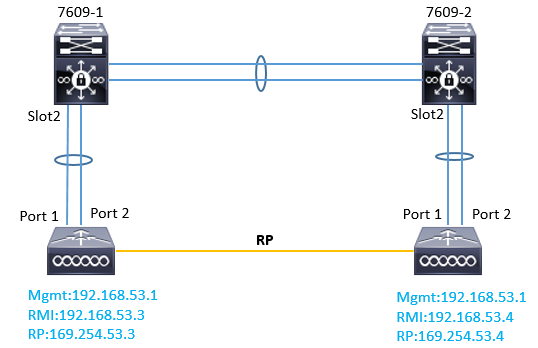
如图所示,7609-1和7609-2分别是网络中的核心设备,起了HSRP,7609-1连接的是WLC-1,,7609-2连接的是WLC-2,WLC1和WLC2的RP口相互连接。
WLC的管理地址为192.168.53.1/24,而RMI地址分别为192.168.53.3和192.168.53.4.
关键知识:RMI和RP
Redundancy Management Interface
The IP address on this interface should be configured in the same subnet as the management interface. This interface will check the health of the Active WLC via network infrastructure once the Active WLC does not respond to Keepalive messages on the Redundant Port. This provides an additional health check of the network and Active WLC, and confirms if switchover should or should not be executed. Also, the Standby WLC uses this interface in order to source ICMP ping packets to check gateway reachability. This interface is also used in order to send notifications from the Active WLC to the Standby WLC in the event of Box failure or Manual Reset. The Standby WLC will use this interface in order to communicate to Syslog, the NTP server, and the TFTP server for any configuration upload.
Redundancy Port
This interface has a very important role in the new HA architecture. Bulk configuration during boot up and incremental configuration are synced from the Active WLC to the Standby WLC using the Redundant Port. WLCs in a HA setup will use this port to perform HA role negotiation. The Redundancy Port is also used in order to check peer reachability sending UDP keep-alive messages every 100 msec (default timer) from the Standby WLC to the Active WLC. Also, in the event of a box failure, the Active WLC will send notification to the Standby WLC via the Redundant Port. If the NTP server is not configured, a manual time sync is performed from the Active WLC to the Standby WLC on the Redundant Port. This port in case of standalone controller and redundancy VLAN in case of WISM-2 will be assigned an auto generated IP Address where last 2 octets are picked from the last 2 octets of Redundancy Management Interface (the first 2 octets are always 169.254).
故障情况:
在7609上出现资源占用100%的情况(例如CPU),无线的业务流量受到了影响无法正常使用。管理流量应该也受到了影响,可能导致了WLC之间RMI通信可能出现了问题,从而导致主备之间的HA状态有所异常。可能发生了SSO切换。
为了缓解核心的问题,将7609设备重启,重启之后,两台连接WLC的板卡都down了,于是,主设备发现所有上行接口全部down掉,无法通过网关和备份设备的RMI接口通信,自己直接进入维护模式,且所有的接口处于管理down的状态,所以mgmt的ip不通,最后临时使用备机先维持无线网络,等待7609的板卡更换。
故障恢复:
7609的板卡更换完毕,下一步尝试恢复WLC HA。
在更换7609的时候尝试重启过主WLC(未连接任何线缆),最终还是进入了维护模式,因为所有的端口(port)都是down的。
恢复步骤:
1、尝试主WLC在独立状态下是否可以正常启动。关闭SSO(config redundancy mode disable),然后重启设备(reset system),设备重启后,发现可以正常进入。配置也在。
2、尝试恢复WLC HA。将备机断电,并恢复之前的连线,连接到7609-2。
3、在主WLC开启port(config port adminmode all enable),然后开启SSO(config redundancy mode sso)。
4、立即将主WLC连接7609-1的线缆恢复,之后立即开启备WLC的电源。
5、观察主备WLC的启动和协商过程。
6、检查WLC HA情况,检查AP join情况,业务情况等。
Other:在备用设备正常的情况下,可以直接将主WLC恢复连接,然后重新启动,这样主WLC应该会进入standb-hot的模式,后续在Active设备上输入 redundancy force-switchover 手动切换一下。
案例:WLC HA主WLC进入维护模式的更多相关文章
- WLC HA模式下的注意事项
管理控制器:1.控制器默认开启的是SSH (CLI),Secure Web/https (GUI)2.登录控制器的管理地址为Active设备所控制(主备的配置同步,所以管理地址一致)3.WLC HA状 ...
- HA主备路由模式的原理 + HA和负载均衡的区别
HA主备路由模式的原理 HA是High Availability缩写,即高可用性 ,可防止网络中由于单个防火墙的设备故障或网络故障导致网络中断,保证网络服务的连续性和安全强度.目前,ha功能已经 ...
- Spring Cloud Netflix项目进入维护模式
任何项目都有其生命周期,Spring Could Netflix也不例外,官宣已进入维护模式,如果在新项目开始考虑技术选型时要考虑到这点风险,并考虑绕道的可能性. 原创: itmuch IT牧场 这 ...
- PowerShell管理SCOM_批量设置维护模式(上 )
#定义存储需要置为维护模式的计算机名称列表 $serverlist = "C:\scomm\servers.txt" #定义脚本执行结果的输出位置 $server_maintena ...
- PowerShell管理SCOM_批量设置维护模式(下)
#定义存储需要置为维护模式的计算机名称列表$serverlist = "C:\scomm\servers.txt"#定义RMS服务器名称$rmsServerName=”scomw. ...
- zabbix api 设置维护模式
通过zabbix提供的api进行维护模式的设置 #!/usr/bin/env python # -*-coding:utf-8-*- import urllib import urllib2 impo ...
- Laravel 5 如何实现网站在维护模式下允许指定 IP 用户访问(白名单)
为了测试需要,有时候需要在网站处于维护模式下允许特定IP访问网站,在 Laravel 中,这可以通过为维护模式编写自定义中间件来实现. 默认情况下,Laravel 使用 CheckForMainten ...
- 通过CLI命令将ESXi主机进入维护模式
将主机置于维护模式# vimsh -n -e /hostsvc/maintenance_mode_enter # vim-cmd /hostsvc/maintenance_mode_enter 退出维 ...
- ambari 维护模式及reset API 操作
Ambari 的维护模式(Maintenance Mode)介绍 Ambari 提供的 Maintenance Mode,是为了让用户在调试或者维护 Service 的时候,抑制不必要的告警(Aler ...
随机推荐
- 微服务监控平台获取网关(zuul)配置列表
步骤: (1)读取zuul的配置文件,获取路由配置项信息: private static Properties props; static { String fileName = "appl ...
- MySQL学习(四)死锁及死锁检测
文章图片来自参考资料 MySQL 的锁 根据加锁的范围,MySQL里面的锁大致可以分成全局锁.表级锁和行锁三类.我们需要明白锁的服务是为了数据统一,或者说是事务,数据隔离. 全局锁 全 ...
- 解决nginx报错:nginx: [emerg] bind() to 0.0.0.0:8088 failed (13: Permission denied)
报错描述: nginx: [emerg] bind() to 0.0.0.0:8088 failed (13: Permission denied) 通过ansible远程给主机更换端口并重新启动ng ...
- kuangbin专题 专题九 连通图 Critical Links UVA - 796
题目链接:https://vjudge.net/problem/UVA-796 题目:裸的求桥,按第一个元素升序输出即可. #include <iostream> #include < ...
- splay2(区间修改+内存回收)
poj3580 要求写一种数据结构: 对一个序列进行 区间增减(add): 区间翻转(reverse): 区间移动(revolve): 插入(insert): 删除(delete): ...
- bugku 散乱密码
BugkuCTF_加密_散乱的密文 WriteUp image.png lf5{ag024c483549d7fd@@1} 一张纸条上凌乱的写着2 1 6 5 3 4 以前做过这种类型的 既然是凌乱 ...
- 本地mongodb数据库导出到远程数据库中
把本地Mongodb中的数据导入(批量插入)到服务器的数据库中 1.导出数据: mongoexport -d admin -c users -o outdatafile.dat 选项解释: -d 指明 ...
- SSHException: Error reading SSH protocol banner
当我在使用ssh 远程connect 另一台机器的server 时出现了错误,错误如下,起初以为是自己代码写的有问题,后来本地了一下看了跑的没问题,我就开始根据报错去查寻原因, 起初在论坛博客看到这 ...
- Android学习使用基本界面组件(下拉框,单选框,复选框,数字转轮,滚动条)
(一)建立单选框按钮 RadioGroup和RadioButton建立单选框按钮 字符串资源文件: <resources> <string name="app_name&q ...
- linux 安装 Jenkins
yum的repo中默认没有Jenkins,需要先将Jenkins存储库添加到yum repos,执行下面的命令: wget -O /etc/yum.repos.d/jenkins.repo https ...