
【Spring Boot学习之二】WEB开发
环境
Java1.8
Spring Boot 1.3.2
一、静态资源访问
动静分离:动态服务和前台页面图片分开,静态资源可以使用CDN加速;
Spring Boot默认提供静态资源目录位置需置于classpath下,目录名需符合如下规则:
/static
/public
/resources
/META-INF/resources
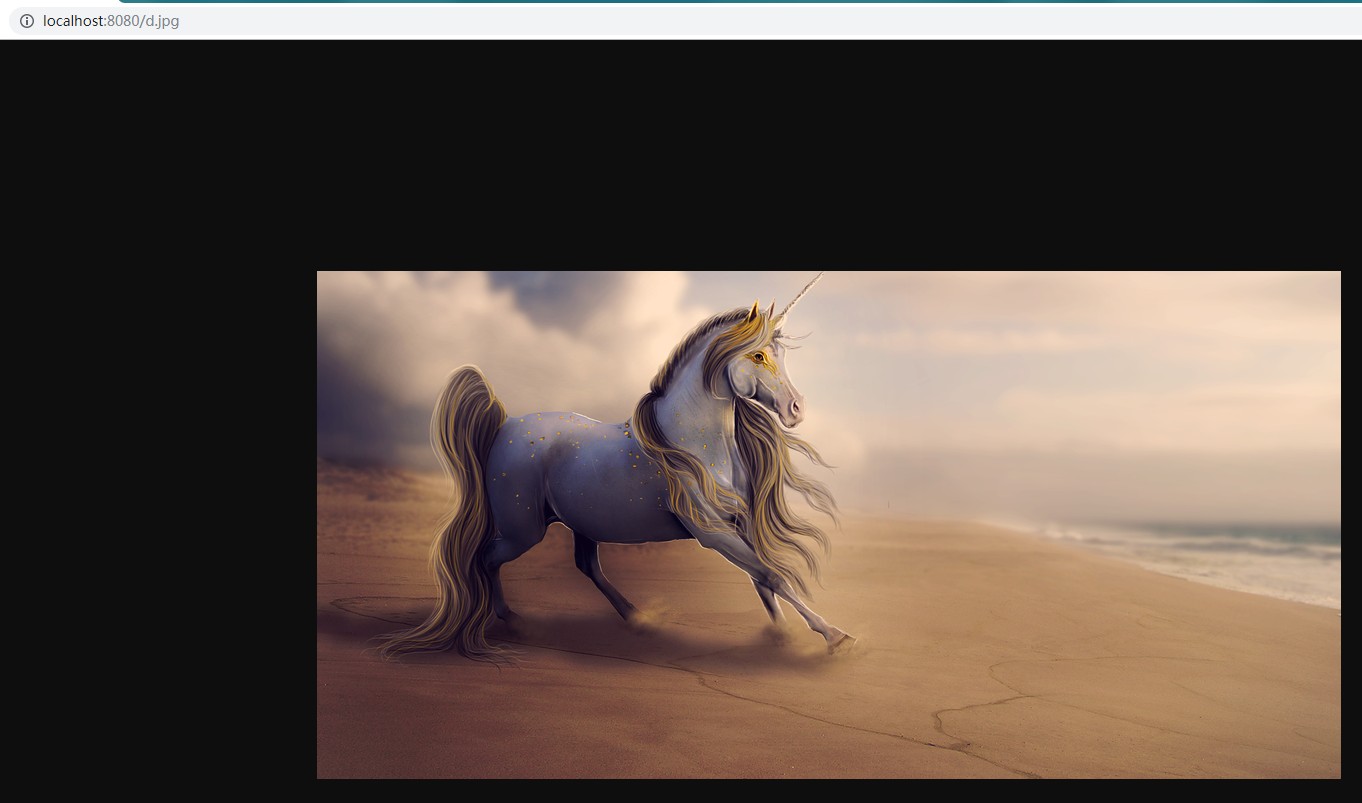
举例:我们可以在src/main/resources/目录下创建static,在该位置放置一个图片文件。启动程序后,尝试访问http://localhost:8080/d.jpg。如能显示图片,配置成功。

二、全局异常捕获
首先定义一个切面处理类 用来处理运行时异常报错:
package com.wjy.controller;

import java.util.HashMap;

import java.util.Map;

import org.springframework.web.bind.annotation.ControllerAdvice;

import org.springframework.web.bind.annotation.ExceptionHandler;

import org.springframework.web.bind.annotation.ResponseBody;

@ControllerAdvice

public class GlobalExceptionHandler {

    @ExceptionHandler(RuntimeException.class)

    @ResponseBody

    public Map<String, Object> resultError() {

        Map<String, Object> result = new HashMap<String, Object>();

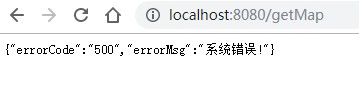
        result.put("errorCode", "500");

        result.put("errorMsg", "系统错误!");

        return result;

    }

}
@ControllerAdvice 是controller的一个辅助类,最常用的就是作为全局异常处理的切面类;
@ControllerAdvice 可以指定扫描范围;
@ControllerAdvice 约定了几种可行的返回值:
返回 String,表示跳到某个 view
返回 modelAndView
返回 model + @ResponseBody:将model类转换成json格式
然后写一个方法抛出异常:
package com.wjy.controller;

import java.util.HashMap;

import java.util.Map;

import org.springframework.boot.autoconfigure.EnableAutoConfiguration;

import org.springframework.web.bind.annotation.RequestMapping;

import org.springframework.web.bind.annotation.RestController;

@EnableAutoConfiguration

@RestController

public class HelloController {

    @RequestMapping("/hello")

    public String hello() {

        return "hello world";

    }

    @RequestMapping("/getMap")

    public Map<String, Object> getMap() {

        Map<String, Object> result = new HashMap<String, Object>();

        result.put("errorCode", "200");

        result.put("errorMsg", "成功..");

        int a = 1/0;

        return result;

    }

}
验证:
三、渲染WEB页面
Spring Boot整合页面建议优先选择模板引擎,不建议选用JSP,若一定要使用JSP将无法实现Spring Boot的多种特性。
模板引擎:使用伪HTML作动态页面模板,方便开发,另外提高搜索引擎搜索,Spring Boot提供了默认配置的模板引擎主要有以下几种:
• Thymeleaf
• FreeMarker
• Velocity
• Groovy
• Mustache
当你使用上述模板引擎中的任何一个,它们默认的模板配置路径为:src/main/resources/templates。
1、使用Freemaker渲染WEB视图
(1)POM引入依赖
<!-- 引入freeMarker的依赖包. -->

<dependency>

    <groupId>org.springframework.boot</groupId>

    <artifactId>spring-boot-starter-freemarker</artifactId>

</dependency>
(2)在src/main/resources/创建一个templates文件夹,里面创建动态页面模板,后缀为*.ftl
比如:index.ftl
<!DOCTYPE html>

<html>

<head lang="en">

<meta charset="UTF-8" />

<title>首页</title>

</head>

<body>

${name}

<#if sex==1>

男

<#elseif sex==2>

女

<#else>

其他

</#if>

<#list userlist as user>

${user}

</#list>

</body>

</html>
(3)创建后台代码
package com.wjy.controller;

import java.util.ArrayList;

import java.util.List;

import java.util.Map;

import org.springframework.stereotype.Controller;

import org.springframework.web.bind.annotation.RequestMapping;

//注意这里是 @Controller   不是@RestController

@Controller

public class FmindexController {

    @RequestMapping("/fmindex")

    public String index(Map<String, Object> result) {

        System.out.println("IndexController....index");

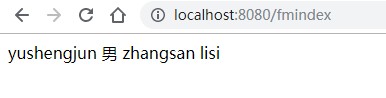
        result.put("name", "yushengjun");

        result.put("sex", 1);

        List<String> list = new ArrayList<String>();

        list.add("zhangsan");

        list.add("lisi");

        result.put("userlist", list);

        return "index";

    }

}
注意:ftl的名字要和java 返回字符串的名字相同
验证:
(4)freemaker配置
使用application.properties文件,默认在src/main/resources目录下
########################################################

###FREEMARKER (FreeMarkerAutoConfiguration)

########################################################

spring.freemarker.allow-request-override=false

spring.freemarker.cache=true

spring.freemarker.check-template-location=true

spring.freemarker.charset=UTF-8

spring.freemarker.content-type=text/html

spring.freemarker.expose-request-attributes=false

spring.freemarker.expose-session-attributes=false

spring.freemarker.expose-spring-macro-helpers=false

#spring.freemarker.prefix=

#spring.freemarker.request-context-attribute=

#spring.freemarker.settings.*=

spring.freemarker.suffix=.ftl

spring.freemarker.template-loader-path=classpath:/templates/

#comma-separated list

#spring.freemarker.view-names= # whitelist of view names that can be resolved
2、使用JSP渲染WEB视图
(1)maven项目必须是war类型 eclipse 4.7 + jdk1.8
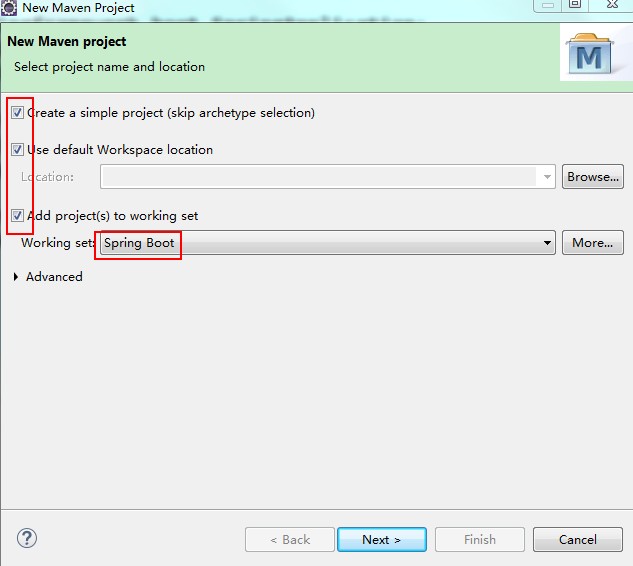
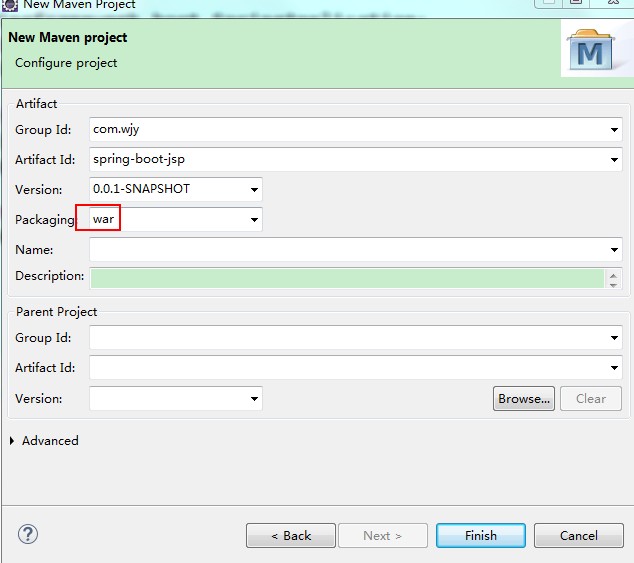
然后依次修改如下配置:
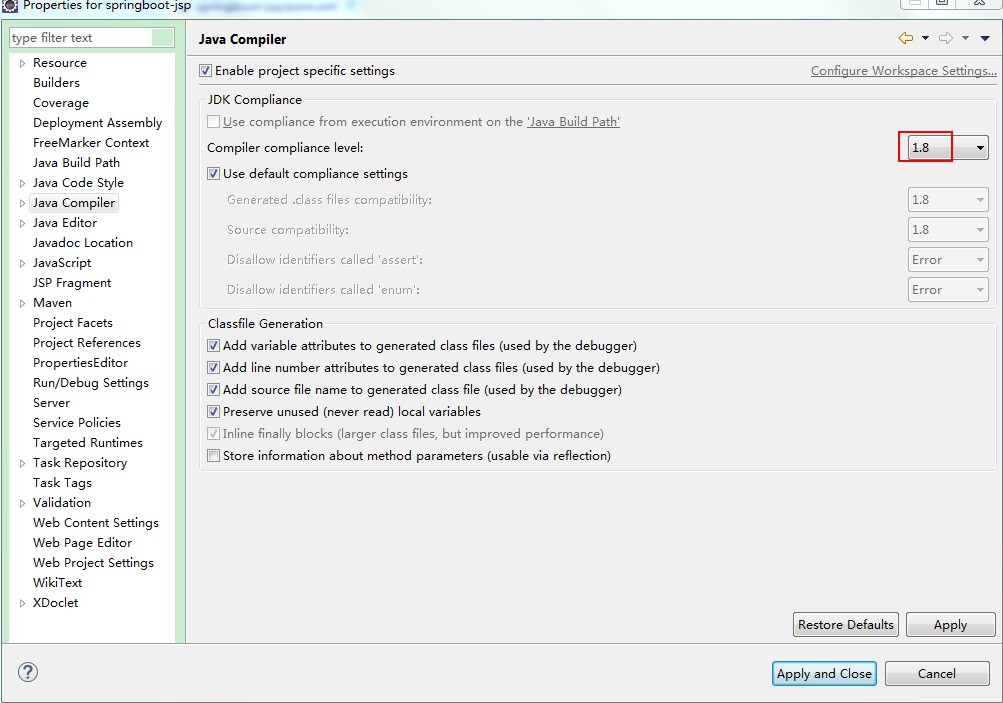
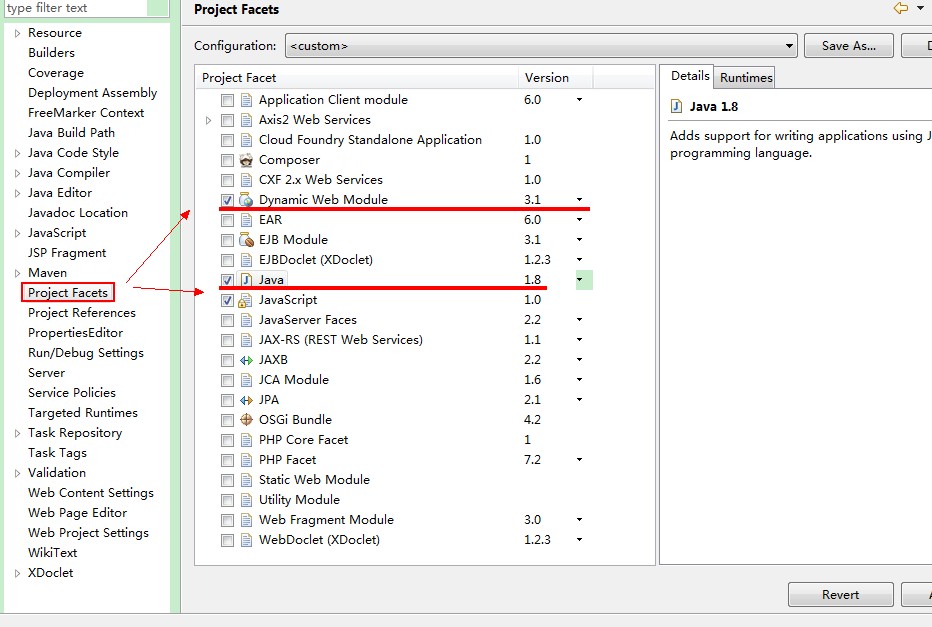
(2)POM引入依赖
<parent>

        <groupId>org.springframework.boot</groupId>

        <artifactId>spring-boot-starter-parent</artifactId>

        <version>1.3.3.RELEASE</version>

    </parent>

    <dependencies>

        <!-- SpringBoot 核心组件 -->

        <dependency>

            <groupId>org.springframework.boot</groupId>

            <artifactId>spring-boot-starter-web</artifactId>

        </dependency>

        <dependency>

            <groupId>org.springframework.boot</groupId>

            <artifactId>spring-boot-starter-tomcat</artifactId>

        </dependency>

        <dependency>

            <groupId>org.apache.tomcat.embed</groupId>

            <artifactId>tomcat-embed-jasper</artifactId>

        </dependency>

        <!-- 强制添加依赖  否则可能在解析JSP报错:No Java compiler available -->

        <dependency>

            <groupId>org.eclipse.jdt.core.compiler</groupId>

            <artifactId>ecj</artifactId>

            <version>4.6.1</version>

            <scope>provided</scope>

        </dependency>

    </dependencies>

    <!-- 不加下面这个build 可能update project不起作用 -->

    <build>

        <plugins>

            <plugin>

                <groupId>org.apache.maven.plugins</groupId>

                <artifactId>maven-compiler-plugin</artifactId>

                <version>3.1</version>

                <configuration>

                    <source>1.8</source>

                    <target>1.8</target>

                </configuration>

            </plugin>

        </plugins>

    </build>
最后 maven --> Update Project...
(3)application.properties创建以下配置
spring.mvc.view.prefix=/WEB-INF/jsp/

spring.mvc.view.suffix=.jsp
(4)代码
页面:
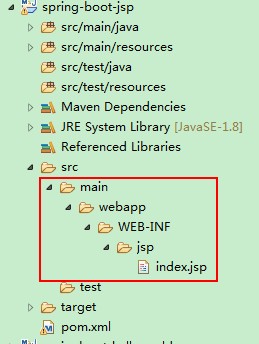
<%@ page language="java" contentType="text/html; UTF-8" pageEncoding="UTF-8"%>

<!DOCTYPE html PUBLIC "-//W3C//DTD HTML 4.01 Transitional//EN" "http://www.w3.org/TR/html4/loose.dtd">

<html>

<head>

<meta http-equiv="Content-Type" content="text/html; charset=UTF-8">

<title>Insert title here</title>

</head>

<body>

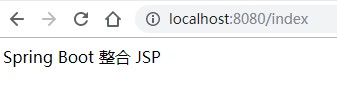
Spring Boot 整合 JSP

</body>

</html>
后台:
package com.wjy.app;

import org.springframework.boot.SpringApplication;

import org.springframework.boot.autoconfigure.EnableAutoConfiguration;

import org.springframework.context.annotation.ComponentScan;

@EnableAutoConfiguration

@ComponentScan(basePackages="com.wjy.controller")

public class App {

    public static void main(String[] args) {

        SpringApplication.run(App.class, args);

    }

}
package com.wjy.controller;

import org.springframework.stereotype.Controller;

import org.springframework.web.bind.annotation.RequestMapping;

@Controller

public class IndexController {

    @RequestMapping("/index")

    public String index() {

        return "index";

    }

}
验证:
【Spring Boot学习之二】WEB开发的更多相关文章
- Spring Boot学习记录(二)--thymeleaf模板 - CSDN博客
==他的博客应该不错,没有细看 Spring Boot学习记录(二)--thymeleaf模板 - CSDN博客 http://blog.csdn.net/u012706811/article/det ...
- Spring Boot学习笔记二
Spring Boot入门第二篇 第一天的详见:https://www.cnblogs.com/LBJLAKERS/p/12001253.html 同样是新建一个pring Initializer快速 ...
- Spring Boot学习(二):配置文件
目录 前言 方式1:通过配置绑定对象的方式 方式2:@Value("${blog.author}")的形式获取属性值 相关说明 注解@Value的说明 参考 前言 Spring B ...
- spring Boot 学习(二、Spring Boot与缓存)
一.概述1. 大多应用中,可通过消息服务中间件来提升系统异步通信.扩展解耦能力 2. 消息服务中两个重要概念: 消息代理(message broker)和目的地(destination) 当消息发送者 ...
- Spring Boot学习笔记:项目开发中规范总结
Spring Boot在企业开发中使用的很广泛,不同的企业有不同的开发规范和标准.但是有些标准都是一致的. 项目包结构 以下是一个项目常见的包结构 以上是一个项目的基本目录结构,不同的项目结构会有差异 ...
- Spring Boot学习笔记(二二) - 与Mybatis集成
Mybatis集成 Spring Boot中的JPA部分默认是使用的hibernate,而如果想使用Mybatis的话就需要自己做一些配置.使用方式有两种,第一种是Mybatis官方提供的 mybat ...
- Spring Boot学习(二)搭建一个简易的Spring Boot工程
第一步:新建项目 新建一个SpringBoot工程 修改项目信息 勾选项目依赖和工具 选择好项目的位置,点击[Finish] 第二步:项目结构分析 新建好项目之后的结构如下图所示,少了很多配置文件: ...
- Spring Boot学习总结二
Redis是目前业界使用最广泛的内存数据存储.相比memcached,Redis支持更丰富的数据结构,例如hashes, lists, sets等,同时支持数据持久化.除此之外,Redis还提供一些类 ...
- spring boot 学习笔记(二) 构建web支持jsp
一.必须将项目打包成war包 <packaging>war</packaging> 二.pom.xml加入依赖包 <dependency> <groupId& ...
随机推荐
- Ajax无法访问回调函数seccess问题
1,后台返回的数据是标准json格式,前端dataType也是josn, 2,没有跨域访问, 但是一直只执行error方法, 原因出在: 应设置为button按钮,指明类型为button
- linux 下如何添加一个用户,并给予用户root权限
分类专栏: Linux 1.添加用户,首先用adduser命令添加一个普通用户,命令如下: adduser tommy //添加一个名为tommy的用户 passwd tommy //修改密码 C ...
- RabbitMQ六种队列模式-发布订阅模式
前言 RabbitMQ六种队列模式-简单队列RabbitMQ六种队列模式-工作队列RabbitMQ六种队列模式-发布订阅 [本文]RabbitMQ六种队列模式-路由模式RabbitMQ六种队列模式-主 ...
- 3.深入学习Servlet的Response和Request
一.HttpServletResponse web服务器接受到客户端的HTTP请求,对于这个请求分别创建一个代表请求的对象HttpServletRequest和一个代表响应的对象HttpServlet ...
- Note_3.31
2019/4/1 奇奇怪怪的笔记 整理了一些之前没有写过的东西,把它们拼在一起,并没有什么逻辑可言qwq FWT快速沃尔什变换 \[ FWT(A)=merge(FWT(A0),FWT(A0+A1)) ...
- 保存tensor至本地文件
path_temp = '../m39_data/temp3' #文件目录 file_name = os.path.join(path_temp, "setQ.txt") Q = ...
- Ubuntu 19.04 安装docker
配置国内源: deb https://mirrors.ustc.edu.cn/ubuntu/ disco main restricted universe multiverse deb https:/ ...
- AtCoder Beginner Contest 137 F
AtCoder Beginner Contest 137 F 数论鬼题(虽然不算特别数论) 希望你在浏览这篇题解前已经知道了费马小定理 利用用费马小定理构造函数\(g(x)=(x-i)^{P-1}\) ...
- mysql将多条结果拼接成一条结果
1,实际数据 SELECT resource_id, resource_type FROM res_resource_mount 2,拼接之后数据 SELECT c.resource_id, GROU ...
- EventHandler
表示将处理不包含事件数据的事件的方法 作用:这句话的意思就是把这两个事放在一起了,意思就是叫你吃完饭了喊我一声.我委托你吃完饭了,喊我一声.这样我就不用过一会就来看一下你吃完了没有了,已经委托你了.