
22、vue实现随机四位数验证码
效果图:
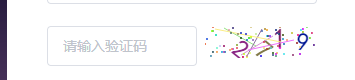
1、新建生成验证码的组件Sidentify.vue(代码如下):
<template>

    <div class="s-canvas">

        <canvas id="s-canvas" :width="contentWidth" :height="contentHeight"></canvas>

    </div>

</template>

<script>

export default {

  name: "Sidentify",

  props: {

    identifyCode: {

      type: String,

      default: "1234"

    },

    fontSizeMin: {

      type: Number,

      default: 25

    },

    fontSizeMax: {

      type: Number,

      default: 30

    },

    backgroundColorMin: {

      type: Number,

      default: 255

    },

    backgroundColorMax: {

      type: Number,

      default: 255

    },

    colorMin: {

      type: Number,

      default: 0

    },

    colorMax: {

      type: Number,

      default: 160

    },

    lineColorMin: {

      type: Number,

      default: 100

    },

    lineColorMax: {

      type: Number,

      default: 255

    },

    dotColorMin: {

      type: Number,

      default: 0

    },

    dotColorMax: {

      type: Number,

      default: 255

    },

    contentWidth: {

      type: Number,

      default: 112

    },

    contentHeight: {

      type: Number,

      default: 31

    }

  },

  methods: {

    // 生成一个随机数

    randomNum(min, max) {

      return Math.floor(Math.random() * (max - min) + min);

    },

    // 生成一个随机的颜色

    randomColor(min, max) {

      let r = this.randomNum(min, max);

      let g = this.randomNum(min, max);

      let b = this.randomNum(min, max);

      return "rgb(" + r + "," + g + "," + b + ")";

    },

    drawPic() {

      let canvas = document.getElementById("s-canvas");

      let ctx = canvas.getContext("2d");

      ctx.textBaseline = "bottom";

      // 绘制背景

      ctx.fillStyle = this.randomColor(

        this.backgroundColorMin,

        this.backgroundColorMax

      );

      ctx.fillRect(0, 0, this.contentWidth, this.contentHeight);

      // 绘制文字

      for (let i = 0; i < this.identifyCode.length; i++) {

        this.drawText(ctx, this.identifyCode[i], i);

      }

      this.drawLine(ctx);

      this.drawDot(ctx);

    },

    drawText(ctx, txt, i) {

      ctx.fillStyle = this.randomColor(this.colorMin, this.colorMax);

      ctx.font =

        this.randomNum(this.fontSizeMin, this.fontSizeMax) + "px SimHei";

      let x = (i + 1) * (this.contentWidth / (this.identifyCode.length + 1));

      let y = this.randomNum(this.fontSizeMax, this.contentHeight - 5);

      var deg = this.randomNum(-45, 45);

      // 修改坐标原点和旋转角度

      ctx.translate(x, y);

      ctx.rotate(deg * Math.PI / 180);

      ctx.fillText(txt, 0, 0);

      // 恢复坐标原点和旋转角度

      ctx.rotate(-deg * Math.PI / 180);

      ctx.translate(-x, -y);

    },

    drawLine(ctx) {

      // 绘制干扰线

      for (let i = 0; i < 5; i++) {

        ctx.strokeStyle = this.randomColor(

          this.lineColorMin,

          this.lineColorMax

        );

        ctx.beginPath();

        ctx.moveTo(

          this.randomNum(0, this.contentWidth),

          this.randomNum(0, this.contentHeight)

        );

        ctx.lineTo(

          this.randomNum(0, this.contentWidth),

          this.randomNum(0, this.contentHeight)

        );

        ctx.stroke();

      }

    },

    drawDot(ctx) {

      // 绘制干扰点

      for (let i = 0; i < 80; i++) {

        ctx.fillStyle = this.randomColor(0, 255);

        ctx.beginPath();

        ctx.arc(

          this.randomNum(0, this.contentWidth),

          this.randomNum(0, this.contentHeight),

          1,

          0,

          2 * Math.PI

        );

        ctx.fill();

      }

    }

  },

  watch: {

    identifyCode() {

      this.drawPic();

    }

  },

  mounted() {

    this.drawPic();

  }

};

</script>

<style scoped>

.s-canvas {

  height: 38px;

}

.s-canvas canvas {

  margin-top: 1px;

  margin-left: 8px;

}

</style>
2、在需要的页面引入该组件并使用:
<el-form-item prop="code">
      <el-input v-model="form.code" autocomplete="off" placeholder="请输入验证码"  style="width:150px;float:left"></el-input>

              <div class="login-code" @click="refreshCode">

                <!--验证码组件-->

                <Sidentify :identifyCode="identifyCode" />

              </div>

            </el-form-item>
import Sidentify from "../utils/Sidentify.vue";

components: {

Sidentify

},
data(){
  return{
 }
}
3、获取验证码的方法:
methods:{
22、vue实现随机四位数验证码的更多相关文章
- JavaScript 编写随机四位数验证码(大小写字母和数字)
1.JavaScript编写随机四位数验证码,用到的知识点为: a.Math对象的随机数:Math.random() b.Math对象的取整 :Math.floor() c.处理所需要的下标个数 ...
- C# 随机四位数验证码
string str ="abcdefghigklmnopqrstuvwxyzABCDEFJHIGKLMNOPQRSTUVWXYZ1234567890"; while(true){ ...
- python随机生成6位数验证码
#随机生成6位数验证码 import randomcode = []for i in range(6): if i == str(random.randint(1,5)): cod ...
- java生成随机六位数的验证码&随机生成十位数ValidCode码,用于邮件的验证&检查是不是符合为合法的中国的手机号码
package com.demo.test1; import java.security.NoSuchAlgorithmException; import java.security.SecureRa ...
- 用MFC完成一个简单的猜数字游戏: 输入的四位数中,位置和数字都正确为A,数字相同而位置不同的为B。
最近学习了MFC一些比较基础的知识,所以打算通过做一个简单的数字游戏来理解MFC的流程并进一步熟悉其操作. 在这里,我做了一个猜数字的小游戏.第一步当然是设计主界面,先给大家展示一下游戏界面: 主界面 ...
- 用C#生成随机中文汉字验证码的基本原理
前几天去申请免费QQ号码,突然发现申请表单中的验证码内容换成了中文,这叫真叫我大跌眼镜感到好笑,Moper上的猫儿们都大骂腾讯采用中文验证码.^_^ 我不得不佩服腾讯为了防止目前网络上横行的QQ号码 ...
- 找一个四位数,要求该四位数的四倍刚好是该四位数的反序。 即b1b2b3b4 * 4 = b4b3b2b1
找一个四位数,要求该四位数的四倍刚好是该四位数的反序. 即b1b2b3b4 * 4 = b4b3b2b1 解: 第一步,确认最末位 假设 b1b2b3b4 + b4b3b2b1 = [x0]x1x2x ...
- Java 找出四位数的全部吸血鬼数字 基础代码实例
/** * 找出四位数的全部吸血鬼数字 * 吸血鬼数字是指位数为偶数的数字,能够由一对数字相乘而得到,而这对数字各包括乘积的一半位数的数字,当中从最初的数字中选取的数字能够随意排序. * 以两个 ...
- 【重点突破】——Canvas技术绘制随机改变的验证码
一.引言 本文主要是我在学习Canvas技术绘图时的一个小练习,绘制随机改变的验证码图片,虽然真正的项目里不这么做,但这个练习是一个掌握Canvas技术很好的综合练习.(真正的项目中验证码图片使用服务 ...
随机推荐
- python nose 自写插件打乱class类中用例执行顺序,但将test_a和test_z排除
在使用nose时,有这样一个需求,用例执行打乱,但部分用例因场景原因必须先执行,这类用例在写用例时人为的加上了test_a或test_z字样 网上找了一圈,都没找到合适的方法,只有自己写插件了 已写完 ...
- Comet OJ 夏季欢乐赛 分配学号
Comet OJ 夏季欢乐赛 H 分配学号 题目传送门 题目描述 今天,是JWJU给同学们分配学号的一天!为了让大家尽可能的得到自己想要的学号,鸡尾酒让大家先从 [1,10^{18}][1,1018] ...
- Random Access Iterator 徐州网络赛(树形dp)
Random Access Iterator \[ Time Limit: 4000 ms \quad Memory Limit: 262144 kB \] 题意 给出伪代码,问按着伪代码在树上跑,能 ...
- [Usaco2012 Feb] Cow Coupons
[Usaco2012 Feb] Cow Coupons 一个比较正确的贪心写法(跑得贼慢...) 首先我们二分答案,设当前答案为mid 将序列按照用券之后能省掉的多少排序,那么我们对于两种情况 \(m ...
- Django单元测试总结
title: Django单元测试总结 date: 2019/6/18 17:50:00 body: [article] description: " 在本文中,笔者大致对Django单元 ...
- 使用vue搭建应用六实现登录页
1.js_cookie js-cookie插件是一个JS操作cookie的插件 安装 yarn add js-cookie 使用 写入 Cookies.set('name', 'value'); 读取 ...
- [JS]截取字符,中英文都可以
//截取字符,中英文都可以,hasDot=true 返回值的最后还可以添加3个点 function subString(str, len, hasDot) { var newLength = 0; v ...
- CentOS中使用FIO测试磁盘IO性能
$ yum install fio 0x02 命令 随机读: $ fio -filename=/dev/sda1 -direct=1 -iodepth 1 -thread -rw=randread - ...
- Python3+PyCryptodome实现各种加密算法教程
一.说明 PyCryptodome是python一个强大的加密算法库,可以实现常见的单向加密.对称加密.非对称加密和流加密算法.直接pip安装即可: pip install pycryptodome ...
- JavaSE 面试题: 方法的参数传递机制
JavaSE 面试题 方法的参数传递机制 import java.util.Arrays; public class Test { public static void main(String[] a ...