
QTP Test ,VAPI-XP Test,LR Test 和ALM 集成远程分布式执行遇到的“access is denied ” “unspecified error”问题
大家都知道QTP与ALM (QC的升级版)集成是最好的一个分布式执行的结合。因为毕竟QTP是一个商业软件,HP当然不会让你去跟其他的open source的工具去集成,要不他到哪里去挣钱。
有时候服务器端的ALM 也安装好了,QTP也配置好了,可能运行的时候就是总是报一些无关紧要的操作。
问题:
本地直接运行QTP test 或者是LR test在ALM中没有问题。可是从远程的机器上运行QTP test就报“Access is denied ” ,”unspecified error” 或者是“host is not available”.这个如果你确定了你ALM的的客户端与远程的运行脚本的机器通信正常,那么很可能这里的原因就是DCOM 的配置导致的问题。
参考HP的官网有一段说明是如何配置执行脚本的机器上的DCOM 以便ALM 可以远程运行QTP类型或者是VAPI-XP ,System-test类型或者是LoadRunner 类型的测试.
The DCOM we need to follow is just the HP document as described as blow:
http://support.openview.hp.com/selfsolve/document/KM187086
准备工作
你需要下载一个DCOM的 配置工具:
dcomperm.exe(http://serverfault.com/questions/333766/how-to-get-dcomperm-exe-from-microsoft from this url you can get the the dcom file location ).
参考地址
下面的这个是我对这个问题的一个调查结果,直接email给了我的manager(这个配置可以跨域运行你的机器,也就是说运行机器和你的ALM 客户端不一定是在一个域上也是可以运行的,只要DCOM 权限配置好了就没问题。不像有的人说的那样,需要在运行脚本的机器上配置当前的用户加入到当前的域中,并且给这个用户一个DCOM remote run的权限。告诉你,这个完全没必要):
For the investigation about remote QTP test or VAPI-XP test performed from PCs ,some info as blow(We call the ALM browser execution host with’ host 1’,and called the planning run the test with ‘host 2’):
For VAPI-XP type test , as blow:
1,’Host 1 ‘ logged with administrator password L0ngh)rn, ‘Host 2’ logged from console with qatest password L0ngh)rn, VAPI-test running status will show from vsphere console;
2,’Host 1’ logged with administrator password L0ngh)rn,’Host 2’ logged from console with qatest password L0ngh)rn, and ‘Host 2’ had not logged with user Administrator, the VAPI-TEST will run from console with user qatest;
3, ’Host 1’ logged with administrator password 123,’Host 2’ logged from console with qatest password L0ngh)rn, and ‘Host 2’ had not logged with user Administrator, the VAPI-TEST will show error message “The server process could not be started because the configured identity is incorrect. Check the username and password”.
4,’Host 1’ logged with alter password L0ngh)rn,’Host 2’ logged from console with qatest password L0ngh)rn, and ‘Host 2 ’ had not logged with user administrator, the VAPI-TEST will show “access is denied”;
For QTP type test ,as blow:
1,’Host 1’ logged with qatest password L0ngh)rn ,’Host 2’ logged from console with Administrator password L0ngh)rn,and ‘Host 2’ had not configured these DCOM objects(as default):
AQTRmtAgent
QuickTest Professional Automation
TlpRmtServer
The QTP test can run from the ALM ;
2,Some other validation as the VAPI-XP script .
So all in all ,if we want to run any QTP Test or VAPI-XP test ,it’s better to make sure that the ALM execution host and running host had logged with the same user ID and user password .
If not ,maybe we need to create a new account in the host and for the QTP test we also need to configure these DCOM : AQTRmtAgent,QuickTest Professional Automation,TlpRmtServer .
Find something as blow:
· For QTP type test ,we can execute the test from our PCs, before we can run the QTP test we need to configure the remote execute host with the correct DCOM and turning off the firewall. But all these we had done in our every hosts. So we no need to configure anything in the planning run host .what we need to do is using FQDN when we execute the ALM test from ALM browser:
As we had run the QTP DCOM setting before ( from start menu->HP Quick test Professional ->Tools->Additional Installation requirements) ,so all the DCOM for QTP (AQTRmtAgent, QuickTest Professional Automation,TlpRmtServer ) had been modified as we need so the ALM can run the remote QTP test from local PC;
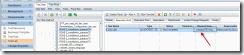
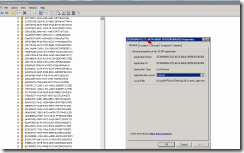
· For VAPI-XP type test, we can execute the test from our PCs, but we need to make sure that our PCs had logged the same credential with the remote execute host(like here: pdeauto75.irl.hp.com).That’s mean your PCs need to create two same accounts(‘qatest’ and ‘Administrator’ with the same password ‘L0ngh0rn’) and logged the system with this account ,and then log to ALM project ,run the VAPI-XP test, it will perform correctly. Whether we had configured the VAPI DCOM showed here:
This configure seems did not make any sense for running the remote VAPI test .if your PC had not logged with qatest or Administrator ,it will show the error “Access is denied” And the password need to log with ‘L0ngh)rn’ after you had configured the above DCOM for VAPI-XP .
So for QTP type test we can performed from PCs with your network credential ,but for VAPI-XP test you need to make sure that the PC had logged with ‘qatest’ or ‘administrator’ account.
配置脚本文件
完整的配置脚本如下,需要将该下面的脚本保存为BAT文件,然后copy到你需要运行QTP脚本或者是LR脚本的机器上。运行在你需要运行QTP或者是LR脚本的机器上:
SET logfile="C:\Temp\RunDCOM.log"

@echo off

echo Working on default DCOM permissions  >%logfile%

echo>>%logfile%

echo>>%logfile%

echo    DCOM Access Limit Permissions   >>%logfile%

echo  >>%logfile%

dcomperm -ma set Administrators permit level:r,l  >>%logfile%

dcomperm -ma set Administrator permit level:r,l  >>%logfile%

dcomperm -ma set "Authenticated Users" permit level:r,l  >>%logfile%

dcomperm -ma set "Anonymous Logon" permit level:r,l  >>%logfile%

dcomperm -ma set Everyone permit level:r,l   >>%logfile%

dcomperm -ma set Interactive permit level:r,l  >>%logfile%

dcomperm -ma set Network permit level:r,l    >>%logfile%

dcomperm -ma set System permit level:r,l    >>%logfile%

echo

echo    DCOM Access Permissions  >>%logfile%

echo

dcomperm -da set Administrators permit level:r,l  >>%logfile%

dcomperm -da set Administrator permit level:r,l   >>%logfile%

dcomperm -da set "Authenticated Users" permit level:r,l  >>%logfile%

dcomperm -da set "Anonymous Logon" permit level:r,l   >>%logfile%

dcomperm -da set Everyone permit level:r,l   >>%logfile%

dcomperm -da set Interactive permit level:r,l   >>%logfile%

dcomperm -da set Network permit level:r,l  >>%logfile%

dcomperm -da set System permit level:r,l   >>%logfile%

echo  >>%logfile%

echo     DCOM Launch Permissions   >>%logfile%

echo   >>%logfile%

dcomperm -ml set Administrators permit level:rl,ll,la,ra   >>%logfile%

dcomperm -ml set Administrator permit level:rl,ll,la,ra  >>%logfile%

dcomperm -ml set "Authenticated Users" permit level:rl,ll,la,ra   >>%logfile%

dcomperm -ml set "Anonymous Logon" permit level:rl,ll,la,ra   >>%logfile%

dcomperm -ml set Everyone permit level:rl,ll,la,ra    >>%logfile%

dcomperm -ml set Interactive permit level:rl,ll,la,ra   >>%logfile%

dcomperm -ml set Network permit level:rl,ll,la,ra    >>%logfile%

dcomperm -ml set System permit level:rl,ll,la,ra   >>%logfile%

echo   >>%logfile%

echo     DCOM Launch Permissions   >>%logfile%

echo    >>%logfile%

dcomperm -dl set Administrators permit level:rl,ll,la,ra   >>%logfile%

dcomperm -dl set Administrator permit level:rl,ll,la,ra   >>%logfile%

dcomperm -dl set "Authenticated Users" permit level:rl,ll,la,ra   >>%logfile%

dcomperm -dl set "Anonymous Logon" permit level:rl,ll,la,ra  >>%logfile%

dcomperm -dl set Everyone permit level:rl,ll,la,ra   >>%logfile%

dcomperm -dl set Interactive permit level:rl,ll,la,ra   >>%logfile%

dcomperm -dl set Network permit level:rl,ll,la,ra   >>%logfile%

dcomperm -dl set System permit level:rl,ll,la,ra   >>%logfile%

echo   >>%logfile%

echo  >>%logfile%

echo Working on AQT Remote Agent permissions  >>%logfile%

echo  >>%logfile%

dcomperm  -runas {25E8BB22-5C86-11D4-90DA-00104B3E51B1} "Interactive User"   >>%logfile%

dcomperm  -al {25E8BB22-5C86-11D4-90DA-00104B3E51B1} Default  >>%logfile%

dcomperm  -aa {25E8BB22-5C86-11D4-90DA-00104B3E51B1} Default   >>%logfile%

echo  >>%logfile%

echo >>%logfile%

echo Working on QTP Automation Server   >>%logfile%

echo >>%logfile%

dcomperm  -runas {A67EB23A-1B8F-487D-8E38-A6A3DD150F0B} "Interactive User"  >>%logfile%

dcomperm  -al {A67EB23A-1B8F-487D-8E38-A6A3DD150F0B} Default  >>%logfile%

dcomperm  -aa {A67EB23A-1B8F-487D-8E38-A6A3DD150F0B} Default  >>%logfile%

echo  >>%logfile%

echo  >>%logfile%

echo Working on Tulip Remote Server >>%logfile%

echo  >>%logfile%

dcomperm  -runas {70396405-BE62-11D2-8F0B-00104B3E51B1} "Interactive User"  >>%logfile%

dcomperm  -al {70396405-BE62-11D2-8F0B-00104B3E51B1} Default  >>%logfile%

dcomperm  -aa {70396405-BE62-11D2-8F0B-00104B3E51B1} Default  >>%logfile%

echo  >>%logfile%

echo  >>%logfile%

echo Working on WinRunner Remote Agent  >>%logfile%

echo  >>%logfile%

dcomperm  -runas {0B171F02-F204-11D0-9398-0080C837F11F} "Interactive User"  >>%logfile%

dcomperm  -al {0B171F02-F204-11D0-9398-0080C837F11F} Default   >>%logfile%

dcomperm  -aa {0B171F02-F204-11D0-9398-0080C837F11F} Default   >>%logfile%

echo  >>%logfile%

echo >>%logfile%

echo Working on WinRunner Document object  >>%logfile%

echo  >>%logfile%

dcomperm  -runas {CD70EDCE-7777-11D2-9509-0080C82DD192} "Interactive User"  >>%logfile%

dcomperm  -al {CD70EDCE-7777-11D2-9509-0080C82DD192} Default  >>%logfile%

dcomperm  -aa {CD70EDCE-7777-11D2-9509-0080C82DD192} Default  >>%logfile%

echo  >>%logfile%

echo  >>%logfile%

echo Working on Vapi-XP object  >>%logfile%

echo  >>%logfile%

dcomperm  -runas {FCB69899-EC52-4A7A-86DB-3655E9FDBA58} "Interactive User"  >>%logfile%

dcomperm  -al {FCB69899-EC52-4A7A-86DB-3655E9FDBA58} Default   >>%logfile%

dcomperm  -aa {FCB69899-EC52-4A7A-86DB-3655E9FDBA58} Default  >>%logfile%

echo   >>%logfile%

echo   >>%logfile%

echo Working on Business Process Testing object   >>%logfile%

echo   >>%logfile%

dcomperm  -runas {6108A56C-6239-41F6-8C0F-94D9CE0D4B61} "Interactive User"   >>%logfile%

dcomperm  -al {6108A56C-6239-41F6-8C0F-94D9CE0D4B61} Default   >>%logfile%

dcomperm  -aa {6108A56C-6239-41F6-8C0F-94D9CE0D4B61} Default   >>%logfile%

echo  >>%logfile%

echo   >>%logfile%

echo Working on System Test Remote Agent  >>%logfile%

echo  >>%logfile%

dcomperm  -runas {1B78CAE4-A6A8-11D5-9D7A-000102E1A2A2} "Interactive User"  >>%logfile%

dcomperm  -al {1B78CAE4-A6A8-11D5-9D7A-000102E1A2A2} Default  >>%logfile%

dcomperm  -aa {1B78CAE4-A6A8-11D5-9D7A-000102E1A2A2} Default  >>%logfile%

echo  >>%logfile%

echo   >>%logfile%

echo Working on LoadRunner Specific Settings   >>%logfile%

echo   >>%logfile%

dcomperm  -runas {E933439A-81A1-11D4-8EEE-0050DA6171E8} "Interactive User"  >>%logfile%

dcomperm  -al {E933439A-81A1-11D4-8EEE-0050DA6171E8} Default   >>%logfile%

dcomperm  -aa {E933439A-81A1-11D4-8EEE-0050DA6171E8} Default  >>%logfile%

运行配置文件的操作步骤
1, go to the new add in page: http://qc1d.atlanta.hp.com/qcbin/addins.html ,and click the link : HP ALM Client Registration;
2,in the new page ,click the new link : Register HP ALM Client;
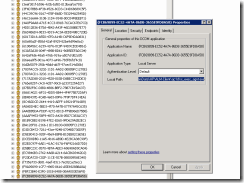
3,after you register the HP ALM client again ,refresh the DCOM to make sure that the VAPI-XP DCOM had reconfigured correctly , you can run the command “dcomcnfg” from start Menu , While still in the Component Services window, navigate to Console Root -> Component Services -> Computers -> My Computer -> DCOM Config ,navigate to the “{FCB69899-EC52-4A7A-86DB-3655E9FDBA58}” to make sure that the local path had updated to the latest VAPI remote executable as blow:
4,run the attach file to reconfigure the VAPI DCOM object in the remote target host
5,rerun the VAPI test from your ALM client. I think it will ok.
好了,以上就就是所有的配置信息用于解决远程运行QTP或者是LR脚本报 Access is denied ” ,”unspecified error”。希望对大家有所帮助。如果又不太清楚的,可以联系我:alterhu2020@gmail.com .
QTP Test ,VAPI-XP Test,LR Test 和ALM 集成远程分布式执行遇到的“access is denied ” “unspecified error”问题的更多相关文章
- Windows Xp不用安装软件管理多个远程桌面连接
一直使用系统默认的Mstsc来进行远程连接,但如果要连接N个远程的话就比较麻烦 之前也找过第三方的管理软件如:mRemoteNG 此软件有优点就不说了,但我在使用此软件时有一个很大的问题,就是如果一个 ...
- lr设置监控本地和远程windows系统资源
LoadRunner之设置监控本地和远程Windows系统资源 一般在客户端通过LoadRunner对服务器进行压力测试,都需要实时监控服务器端的系统资源,本篇主要简单介绍一下如何设置在LoadR ...
- windows msiexec quiet静默安装及卸载msi软件包
aaarticlea/png;base64,iVBORw0KGgoAAAANSUhEUgAAAoUAAAA4CAIAAAAEgBUBAAAIj0lEQVR4nO2dQXLcOAxFdbXJ0aZys6
- lr各种问题以及解决办法
LR 脚本为空的解决方法: 1.去掉ie设置中的第三方支持取消掉 2.在系统属性-高级-性能-数据执行保护中,添加loadrunner安装目录中的vugen.exe文件 遇到flight界面为空的解决 ...
- LR常见问题整理
1.LoadRunner录制脚本时为什么不弹出IE浏览器? 当一台主机上安装多个浏览器时,LoadRunner录制脚本经常遇到不能打开浏览器的情况,可以用下面的方法来解决. LR11 无法弹出ie浏览 ...
- 性能测试学习第一天-----概念、环境、LR录制&参数化
1.性能测试的概念: 通过一定的手段,在多并发情况下,获取被测系统的各项性能指标, 验证被测系统在高并发下的处理能力.响应能力.稳定性等,能否满足预期.定位性能瓶颈,排查性能隐患,保障系统的质量,提升 ...
- 远程到Server系统安装和使用QTP
转自http://www.51testing.com/html/40/307440-832446.html 感谢作者 多童鞋都问在2003上如何安装QTP,为何单机许可不能使用? 我在N太serve ...
- 最新GHOST XP系统下载旗舰增强版 V2016年
系统来自:系统妈:http://www.xitongma.com 深度技术GHOST xp系统旗舰增强版 V2016年3月 系统概述 深度技术ghost xp系统旗舰增强版集合微软JAVA虚拟机IE插 ...
- 最新深度技术GHOST XP系统旗舰增强版 V2016年
来自系统妈:http://www.xitongma.com 深度技术GHOST xp系统旗舰增强版 V2016年 系统概述 深度技术ghost xp系统旗舰增强版集合微软JAVA虚拟机IE插件,增强浏 ...
随机推荐
- Locks Set by Different SQL Statements in InnoDB
A locking read, an UPDATE, or a DELETE generally set record locks on every index record that is scan ...
- 【BZOJ】【4146】 【AMPPZ2014】Divisors
暴力 由于值的范围很小($ \leq 2*10^6$),所以用一个cnt数组统计每个值有多少个数,然后从小到大,统计每个数的倍数即可. 根据调和数?的神奇性质= =这样是$O(nlogn)$的…… / ...
- PyTorch保存模型与加载模型+Finetune预训练模型使用
Pytorch 保存模型与加载模型 PyTorch之保存加载模型 参数初始化参 数的初始化其实就是对参数赋值.而我们需要学习的参数其实都是Variable,它其实是对Tensor的封装,同时提供了da ...
- Unique Paths II leetcode java
题目: Follow up for "Unique Paths": Now consider if some obstacles are added to the grids. H ...
- Valid Sudoku leetcode java
题目: Determine if a Sudoku is valid, according to: Sudoku Puzzles - The Rules. The Sudoku board could ...
- IT痴汉的工作现状42-Android越用越慢?立场不同,谈何信任!
大海和我一次闲聊中问,你做安卓这么久.能给我解释一下为什么安卓手机用半年后就变慢吗? 呃... 伟仔还真是头一次听说这么精准的半年就慢的说法. 大海继续说."能不能是厂家有益设置的?哦,也不 ...
- 【大数据】下载Windows版本的Redis 转
https://www.cnblogs.com/tommy-huang/p/6093813.html 下载Windows版本的Redis 1.打开官网http://redis.io/点击Downl ...
- 创业公司做数据分析(四)ELK日志系统 (转)
http://blog.csdn.net/zwgdft/article/details/53842574 作为系列文章的第四篇,本文将重点探讨数据采集层中的ELK日志系统.日志,指的是后台服务中产生的 ...
- c#:判断一个数组元素中否有重复元素
给定一个数组,判定该数组中是否有重复元素. 判定该数组中是否有重复元素总结出以下实现方案: using System; using System.Collections.Generic; using ...
- angular5中使用jsonp请求页面
说多了,都是眼泪,折腾了很久,各种百度,查到的例子,全都报错,可能是因为我的angular的版本太高,向下都不兼容? 我的angular版本为最新的5.2.11: 下面是正确的jsonp请求的方法 1 ...