
微信小程序项目-你是什么垃圾?
垃圾分类特别火也不知道北京什么时候也开始执行,看见之前上海市民被灵魂拷问了以后垃圾真的不知道如何丢了,作为程序员就做一个小程序造福人类吧。
效果图:
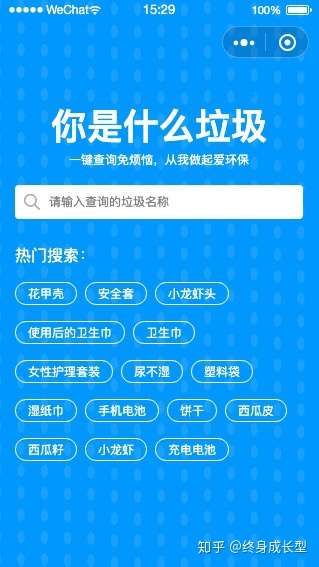
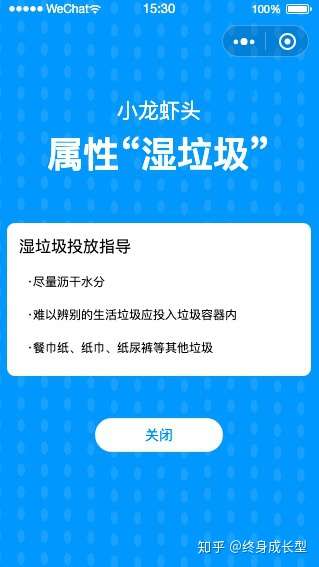
一、全局的app.json和app.wxss加入了一点东西
App.json
{
  "pages": [
    "pages/index/index",
    "pages/details/details",
    "pages/logs/logs"

  ],
  "window": {
    "backgroundTextStyle": "light",
    "navigationBarBackgroundColor": "#fff",
    "navigationBarTitleText": "WeChat",
    "navigationBarTextStyle": "white",
    "navigationStyle": "custom"
  },
  "sitemapLocation": "sitemap.json"

}
App.wxss
.bg{
  position: absolute;
  left:0;
  top:0;
  width:100%;
  height: 100%;
}
二、下面就是首页的index.wxml、index.js、 index.wxss
index.wxml
<image class='bg' src='../img/bg.png'></image>

<view class='container'>
    <view class='top'>
        <text class='top-title'>你是什么垃圾</text>
        <text class='top-more'>一键查询免烦恼,从我做起爱环保</text>
    </view>

    <view class='search'>
       <view class='search-main'>
         <icon type='search' size='16'></icon>
         <input
         placeholder="请输入查询的垃圾名称"
         bindinput='iptDetails'
         bindconfirm="search"
         ></input>
       </view>

        <view class='search-end' wx:if='{{searchResultDatas.length > 0}}'>
          <text
          wx:for='{{searchResultDatas}}'
          wx:key='{{index}}'
          bindtap='toDetails'
          data-title='{{item.itemName}}'
          >{{item.itemName}}</text>
        </view>
    </view>

    <view class='hot'>
        <view class='hot-main'>
          <view class='hot-title'>热门搜索:</view>
          <view class='hot-item'>

              <text
                wx:for='{{hotSearch}}'
                wx:key='{{index}}'
                bindtap='toDetails'
                data-title='{{item.itemName}}'
              >{{item.itemName}}</text>

          </view>
        </view>
    </view>

</view>
index.js
Page({

  /**
   * 页面的初始数据
   */
  data: {
    hotSearch:[],
    searchResultDatas:[]
  },

  /**
   * 生命周期函数--监听页面加载
   */
  onLoad: function (options) {
      let That = this;
      wx.request({
        url: 'http://apis.juhe.cn/rubbish/hotSearch',
        data:{
          key: 'ae200d60495f41dfb86da332dc059214',
        },
        success(res){
          That.setData({
            hotSearch: res.data.result
          })
        }
      })

  },
  toDetails(e){
    let title = e.currentTarget.dataset.title;
    wx.navigateTo({
      url: `../details/details?id=${title}`
    })
  },
  iptDetails(e){
    let That = this;
    let val = e.detail.value;
    if(val.length == 0){
      this.setData({
        searchResultDatas: []
      })
      return;
    }

    wx.request({
      url: 'http://apis.juhe.cn/rubbish/search',
      data:{
        key:"ae200d60495f41dfb86da332dc059214",
        q: val
      },
      success(res){
        That.setData({
          searchResultDatas: res.data.result
        })
      }
    })
  },
  /**
   * 生命周期函数--监听页面初次渲染完成
   */
  onReady: function () {

  },

  /**
   * 生命周期函数--监听页面显示
   */
  onShow: function () {

  },

  /**
   * 生命周期函数--监听页面隐藏
   */
  onHide: function () {

  },

  /**
   * 生命周期函数--监听页面卸载
   */
  onUnload: function () {

  },

  /**
   * 页面相关事件处理函数--监听用户下拉动作
   */
  onPullDownRefresh: function () {

  },

  /**
   * 页面上拉触底事件的处理函数
   */
  onReachBottom: function () {

  },

  /**
   * 用户点击右上角分享
   */
  onShareAppMessage: function () {

  }
})
index.wxss
.container{
  position: relative;
  left:0;
  top:88rpx;
}

.search-end{
  display: flex;
  overflow-y:auto;
  background: #fff;
  width:100%;
  height: 750rpx;
  position: fixed;
  left:0rpx;
  bottom:0rpx;
  z-index:999;
  flex-direction: column;
  padding:30rpx;
}
.search-end text{
  padding:20rpx 0 ;
  border-bottom:1px solid #f5f5f5;
  font-size:12px;
  color:#ccc;
}

.top{
  display: flex;
  align-items: center;
  flex-direction: column;
  padding-top:150rpx;
  color:#fff;
}
.top-title{
  font-size:36px;
  font-weight: bold;
}
.top-more{
  font-size:12px;
}
.search{
  padding-top:40rpx;
  display: flex;
  justify-content: center;
}
.search-main{
  display: flex;
  align-items: center;
  background: #fff;
  height:80rpx;
  width:90%;
  border-radius: 10rpx;
}
.search-main icon{
   width:80rpx;
   text-align: center;
}
.search-main input{
  flex:1;
  font-size:12px;
}

.hot{
  padding-top:40rpx;
  display: flex;
  justify-content: center;
}
.hot-main{
  width:90%;
  color:#fff;
}
.hot-title{
  padding:20rpx 0;
}
.hot-item{
  display: flex;
  flex-wrap: wrap;
}
.hot text{
  border-radius: 30rpx;
  border:1px solid #fff;
  padding:5rpx 30rpx;
  margin: 20rpx 20rpx 20rpx 0;
  font-size:12px;
}
三、下面就是详情页details.wxml、details.js、details.wxss
details.wxml
<image class='bg' src='../img/bg.png'></image>

<view class='details'>
    <view class="end">
       <text class='name'>{{item.itemName}}</text>
       <text class='attr'>属性“{{item.itemCategory}}”</text>
    </view>

    <view class='details-more'>

       <view class='more-title'>
        {{item.itemCategory}}投放指导
       </view>

       <view class='more-title'>
           <text>·尽量沥干水分</text>
           <text>·难以辨别的生活垃圾应投入垃圾容器内</text>
           <text>·餐巾纸、纸巾、纸尿裤等其他垃圾</text>
       </view>

    </view>

    <button bindtap='toHome'>关闭</button>

</view>
details.js
// pages/details/details.js
Page({

  /**
   * 页面的初始数据
   */
  data: {
    item:[]
  },

  /**
   * 生命周期函数--监听页面加载
   */
  onLoad: function (options) {
    let itemName = options.id;
    let That = this;
    wx.request({
      url: 'http://apis.juhe.cn/rubbish/search',
      data:{
        key: 'ae200d60495f41dfb86da332dc059214',
        q: itemName,
        type:2
      },
      success(res){
        That.setData({
          item: res.data.result[0]
        })
      }
    })
  },
  toHome(){
    // wx.navigateTo({
    //   url: '../index/index',
    // })
    wx.navigateBack()
  },
  /**
   * 生命周期函数--监听页面初次渲染完成
   */
  onReady: function () {

  },

  /**
   * 生命周期函数--监听页面显示
   */
  onShow: function () {

  },

  /**
   * 生命周期函数--监听页面隐藏
   */
  onHide: function () {

  },

  /**
   * 生命周期函数--监听页面卸载
   */
  onUnload: function () {

  },

  /**
   * 页面相关事件处理函数--监听用户下拉动作
   */
  onPullDownRefresh: function () {

  },

  /**
   * 页面上拉触底事件的处理函数
   */
  onReachBottom: function () {

  },

  /**
   * 用户点击右上角分享
   */
  onShareAppMessage: function () {

  }
})
index.wxss
.details{
  position: relative;
  top:44px;
  left:0;
}
.end{
  padding-top:120rpx;
  padding-bottom:100rpx;
  color:#fff;
  display: flex;
  flex-direction: column;
  align-items: center;
}
.end text{
  padding:5rpx 0;
}
.name{
  font-size:21px;
}
.attr{
  font-size:36px;
  font-weight: bold;
}

.details-more{
  width:90%;
  margin:0 auto;
  background: #fff;
  border-radius:  20rpx;
  padding:20rpx;
}
.more-title{
  padding:10rpx;
  font-size:16px;
}
.more-title text{
  padding:20rpx;
  font-size:12px;
  display: block;
}
button{
  margin-top:100rpx;
  background: #fff;
  color:#0190ff;
  border:none;
  width:300rpx;
  height: 80rpx;
  border-radius: 50rpx;
  font-size:14px;
  text-align: center;
  line-height: 80rpx;
}
微信小程序项目-你是什么垃圾?的更多相关文章
- 微信小程序开发01 --- 微信小程序项目结构介绍
一.微信小程序简单介绍: 微信官方介绍微信小程序是一个不需要下载安装就可使用(呵呵,JS代码不用下载吗?展示的UI不用下载吗?)的应用,它实现了应用“触手可及”的梦想,用户扫一扫或搜一下即可打开应用. ...
- 高仿Readhub小程序 微信小程序项目【原】
# News #### 项目介绍微信小程序项目涉及功能 https://gitee.com/richard1015/News https://github.com/richard1015/News 高 ...
- 【微信小程序项目实践总结】30分钟从陌生到熟悉 web app 、native app、hybrid app比较 30分钟ES6从陌生到熟悉 【原创】浅谈内存泄露 HTML5 五子棋 - JS/Canvas 游戏 meta 详解,html5 meta 标签日常设置 C#中回滚TransactionScope的使用方法和原理
[微信小程序项目实践总结]30分钟从陌生到熟悉 前言 我们之前对小程序做了基本学习: 1. 微信小程序开发07-列表页面怎么做 2. 微信小程序开发06-一个业务页面的完成 3. 微信小程序开发05- ...
- 微信小程序项目实战之天气预报
概述 微信小程序项目实战之天气预报 详细 代码下载:http://www.demodashi.com/demo/10634.html 一.准备工作 1.注册微信小程序 2.注册和风天气账号 3.注册百 ...
- 微信小程序项目实战之豆瓣天气
概述 微信小程序项目实战之豆瓣天气 详细 代码下载:http://www.demodashi.com/demo/10943.html 一.准备工作 1.注册微信小程序 2.在小程序设置中设置reque ...
- 《微信小程序项目开发实战:用WePY、mpvue、Taro打造高效的小程序》(笔记1)WePY开发环境的安装
WePY的安装或更新都通过npm进行,全局安装或更新WePY命令行工具,使用以下命令: npm install wepy-cli -g 稍等片刻,成功安装后,即可创建WePY项目. 注意:如果npm安 ...
- 微信小程序项目开发实战:用WePY、mpvue、Taro打造高效的小程序》(笔记4)支持React.js语法的Taro框架
Taro本身实现的情况类似于mpvue,mpvue的未来展望中也包含了支付宝小程序,现在的版本中,也可以使用不同的构建命令来构建出百度小程序的支持,如第10章所示,但是现在Taro先于mpvue实现了 ...
- 使用uni-app(Vue.js)创建运行微信小程序项目步骤
使用uni-app(Vue.js)开发微信小程序项目步骤 1. 新建一个uni-app项目 创建完成后的目录结构 2. 打开微信小程序开发工具端的端口调试功能 3. 运行创建的项目 效果
- 微信小程序项目转换为uni-app项目
一.它是谁? [miniprogram-to-uniapp]转换微信小程序"项目为uni-app项目.原则上混淆过的项目,也可以进转换,因为关键字丢失,不一定会完美. 二.它的原理是什么? ...
随机推荐
- Eureka(一)术语详解(用具体的事物理解抽象的概念)
最近工作较闲,所以自己研究了下eureka的原理,实现,和集群搭建等.(注:我没实操过eureka集群项目,都是自己做的demo产生的结论,如果有错误欢迎指出) 首先说一下我对eureka的一些术语的 ...
- Java入门指南-02 变量
一.回顾上一篇讲到了常用的DOS命令.如何创建第一个程序.打印.注释与空白. 那么我们已经学会了使用System.out.println() 可以来输出一个值.进一步的,我们可以用它来显示简单的算术运 ...
- HDU4289Control 无向图拆点最大流
/* ** 无向图拆点,求最大流,最大流即为割点个数. */ #include <iostream> #include <cstdio> #include <cstrin ...
- 牛客暑假多校第六场 I Team Rocket
题意: 现在有n条火车, 每条火车都有一个运行 [ Li, Ri ], 现在有m支火箭队, 每次火箭队都会破坏这整条铁路上的一个点, 如果一条火车的运行区间[Li, Ri] 被破坏了, 那么这条火车会 ...
- kick start 2019 round D T2题解
题目大意:由N个房子围成一个环,G个人分别顺时针/逆时针在房子上走,一共走M分钟,每分钟结束,每个人顺/逆时针走到相邻的房子.对于每个房子都会记录最后时刻到达的人(可能是一群人).最终输出每个人会被几 ...
- (六十五)c#Winform自定义控件-思维导图/组织架构图(工业)
前提 入行已经7,8年了,一直想做一套漂亮点的自定义控件,于是就有了本系列文章. GitHub:https://github.com/kwwwvagaa/NetWinformControl 码云:ht ...
- SpringCloud学习笔记(2):使用Ribbon负载均衡
简介 Spring Cloud Ribbon是基于Netflix Ribbon实现的一套客户端负载均衡工具,在注册中心对Ribbon客户端进行注册后,Ribbon可以基于某种负载均衡算法,如轮询(默认 ...
- Numpy版本问题,import tensorflow as tf 报警:“ FutureWarning: Passing (type, 1) or '1type' as a synonym of type is deprecated; in a future version of numpy, it will be understood as (type, (1,)) / '(1,)type'”
tensorflow成功安装后 import tensorflow as tf 报警:“ FutureWarning: Passing (type, 1) or '1type' as a synony ...
- java学习笔记之基础篇
java选择语句之switch //switch可以用于等值判断 switch (e) //int ,或则可以自动转化成int 的类型,(byte char short)枚举jdk 7中可以防止字 ...
- IDEA中自动导包快捷键
1.File-->Settings 2.解释: 勾选标注第1个选项,IntelliJ IDEA 将在我们书写代码的时候自动帮我们导入需要用到的包.但是对于那些同名的包,还是需要手动 Alt + ...