
LOVE POWER html与javaScript
1.纯HTML与javaScript编写的表白动态图
1.对于世界而言,你是一个人;但是对于某个人,你是他的整个世界。
2.不要为那些不愿在你身上花费时间的人而浪费你的时间。
3.我爱你,不是因为你是一个怎样的人,而是因为我喜欢与你在一起时的感觉。
4 没有人值得你流泪,值得让你这么做的人不会让你哭泣。
5.世上最遥远的距离,不是生与死的距离,不是天各一方,而是我就站在你面前,你却不知道我爱你。
6 .我爱你....为了你的幸福,我愿意放弃一切---包括你。
7. 爱情使人忘记时间,时间也使人忘记爱情。
8.曾经相遇,总胜过从未碰头。
9.开始的时侯,我们就知道,总会有终结。
10. 爱一个人很难,放弃自己心爱的人更难。
11. 你曾经不被人所爱,你才会珍惜将来那个爱你的人。
12.孤单不是与生俱来,而是由你爱尚上个人的那一刻开始。
13.就当我是首偶尔飘过你耳畔的诗,不贯穿你的生命,却给你一生祝福; 就当我是场昨日淋漓的雨,不给你永远却给你瞬间美丽。
14.爱你的人如果没有按你所希望的方式爱你,那并不代表他们没有全心全意地爱你.
15.在遇到梦好的爱情是你透过一个男人看到世界,坏的爱情是你为了一个人舍弃整个世界
效果如下图所示:

<!DOCTYPE html PUBLIC "-//W3C//DTD XHTML 1.0 Strict//EN" "http://www.w3.org/TR/xhtml1/DTD/xhtml1-strict.dtd">

<html xml:lang="en" xmlns="http://www.w3.org/1999/xhtml">

<head>

<meta http-equiv="Content-Type" content="text/html; charset=UTF-8">

<title>来自易某的寄语</title>

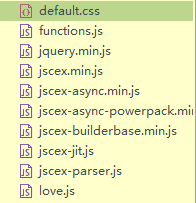
<link type="text/css" rel="stylesheet" href="renxi/default.css">

<script type="text/javascript" src="renxi/jquery.min.js"></script>

<script type="text/javascript" src="renxi/jscex.min.js"></script>

<script type="text/javascript" src="renxi/jscex-parser.js"></script>

<script type="text/javascript" src="renxi/jscex-jit.js"></script>

<script type="text/javascript" src="renxi/jscex-builderbase.min.js"></script>

<script type="text/javascript" src="renxi/jscex-async.min.js"></script>

<script type="text/javascript" src="renxi/jscex-async-powerpack.min.js"></script>

<script type="text/javascript" src="renxi/functions.js" charset="utf-8"></script>

<script type="text/javascript" src="renxi/love.js" charset="utf-8"></script>

<style type="text/css">

<!--

.STYLE1 {

    color: #666666

}

-->

</style>

</head>

<body>

    <h1 align="center">易生的友情提示:请点击心形</h1>

<audio autoplay="autopaly">

  <source src="Two Steps From Hell - Victory.mp3" type="audio/mp3" />

</audio>

<div id="main">

  <div id="error">本页面采用HTML5编辑,目前您的浏览器无法显示,请换成谷歌(<a href="http://www.google.cn/chrome/intl/zh-CN/landing_chrome.html?hl=zh-CN&brand=CHMI">Chrome</a>)或者火狐(<a href="http://firefox.com.cn/download/">Firefox</a>)浏览器,或者其他游览器的最新版本。</div>

  <div id="wrap">

    <div id="text">

      <div id="code"> <font color="#FF0000" size="5"> --十年寒窗苦,一朝成名耀,金榜题名日,蟾宫折桂时。<span class="say"></span><br>

        <span class="say"> --用汗水织就实力,用毅力成就梦想,用拼搏铸就辉煌。</span><br>

        <span class="say"> --用拼搏的汗水灌注无悔的高三路。考前不怕,考后不悔</span><br>

        <span class="say"></span>--三年苦读磨一剑,气定神闲战犹酣。势如破竹捣黄龙, 千帆竞发齐凯旋。<br>

        <span class="say">--在最美的年龄遇见最美的你们 </span><br>

        <span class="say">--高考加油-- </span><br>

        <span class="say"><span class="space"></span> -- 易生--</span> </font>

          <span class="say"> </span><br>

        </p>

      </div>

    </div>

    <div id="clock-box"> <span class="STYLE1"></span><font color="#33CC00"> 认识你</font> <span class="STYLE1">已经是</span>

      <div id="clock"></div>

    </div>

    <canvas id="canvas" width="1100" height="680"></canvas>

  </div>

</div>

<script>

    </script>

<script>

    (function(){

        var canvas = $('#canvas');

        if (!canvas[0].getContext) {

            $("#error").show();

            return false;        }

        var width = canvas.width();

        var height = canvas.height();

        canvas.attr("width", width);

        canvas.attr("height", height);

        var opts = {

            seed: {

                x: width / 2 - 20,

                color: "rgb(190, 26, 37)",

                scale: 2

            },

            branch: [

                [535, 680, 570, 250, 500, 200, 30, 100, [

                    [540, 500, 455, 417, 340, 400, 13, 100, [

                        [450, 435, 434, 430, 394, 395, 2, 40]

                    ]],

                    [550, 445, 600, 356, 680, 345, 12, 100, [

                        [578, 400, 648, 409, 661, 426, 3, 80]

                    ]],

                    [539, 281, 537, 248, 534, 217, 3, 40],

                    [546, 397, 413, 247, 328, 244, 9, 80, [

                        [427, 286, 383, 253, 371, 205, 2, 40],

                        [498, 345, 435, 315, 395, 330, 4, 60]

                    ]],

                    [546, 357, 608, 252, 678, 221, 6, 100, [

                        [590, 293, 646, 277, 648, 271, 2, 80]

                    ]]

                ]]

            ],

            bloom: {

                num: 700,

                width: 1080,

                height: 650,

            },

            footer: {

                width: 1200,

                height: 5,

                speed: 10,

            }

        }

        var tree = new Tree(canvas[0], width, height, opts);

        var seed = tree.seed;

        var foot = tree.footer;

        var hold = 1;

        canvas.click(function(e) {

            var offset = canvas.offset(), x, y;

            x = e.pageX - offset.left;

            y = e.pageY - offset.top;

            if (seed.hover(x, y)) {

                hold = 0;

                canvas.unbind("click");

                canvas.unbind("mousemove");

                canvas.removeClass('hand');

            }

        }).mousemove(function(e){

            var offset = canvas.offset(), x, y;

            x = e.pageX - offset.left;

            y = e.pageY - offset.top;

            canvas.toggleClass('hand', seed.hover(x, y));

        });

        var seedAnimate = eval(Jscex.compile("async", function () {

            seed.draw();

            while (hold) {

                $await(Jscex.Async.sleep(10));

            }

            while (seed.canScale()) {

                seed.scale(0.95);

                $await(Jscex.Async.sleep(10));

            }

            while (seed.canMove()) {

                seed.move(0, 2);

                foot.draw();

                $await(Jscex.Async.sleep(10));

            }

        }));

        var growAnimate = eval(Jscex.compile("async", function () {

            do {

                tree.grow();

                $await(Jscex.Async.sleep(10));

            } while (tree.canGrow());

        }));

        var flowAnimate = eval(Jscex.compile("async", function () {

            do {

                tree.flower(2);

                $await(Jscex.Async.sleep(10));

            } while (tree.canFlower());

        }));

        var moveAnimate = eval(Jscex.compile("async", function () {

            tree.snapshot("p1", 240, 0, 610, 680);

            while (tree.move("p1", 500, 0)) {

                foot.draw();

                $await(Jscex.Async.sleep(10));

            }

            foot.draw();

            tree.snapshot("p2", 500, 0, 610, 680);

            // 会有闪烁不得意这样做, (>﹏<)

            canvas.parent().css("background", "url(" + tree.toDataURL('image/png') + ")");

            canvas.css("background", "#ffe");

            $await(Jscex.Async.sleep(300));

            canvas.css("background", "none");

        }));

        var jumpAnimate = eval(Jscex.compile("async", function () {

            var ctx = tree.ctx;

            while (true) {

                tree.ctx.clearRect(0, 0, width, height);

                tree.jump();

                foot.draw();

                $await(Jscex.Async.sleep(25));

            }

        }));

        var textAnimate = eval(Jscex.compile("async", function () {

            var together = new Date();

            together.setFullYear(2013,9 , 1);             //时间年月日

            together.setHours(16);                        //小时

            together.setMinutes(53);                    //分钟

            together.setSeconds(0);                    //秒前一位

            together.setMilliseconds(2);                //秒第二位

            $("#code").show().typewriter();

            $("#clock-box").fadeIn(500);

            while (true) {

                timeElapse(together);

                $await(Jscex.Async.sleep(1000));

            }

        }));

        var runAsync = eval(Jscex.compile("async", function () {

            $await(seedAnimate());

            $await(growAnimate());

            $await(flowAnimate());

            $await(moveAnimate());

            textAnimate().start();

            $await(jumpAnimate());

        }));

        runAsync().start();

    })();

    </script>

</body>

</html>
CSS样式:
body{margin:;padding:;background:#ffe;font-size:14px;font-family:'微软雅黑','宋体',sans-serif;color:#231F20;overflow:auto}

a {color:#000;font-size:14px;}

#main{width:100%;}

#wrap{position:relative;margin:0 auto;width:1100px;height:680px;margin-top:10px;}

#text{width:400px;height:425px;left:60px;top:80px;position:absolute;}

#code{display:none;font-size:16px;}

#clock-box {position:absolute;left:60px;top:550px;font-size:28px;display:none;}

#clock-box a {font-size:28px;text-decoration:none;}

#clock{margin-left:48px;}

#clock .digit {font-size:64px;}

#canvas{margin:0 auto;width:1100px;height:680px;}

#error{margin:0 auto;text-align:center;margin-top:60px;display:none;}

.hand{cursor:pointer;}

.say{margin-left:5px;}

.space{margin-right:150px;}
javaScript代码 love.js
(function(window){
function random(min, max) {
return min + Math.floor(Math.random() * (max - min + 1));
}
function bezier(cp, t) {
var p1 = cp[0].mul((1 - t) * (1 - t));
var p2 = cp[1].mul(2 * t * (1 - t));
var p3 = cp[2].mul(t * t);
return p1.add(p2).add(p3);
}
function inheart(x, y, r) {
// x^2+(y-(x^2)^(1/3))^2 = 1
// http://www.wolframalpha.com/input/?i=x%5E2%2B%28y-%28x%5E2%29%5E%281%2F3%29%29%5E2+%3D+1
var z = ((x / r) * (x / r) + (y / r) * (y / r) - 1) * ((x / r) * (x / r) + (y / r) * (y / r) - 1) * ((x / r) * (x / r) + (y / r) * (y / r) - 1) - (x / r) * (x / r) * (y / r) * (y / r) * (y / r);
return z < 0;
}
Point = function(x, y) {
this.x = x || 0;
this.y = y || 0;
}
Point.prototype = {
clone: function() {
return new Point(this.x, this.y);
},
add: function(o) {
p = this.clone();
p.x += o.x;
p.y += o.y;
return p;
},
sub: function(o) {
p = this.clone();
p.x -= o.x;
p.y -= o.y;
return p;
},
div: function(n) {
p = this.clone();
p.x /= n;
p.y /= n;
return p;
},
mul: function(n) {
p = this.clone();
p.x *= n;
p.y *= n;
return p;
}
}
Heart = function() {
// x = 16 sin^3 t
// y = 13 cos t - 5 cos 2t - 2 cos 3t - cos 4t
// http://www.wolframalpha.com/input/?i=x+%3D+16+sin%5E3+t%2C+y+%3D+(13+cos+t+-+5+cos+2t+-+2+cos+3t+-+cos+4t)
var points = [], x, y, t;
for (var i = 10; i < 30; i += 0.2) {
t = i / Math.PI;
x = 16 * Math.pow(Math.sin(t), 3);
y = 13 * Math.cos(t) - 5 * Math.cos(2 * t) - 2 * Math.cos(3 * t) - Math.cos(4 * t);
points.push(new Point(x, y));
}
this.points = points;
this.length = points.length;
}
Heart.prototype = {
get: function(i, scale) {
return this.points[i].mul(scale || 1);
}
}
Seed = function(tree, point, scale, color) {
this.tree = tree;
var scale = scale || 1
var color = color || '#FF0000';
this.heart = {
point : point,
scale : scale,
color : color,
figure : new Heart(),
}
this.cirle = {
point : point,
scale : scale,
color : color,
radius : 5,
}
}
Seed.prototype = {
draw: function() {
this.drawHeart();
this.drawText();
},
addPosition: function(x, y) {
this.cirle.point = this.cirle.point.add(new Point(x, y));
},
canMove: function() {
return this.cirle.point.y < (this.tree.height + 20);
},
move: function(x, y) {
this.clear();
this.drawCirle();
this.addPosition(x, y);
},
canScale: function() {
return this.heart.scale > 0.2;
},
setHeartScale: function(scale) {
this.heart.scale *= scale;
},
scale: function(scale) {
this.clear();
this.drawCirle();
this.drawHeart();
this.setHeartScale(scale);
},
drawHeart: function() {
var ctx = this.tree.ctx, heart = this.heart;
var point = heart.point, color = heart.color,
scale = heart.scale;
ctx.save();
ctx.fillStyle = color;
ctx.translate(point.x, point.y);
ctx.beginPath();
ctx.moveTo(0, 0);
for (var i = 0; i < heart.figure.length; i++) {
var p = heart.figure.get(i, scale);
ctx.lineTo(p.x, -p.y);
}
ctx.closePath();
ctx.fill();
ctx.restore();
},
drawCirle: function() {
var ctx = this.tree.ctx, cirle = this.cirle;
var point = cirle.point, color = cirle.color,
scale = cirle.scale, radius = cirle.radius;
ctx.save();
ctx.fillStyle = color;
ctx.translate(point.x, point.y);
ctx.scale(scale, scale);
ctx.beginPath();
ctx.moveTo(0, 0);
ctx.arc(0, 0, radius, 0, 2 * Math.PI);
ctx.closePath();
ctx.fill();
ctx.restore();
},
drawText: function() {
var ctx = this.tree.ctx, heart = this.heart;
var point = heart.point, color = heart.color,
scale = heart.scale;
ctx.save();
ctx.strokeStyle = color;
ctx.fillStyle = color;
ctx.translate(point.x, point.y);
ctx.scale(scale, scale);
ctx.moveTo(0, 0);
ctx.lineTo(15, 15);
ctx.lineTo(60, 15);
ctx.stroke();
ctx.moveTo(0, 0);
ctx.scale(0.75, 0.75);
ctx.font = "12px 微软雅黑,Verdana"; // 字号肿么没有用? (ˉ(∞)ˉ)
ctx.fillText("Come Baby", 23, 10);
ctx.restore();
},
clear: function() {
var ctx = this.tree.ctx, cirle = this.cirle;
var point = cirle.point, scale = cirle.scale, radius = 26;
var w = h = (radius * scale);
ctx.clearRect(point.x - w, point.y - h, 4 * w, 4 * h);
},
hover: function(x, y) {
var ctx = this.tree.ctx;
var pixel = ctx.getImageData(x, y, 1, 1);
return pixel.data[3] == 255
}
}
Footer = function(tree, width, height, speed) {
this.tree = tree;
this.point = new Point(tree.seed.heart.point.x, tree.height - height / 2);
this.width = width;
this.height = height;
this.speed = speed || 2;
this.length = 0;
}
Footer.prototype = {
draw: function() {
var ctx = this.tree.ctx, point = this.point;
var len = this.length / 2;
ctx.save();
ctx.strokeStyle = 'rgb(35, 31, 32)';
ctx.lineWidth = this.height;
ctx.lineCap = 'round';
ctx.lineJoin = 'round';
ctx.translate(point.x, point.y);
ctx.beginPath();
ctx.moveTo(0, 0);
ctx.lineTo(len, 0);
ctx.lineTo(-len, 0);
ctx.stroke();
ctx.restore();
if (this.length < this.width) {
this.length += this.speed;
}
}
}
Tree = function(canvas, width, height, opt) {
this.canvas = canvas;
this.ctx = canvas.getContext('2d');
this.width = width;
this.height = height;
this.opt = opt || {};
this.record = {};
this.initSeed();
this.initFooter();
this.initBranch();
this.initBloom();
}
Tree.prototype = {
initSeed: function() {
var seed = this.opt.seed || {};
var x = seed.x || this.width / 2;
var y = seed.y || this.height / 2;
var point = new Point(x, y);
var color = seed.color || '#FF0000';
var scale = seed.scale || 1;
this.seed = new Seed(this, point, scale, color);
},
initFooter: function() {
var footer = this.opt.footer || {};
var width = footer.width || this.width;
var height = footer.height || 5;
var speed = footer.speed || 2;
this.footer = new Footer(this, width, height, speed);
},
initBranch: function() {
var branchs = this.opt.branch || []
this.branchs = [];
this.addBranchs(branchs);
},
initBloom: function() {
var bloom = this.opt.bloom || {};
var cache = [],
num = bloom.num || 500,
width = bloom.width || this.width,
height = bloom.height || this.height,
figure = this.seed.heart.figure;
var r = 240, x, y;
for (var i = 0; i < num; i++) {
cache.push(this.createBloom(width, height, r, figure));
}
this.blooms = [];
this.bloomsCache = cache;
},
toDataURL: function(type) {
return this.canvas.toDataURL(type);
},
draw: function(k) {
var s = this, ctx = s.ctx;
var rec = s.record[k];
if (!rec) {
return ;
}
var point = rec.point,
image = rec.image;
ctx.save();
ctx.putImageData(image, point.x, point.y);
ctx.restore();
},
addBranch: function(branch) {
this.branchs.push(branch);
},
addBranchs: function(branchs){
var s = this, b, p1, p2, p3, r, l, c;
for (var i = 0; i < branchs.length; i++) {
b = branchs[i];
p1 = new Point(b[0], b[1]);
p2 = new Point(b[2], b[3]);
p3 = new Point(b[4], b[5]);
r = b[6];
l = b[7];
c = b[8]
s.addBranch(new Branch(s, p1, p2, p3, r, l, c));
}
},
removeBranch: function(branch) {
var branchs = this.branchs;
for (var i = 0; i < branchs.length; i++) {
if (branchs[i] === branch) {
branchs.splice(i, 1);
}
}
},
canGrow: function() {
return !!this.branchs.length;
},
grow: function() {
var branchs = this.branchs;
for (var i = 0; i < branchs.length; i++) {
var branch = branchs[i];
if (branch) {
branch.grow();
}
}
},
addBloom: function (bloom) {
this.blooms.push(bloom);
},
removeBloom: function (bloom) {
var blooms = this.blooms;
for (var i = 0; i < blooms.length; i++) {
if (blooms[i] === bloom) {
blooms.splice(i, 1);
}
}
},
createBloom: function(width, height, radius, figure, color, alpha, angle, scale, place, speed) {
var x, y;
while (true) {
x = random(20, width - 20);
y = random(20, height - 20);
if (inheart(x - width / 2, height - (height - 40) / 2 - y, radius)) {
return new Bloom(this, new Point(x, y), figure, color, alpha, angle, scale, place, speed);
}
}
},
canFlower: function() {
return !!this.blooms.length;
},
flower: function(num) {
var s = this, blooms = s.bloomsCache.splice(0, num);
for (var i = 0; i < blooms.length; i++) {
s.addBloom(blooms[i]);
}
blooms = s.blooms;
for (var j = 0; j < blooms.length; j++) {
blooms[j].flower();
}
},
snapshot: function(k, x, y, width, height) {
var ctx = this.ctx;
var image = ctx.getImageData(x, y, width, height);
this.record[k] = {
image: image,
point: new Point(x, y),
width: width,
height: height
}
},
setSpeed: function(k, speed) {
this.record[k || "move"].speed = speed;
},
move: function(k, x, y) {
var s = this, ctx = s.ctx;
var rec = s.record[k || "move"];
var point = rec.point,
image = rec.image,
speed = rec.speed || 10,
width = rec.width,
height = rec.height;
i = point.x + speed < x ? point.x + speed : x;
j = point.y + speed < y ? point.y + speed : y;
ctx.save();
ctx.clearRect(point.x, point.y, width, height);
ctx.putImageData(image, i, j);
ctx.restore();
rec.point = new Point(i, j);
rec.speed = speed * 0.95;
if (rec.speed < 2) {
rec.speed = 2;
}
return i < x || j < y;
},
jump: function() {
var s = this, blooms = s.blooms;
if (blooms.length) {
for (var i = 0; i < blooms.length; i++) {
blooms[i].jump();
}
}
if ((blooms.length && blooms.length < 3) || !blooms.length) {
var bloom = this.opt.bloom || {},
width = bloom.width || this.width,
height = bloom.height || this.height,
figure = this.seed.heart.figure;
var r = 240, x, y;
for (var i = 0; i < random(1,2); i++) {
blooms.push(this.createBloom(width / 2 + width, height, r, figure, null, 1, null, 1, new Point(random(-100,600), 720), random(200,300)));
}
}
}
}
Branch = function(tree, point1, point2, point3, radius, length, branchs) {
this.tree = tree;
this.point1 = point1;
this.point2 = point2;
this.point3 = point3;
this.radius = radius;
this.length = length || 100;
this.len = 0;
this.t = 1 / (this.length - 1);
this.branchs = branchs || [];
}
Branch.prototype = {
grow: function() {
var s = this, p;
if (s.len <= s.length) {
p = bezier([s.point1, s.point2, s.point3], s.len * s.t);
s.draw(p);
s.len += 1;
s.radius *= 0.97;
} else {
s.tree.removeBranch(s);
s.tree.addBranchs(s.branchs);
}
},
draw: function(p) {
var s = this;
var ctx = s.tree.ctx;
ctx.save();
ctx.beginPath();
ctx.fillStyle = 'rgb(35, 31, 32)';
ctx.shadowColor = 'rgb(35, 31, 32)';
ctx.shadowBlur = 2;
ctx.moveTo(p.x, p.y);
ctx.arc(p.x, p.y, s.radius, 0, 2 * Math.PI);
ctx.closePath();
ctx.fill();
ctx.restore();
}
}
Bloom = function(tree, point, figure, color, alpha, angle, scale, place, speed) {
this.tree = tree;
this.point = point;
this.color = color || 'rgb(255,' + random(0, 255) + ',' + random(0, 255) + ')';
this.alpha = alpha || random(0.3, 1);
this.angle = angle || random(0, 360);
this.scale = scale || 0.1;
this.place = place;
this.speed = speed;
this.figure = figure;
}
Bloom.prototype = {
setFigure: function(figure) {
this.figure = figure;
},
flower: function() {
var s = this;
s.draw();
s.scale += 0.1;
if (s.scale > 1) {
s.tree.removeBloom(s);
}
},
draw: function() {
var s = this, ctx = s.tree.ctx, figure = s.figure;
ctx.save();
ctx.fillStyle = s.color;
ctx.globalAlpha = s.alpha;
ctx.translate(s.point.x, s.point.y);
ctx.scale(s.scale, s.scale);
ctx.rotate(s.angle);
ctx.beginPath();
ctx.moveTo(0, 0);
for (var i = 0; i < figure.length; i++) {
var p = figure.get(i);
ctx.lineTo(p.x, -p.y);
}
ctx.closePath();
ctx.fill();
ctx.restore();
},
jump: function() {
var s = this, height = s.tree.height;
if (s.point.x < -20 || s.point.y > height + 20) {
s.tree.removeBloom(s);
} else {
s.draw();
s.point = s.place.sub(s.point).div(s.speed).add(s.point);
s.angle += 0.05;
s.speed -= 1;
}
}
}
window.random = random;
window.bezier = bezier;
window.Point = Point;
window.Tree = Tree;
})(window);
javaScript 代码 function.html
/*

 * http://love.hackerzhou.me

 */

// variables

var $win = $(window);

var clientWidth = $win.width();

var clientHeight = $win.height();

$(window).resize(function() {

    var newWidth = $win.width();

    var newHeight = $win.height();

    if (newWidth != clientWidth && newHeight != clientHeight) {

        location.replace(location);

    }

});

(function($) {

    $.fn.typewriter = function() {

        this.each(function() {

            var $ele = $(this), str = $ele.html(), progress = 0;

            $ele.html('');

            var timer = setInterval(function() {

                var current = str.substr(progress, 1);

                if (current == '<') {

                    progress = str.indexOf('>', progress) + 1;

                } else {

                    progress++;

                }

                $ele.html(str.substring(0, progress) + (progress & 1 ? '_' : ''));

                if (progress >= str.length) {

                    clearInterval(timer);

                }

            }, 75);

        });

        return this;

    };

})(jQuery);

function timeElapse(date){

    var current = Date();

    var seconds = (Date.parse(current) - Date.parse(date)) / 1000;

    var days = Math.floor(seconds / (3600 * 24));

    seconds = seconds % (3600 * 24);

    var hours = Math.floor(seconds / 3600);

    if (hours < 10) {

        hours = "0" + hours;

    }

    seconds = seconds % 3600;

    var minutes = Math.floor(seconds / 60);

    if (minutes < 10) {

        minutes = "0" + minutes;

    }

    seconds = seconds % 60;

    if (seconds < 10) {

        seconds = "0" + seconds;

    }

    var result = "第 <span class=\"digit\">" + days + "</span> 天 <span class=\"digit\">" + hours + "</span> 小时 <span class=\"digit\">" + minutes + "</span> 分钟 <span class=\"digit\">" + seconds + "</span> 秒";

    $("#clock").html(result);

}
本案例还导入别的前端js:
源码/修改
源码打包下载地址(CSDN):
源码打包下载地址(Github):
有人说不会在github上下载,很简单的,打开这个网站,中间右边有个“clone and download”, 点击”DownLoad zip”,就能把源码一次性下载下来,github下载比较慢,如果只需要单个,只需要把其中一个里的文件全部下载下来就行。 如果是从github上下载的话,源码里有源码里的config.yaml和index.php都无用,是新浪自行产生的文件,可以删除
如果还想在页面里播放音乐,直接在body标签中加入下面这句就行, src是音乐的位置,要做表白的话,音乐最近自己剪切一下,感觉直接用音乐的高潮部分好一些: <audio id="bgmMusic" src="./当我唱起这首歌.mp3" preload="auto" type="audio/mp3" autoplay="" loop="" src="></audio>
LOVE POWER html与javaScript的更多相关文章
- (转) [it-ebooks]电子书列表
[it-ebooks]电子书列表 [2014]: Learning Objective-C by Developing iPhone Games || Leverage Xcode and Obj ...
- [转]15 个顶级 HTML5 游戏引擎
本文转自:http://www.open-open.com/news/view/13874db 1) HTML5 Game Engine Construct 2 is a leading high q ...
- JavaScript特性(attribute)、属性(property)和样式(style)
最近在研读一本巨著<JavaScript忍者秘籍>,里面有一篇文章提到了这3个概念. 书中的源码可以在此下载.我将源码放到了线上,如果不想下载,可以直接访问在线网址,修改页面名就能访问到相 ...
- 免费的精品: Productivity Power Tools 动画演示
Productivity Power Tools 是微软官方推出的 Visual Studio 扩展,被用以提高开发人员生产率.它的出现一定程度上弥补和完善了 Visual Studio 自身的不足, ...
- JavaScript资源大全中文版(Awesome最新版)
Awesome系列的JavaScript资源整理.awesome-javascript是sorrycc发起维护的 JS 资源列表,内容包括:包管理器.加载器.测试框架.运行器.QA.MVC框架和库.模 ...
- JavaScript原型OOP——你上车了吗?
.title-bar { width: 80%; height: 35px; padding-left: 35px; color: white; line-height: 35px; font-siz ...
- 推荐15个最好用的 JavaScript 代码压缩工具
JavaScript 代码压缩是指去除源代码里的所有不必要的字符,而不改变其功能的过程.这些不必要的字符通常包括空格字符,换行字符,注释以及块分隔符等用来增加可读性的代码,但并不需要它来执行. 在这篇 ...
- ES6新特性:使用新方法定义javascript的Class
ES6中定义类的方式, 就是ES3和ES5中定义类的语法糖,虽然也有些区别,但是整体定义类的方式更加简洁,类的继承更加方便, 如果想对ES6中的继承更加熟悉, 最好了解ES5中原型继承的方式, 博客园 ...
- 情人节那点事,Power BI告诉你
情人节伴随着元宵节刚刚过去,Power BI团队就送给我们一份大礼,利用来自NRF(national retail foundation)和Bing搜索的数据,在Power BI中帮助我们发现在美国那 ...
随机推荐
- 自己实现spring核心功能 二
前言 上一篇我们讲了spring的一些特点并且分析了需要实现哪些功能,已经把准备工作都做完了,这一篇我们开始实现具体功能. 容器加载过程 我们知道,在spring中refesh()方法做了很多初始化的 ...
- vue路由传参的三种方式以及解决vue路由传参页面刷新参数丢失问题
最近项目中涉及到跨页面传参数和后台进行数据交互,看到需求之后第一反应就是用路由传参来解决:Vue中给我们提供了三种路由传参方式,下面我们一个一个的来看一下: 方法一:params传参: this.$r ...
- FileUtils工具类的使用
import org.apache.commons.io.FileUtils; import org.apache.commons.io.filefilter.DirectoryFileFilter; ...
- 「每日五分钟,玩转JVM」:线程独占区
前言 如果我们对计算机组成有所了解,那么我们一定会知道在计算机中有一块儿特殊的区域,称之为寄存器,寄存器包括了指令寄存器和程序计数器,这两样位于CPU中,作为程序运行的大脑来控制程序的运行和流转. 而 ...
- Java虚拟机一看就懂01
Jvm内存结构 --- 线程隔离区域说明: 1.1.程序计数器 线程私有 是一块内存空间 唯一的一个在Java虚拟机规范中没有规定任何OOM情况的区域(不会OOM?) 1.2.Java虚拟机栈 线程私 ...
- 一文搞懂Python中的所有数组数据类型
关于我 一个有思想的程序猿,终身学习实践者,目前在一个创业团队任team lead,技术栈涉及Android.Python.Java和Go,这个也是我们团队的主要技术栈. Github:https:/ ...
- Liunx学习总结(六)--进程
进程概述 简单来讲程序是一个包含可以执行代码的静态的文件.进程是一个开始执行但是还没有结束的程序的实例.当程序被系统调用到内存以后,系统会给程序分配一定的资源(内存,设备等等)然后进行一系列的复杂操作 ...
- mysql安装-yum方式
1.环境 查看当前系统环境,使用的是 centos release 6.5 (Final). 2.检查当前系统是否已经安装过mysql rpm -qa | grep mysql 3.如果有,那么删除已 ...
- 实参&形参
实参VS形参 1.实参 argument 实际参数,在函数调用的时候,传递给函数的参数.实参-按值调用 实际参数可以是变量.常量.表达式以及函数 实际参数必须得有确定的值(赋值.输入等),在函数调用时 ...
- HDU 6346 整数规划 二分图匹配最优解
整数规划 原来的km+hunger跑法T了, 拿了一个新的板子, 新的写法是将这原来的找新的最小的d放在了上一次的残留图上,从而减小复杂度, 但是个人还不是很理解为什么最小的d下一次出现的位置一定是这 ...