
(四十八)c#Winform自定义控件-下拉按钮
官网
前提
入行已经7,8年了,一直想做一套漂亮点的自定义控件,于是就有了本系列文章。
GitHub:https://github.com/kwwwvagaa/NetWinformControl
码云:https://gitee.com/kwwwvagaa/net_winform_custom_control.git
如果觉得写的还行,请点个 star 支持一下吧
欢迎前来交流探讨: 企鹅群568015492 
麻烦博客下方点个【推荐】,谢谢
NuGet
Install-Package HZH_Controls
目录
https://www.cnblogs.com/bfyx/p/11364884.html
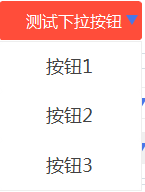
用处及效果
准备工作
这个控件将继承自(三)c#Winform自定义控件-有图标的按钮,如不了解,请移步查看
开始
添加一个用户控件UCDropDownBtn,继承自UCBtnImg
处理一些属性
 Forms.FrmAnchor _frmAnchor;

         private int _dropPanelHeight = -;

         public new event EventHandler BtnClick;

         [Description("下拉框高度"), Category("自定义")]

         public int DropPanelHeight

         {

             get { return _dropPanelHeight; }

             set { _dropPanelHeight = value; }

         }

         private string[] btns ;

         [Description("按钮"), Category("自定义")]

         public string[] Btns

         {

             get { return btns; }

             set { btns = value; }

         }

         [Obsolete("不再可用的属性")]

         [Browsable(false), EditorBrowsable(EditorBrowsableState.Never)]

         public override Image Image

         {

             get;

             set;

         }

         [Obsolete("不再可用的属性")]

         [Browsable(false), EditorBrowsable(EditorBrowsableState.Never)]

         public override ContentAlignment ImageAlign

         {

             get;

             set;

         }
点击时候显示下拉框
 void UCDropDownBtn_BtnClick(object sender, EventArgs e)

         {

             if (_frmAnchor == null || _frmAnchor.IsDisposed || _frmAnchor.Visible == false)

             {

                 if (Btns != null && Btns.Length > )

                 {

                     int intRow = ;

                     int intCom = ;

                     var p = this.PointToScreen(this.Location);

                     while (true)

                     {

                         int intScreenHeight = Screen.PrimaryScreen.Bounds.Height;

                         if ((p.Y + this.Height + Btns.Length / intCom *  < intScreenHeight || p.Y - Btns.Length / intCom *  > )

                             && (_dropPanelHeight <=  ? true : (Btns.Length / intCom *  <= _dropPanelHeight)))

                         {

                             intRow = Btns.Length / intCom + (Btns.Length % intCom !=  ?  : );

                             break;

                         }

                         intCom++;

                     }

                     UCTimePanel ucTime = new UCTimePanel();

                     ucTime.IsShowBorder = true;

                     int intWidth = this.Width / intCom;

                     Size size = new Size(intCom * intWidth, intRow * );

                     ucTime.Size = size;

                     ucTime.FirstEvent = true;

                     ucTime.SelectSourceEvent += ucTime_SelectSourceEvent;

                     ucTime.Row = intRow;

                     ucTime.Column = intCom;

                     List<KeyValuePair<string, string>> lst = new List<KeyValuePair<string, string>>();

                     foreach (var item in Btns)

                     {

                         lst.Add(new KeyValuePair<string, string>(item, item));

                     }

                     ucTime.Source = lst;

                     _frmAnchor = new Forms.FrmAnchor(this, ucTime);

                     _frmAnchor.Load += (a, b) => { (a as Form).Size = size; };

                     _frmAnchor.Show(this.FindForm());

                 }

             }

             else

             {

                 _frmAnchor.Close();

             }

         }
处理一下按钮事件
 void ucTime_SelectSourceEvent(object sender, EventArgs e)

         {

             if (_frmAnchor != null && !_frmAnchor.IsDisposed && _frmAnchor.Visible)

             {

                 _frmAnchor.Close();

                 if (BtnClick != null)

                 {

                     BtnClick(sender.ToString(), e);

                 }

             }

         }
完整代码
 using System;

 using System.Collections.Generic;

 using System.ComponentModel;

 using System.Drawing;

 using System.Data;

 using System.Linq;

 using System.Text;

 using System.Windows.Forms;

 namespace HZH_Controls.Controls.Btn

 {

     [DefaultEvent("BtnClick")]

     public partial class UCDropDownBtn : UCBtnImg

     {

         Forms.FrmAnchor _frmAnchor;

         private int _dropPanelHeight = -;

         public new event EventHandler BtnClick;

         [Description("下拉框高度"), Category("自定义")]

         public int DropPanelHeight

         {

             get { return _dropPanelHeight; }

             set { _dropPanelHeight = value; }

         }

         private string[] btns ;

         [Description("按钮"), Category("自定义")]

         public string[] Btns

         {

             get { return btns; }

             set { btns = value; }

         }

         [Obsolete("不再可用的属性")]

         [Browsable(false), EditorBrowsable(EditorBrowsableState.Never)]

         public override Image Image

         {

             get;

             set;

         }

         [Obsolete("不再可用的属性")]

         [Browsable(false), EditorBrowsable(EditorBrowsableState.Never)]

         public override ContentAlignment ImageAlign

         {

             get;

             set;

         }

         public UCDropDownBtn()

         {

             InitializeComponent();

             IsShowTips = false;

             this.lbl.Image=Properties.Resources.ComboBox;

             this.lbl.ImageAlign = ContentAlignment.MiddleRight;

             base.BtnClick += UCDropDownBtn_BtnClick;

         }

         void UCDropDownBtn_BtnClick(object sender, EventArgs e)

         {

             if (_frmAnchor == null || _frmAnchor.IsDisposed || _frmAnchor.Visible == false)

             {

                 if (Btns != null && Btns.Length > )

                 {

                     int intRow = ;

                     int intCom = ;

                     var p = this.PointToScreen(this.Location);

                     while (true)

                     {

                         int intScreenHeight = Screen.PrimaryScreen.Bounds.Height;

                         if ((p.Y + this.Height + Btns.Length / intCom *  < intScreenHeight || p.Y - Btns.Length / intCom *  > )

                             && (_dropPanelHeight <=  ? true : (Btns.Length / intCom *  <= _dropPanelHeight)))

                         {

                             intRow = Btns.Length / intCom + (Btns.Length % intCom !=  ?  : );

                             break;

                         }

                         intCom++;

                     }

                     UCTimePanel ucTime = new UCTimePanel();

                     ucTime.IsShowBorder = true;

                     int intWidth = this.Width / intCom;

                     Size size = new Size(intCom * intWidth, intRow * );

                     ucTime.Size = size;

                     ucTime.FirstEvent = true;

                     ucTime.SelectSourceEvent += ucTime_SelectSourceEvent;

                     ucTime.Row = intRow;

                     ucTime.Column = intCom;

                     List<KeyValuePair<string, string>> lst = new List<KeyValuePair<string, string>>();

                     foreach (var item in Btns)

                     {

                         lst.Add(new KeyValuePair<string, string>(item, item));

                     }

                     ucTime.Source = lst;

                     _frmAnchor = new Forms.FrmAnchor(this, ucTime);

                     _frmAnchor.Load += (a, b) => { (a as Form).Size = size; };

                     _frmAnchor.Show(this.FindForm());

                 }

             }

             else

             {

                 _frmAnchor.Close();

             }

         }

         void ucTime_SelectSourceEvent(object sender, EventArgs e)

         {

             if (_frmAnchor != null && !_frmAnchor.IsDisposed && _frmAnchor.Visible)

             {

                 _frmAnchor.Close();

                 if (BtnClick != null)

                 {

                     BtnClick(sender.ToString(), e);

                 }

             }

         }

     }

 }
 namespace HZH_Controls.Controls.Btn

 {

     partial class UCDropDownBtn

     {

         /// <summary>

         /// 必需的设计器变量。

         /// </summary>

         private System.ComponentModel.IContainer components = null;

         /// <summary>

         /// 清理所有正在使用的资源。

         /// </summary>

         /// <param name="disposing">如果应释放托管资源,为 true;否则为 false。</param>

         protected override void Dispose(bool disposing)

         {

             if (disposing && (components != null))

             {

                 components.Dispose();

             }

             base.Dispose(disposing);

         }

         #region 组件设计器生成的代码

         /// <summary>

         /// 设计器支持所需的方法 - 不要

         /// 使用代码编辑器修改此方法的内容。

         /// </summary>

         private void InitializeComponent()

         {

             System.ComponentModel.ComponentResourceManager resources = new System.ComponentModel.ComponentResourceManager(typeof(UCDropDownBtn));

             this.SuspendLayout();

             //

             // lbl

             //

             this.lbl.Font = new System.Drawing.Font("微软雅黑", 14F);

             this.lbl.ForeColor = System.Drawing.Color.White;

             this.lbl.ImageAlign = System.Drawing.ContentAlignment.MiddleRight;

             this.lbl.ImageList = null;

             this.lbl.Text = "自定义按钮";

             this.lbl.TextAlign = System.Drawing.ContentAlignment.MiddleCenter;

             //

             // UCDropDownBtn

             //

             this.AutoScaleMode = System.Windows.Forms.AutoScaleMode.None;

             this.BtnFont = new System.Drawing.Font("微软雅黑", 14F);

             this.BtnForeColor = System.Drawing.Color.White;

             this.ForeColor = System.Drawing.Color.White;

             this.Image = ((System.Drawing.Image)(resources.GetObject("$this.Image")));

             this.ImageAlign = System.Drawing.ContentAlignment.MiddleRight;

             this.Margin = new System.Windows.Forms.Padding();

             this.Name = "UCDropDownBtn";

             this.ResumeLayout(false);

         }

         #endregion

     }

 }
最后的话
如果你喜欢的话,请到 https://gitee.com/kwwwvagaa/net_winform_custom_control 点个星星吧
(四十八)c#Winform自定义控件-下拉按钮的更多相关文章
- (四十九)c#Winform自定义控件-下拉框(表格)
前提 入行已经7,8年了,一直想做一套漂亮点的自定义控件,于是就有了本系列文章. GitHub:https://github.com/kwwwvagaa/NetWinformControl 码云:ht ...
- (三十五)c#Winform自定义控件-下拉框
前提 入行已经7,8年了,一直想做一套漂亮点的自定义控件,于是就有了本系列文章. GitHub:https://github.com/kwwwvagaa/NetWinformControl 码云:ht ...
- (四十)c#Winform自定义控件-开关-HZHControls
官网 http://www.hzhcontrols.com 前提 入行已经7,8年了,一直想做一套漂亮点的自定义控件,于是就有了本系列文章. GitHub:https://github.com/kww ...
- NeHe OpenGL教程 第四十八课:轨迹球
转自[翻译]NeHe OpenGL 教程 前言 声明,此 NeHe OpenGL教程系列文章由51博客yarin翻译(2010-08-19),本博客为转载并稍加整理与修改.对NeHe的OpenGL管线 ...
- SQL注入之Sqli-labs系列第四十七关,第四十八关,第四十九关(ORDER BY注入)
0x1 源码区别点 将id变为字符型:$sql = "SELECT * FROM users ORDER BY '$id'"; 0x2实例测试 (1)and rand相结合的方式 ...
- 《手把手教你》系列技巧篇(四十八)-java+ selenium自动化测试-判断元素是否可操作(详解教程)
1.简介 webdriver有三种判断元素状态的方法,分别是isEnabled,isSelected 和 isDisplayed,其中isSelected在前面的内容中已经简单的介绍了,isSelec ...
- 第四十八个知识点:TPM的目的和使用方法
第四十八个知识点:TPM的目的和使用方法 在检查TPM目的之前,值得去尝试理解TPM设计出来的目的是为了克服什么样的问题.真正的问题是信任.信任什么?首先内存和软件运行在电脑上.这些东西能直接的通过操 ...
- Qt中QComboBox中自定义界面使用stylesheet实现下拉按钮独立效果
使用QSS自定义控件界面时,QT中控件QCombobox含有两个子控件drop-down和down-arrow.一般而言,当改变QCombox时,很多效果都会出来,但是,针对下拉按钮和下拉图标的自定义 ...
- 修改select下拉框的下拉按钮
ie上的下拉框下拉按钮真是太丑了,如何把他自定义一下呢? 首先,把浏览器自带的下拉框去掉: select::-ms-expand { display: none; } 接下来,用自己喜欢的下拉图片去 ...
随机推荐
- .NET Core 3.0之深入源码理解HttpClientFactory(一)
写在前面 创建HttpClient实例的时候,在内部会创建HttpMessageHandler链,我们知道HttpMessageHandler是负责建立连接的抽象处理程序,所以HttpClient的维 ...
- cve-2018-14515复现
一.环境 Windows NT WIN-RRI9T9SN85D 6.1 build 7600 (Windows 7 Business Edition) i586 Apache/2.4.23 (Win3 ...
- nginx(二)
nginx rewrite Nginx提供的全局变量或自己设置的变量,结合正则表达式和标志位实现url重写以及重定向.rewrite只能放在server{},location{},if{}中,并且 ...
- 50 行 Python 代码,带你追到女神
今天来给大家分享一个撩妹技巧,利用 python 每天给你最心爱的人,发送微信消息,说声晚安. 废话不多说,源代码奉上 def get_news(): ... url = "http://o ...
- ssm下的CURD
https://github.com/MenghuiLiu/ssm-curd 以后有更新.... 照着前辈的足迹向前撸
- 287. 寻找重复数 Java解法
287. 寻找重复数 这题的难点就在于下面的说明了,我们先不管下面的那些说明的要求,用常规的解法来解答下上的题目. 排序思想解法 先把原来的数组进行排序,然后逐个遍历,一旦发现后一个元素和当前的元素相 ...
- Mysql 学校信息管理系统
1.创建数据库语句: #创建数据库 CREATE DATABASE `schoolDB`; USE `schoolDB`; #创建学生表 CREATE TABLE `student`( `sid` I ...
- java名词
1 applet Java语言编写的小程序,可以包含在html页面中,有支持Java语言的浏览器执行,作用是在页面产生动态效果. 2 jdk java development kit java 开发环 ...
- Ubuntu启动Apache
划重点:最重要的是找到一个文件--------startup.sh 如果你是按照百度上的方法下载的Apache2,那么就按照百度的方式来 但是异曲同工 如果你是自己在网上下载的Apache到的磁盘 找 ...
- 1.4.2python网站地图爬虫(每天一更)
# -*- coding: utf-8 -*- ''' Created on 2019年5月6日 @author: 薛卫卫 ''' import urllib.request import re de ...