
(四十)c#Winform自定义控件-开关-HZHControls
官网
前提
入行已经7,8年了,一直想做一套漂亮点的自定义控件,于是就有了本系列文章。
GitHub:https://github.com/kwwwvagaa/NetWinformControl
码云:https://gitee.com/kwwwvagaa/net_winform_custom_control.git
如果觉得写的还行,请点个 star 支持一下吧
欢迎前来交流探讨: 企鹅群568015492 idkey=6e08741ef16fe53bf0314c1c9e336c4f626047943a8b76bac062361bab6b4f8d">
目录
https://www.cnblogs.com/bfyx/p/11364884.html
准备工作
GDI+需要有一点了解,不知道的可以百度瞅瞅
开始
添加一个用户控件,命名UCSwitch
添加一个枚举用以控制样式
 public enum SwitchType

     {

         /// <summary>

         /// 椭圆

         /// </summary>

         Ellipse,

         /// <summary>

         /// 四边形

         /// </summary>

         Quadrilateral,

         /// <summary>

         /// 横线

         /// </summary>

         Line

     }
添加属性
   [Description("选中改变事件"), Category("自定义")]

         public event EventHandler CheckedChanged;

         private Color m_trueColor = Color.FromArgb(, , );

         [Description("选中时颜色"), Category("自定义")]

         public Color TrueColor

         {

             get { return m_trueColor; }

             set

             {

                 m_trueColor = value;

                 Refresh();

             }

         }

         private Color m_falseColor = Color.FromArgb(, , );

         [Description("没有选中时颜色"), Category("自定义")]

         public Color FalseColor

         {

             get { return m_falseColor; }

             set

             {

                 m_falseColor = value;

                 Refresh();

             }

         }

         private bool m_checked;

         [Description("是否选中"), Category("自定义")]

         public bool Checked

         {

             get { return m_checked; }

             set

             {

                 m_checked = value;

                 Refresh();

                 if (CheckedChanged != null)

                 {

                     CheckedChanged(this, null);

                 }

             }

         }

         private string[] m_texts;

         [Description("文本值,当选中或没有选中时显示,必须是长度为2的数组"), Category("自定义")]

         public string[] Texts

         {

             get { return m_texts; }

             set

             {

                 m_texts = value;

                 Refresh();

             }

         }

         private SwitchType m_switchType = SwitchType.Ellipse;

         [Description("显示类型"), Category("自定义")]

         public SwitchType SwitchType

         {

             get { return m_switchType; }

             set

             {

                 m_switchType = value;

                 Refresh();

             }

         }

         public override Font Font

         {

             get

             {

                 return base.Font;

             }

             set

             {

                 base.Font = value;

                 Refresh();

             }

         }
重绘
  protected override void OnPaint(PaintEventArgs e)

         {

             base.OnPaint(e);

             var g = e.Graphics;

             g.SetGDIHigh();

             if (m_switchType == HZH_Controls.Controls.SwitchType.Ellipse)

             {

                 var fillColor = m_checked ? m_trueColor : m_falseColor;

                 GraphicsPath path = new GraphicsPath();

                 path.AddLine(new Point(this.Height / , ), new Point(this.Width - this.Height / , ));

                 path.AddArc(new Rectangle(this.Width - this.Height - , , this.Height - , this.Height - ), -, );

                 path.AddLine(new Point(this.Width - this.Height / , this.Height - ), new Point(this.Height / , this.Height - ));

                 path.AddArc(new Rectangle(, , this.Height - , this.Height - ), , );

                 g.FillPath(new SolidBrush(fillColor), path);

                 string strText = string.Empty;

                 if (m_texts != null && m_texts.Length == )

                 {

                     if (m_checked)

                     {

                         strText = m_texts[];

                     }

                     else

                     {

                         strText = m_texts[];

                     }

                 }

                 if (m_checked)

                 {

                     g.FillEllipse(Brushes.White, new Rectangle(this.Width - this.Height -  + ,  + , this.Height -  - , this.Height -  - ));

                     if (string.IsNullOrEmpty(strText))

                     {

                         g.DrawEllipse(new Pen(Color.White, ), new Rectangle((this.Height -  - ) /  - ((this.Height -  - ) / ) / , (this.Height -  - (this.Height -  - ) / ) /  + , (this.Height -  - ) / , (this.Height -  - ) / ));

                     }

                     else

                     {

                         System.Drawing.SizeF sizeF = g.MeasureString(strText.Replace(" ", "A"), Font);

                         int intTextY = (this.Height - (int)sizeF.Height) /  + ;

                         g.DrawString(strText, Font, Brushes.White, new Point((this.Height -  - ) / , intTextY));

                     }

                 }

                 else

                 {

                     g.FillEllipse(Brushes.White, new Rectangle( + ,  + , this.Height -  - , this.Height -  - ));

                     if (string.IsNullOrEmpty(strText))

                     {

                         g.DrawEllipse(new Pen(Color.White, ), new Rectangle(this.Width -  - (this.Height -  - ) /  - ((this.Height -  - ) / ) / , (this.Height -  - (this.Height -  - ) / ) /  + , (this.Height -  - ) / , (this.Height -  - ) / ));

                     }

                     else

                     {

                         System.Drawing.SizeF sizeF = g.MeasureString(strText.Replace(" ", "A"), Font);

                         int intTextY = (this.Height - (int)sizeF.Height) /  + ;

                         g.DrawString(strText, Font, Brushes.White, new Point(this.Width -  - (this.Height -  - ) /  - ((this.Height -  - ) / ) /  - (int)sizeF.Width / , intTextY));

                     }

                 }

             }

             else if (m_switchType == HZH_Controls.Controls.SwitchType.Quadrilateral)

             {

                 var fillColor = m_checked ? m_trueColor : m_falseColor;

                 GraphicsPath path = new GraphicsPath();

                 int intRadius = ;

                 path.AddArc(, , intRadius, intRadius, 180f, 90f);

                 path.AddArc(this.Width - intRadius - , , intRadius, intRadius, 270f, 90f);

                 path.AddArc(this.Width - intRadius - , this.Height - intRadius - , intRadius, intRadius, 0f, 90f);

                 path.AddArc(, this.Height - intRadius - , intRadius, intRadius, 90f, 90f);

                 g.FillPath(new SolidBrush(fillColor), path);

                 string strText = string.Empty;

                 if (m_texts != null && m_texts.Length == )

                 {

                     if (m_checked)

                     {

                         strText = m_texts[];

                     }

                     else

                     {

                         strText = m_texts[];

                     }

                 }

                 if (m_checked)

                 {

                     GraphicsPath path2 = new GraphicsPath();

                     path2.AddArc(this.Width - this.Height -  + ,  + , intRadius, intRadius, 180f, 90f);

                     path2.AddArc(this.Width -  -  - intRadius,  + , intRadius, intRadius, 270f, 90f);

                     path2.AddArc(this.Width -  -  - intRadius, this.Height -  - intRadius - , intRadius, intRadius, 0f, 90f);

                     path2.AddArc(this.Width - this.Height -  + , this.Height -  - intRadius - , intRadius, intRadius, 90f, 90f);

                     g.FillPath(Brushes.White, path2);

                     if (string.IsNullOrEmpty(strText))

                     {

                         g.DrawEllipse(new Pen(Color.White, ), new Rectangle((this.Height -  - ) /  - ((this.Height -  - ) / ) / , (this.Height -  - (this.Height -  - ) / ) /  + , (this.Height -  - ) / , (this.Height -  - ) / ));

                     }

                     else

                     {

                         System.Drawing.SizeF sizeF = g.MeasureString(strText.Replace(" ", "A"), Font);

                         int intTextY = (this.Height - (int)sizeF.Height) /  + ;

                         g.DrawString(strText, Font, Brushes.White, new Point((this.Height -  - ) / , intTextY));

                     }

                 }

                 else

                 {

                     GraphicsPath path2 = new GraphicsPath();

                     path2.AddArc( + ,  + , intRadius, intRadius, 180f, 90f);

                     path2.AddArc(this.Height -  - intRadius,  + , intRadius, intRadius, 270f, 90f);

                     path2.AddArc(this.Height -  - intRadius, this.Height -  - intRadius - , intRadius, intRadius, 0f, 90f);

                     path2.AddArc( + , this.Height -  - intRadius - , intRadius, intRadius, 90f, 90f);

                     g.FillPath(Brushes.White, path2);

                     //g.FillEllipse(Brushes.White, new Rectangle(1 + 2, 1 + 2, this.Height - 2 - 4, this.Height - 2 - 4));

                     if (string.IsNullOrEmpty(strText))

                     {

                         g.DrawEllipse(new Pen(Color.White, ), new Rectangle(this.Width -  - (this.Height -  - ) /  - ((this.Height -  - ) / ) / , (this.Height -  - (this.Height -  - ) / ) /  + , (this.Height -  - ) / , (this.Height -  - ) / ));

                     }

                     else

                     {

                         System.Drawing.SizeF sizeF = g.MeasureString(strText.Replace(" ", "A"), Font);

                         int intTextY = (this.Height - (int)sizeF.Height) /  + ;

                         g.DrawString(strText, Font, Brushes.White, new Point(this.Width -  - (this.Height -  - ) /  - ((this.Height -  - ) / ) /  - (int)sizeF.Width / , intTextY));

                     }

                 }

             }

             else

             {

                 var fillColor = m_checked ? m_trueColor : m_falseColor;

                 int intLineHeight = (this.Height -  - ) / ;

                 GraphicsPath path = new GraphicsPath();

                 path.AddLine(new Point(this.Height / , (this.Height - intLineHeight) / ), new Point(this.Width - this.Height / , (this.Height - intLineHeight) / ));

                 path.AddArc(new Rectangle(this.Width - this.Height /  - intLineHeight - , (this.Height - intLineHeight) / , intLineHeight, intLineHeight), -, );

                 path.AddLine(new Point(this.Width - this.Height / , (this.Height - intLineHeight) /  + intLineHeight), new Point(this.Width - this.Height / , (this.Height - intLineHeight) /  + intLineHeight));

                 path.AddArc(new Rectangle(this.Height / , (this.Height - intLineHeight) / , intLineHeight, intLineHeight), , );

                 g.FillPath(new SolidBrush(fillColor), path);

                 if (m_checked)

                 {

                     g.FillEllipse(new SolidBrush(fillColor), new Rectangle(this.Width - this.Height -  + ,  + , this.Height -  - , this.Height -  - ));

                     g.FillEllipse(Brushes.White, new Rectangle(this.Width -  - (this.Height -  - ) /  - ((this.Height -  - ) / ) /  - , (this.Height -  - (this.Height -  - ) / ) /  + , (this.Height -  - ) / , (this.Height -  - ) / ));

                 }

                 else

                 {

                     g.FillEllipse(new SolidBrush(fillColor), new Rectangle( + ,  + , this.Height -  - , this.Height -  - ));

                     g.FillEllipse(Brushes.White, new Rectangle((this.Height -  - ) /  - ((this.Height -  - ) / ) /  + , (this.Height -  - (this.Height -  - ) / ) /  + , (this.Height -  - ) / , (this.Height -  - ) / ));

                 }

             }

         }
处理一下点击事件
  void UCSwitch_MouseDown(object sender, MouseEventArgs e)

         {

             Checked = !Checked;

         }
完整代码
 using System;

 using System.Collections.Generic;

 using System.ComponentModel;

 using System.Drawing;

 using System.Data;

 using System.Linq;

 using System.Text;

 using System.Windows.Forms;

 using System.Drawing.Drawing2D;

 namespace HZH_Controls.Controls

 {

     [DefaultEvent("CheckedChanged")]

     public partial class UCSwitch : UserControl

     {

         [Description("选中改变事件"), Category("自定义")]

         public event EventHandler CheckedChanged;

         private Color m_trueColor = Color.FromArgb(, , );

         [Description("选中时颜色"), Category("自定义")]

         public Color TrueColor

         {

             get { return m_trueColor; }

             set

             {

                 m_trueColor = value;

                 Refresh();

             }

         }

         private Color m_falseColor = Color.FromArgb(, , );

         [Description("没有选中时颜色"), Category("自定义")]

         public Color FalseColor

         {

             get { return m_falseColor; }

             set

             {

                 m_falseColor = value;

                 Refresh();

             }

         }

         private bool m_checked;

         [Description("是否选中"), Category("自定义")]

         public bool Checked

         {

             get { return m_checked; }

             set

             {

                 m_checked = value;

                 Refresh();

                 if (CheckedChanged != null)

                 {

                     CheckedChanged(this, null);

                 }

             }

         }

         private string[] m_texts;

         [Description("文本值,当选中或没有选中时显示,必须是长度为2的数组"), Category("自定义")]

         public string[] Texts

         {

             get { return m_texts; }

             set

             {

                 m_texts = value;

                 Refresh();

             }

         }

         private SwitchType m_switchType = SwitchType.Ellipse;

         [Description("显示类型"), Category("自定义")]

         public SwitchType SwitchType

         {

             get { return m_switchType; }

             set

             {

                 m_switchType = value;

                 Refresh();

             }

         }

         public override Font Font

         {

             get

             {

                 return base.Font;

             }

             set

             {

                 base.Font = value;

                 Refresh();

             }

         }

         public UCSwitch()

         {

             InitializeComponent();

             this.SetStyle(ControlStyles.AllPaintingInWmPaint, true);

             this.SetStyle(ControlStyles.DoubleBuffer, true);

             this.SetStyle(ControlStyles.ResizeRedraw, true);

             this.SetStyle(ControlStyles.Selectable, true);

             this.SetStyle(ControlStyles.SupportsTransparentBackColor, true);

             this.SetStyle(ControlStyles.UserPaint, true);

             this.MouseDown += UCSwitch_MouseDown;

         }

         void UCSwitch_MouseDown(object sender, MouseEventArgs e)

         {

             Checked = !Checked;

         }

         protected override void OnPaint(PaintEventArgs e)

         {

             base.OnPaint(e);

             var g = e.Graphics;

             g.SetGDIHigh();

             if (m_switchType == HZH_Controls.Controls.SwitchType.Ellipse)

             {

                 var fillColor = m_checked ? m_trueColor : m_falseColor;

                 GraphicsPath path = new GraphicsPath();

                 path.AddLine(new Point(this.Height / , ), new Point(this.Width - this.Height / , ));

                 path.AddArc(new Rectangle(this.Width - this.Height - , , this.Height - , this.Height - ), -, );

                 path.AddLine(new Point(this.Width - this.Height / , this.Height - ), new Point(this.Height / , this.Height - ));

                 path.AddArc(new Rectangle(, , this.Height - , this.Height - ), , );

                 g.FillPath(new SolidBrush(fillColor), path);

                 string strText = string.Empty;

                 if (m_texts != null && m_texts.Length == )

                 {

                     if (m_checked)

                     {

                         strText = m_texts[];

                     }

                     else

                     {

                         strText = m_texts[];

                     }

                 }

                 if (m_checked)

                 {

                     g.FillEllipse(Brushes.White, new Rectangle(this.Width - this.Height -  + ,  + , this.Height -  - , this.Height -  - ));

                     if (string.IsNullOrEmpty(strText))

                     {

                         g.DrawEllipse(new Pen(Color.White, ), new Rectangle((this.Height -  - ) /  - ((this.Height -  - ) / ) / , (this.Height -  - (this.Height -  - ) / ) /  + , (this.Height -  - ) / , (this.Height -  - ) / ));

                     }

                     else

                     {

                         System.Drawing.SizeF sizeF = g.MeasureString(strText.Replace(" ", "A"), Font);

                         int intTextY = (this.Height - (int)sizeF.Height) /  + ;

                         g.DrawString(strText, Font, Brushes.White, new Point((this.Height -  - ) / , intTextY));

                     }

                 }

                 else

                 {

                     g.FillEllipse(Brushes.White, new Rectangle( + ,  + , this.Height -  - , this.Height -  - ));

                     if (string.IsNullOrEmpty(strText))

                     {

                         g.DrawEllipse(new Pen(Color.White, ), new Rectangle(this.Width -  - (this.Height -  - ) /  - ((this.Height -  - ) / ) / , (this.Height -  - (this.Height -  - ) / ) /  + , (this.Height -  - ) / , (this.Height -  - ) / ));

                     }

                     else

                     {

                         System.Drawing.SizeF sizeF = g.MeasureString(strText.Replace(" ", "A"), Font);

                         int intTextY = (this.Height - (int)sizeF.Height) /  + ;

                         g.DrawString(strText, Font, Brushes.White, new Point(this.Width -  - (this.Height -  - ) /  - ((this.Height -  - ) / ) /  - (int)sizeF.Width / , intTextY));

                     }

                 }

             }

             else if (m_switchType == HZH_Controls.Controls.SwitchType.Quadrilateral)

             {

                 var fillColor = m_checked ? m_trueColor : m_falseColor;

                 GraphicsPath path = new GraphicsPath();

                 int intRadius = ;

                 path.AddArc(, , intRadius, intRadius, 180f, 90f);

                 path.AddArc(this.Width - intRadius - , , intRadius, intRadius, 270f, 90f);

                 path.AddArc(this.Width - intRadius - , this.Height - intRadius - , intRadius, intRadius, 0f, 90f);

                 path.AddArc(, this.Height - intRadius - , intRadius, intRadius, 90f, 90f);

                 g.FillPath(new SolidBrush(fillColor), path);

                 string strText = string.Empty;

                 if (m_texts != null && m_texts.Length == )

                 {

                     if (m_checked)

                     {

                         strText = m_texts[];

                     }

                     else

                     {

                         strText = m_texts[];

                     }

                 }

                 if (m_checked)

                 {

                     GraphicsPath path2 = new GraphicsPath();

                     path2.AddArc(this.Width - this.Height -  + ,  + , intRadius, intRadius, 180f, 90f);

                     path2.AddArc(this.Width -  -  - intRadius,  + , intRadius, intRadius, 270f, 90f);

                     path2.AddArc(this.Width -  -  - intRadius, this.Height -  - intRadius - , intRadius, intRadius, 0f, 90f);

                     path2.AddArc(this.Width - this.Height -  + , this.Height -  - intRadius - , intRadius, intRadius, 90f, 90f);

                     g.FillPath(Brushes.White, path2);

                     if (string.IsNullOrEmpty(strText))

                     {

                         g.DrawEllipse(new Pen(Color.White, ), new Rectangle((this.Height -  - ) /  - ((this.Height -  - ) / ) / , (this.Height -  - (this.Height -  - ) / ) /  + , (this.Height -  - ) / , (this.Height -  - ) / ));

                     }

                     else

                     {

                         System.Drawing.SizeF sizeF = g.MeasureString(strText.Replace(" ", "A"), Font);

                         int intTextY = (this.Height - (int)sizeF.Height) /  + ;

                         g.DrawString(strText, Font, Brushes.White, new Point((this.Height -  - ) / , intTextY));

                     }

                 }

                 else

                 {

                     GraphicsPath path2 = new GraphicsPath();

                     path2.AddArc( + ,  + , intRadius, intRadius, 180f, 90f);

                     path2.AddArc(this.Height -  - intRadius,  + , intRadius, intRadius, 270f, 90f);

                     path2.AddArc(this.Height -  - intRadius, this.Height -  - intRadius - , intRadius, intRadius, 0f, 90f);

                     path2.AddArc( + , this.Height -  - intRadius - , intRadius, intRadius, 90f, 90f);

                     g.FillPath(Brushes.White, path2);

                     //g.FillEllipse(Brushes.White, new Rectangle(1 + 2, 1 + 2, this.Height - 2 - 4, this.Height - 2 - 4));

                     if (string.IsNullOrEmpty(strText))

                     {

                         g.DrawEllipse(new Pen(Color.White, ), new Rectangle(this.Width -  - (this.Height -  - ) /  - ((this.Height -  - ) / ) / , (this.Height -  - (this.Height -  - ) / ) /  + , (this.Height -  - ) / , (this.Height -  - ) / ));

                     }

                     else

                     {

                         System.Drawing.SizeF sizeF = g.MeasureString(strText.Replace(" ", "A"), Font);

                         int intTextY = (this.Height - (int)sizeF.Height) /  + ;

                         g.DrawString(strText, Font, Brushes.White, new Point(this.Width -  - (this.Height -  - ) /  - ((this.Height -  - ) / ) /  - (int)sizeF.Width / , intTextY));

                     }

                 }

             }

             else

             {

                 var fillColor = m_checked ? m_trueColor : m_falseColor;

                 int intLineHeight = (this.Height -  - ) / ;

                 GraphicsPath path = new GraphicsPath();

                 path.AddLine(new Point(this.Height / , (this.Height - intLineHeight) / ), new Point(this.Width - this.Height / , (this.Height - intLineHeight) / ));

                 path.AddArc(new Rectangle(this.Width - this.Height /  - intLineHeight - , (this.Height - intLineHeight) / , intLineHeight, intLineHeight), -, );

                 path.AddLine(new Point(this.Width - this.Height / , (this.Height - intLineHeight) /  + intLineHeight), new Point(this.Width - this.Height / , (this.Height - intLineHeight) /  + intLineHeight));

                 path.AddArc(new Rectangle(this.Height / , (this.Height - intLineHeight) / , intLineHeight, intLineHeight), , );

                 g.FillPath(new SolidBrush(fillColor), path);

                 if (m_checked)

                 {

                     g.FillEllipse(new SolidBrush(fillColor), new Rectangle(this.Width - this.Height -  + ,  + , this.Height -  - , this.Height -  - ));

                     g.FillEllipse(Brushes.White, new Rectangle(this.Width -  - (this.Height -  - ) /  - ((this.Height -  - ) / ) /  - , (this.Height -  - (this.Height -  - ) / ) /  + , (this.Height -  - ) / , (this.Height -  - ) / ));

                 }

                 else

                 {

                     g.FillEllipse(new SolidBrush(fillColor), new Rectangle( + ,  + , this.Height -  - , this.Height -  - ));

                     g.FillEllipse(Brushes.White, new Rectangle((this.Height -  - ) /  - ((this.Height -  - ) / ) /  + , (this.Height -  - (this.Height -  - ) / ) /  + , (this.Height -  - ) / , (this.Height -  - ) / ));

                 }

             }

         }

     }

     public enum SwitchType

     {

         /// <summary>

         /// 椭圆

         /// </summary>

         Ellipse,

         /// <summary>

         /// 四边形

         /// </summary>

         Quadrilateral,

         /// <summary>

         /// 横线

         /// </summary>

         Line

     }

 }
 namespace HZH_Controls.Controls

 {

     partial class UCSwitch

     {

         /// <summary>

         /// 必需的设计器变量。

         /// </summary>

         private System.ComponentModel.IContainer components = null;

         /// <summary>

         /// 清理所有正在使用的资源。

         /// </summary>

         /// <param name="disposing">如果应释放托管资源,为 true;否则为 false。</param>

         protected override void Dispose(bool disposing)

         {

             if (disposing && (components != null))

             {

                 components.Dispose();

             }

             base.Dispose(disposing);

         }

         #region 组件设计器生成的代码

         /// <summary>

         /// 设计器支持所需的方法 - 不要

         /// 使用代码编辑器修改此方法的内容。

         /// </summary>

         private void InitializeComponent()

         {

             this.SuspendLayout();

             //

             // UCSwitch

             //

             this.AutoScaleMode = System.Windows.Forms.AutoScaleMode.None;

             this.BackColor = System.Drawing.Color.Transparent;

             this.Name = "UCSwitch";

             this.Size = new System.Drawing.Size(, );

             this.ResumeLayout(false);

         }

         #endregion

     }

 }
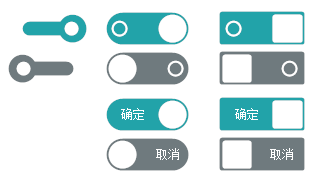
用处及效果
最后的话
如果你喜欢的话,请到 https://gitee.com/kwwwvagaa/net_winform_custom_control 点个星 星吧
(四十)c#Winform自定义控件-开关-HZHControls的更多相关文章
- (四十四)c#Winform自定义控件-水波-HZHControls
官网 http://www.hzhcontrols.com 前提 入行已经7,8年了,一直想做一套漂亮点的自定义控件,于是就有了本系列文章. GitHub:https://github.com/kww ...
- (二十四)c#Winform自定义控件-单标题窗体
前提 入行已经7,8年了,一直想做一套漂亮点的自定义控件,于是就有了本系列文章. 开源地址:https://gitee.com/kwwwvagaa/net_winform_custom_control ...
- (四)c#Winform自定义控件-选择按钮组
前提 入行已经7,8年了,一直想做一套漂亮点的自定义控件,于是就有了本系列文章. 开源地址:https://gitee.com/kwwwvagaa/net_winform_custom_control ...
- (十四)c#Winform自定义控件-键盘(一)
前提 入行已经7,8年了,一直想做一套漂亮点的自定义控件,于是就有了本系列文章. 开源地址:https://gitee.com/kwwwvagaa/net_winform_custom_control ...
- (五十四)c#Winform自定义控件-仪表盘
前提 入行已经7,8年了,一直想做一套漂亮点的自定义控件,于是就有了本系列文章. GitHub:https://github.com/kwwwvagaa/NetWinformControl 码云:ht ...
- (六十四)c#Winform自定义控件-温度计(工业)
前提 入行已经7,8年了,一直想做一套漂亮点的自定义控件,于是就有了本系列文章. GitHub:https://github.com/kwwwvagaa/NetWinformControl 码云:ht ...
- (七十四)c#Winform自定义控件-金字塔图表
前提 入行已经7,8年了,一直想做一套漂亮点的自定义控件,于是就有了本系列文章. GitHub:https://github.com/kwwwvagaa/NetWinformControl 码云:ht ...
- (八十四)c#Winform自定义控件-导航菜单(类Office菜单)
前提 入行已经7,8年了,一直想做一套漂亮点的自定义控件,于是就有了本系列文章. GitHub:https://github.com/kwwwvagaa/NetWinformControl 码云:ht ...
- (四十六)c#Winform自定义控件-水波进度条-HZHControls
官网 http://www.hzhcontrols.com 前提 入行已经7,8年了,一直想做一套漂亮点的自定义控件,于是就有了本系列文章. GitHub:https://github.com/kww ...
随机推荐
- Docker常用命令-全
原文内容来自于LZ(楼主)的印象笔记,如出现排版异常或图片丢失等问题,可查看当前链接: https://app.yinxiang.com/shard/s17/nl/19391737/9f6bf39e- ...
- Docker network整理
一.简介 默认情况下容器与容器.容器与宿主机的网络是隔离开来的, 当你安装docker的时候,docker会创建一个桥接器docker0,通过它才让容器与容器.容器与宿主机之间通信. Docker安装 ...
- git 本地代码 切换远程分支
公司之前代码使用的是gitlab,后来换成腾讯的工峰,所以需要切换远程不支,所以在原代码上切换即可. 在原项目打开git bash命令,打开后会显示本地的原始分支 打开后 添加新的远程分支,红色字体为 ...
- Dynamics 365 Portal Onpremise缓存问题
最近被Dynamics 365 Portal的缓存问题折腾得不轻,Portal的配置进行缓存也就算了,连CRM中的记录也进行了长达15分钟到2小时的缓存,这是完全无法接受的 试想,我们有一个Porta ...
- 1.Android-入门之系统架构介绍
1.Android 系统架构 android分为四个层,从高层到低层分别是应用程序层.应用程序框架层.系统运行库层和linux核心层,如下图所示: 2.application应用程序层 该层提供一些核 ...
- 如何向小姐姐解释SQL和NoSQL之间的区别
最近,在Medium上出现了一个采访问题:如何向奶奶解释SQL和NoSQL之间的区别.我认为作者使用自己的结构化家谱来比较sql和nosql之间的差异.写作非常好,但是有点尴尬.面试官没有时间听你的话 ...
- C#的语法----程序结构(3)
练习2 对于学员成绩的评测 成绩>=90:A 成绩>=80&&成绩<90:B 成绩>=70&&成绩<80:C 成绩>=60& ...
- Linux Redis 安装(带视频)
疯狂创客圈 Java 高并发[ 亿级流量聊天室实战]实战系列 [博客园总入口 ] 架构师成长+面试必备之 高并发基础书籍 [Netty Zookeeper Redis 高并发实战 ] 疯狂创客圈 高并 ...
- 备份下ESP8266的AT指令集手册和用例手册中文版,准备为V7做几个ESP8266的例子
指令集手册:https://files.cnblogs.com/files/armfly/4a-esp8266_at_instruction_set_cn.rar 用例手册: https://file ...
- Spring中常见的设计模式——委派模式
一.委派模式的定义及应用场景 委派模式(Delegate Pattern)的基本作用是负责任务的调用和分配,跟代理模式很像,可以看做特殊情况下的静态的全权代理,但是代理模式注重过程,而委派模式注重结果 ...