
Vue 组件(上)转载
一、定义
组件:应用界面上一个个的区块。
自定义的HTML元素。
二、创建和注册
- Vue.extend() 扩展,创建组件构造器
- Vue.component()注册组件,2个参数,1为标签,2是组件构造器
- Vue实例范围使用组件
<!DOCTYPE html>

<html>

    <body>

        <div id="app">

            <!-- . #app是Vue实例挂载的元素,应该在挂载元素范围内使用组件-->

            <my-component></my-component>

        </div>

    </body>

    <script src="js/vue.js"></script>

    <script>

        // 1.创建一个组件构造器

        var myComponent = Vue.extend({

            template: '<div>This is my first component!</div>'

        })

        // 2.注册组件,并指定组件的标签,组件的HTML标签为<my-component>

        Vue.component('my-component', myComponent)

        new Vue({

            el: '#app'

        });

    </script>

</html>
<!DOCTYPE html>

<html>

    <body>

        <div id="app1">

            <my-component></my-component>

        </div>

        <div id="app2">

            <my-component></my-component>

        </div>

        <!--该组件不会被渲染-->

        <my-component></my-component>

    </body>

    <script src="js/vue.js"></script>

    <script>

        var myComponent = Vue.extend({

            template: '<div>This is a component!</div>'

        })

        Vue.component('my-component', myComponent)

        var app1 = new Vue({

            el: '#app1'

        });

        var app2 = new Vue({

            el: '#app2'

        })

    </script>

</html>
三、全局注册和局部注册
//全局注册

Vue.component('my-component', myComponent)

        new Vue({

            el: '#app'

        });

//局部注册

new Vue({

            //只能在#app元素下使用

            el: '#app',

            components: {

                // 2. 将myComponent组件注册到Vue实例下

                'my-component' : myComponent

            }

        });
四、父子组件
父子组件:组件中再定义并使用其他组件。
<!DOCTYPE html>

<html>

    <body>

        <div id="app">

            <parent-component>

            </parent-component>

        </div>

    </body>

    <script src="js/vue.js"></script>

    <script>

        //子组件构造器

        var Child = Vue.extend({

            template: '<p>This is a child component!</p>'

        })

        //父组件构造器

        var Parent = Vue.extend({

            // 在Parent组件内使用<child-component>标签

            template :'<p>This is a Parent component</p><child-component></child-component>',

            //引用子组件

            components: {

                // 局部注册Child组件,该组件只能在Parent组件内使用

                'child-component': Child

            }

        })

        // 全局注册Parent父组件

        Vue.component('parent-component', Parent)

        new Vue({

            el: '#app'

        })

    </script>

</html>
五、组件注册语法糖
//全局注册

Vue.component('my-title1',{

    template:'<div>This is the first component!</div>'

})

var vm1 = new Vue({

    el:'#app1'

})

var vm2 = new Vue({

    el:'#app2',

    components:{

    // 局部注册,my-title2是标签名称

        'my-title2': {

            template: '<div>This is the second component!</div>'

        },

        // 局部注册,my-title3是标签名称

        'my-title3': {

            template: '<div>This is the second component!</div>'

        },

}

})
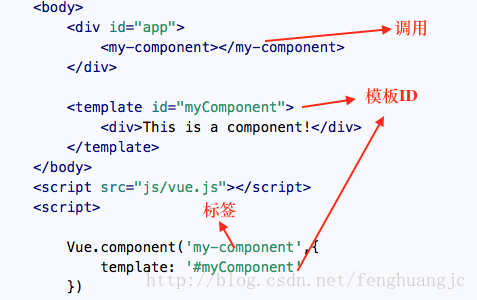
六、script和template标签
script

使用script标签时,type为text/x-template,是让浏览器忽略标签内容
template
不需要指定type,从用法上来看,就像是script的简化版。
七、el和data选项
el
只由new创建的实例中使用
提供已存在的DOM元素为Vue实例的挂载目标。决定其作用域。
data
只接受function。
实例的数据对象,Vue会将data属性转为getter/setter,让data响应数据变化。对象必须是纯粹的对象 (含有零个或多个的 key/value 对)
Vue.component('my-component', { data: function(){ return {a : } } })
八、props
组件实例有自己的作用域,如果想在组件里使用其他组件的数据,可以使用props传递(默认是单向绑定)
普通绑定
var vm = new Vue({

    el: '#app',

    data: {

        name: 'keepfool',

        age:

    },

    components: {

        'my-component': {

            template: '#myComponent',

            props: ['myName', 'myAge']//定义props属性

        }

    }

})
<template id="myComponent">

    <table>//表格

        <tr>//一行

            <th colspan="">//colspan代表占几个格子

                //子组件数据

            </th>//标题

        </tr>

        <tr>//

            <td>my name</td>

            <td>{{ myName }}</td>//获取数据

        </tr>

        <tr>

            <td>my age</td>

            <td>{{ myAge }}</td>//获取数据

        </tr>

    </table>

</template>
<div id="app">

    //绑定数据

    <my-component v-bind:my-name="name" v-bind:my-age="age"></my-component>

</div>
双向绑定
使用.sync双向绑定,修改时数据会回传
<my-component v-bind:my-name.sync="name" v-bind:my-age.sync="age"></my-component>
单次绑定
使用.once单次绑定,关系建立后数据不会同步。
<my-component v-bind:my-name.once="name" v-bind:my-age.once="age"></my-component>
Vue 组件(上)转载的更多相关文章
- vue组件上动态添加和删除属性
1.vue组件上动态添加和删除属性 // 添加 this.$set(this.obj, 'propName', val) // 删除 this.$delete(this.obj, 'propName' ...
- Vue——组件上使用v-model
一.最近在工作过程中要实现一个搜索模糊匹配功能,考虑到组件的复用,就单独把搜索框抽出来作为一个子组件.在以往的开发中,我一般会在input框中的值变化时向父组件emit一个事件,并带上一些父组件中需要 ...
- webAPP如何实现移动端拍照上传(Vue组件示例)?
摘要:使用HTML5编写移动Web应用,主要是为了尝试一下“一套代码多处运行”,一个webapp几乎可以不加修改的运行在PC/Android/iOS等上面运行.但是写到现在觉得虽然这种方式弊大于利,不 ...
- vue里在自定义的组件上定义的事件
事件分为原生事件和自定义事件. vue里在自定义的组件上定义的事件,都被认为是自定义事件,必须用$emit()来触发. 这也是子组件向父传值的原理. 如果想作为原生事件,需要在原生事件后面加上.nat ...
- vue图片上传组件
前言:很多项目中都需要用到图片上传功能,而其多处使用的要求,为了避免重复造轮子,让我决定花费一些时间去深入了解,最终封装了一个vue的图片上传组件.现将总结再次,希望有帮助. Layout <d ...
- vue 学习七 组件上使用插槽
我们有时候可能会在组件上添加元素,就像下面那样 <template> <div id="a"> <com1> <p>我是渲染的值&l ...
- vue 学习六 在组件上使用v-model
其实这个部分应该是属于component,为什么把这玩意单独拿出来呢,原因是它这个东西比较涉及到了vue的事件,以及v-model指令的使用,还是比较综合的.所以就拿出来啦 父组件 <templ ...
- c#版阿里云oss上传——基于layui、pupload的oss 后端web端直传的vue组件
废话前言 去年,做项目用到oss上传,度娘上逛了一圈写了个前后端代码结合的c#版oss上传. 今年又要用到oss上传时发现很难复用,复用改动的范围太大,显然这个轮子不合格.于是想了下,花了一天的时间( ...
- AntDesign VUE:上传组件图片/视频宽高、文件大小、image/video/pdf文件类型等限制(Promise、Boolean)
文件大小限制 - Promise checkFileSize(file, rules) { return new Promise((resolve, reject) => { file.size ...
- AntDesign VUE:上传组件自定义限制的两种方式(Boolean、Promise)
AntD上传组件 AntDesign VUE文档 第一种方式 beforeUpload(file) { let isLt = true if (filesSize) { isLt = file.siz ...
随机推荐
- linux服务器上配置多个svn仓库
linux服务器上配置多个svn仓库 1.在指定目录建立仓库保存总目录,本文示例目录设定为:/usr/local/svn/svnrepos # mkdir -p /usr/local/svn/svnr ...
- vue.js插槽
具体讲解的url https://github.com/cunzaizhuyi/vue-slot-demo //例子 用jsfiddle.net去运行就好 <!DOCTYPE html> ...
- Python-爬虫-租房Ziroom
目标站点需求分析 涉及的库 import requestsimport timeimport pymongofrom lxml import etreefrom requests.exceptions ...
- CentOS 7 服务器之间ssh无密码登录、传输文件
在Linux服务器之间使用ssh命令向另一个Linux服务器发送执行指令是需要输入密码 ssh登录提供两种认证方式:口令(密码)认证方式和密钥认证方式.其中口令(密码)认证方式是我们最常用的一 ...
- liunx 利用nginx 实现负载均衡
一般采用软件实现负载均衡的有Nginx.apache.nginx 近年来使用频繁,其官网上面显示可以承载5万并发访问量,太牛了. nginx 相比 apache优势明显:Nginx 服务程序比较稳定, ...
- Confluence 6 使用电子邮件可见
Confluence 提供了 3 个电子邮件策略,这些策略 Confluence 管理员可以通过管理员控制台(Administration Console)进行配置: 公开(Public):电子邮件地 ...
- Android UiAutomator
UiAutomator是一个做UI测试的自动化框架.<Android自动化测试框架>中已有详细介绍,这里就不再累赘了. 一.首先了解自动化测试流程 自动化需求分析 测试用例设计 自动化框架 ...
- SpringBoot的yml配置文件
1.在src\main\resources下创建application.yml配置文件 spring: datasource: driver-class-name: com.mysql.jdbc.Dr ...
- html 之表单,div标签等。。。。。。。
一.表单 功能:表单用于向服务器传输数据,从而实现用户与Web服务器的交互 表单能够包含input系列标签,比如文本字段.复选框.单选框.提交按钮等等. 表单还可以包含textarea.select. ...
- 常见的排序算法(直接插入&选择排序&二分查找排序)
1.直接插入排序算法 源码: package com.DiYiZhang;/* 插入排序算法 * 如下进行的是插入,排序算法*/ public class InsertionSort { pub ...