
通过google cloud API 使用 WaveNet
Cloud Text-to-Speech 中使用了WaveNet,用于TTS,页面上有Demo。目前是BETA版
使用方法
- 注册及认证参考:Quickstart: Text-to-Speech
- 安装google clould 的python库
- 安装 Google Cloud Text-to-Speech API Python 依赖(Dependencies),参见github说明
- ----其中包括了,安装pip install google-cloud-texttospeech==0.1.0
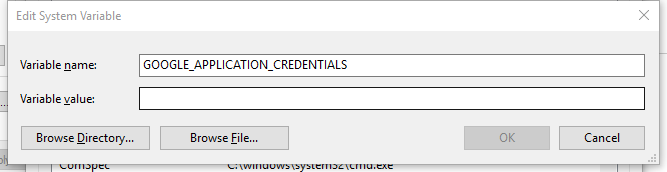
为了implicit调用,设置环境变量GOOGLE_APPLICATION_CREDENTIALS到你的API Key(json文件),完成后重启
python脚本:text到mp3
# [START tts_synthesize_text]

def synthesize_text(text):

    """Synthesizes speech from the input string of text."""

    from google.cloud import texttospeech

    client = texttospeech.TextToSpeechClient()

    input_text = texttospeech.types.SynthesisInput(text=text)

    # Note: the voice can also be specified by name.

    # Names of voices can be retrieved with client.list_voices().

    voice = texttospeech.types.VoiceSelectionParams(

        language_code='en-US',

        ssml_gender=texttospeech.enums.SsmlVoiceGender.FEMALE)

    audio_config = texttospeech.types.AudioConfig(

        audio_encoding=texttospeech.enums.AudioEncoding.MP3)

    response = client.synthesize_speech(input_text, voice, audio_config)

    # The response's audio_content is binary.

    with open('output.mp3', 'wb') as out:

        out.write(response.audio_content)

        print('Audio content written to file "output.mp3"')

# [END tts_synthesize_text]
WaveNet特性
目前支持的6种voice type


参数说明
https://cloud.google.com/text-to-speech/docs/reference/rest/v1beta1/text/synthesize#audioconfig
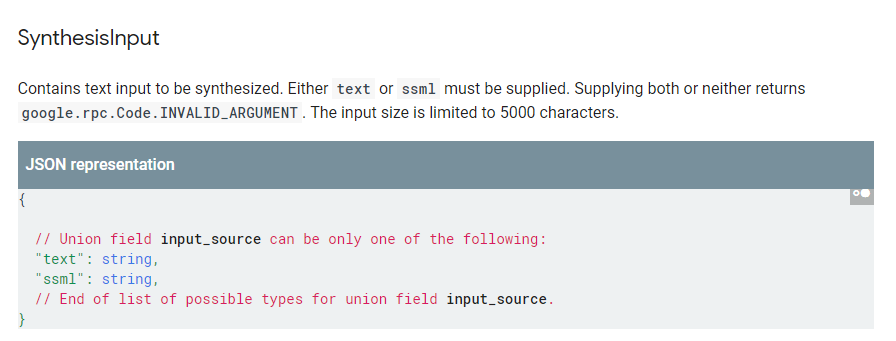
- input_text
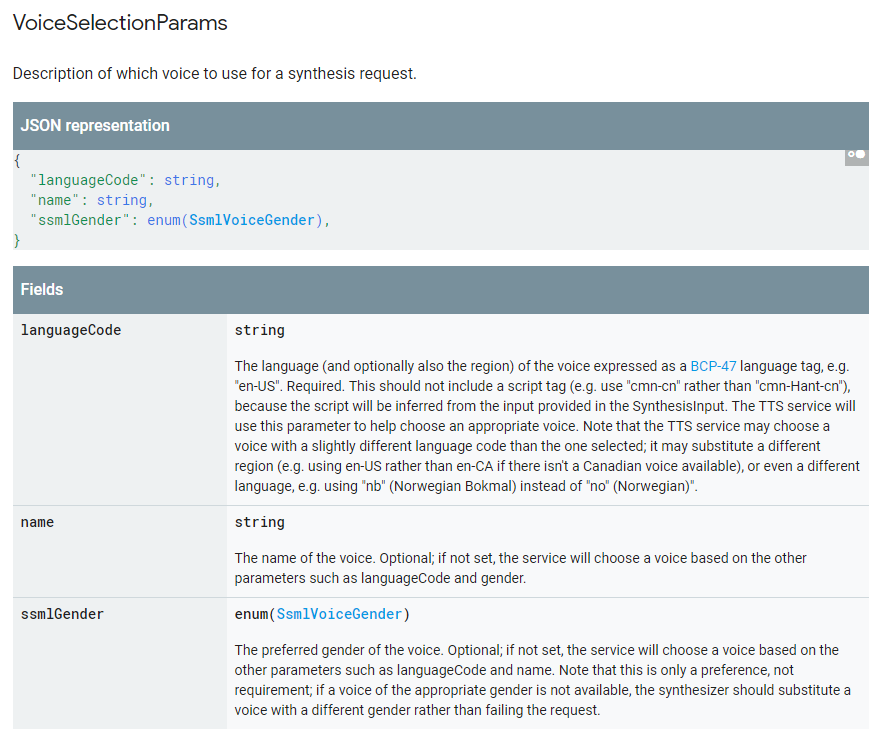
- voice
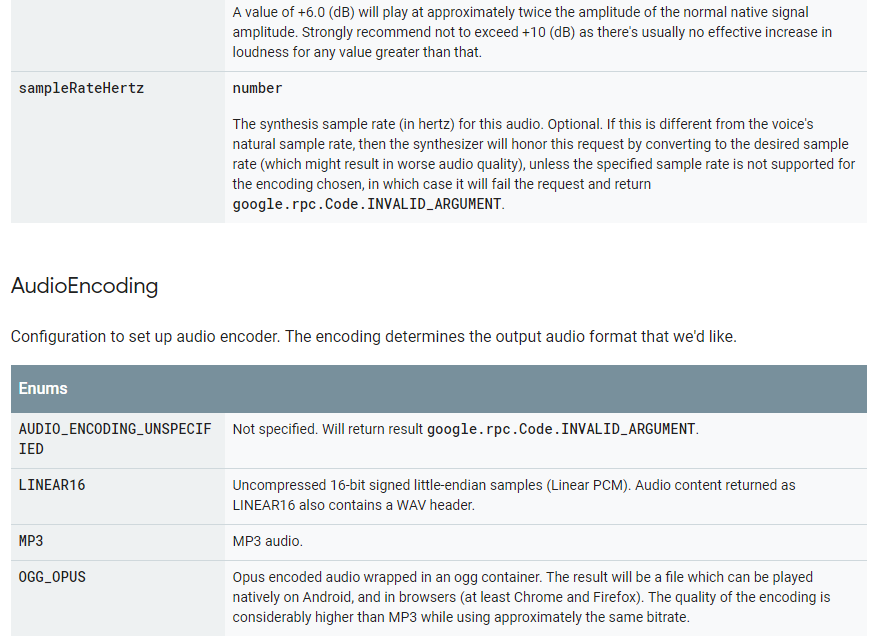
- audio_config

通过google cloud API 使用 WaveNet的更多相关文章
- 【Google Cloud技术咨询】「Contact Center AI」引领我们走向高度智能客服的时代
前提背景 我们距离"不再智障"的智能客服还有多远?对于智能客服,用户一直都是"批评多于褒奖",究其原因是在于人们对于AI客服的期待很高,而AI客服在实际应用中的 ...
- 利用Google Speech API实现Speech To Text
很久很久以前, 网上流传着一个免费的,识别率暴高的,稳定的 Speech To Text API, 那就是Google Speech API. 但是最近再使用的时候,总是返回500 Error. 后来 ...
- Getting Started(Google Cloud Storage Client Library)
在运行下面的步骤之前,请确保: 1.你的项目已经激活了Google Cloud Storage和App Engine,包括已经创建了至少一个Cloud Storage bucket. 2.你已经下载了 ...
- Activating Google Cloud Storage
先决条件 你需要下面的内容: 1.一个Google账户,比如来自Gmail.如果你没有,请在Google account signup site注册. 2.一个新的或已经存在的Google Devel ...
- Downloading the Google Cloud Storage Client Library
Google Cloud Storage client是一个客户端库,与任何一个生产环境使用的App Engine版本都相互独立.如果你想使用App Engine Development server ...
- Java Client for Google Cloud Storage
关于Google Cloud Storage Google Cloud Storage有益于大文件的存储与服务(serve).此外,Cloud Storage提供了对访问控制列表(ACLs)的使用,提 ...
- 使用GCM服务(Google Cloud Messaging)实现Android消息推送
最近在网上查了关于很多Android消息推送的资料,其中主要有四种方法. 1) 使用GCM服务(Google Cloud Messaging) 2) 使用XMPP协议(Openfire + Spark ...
- Asp.net MVC集成Google Calendar API(附Demo源码)
Asp.net MVC集成Google Calendar API(附Demo源码) Google Calendar是非常方便的日程管理应用,很多人都非常熟悉.Google的应用在国内不稳定,但是在国外 ...
- 使用Google Cloud Platform构建机器学习项目-宠物识别
宠物识别我们使用到了tensorflow object-detection API (https://github.com/tensorflow/models/tree/master/researc ...
随机推荐
- svn 部署
安装svn [root@localhost ~]# yum -y install subversion 创建两个目录 一个 数据存储 一个用户密码 [root@localhost ~]# mkdir ...
- mysql数据库的增量备份和全备
还有一种简单的方法 参考 https://blog.csdn.net/u010098331/article/details/50932064 (注意:5.6版本以上新加了gtid 功能,gtid开启之 ...
- [亲身实践]linux命令行下配置网路
1.在命令行下输入setup, 2.之后出现下图,选择网络配置 4.配置IP地址,子网掩码,DNS 5.保存之后回到命令行模式下,输入service network restart,至此网络配置完成
- linux解压缩文件名乱码问题 亲测可用
unar 这个工具会自动检测文件的编码,也可以通过-e来指定:unar file.zip 即可解压出中文文件.
- Day8 linux软件包管理
软件包的两种形式 qq.tar.gz (需要编译 源码翻译成二进制)/ rpm (直接安装) rpm的文件名分为5部分 name名称 version版本编号 release发布次数 ...
- LR-SVM(有待重新整理)
参考:http://www.zhihu.com/question/26768865 总结: 1)在线学习:SVM不支持在线学习,LR支持 2)不平衡数据:SVM不依赖于数据的分布,所以数据是否平衡影响 ...
- 构建之法 chapter 8 需求分析 ——读书心得
需求分析,是软件工程开发的第一步,准确全面地找到用户的需求,尽可能满足用户的要求,是软件惺惺发展的基础.所以需求分析很重要.具体来说有以下几个步骤: 1.获取和引导需求:软件团队需要找到软件的利益相关 ...
- 利用python实现两个文件夹的同步
其实无论windows还是Linux,简单地去实现两个两个文件夹的同步只需系统自带的复制命令加参数就可以了. WINDOWS : xcopy 源文件夹\* 目标文件夹 /s /e /y Linux : ...
- Go Example--json
package main import ( "encoding/json" "fmt" "os" ) type Response1 stru ...
- [IOS][已越狱]配合网易云音乐,使用Bridge快速免iTunes导入音乐到“音乐”
前置:已越狱IOS设备 工具表: Bridge{bigboss源,可以使用cydown以非官方服务器下载安装} 网易云音乐{Appstore} Filza{很多源都有} 网易云试听缓存路径 ...