
通过google cloud API 使用 WaveNet
Cloud Text-to-Speech 中使用了WaveNet,用于TTS,页面上有Demo。目前是BETA版
使用方法
- 注册及认证参考:Quickstart: Text-to-Speech
- 安装google clould 的python库
- 安装 Google Cloud Text-to-Speech API Python 依赖(Dependencies),参见github说明
- ----其中包括了,安装pip install google-cloud-texttospeech==0.1.0
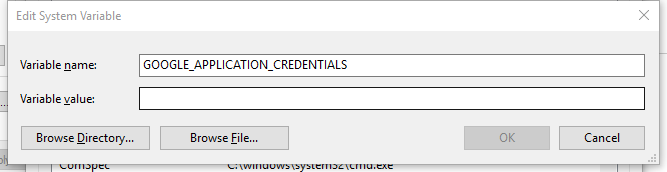
为了implicit调用,设置环境变量GOOGLE_APPLICATION_CREDENTIALS到你的API Key(json文件),完成后重启
python脚本:text到mp3
# [START tts_synthesize_text]

def synthesize_text(text):

    """Synthesizes speech from the input string of text."""

    from google.cloud import texttospeech

    client = texttospeech.TextToSpeechClient()

    input_text = texttospeech.types.SynthesisInput(text=text)

    # Note: the voice can also be specified by name.

    # Names of voices can be retrieved with client.list_voices().

    voice = texttospeech.types.VoiceSelectionParams(

        language_code='en-US',

        ssml_gender=texttospeech.enums.SsmlVoiceGender.FEMALE)

    audio_config = texttospeech.types.AudioConfig(

        audio_encoding=texttospeech.enums.AudioEncoding.MP3)

    response = client.synthesize_speech(input_text, voice, audio_config)

    # The response's audio_content is binary.

    with open('output.mp3', 'wb') as out:

        out.write(response.audio_content)

        print('Audio content written to file "output.mp3"')

# [END tts_synthesize_text]
WaveNet特性
目前支持的6种voice type


参数说明
https://cloud.google.com/text-to-speech/docs/reference/rest/v1beta1/text/synthesize#audioconfig
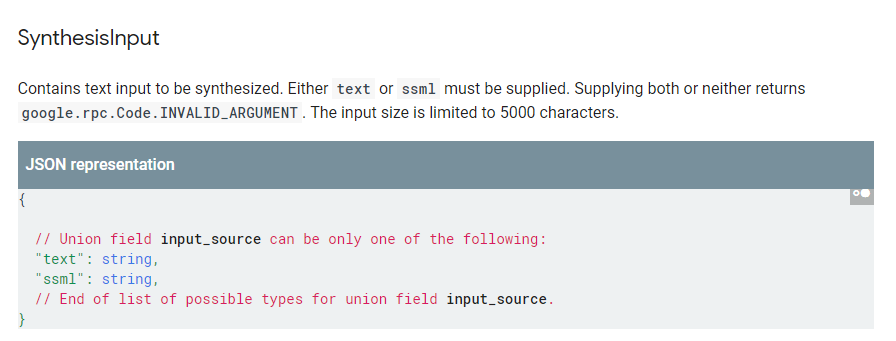
- input_text
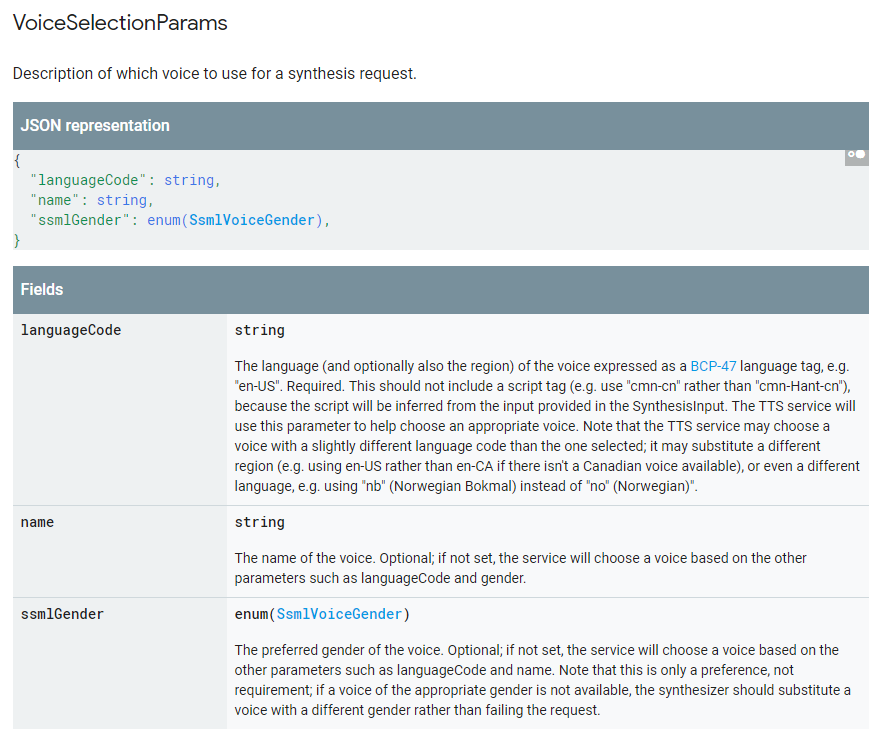
- voice
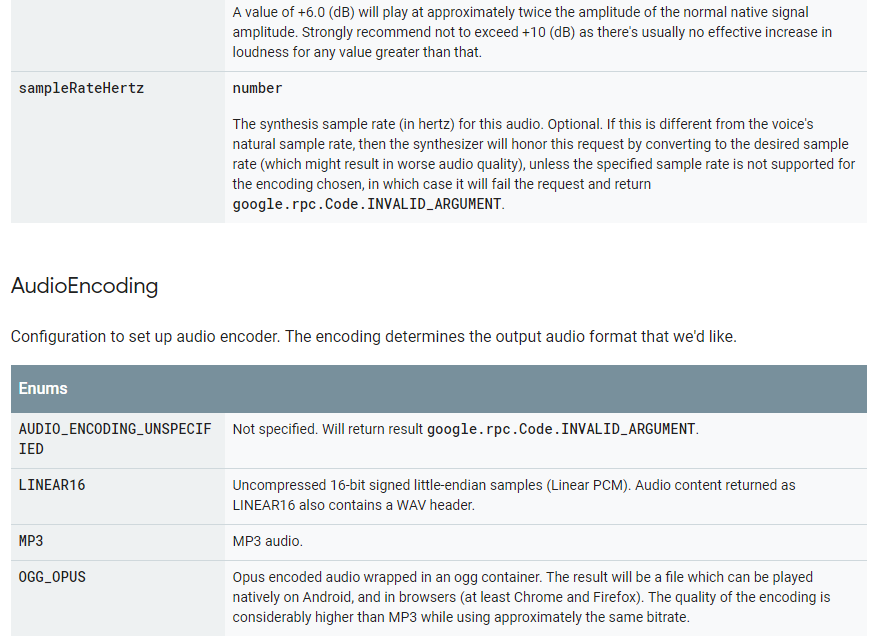
- audio_config

通过google cloud API 使用 WaveNet的更多相关文章
- 【Google Cloud技术咨询】「Contact Center AI」引领我们走向高度智能客服的时代
前提背景 我们距离"不再智障"的智能客服还有多远?对于智能客服,用户一直都是"批评多于褒奖",究其原因是在于人们对于AI客服的期待很高,而AI客服在实际应用中的 ...
- 利用Google Speech API实现Speech To Text
很久很久以前, 网上流传着一个免费的,识别率暴高的,稳定的 Speech To Text API, 那就是Google Speech API. 但是最近再使用的时候,总是返回500 Error. 后来 ...
- Getting Started(Google Cloud Storage Client Library)
在运行下面的步骤之前,请确保: 1.你的项目已经激活了Google Cloud Storage和App Engine,包括已经创建了至少一个Cloud Storage bucket. 2.你已经下载了 ...
- Activating Google Cloud Storage
先决条件 你需要下面的内容: 1.一个Google账户,比如来自Gmail.如果你没有,请在Google account signup site注册. 2.一个新的或已经存在的Google Devel ...
- Downloading the Google Cloud Storage Client Library
Google Cloud Storage client是一个客户端库,与任何一个生产环境使用的App Engine版本都相互独立.如果你想使用App Engine Development server ...
- Java Client for Google Cloud Storage
关于Google Cloud Storage Google Cloud Storage有益于大文件的存储与服务(serve).此外,Cloud Storage提供了对访问控制列表(ACLs)的使用,提 ...
- 使用GCM服务(Google Cloud Messaging)实现Android消息推送
最近在网上查了关于很多Android消息推送的资料,其中主要有四种方法. 1) 使用GCM服务(Google Cloud Messaging) 2) 使用XMPP协议(Openfire + Spark ...
- Asp.net MVC集成Google Calendar API(附Demo源码)
Asp.net MVC集成Google Calendar API(附Demo源码) Google Calendar是非常方便的日程管理应用,很多人都非常熟悉.Google的应用在国内不稳定,但是在国外 ...
- 使用Google Cloud Platform构建机器学习项目-宠物识别
宠物识别我们使用到了tensorflow object-detection API (https://github.com/tensorflow/models/tree/master/researc ...
随机推荐
- win11.2.0.4lsnrctl status hang
以前听客户说监听日志大于4G,监听出现问题.本次另一个客户也出现这个问题,表现为监听lsnrctl start,status长久hang住 匹配mos WINDOWS: Listener Hangs ...
- 常用的CMD & Linux命令
[CMD命令] 1.分行输入环境变量 使用echo %PATH%输出环境变量的时候没有分行输出,看起来十分麻烦: 通过xargs命令可以实现分行输出,命令如下: echo %PATH% | xargs ...
- JavaScript语言里判断一个整数是偶数还是奇数,并输出判断结果
<!DOCTYPE html> <html> <head> <meta charset="UTF-8"> <title> ...
- 最详细的 linux grep命令教程
简介 grep (global search regular expression(RE) and print out the line,全面搜索正则表达式并把行打印出来)是一种强大的文本搜索工具,它 ...
- ServletContext、ServletRequest和HttpSession的生命周期
学习web的Listener监听器的时,监听域对象创建的监听器.通过监听器重新分析着三个对象的生命周期,清晰明了. 首先域对象的监听器有三个ServletContextListene.ServletR ...
- 熟悉 JUnit 测试
2.1 Mooctest 使用心得 web Ide挺方便,就是很慢.mooctest很方便入门软件测试,但是里面的题目还是不多. 2.2 Junit 编写代码经验总结 1.首先要熟悉junit中经常使 ...
- Python爬虫初学者学习笔记(带注释)
一,安装编程工具并进入编程界面 首先去https://www.continuum.io/downloads/网站下载Anaconda工具并安装;打开cmd,输入jupyter notebook并回车( ...
- 【java编程】java的关键字修饰符
一.transient java语言的关键字,变量修饰符,如果用transient声明一个实例变量,当对象存储时,它的值不需要维持.换句话来说就是,用transient关键字标记的成员变量不参与序列化 ...
- git编译安装
因yum安装的git版本过低,所以尝试使用编译安装git 以下为编译安装时执行的命令 tar xf git-2.9.5.tar.gz cd git-2.9.5yum install curl-deve ...
- Taro 生命周期
Taro 新加的生命周期 说明 网址 componentDidShow() 在此生命周期中通过 this.$router.params,可以访问到程序初始化参数 https://nervjs.gith ...